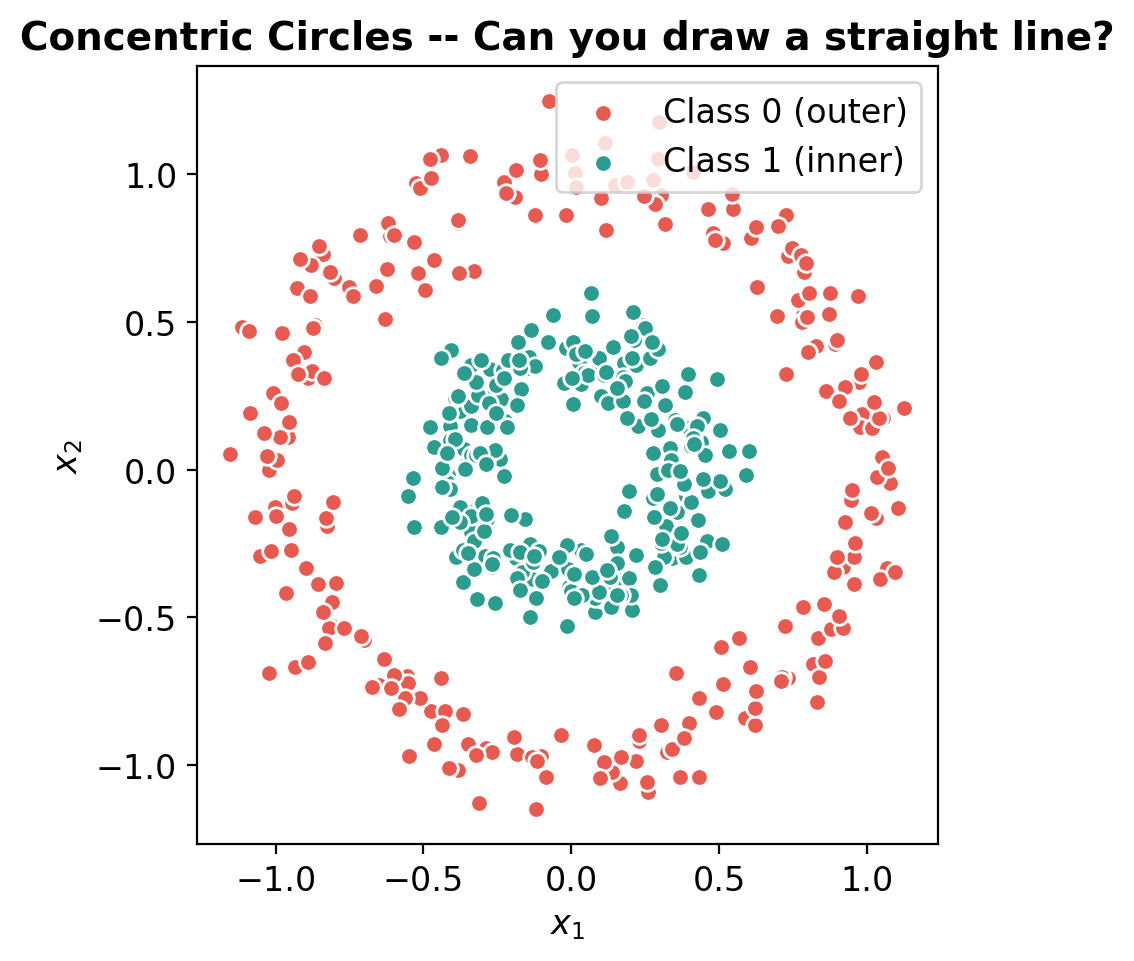
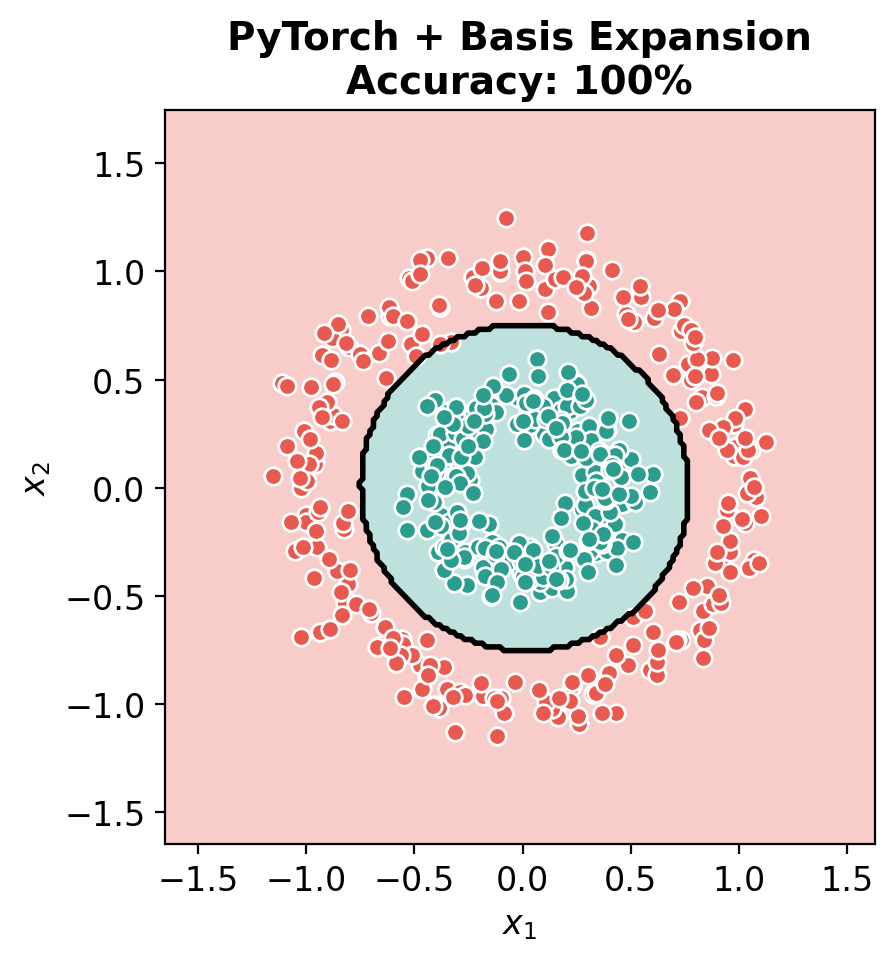
The big idea: Linear models can only draw straight lines. Neural networks can draw any shape.
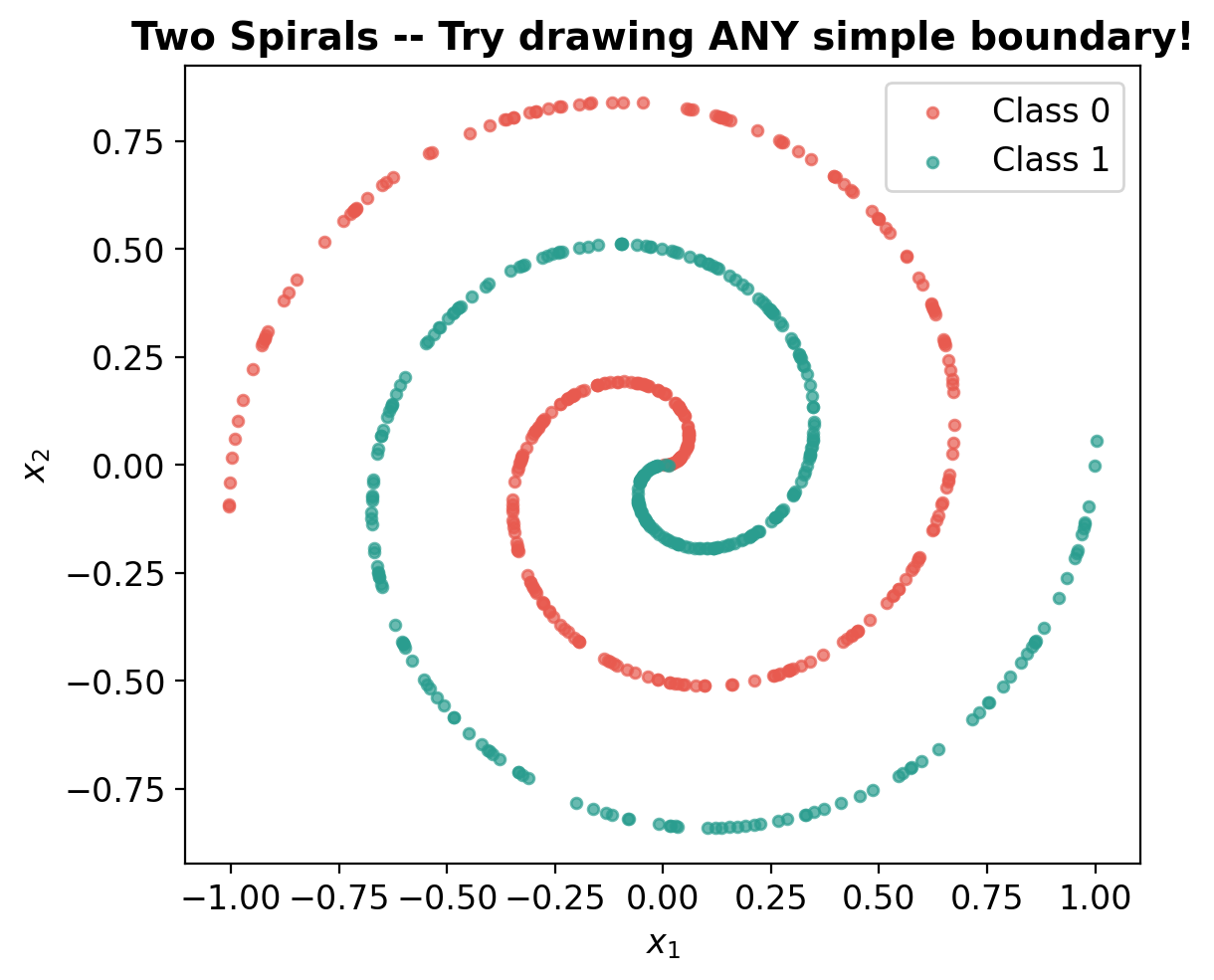
We’ll prove this step by step, increasing difficulty: 1. Classification (concentric circles) – linear fails, basis expansion works, NN works 2. Regression (sine wave) – same progression, with MSE and R² 3. Harder classification (spirals) – basis expansion breaks down, NN still works 4. Images (MNIST digits) – hand-crafted features vs CNN
At each step: sklearn first, then the same thing in PyTorch, so you see the connection.
import numpy as npimport matplotlib.pyplot as pltimport torchimport torch.nn as nnimport torch.optim as optimfrom sklearn.datasets import make_circlesfrom sklearn.linear_model import LogisticRegression, LinearRegressionfrom sklearn.preprocessing import PolynomialFeaturesimport warningswarnings.filterwarnings('ignore')plt.rcParams['figure.figsize'] = (10, 4)plt.rcParams['font.size'] =12# ColorsC0, C1 ='#e85a4f', '#2a9d8f'print('Ready!')%config InlineBackend.figure_format ='retina'
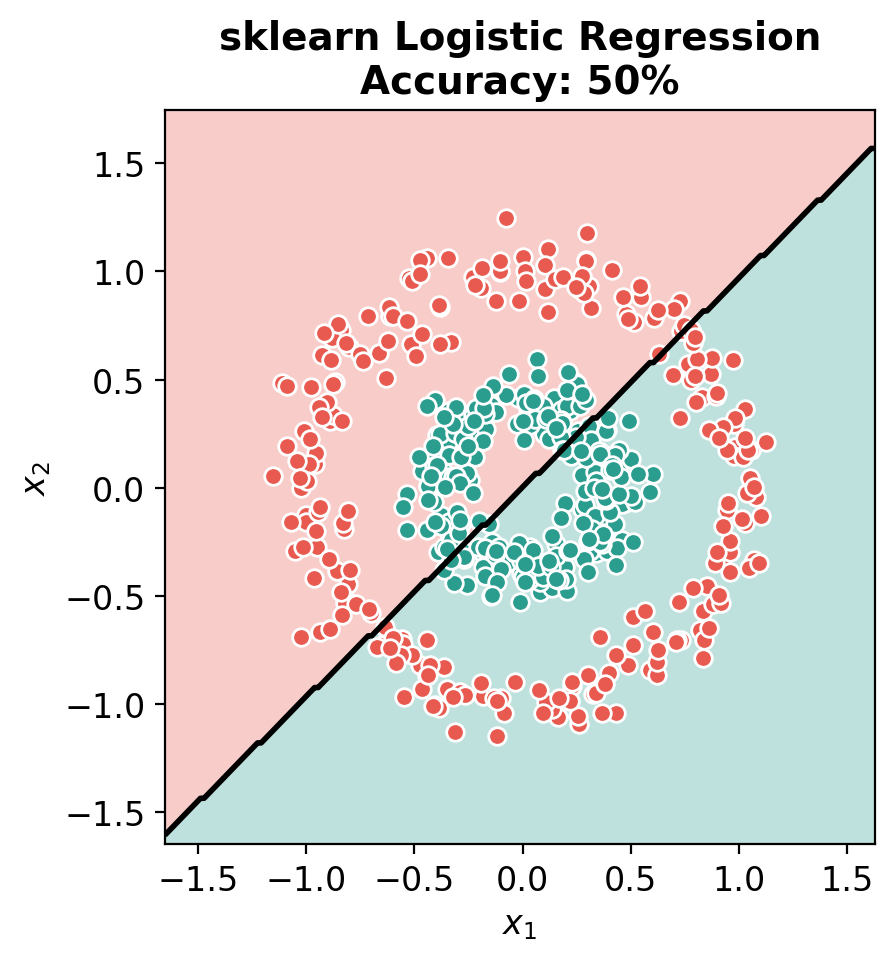
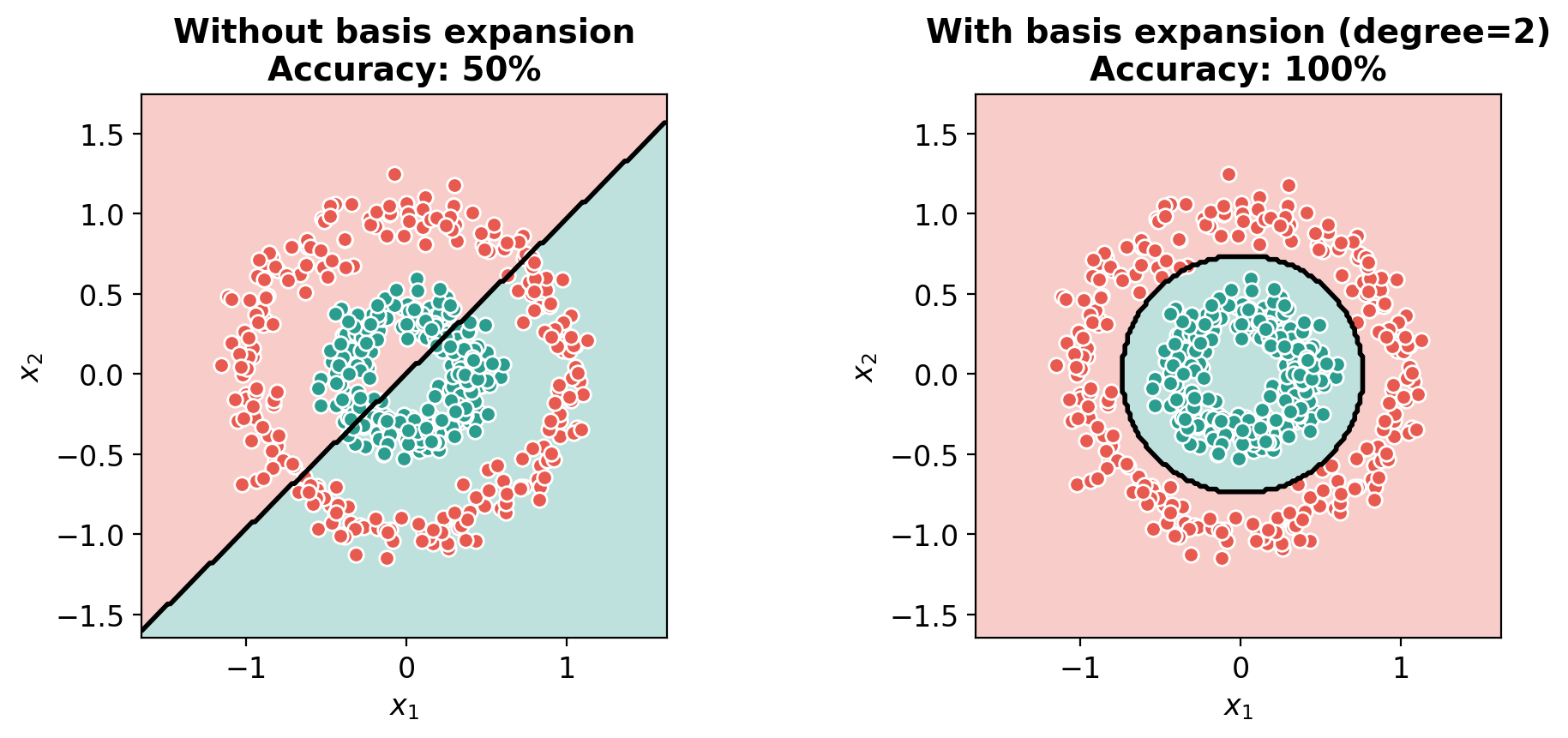
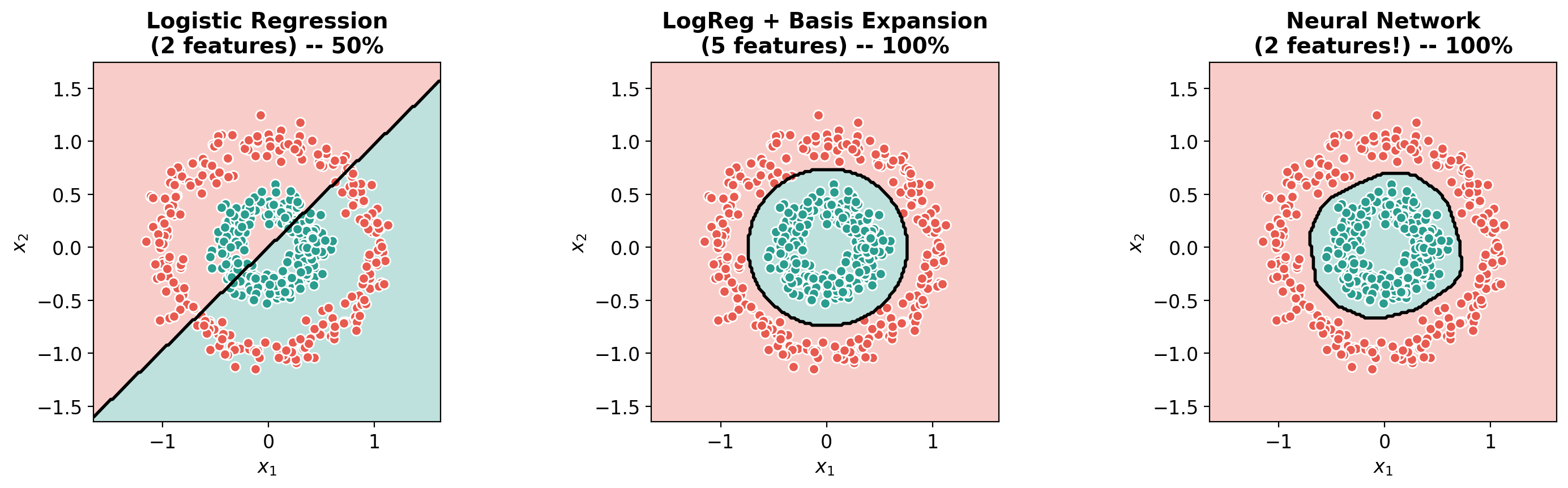
# The big comparisonfig, axes = plt.subplots(1, 3, figsize=(15, 4.5))plot_decision_boundary(lr_sklearn.predict, X_circles, y_circles,f'Logistic Regression\n(2 features) -- {lr_sklearn.score(X_circles, y_circles):.0%}', ax=axes[0])plot_decision_boundary(predict_poly_sklearn, X_circles, y_circles,f'LogReg + Basis Expansion\n(5 features) -- {lr_poly.score(X_poly, y_circles):.0%}', ax=axes[1])plot_decision_boundary(predict_nn, X_circles, y_circles,f'Neural Network\n(2 features!) -- {acc:.0%}', ax=axes[2])plt.tight_layout()plt.show()print('Left: Linear model on raw features -- FAILS (can only draw a line)')print('Middle: Linear model + manual features -- WORKS (but we had to know which features to add)')print('Right: Neural network on raw features -- WORKS (learns its own features!)')
Left:   Linear model on raw features     -- FAILS (can only draw a line)
Middle: Linear model + manual features    -- WORKS (but we had to know which features to add)
Right:  Neural network on raw features    -- WORKS (learns its own features!)
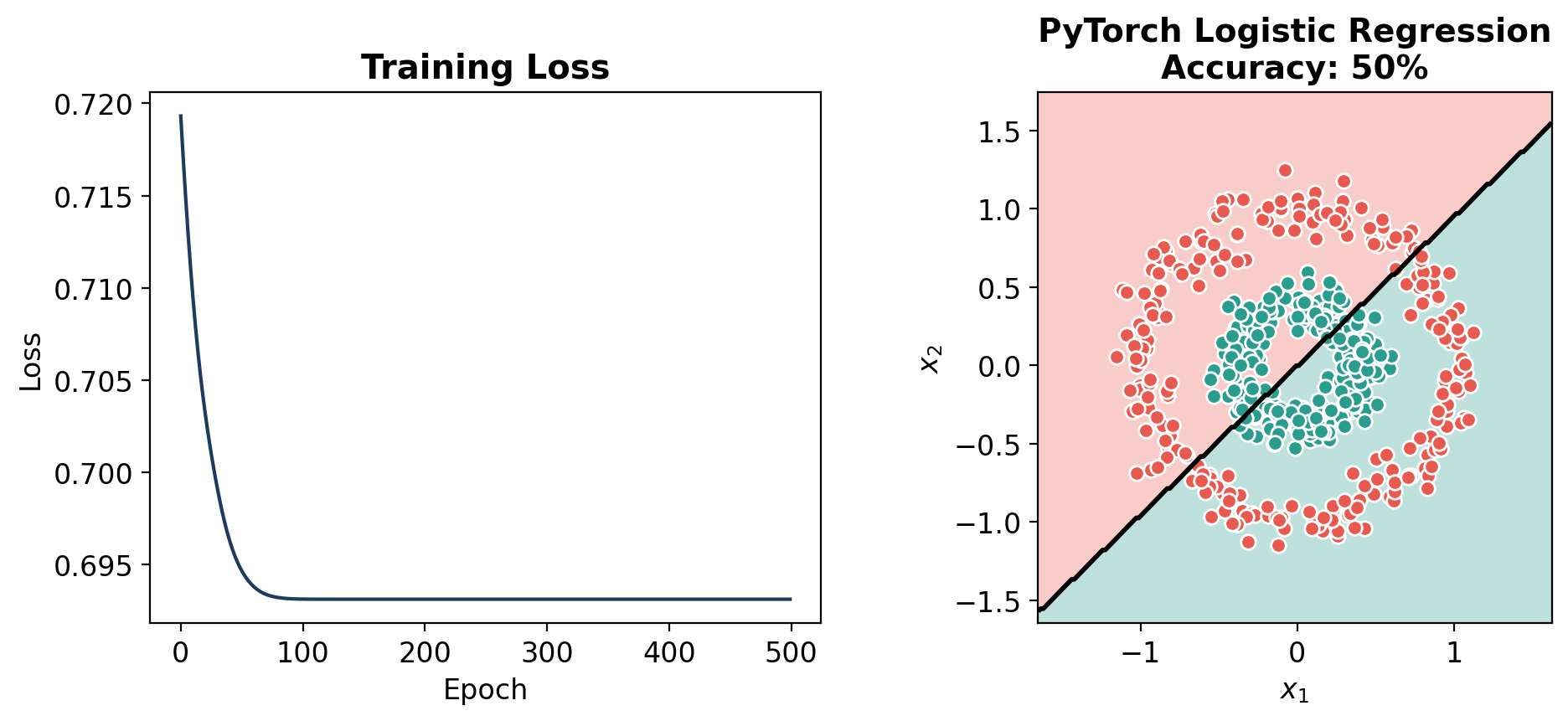
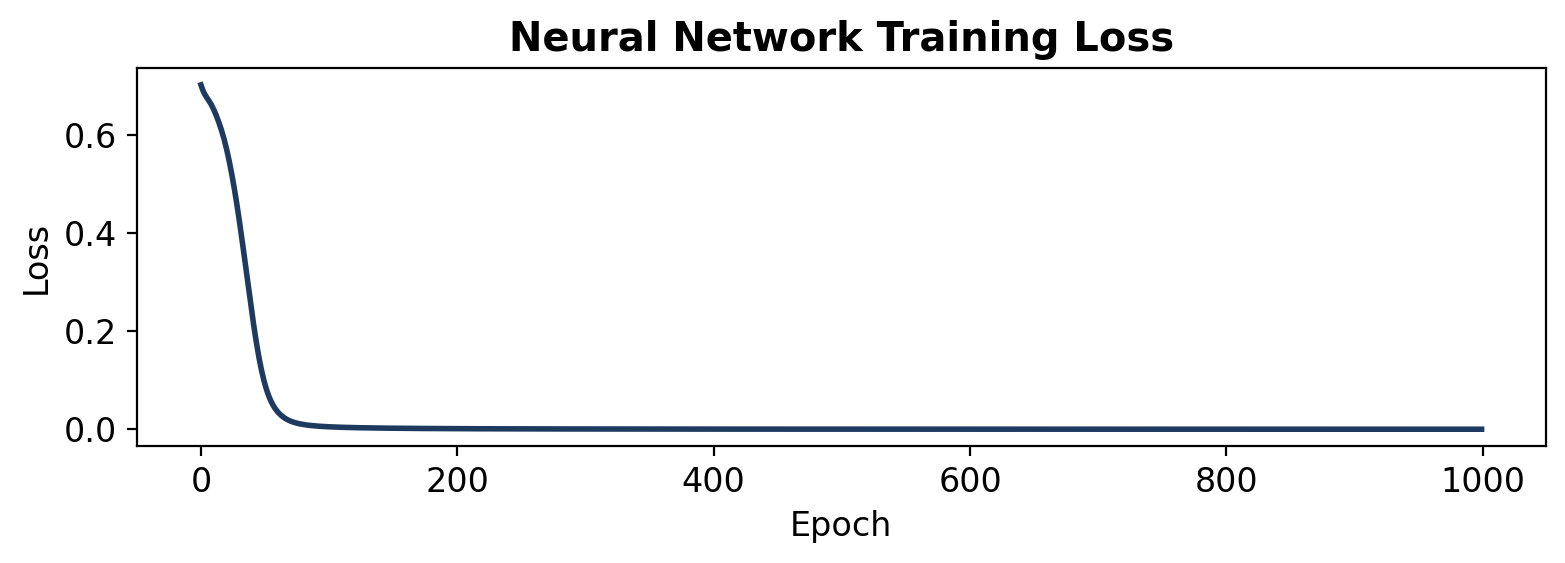
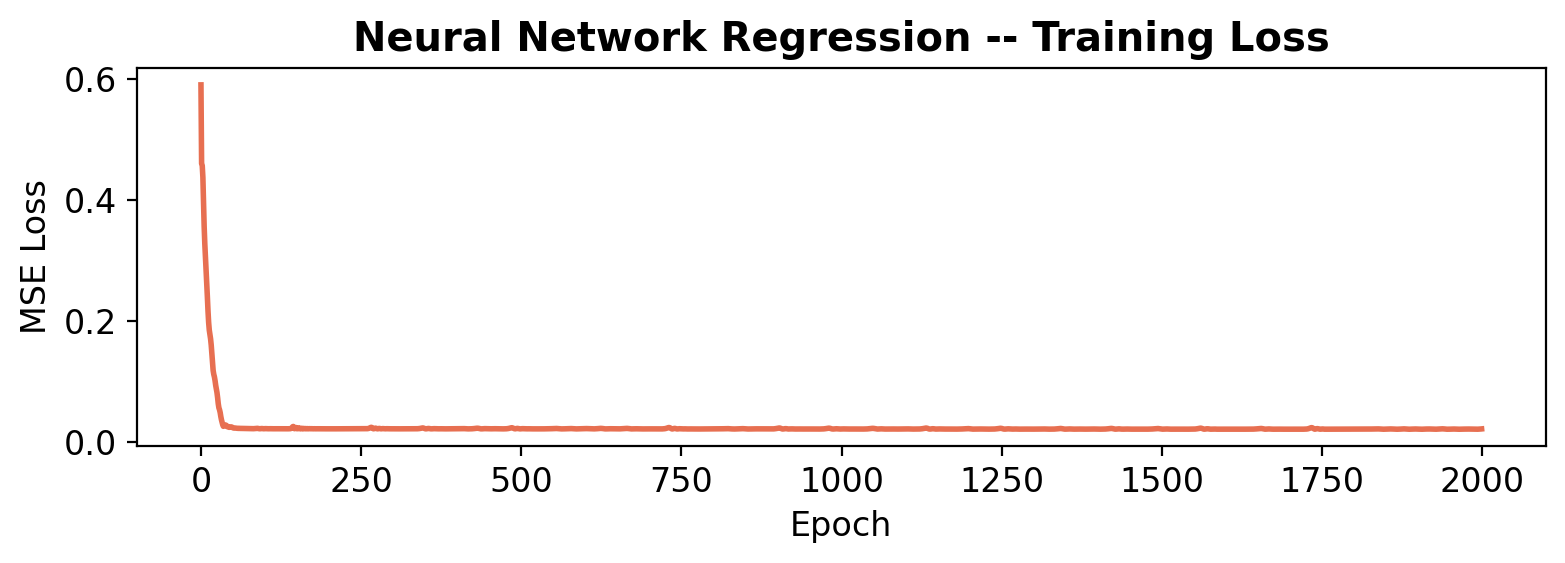
# Training loss curve for the neural networkfig, ax = plt.subplots(figsize=(8, 3))ax.plot(losses, color='#1e3a5f', linewidth=2)ax.set_xlabel('Epoch')ax.set_ylabel('Loss')ax.set_title('Neural Network Training Loss', fontweight='bold')plt.tight_layout()plt.show()
Part 2: Regression – Fitting a Wiggly Curve
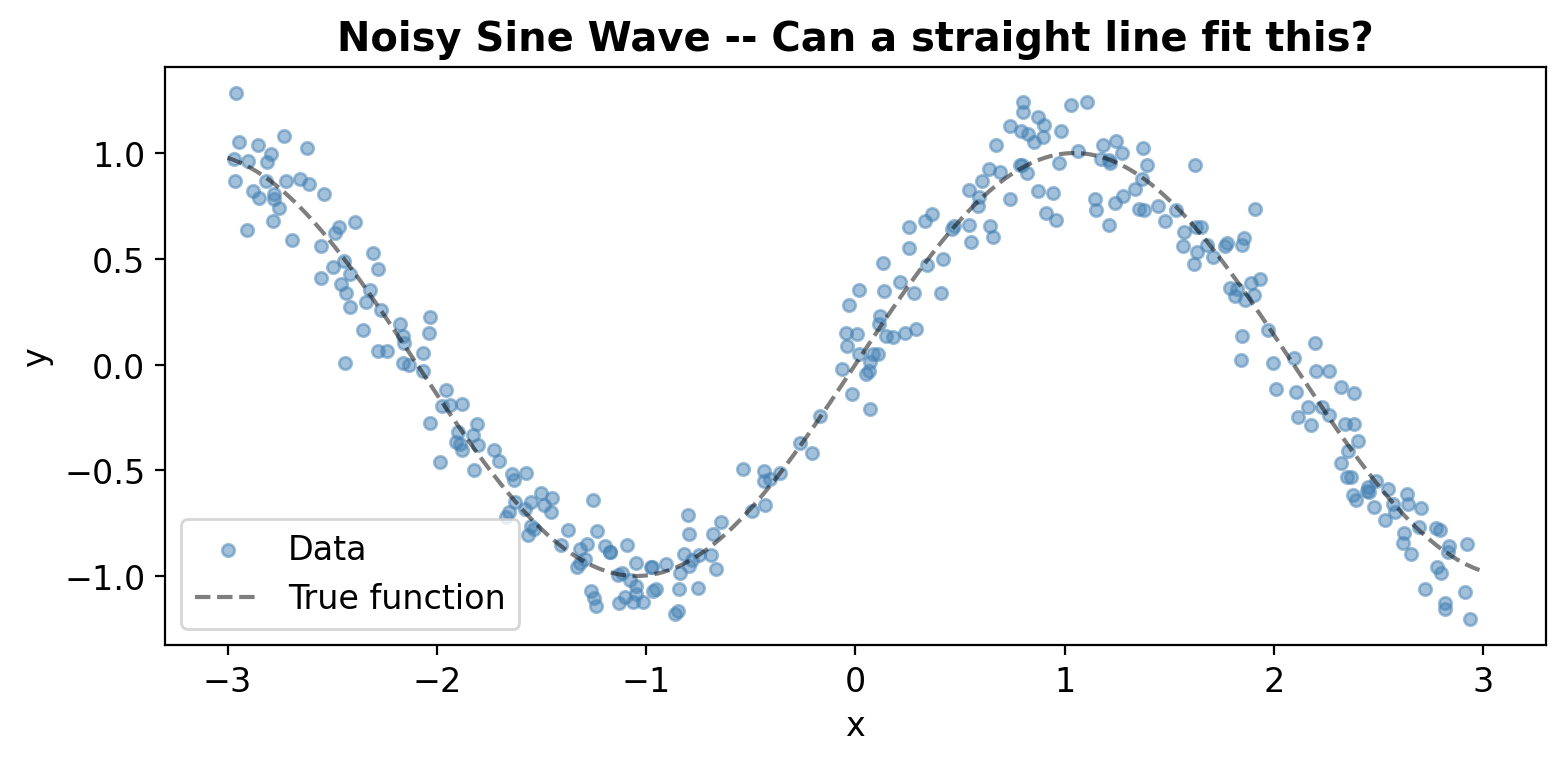
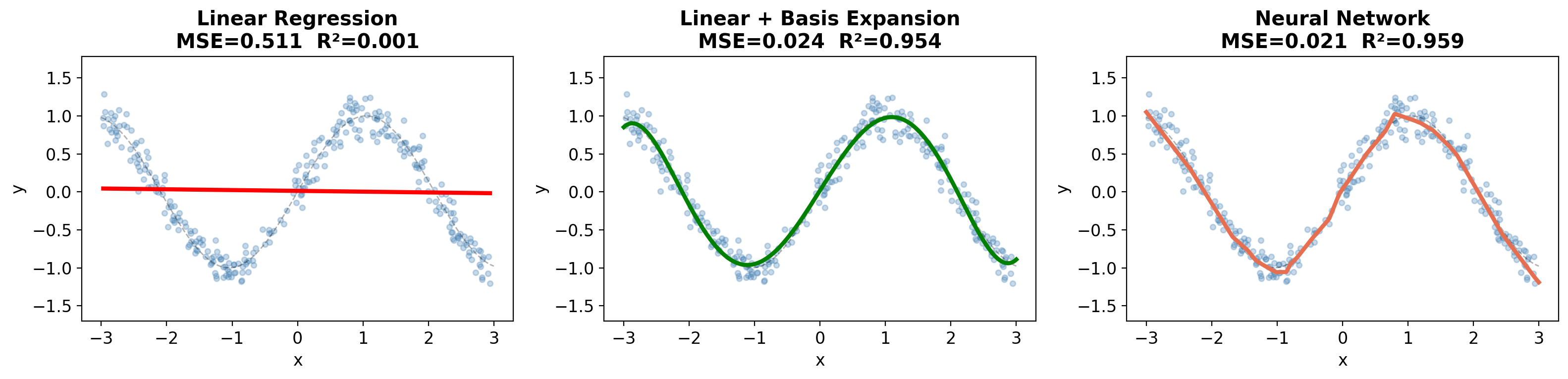
Same idea, but for regression. Can a straight line fit a sine wave?
# Generate noisy sine wave datanp.random.seed(42)n =300X_reg = np.sort(np.random.uniform(-3, 3, n))# True function: a wiggly sine curvedef true_fn(x):return np.sin(1.5* x)y_reg = true_fn(X_reg) + np.random.normal(0, 0.15, n)fig, ax = plt.subplots(figsize=(8, 4))ax.scatter(X_reg, y_reg, alpha=0.5, s=20, color='steelblue', label='Data')x_dense = np.linspace(-3, 3, 500)ax.plot(x_dense, true_fn(x_dense), 'k--', alpha=0.5, label='True function')ax.set_xlabel('x'); ax.set_ylabel('y')ax.set_title('Noisy Sine Wave -- Can a straight line fit this?', fontweight='bold')ax.legend()plt.tight_layout()plt.show()
Step 1: Linear Regression (sklearn)
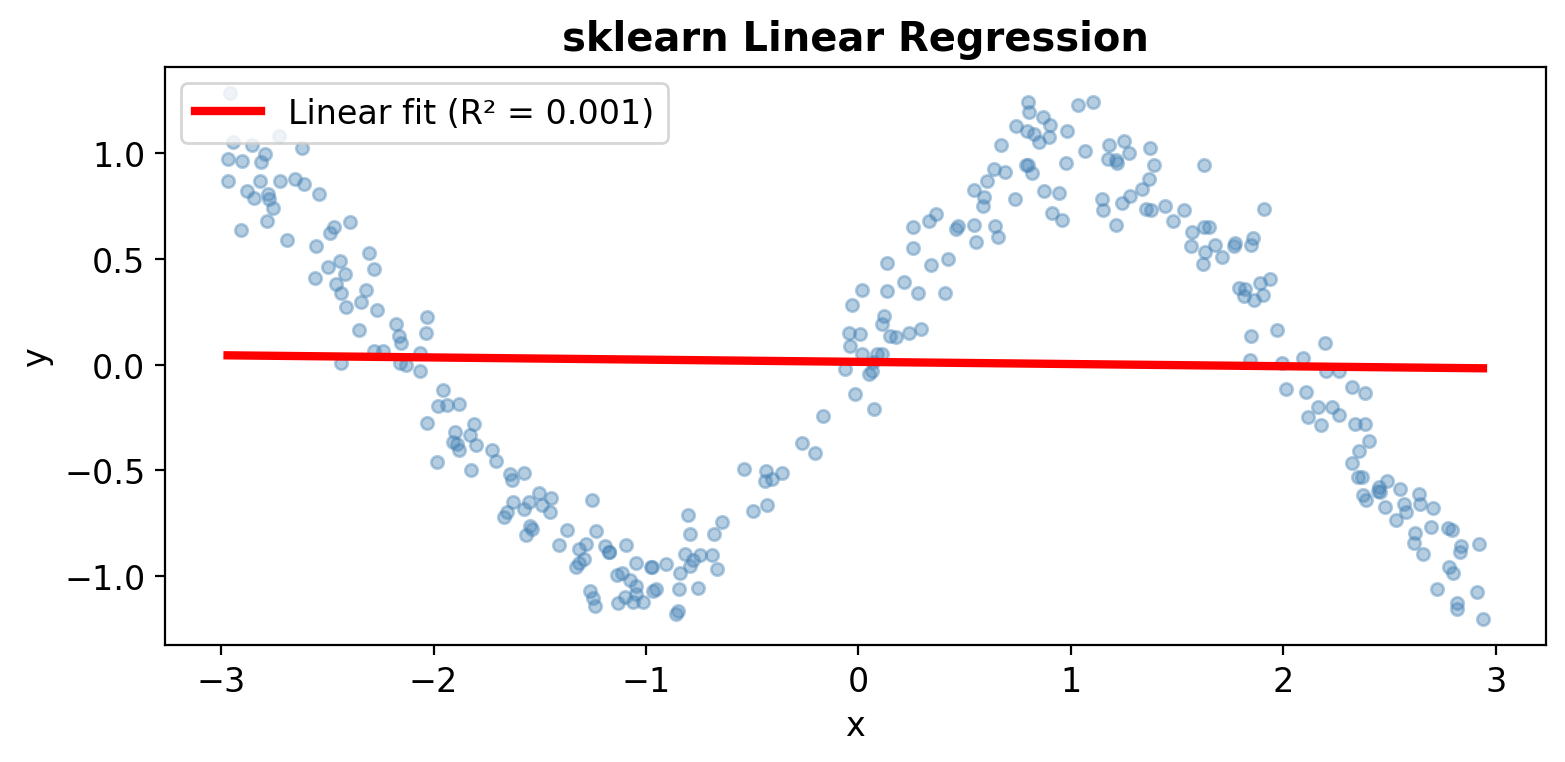
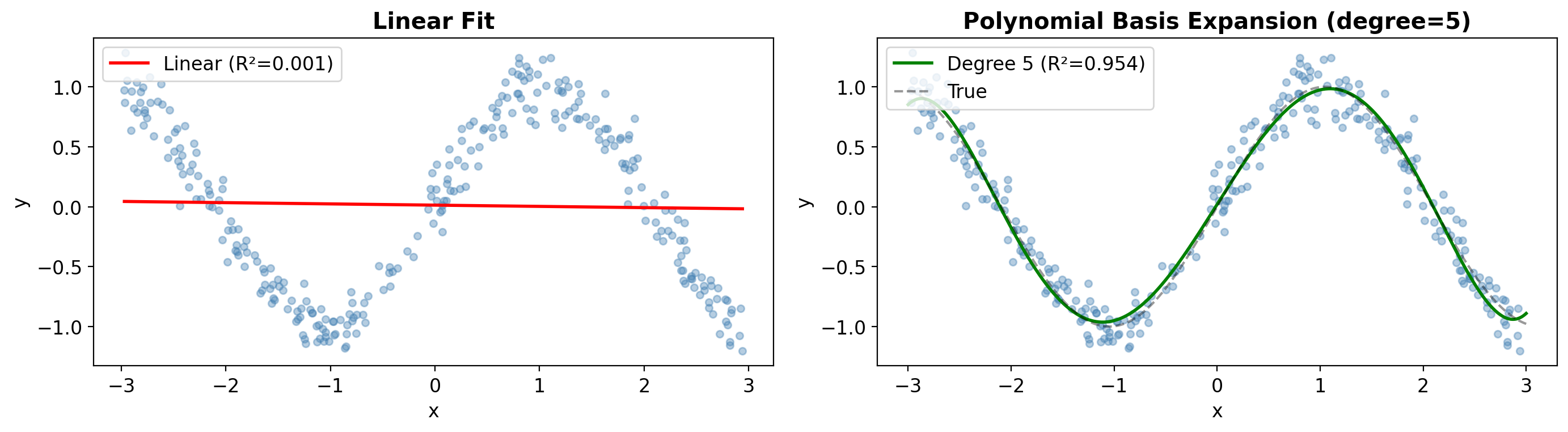
from sklearn.metrics import r2_score# Fit a straight linelin_sklearn = LinearRegression()lin_sklearn.fit(X_reg.reshape(-1, 1), y_reg)y_pred_lin = lin_sklearn.predict(X_reg.reshape(-1, 1))r2_lin = r2_score(y_reg, y_pred_lin)fig, ax = plt.subplots(figsize=(8, 4))ax.scatter(X_reg, y_reg, alpha=0.4, s=20, color='steelblue')ax.plot(X_reg, y_pred_lin, 'r-', linewidth=3, label=f'Linear fit (R² = {r2_lin:.3f})')ax.set_xlabel('x'); ax.set_ylabel('y')ax.set_title('sklearn Linear Regression', fontweight='bold')ax.legend()plt.tight_layout()plt.show()print(f'R² = {r2_lin:.3f} -- terrible! A line cannot capture the wiggles.')
R² = 0.001 -- terrible! A line cannot capture the wiggles.
Step 2: Linear Regression in PyTorch
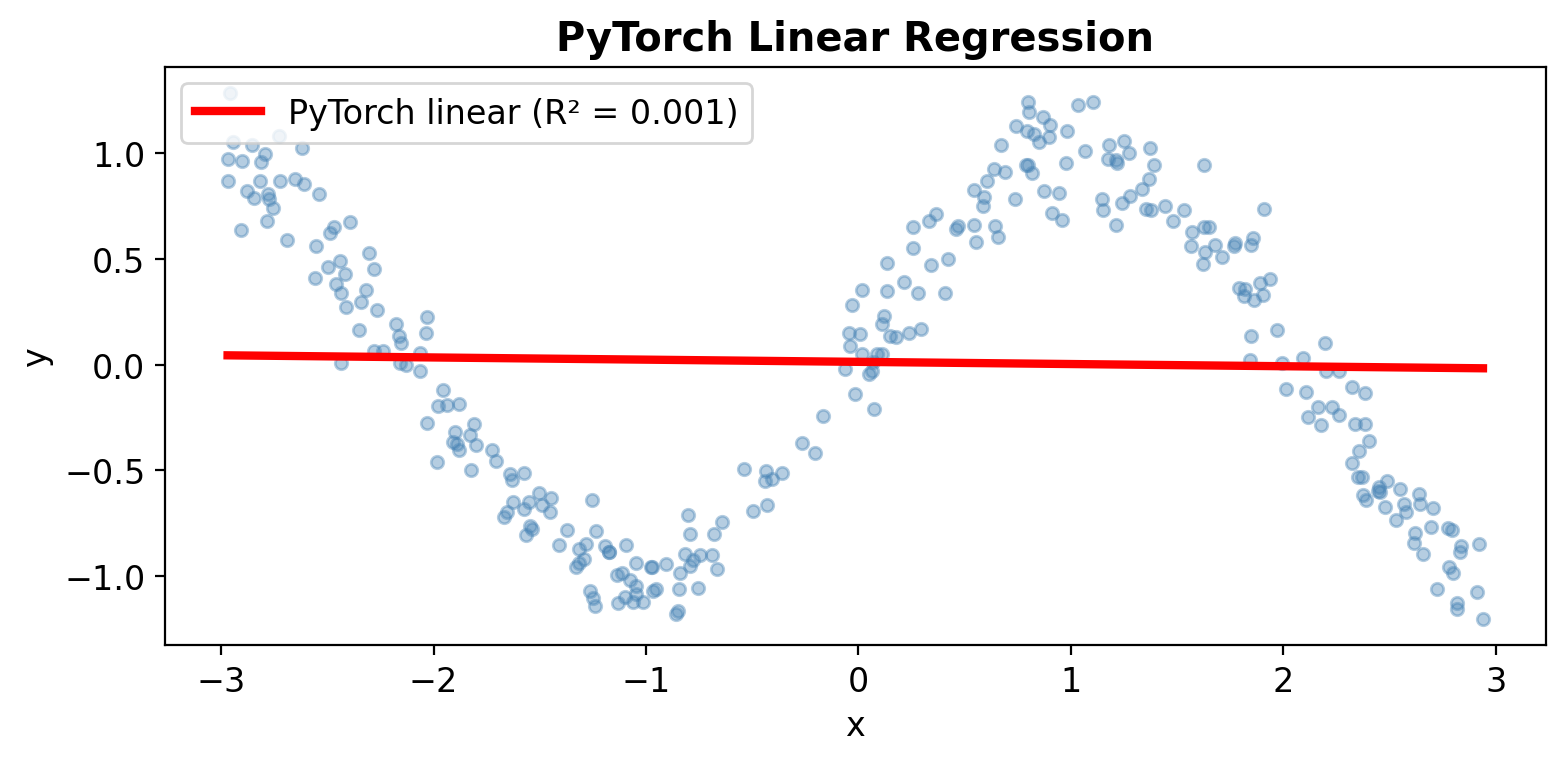
# Same linear regression in PyTorchX_reg_t = torch.tensor(X_reg, dtype=torch.float32).unsqueeze(1)y_reg_t = torch.tensor(y_reg, dtype=torch.float32).unsqueeze(1)torch.manual_seed(42)lin_torch = nn.Linear(1, 1)optimizer = optim.Adam(lin_torch.parameters(), lr=0.05)mse_loss = nn.MSELoss()for epoch inrange(500): pred = lin_torch(X_reg_t) loss = mse_loss(pred, y_reg_t) optimizer.zero_grad() loss.backward() optimizer.step()with torch.no_grad(): y_pred_lin_torch = lin_torch(X_reg_t).numpy()r2_torch = r2_score(y_reg, y_pred_lin_torch)fig, ax = plt.subplots(figsize=(8, 4))ax.scatter(X_reg, y_reg, alpha=0.4, s=20, color='steelblue')ax.plot(X_reg, y_pred_lin_torch, 'r-', linewidth=3, label=f'PyTorch linear (R² = {r2_torch:.3f})')ax.set_xlabel('x'); ax.set_ylabel('y')ax.set_title('PyTorch Linear Regression', fontweight='bold')ax.legend()plt.tight_layout()plt.show()print(f'Same result: R² = {r2_torch:.3f}')print('PyTorch linear = sklearn linear. Both can only fit a line.')
Same result: R² = 0.001
PyTorch linear = sklearn linear. Both can only fit a line.
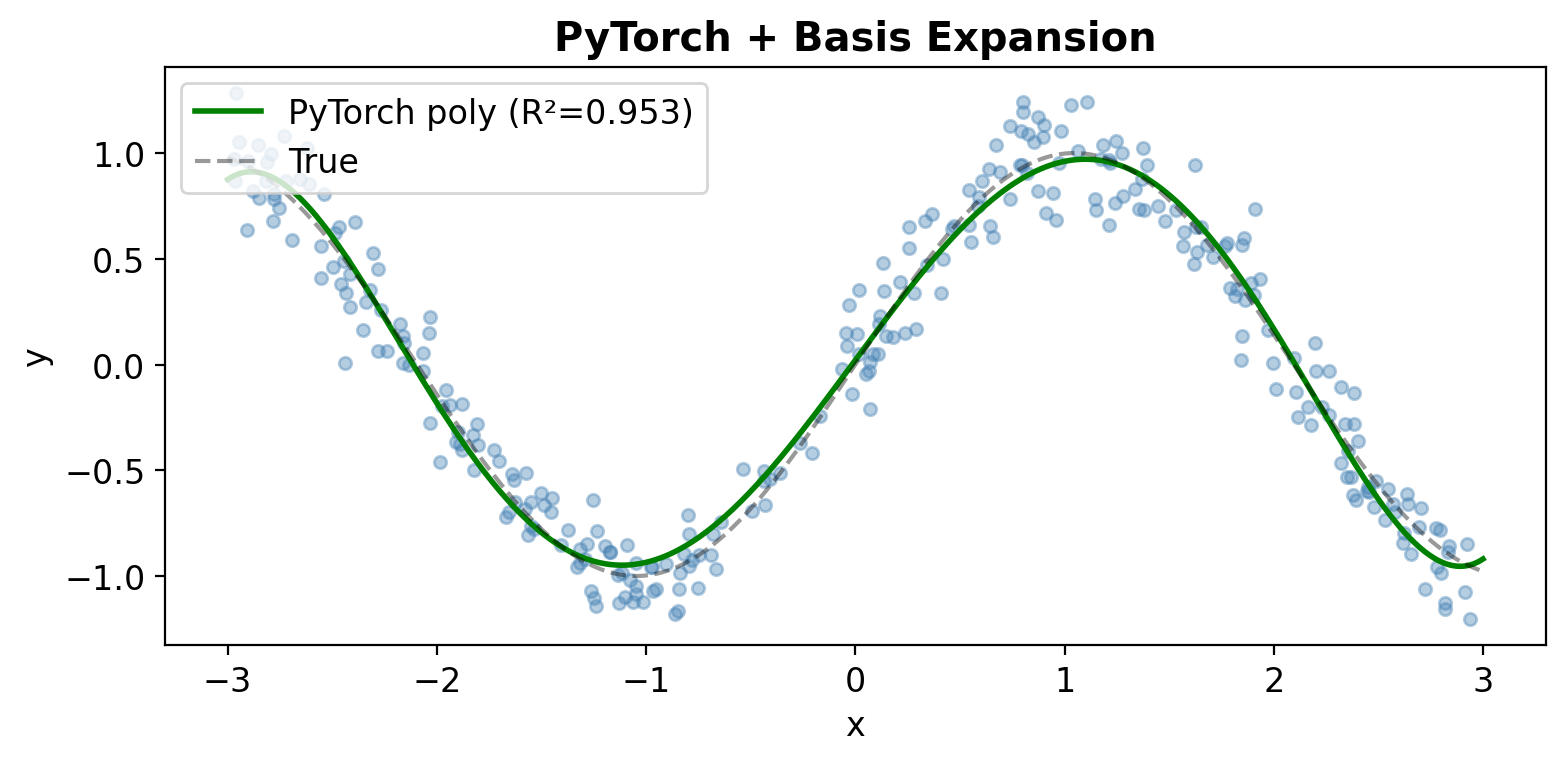
Step 3: Basis Expansion – Adding Polynomial Features
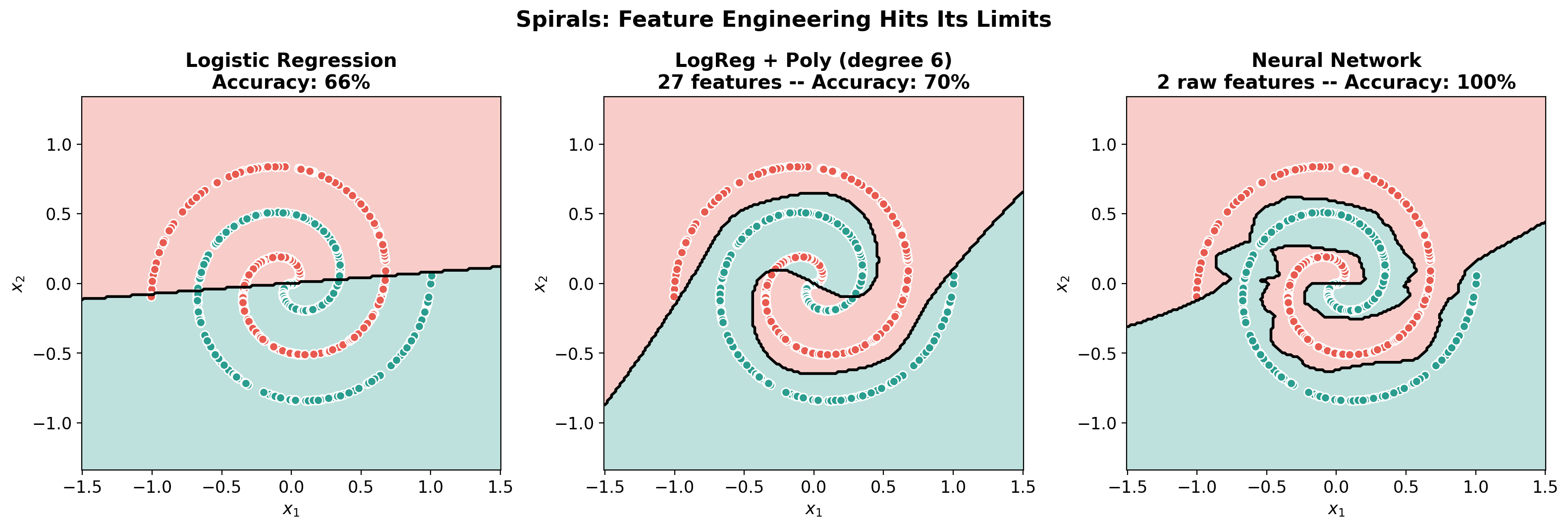
Polynomial features: 27 features from degree-6 expansion!

Linear:                 66%
Poly (degree 6, 27 features): 70%
Neural Network (2 raw features): 100%
# Decision boundary comparisonfig, axes = plt.subplots(1, 3, figsize=(16, 5))plot_decision_boundary(lr_spiral.predict, X_spiral, y_spiral,f'Logistic Regression\nAccuracy: {acc_lin:.0%}', ax=axes[0])plot_decision_boundary(predict_spiral_poly, X_spiral, y_spiral,f'LogReg + Poly (degree 6)\n{X_spiral_poly.shape[1]} features -- Accuracy: {acc_poly:.0%}', ax=axes[1])plot_decision_boundary(predict_nn_spiral, X_spiral, y_spiral,f'Neural Network\n2 raw features -- Accuracy: {acc_nn:.0%}', ax=axes[2])plt.suptitle('Spirals: Feature Engineering Hits Its Limits', fontsize=16, fontweight='bold', y=1.02)plt.tight_layout()plt.show()print('Even with 27 polynomial features, logistic regression struggles.')print('The neural network learns the spiral boundary from just x1 and x2!')print('\nThis is the real power: NNs handle patterns that no human would think to engineer.')
Even with 27 polynomial features, logistic regression struggles.
The neural network learns the spiral boundary from just x1 and x2!

This is the real power: NNs handle patterns that no human would think to engineer.
Part 4: Images – Where Feature Engineering Really Falls Apart
For circles and spirals, a clever person might guess polar coordinates or high-degree polynomials.
But what about images? Before deep learning, computer vision relied on: - Pixel intensity histograms - HOG (Histogram of Oriented Gradients) – edge directions - SIFT/SURF – local keypoints - Manually designed for each task!
Let’s see this on MNIST digit classification.
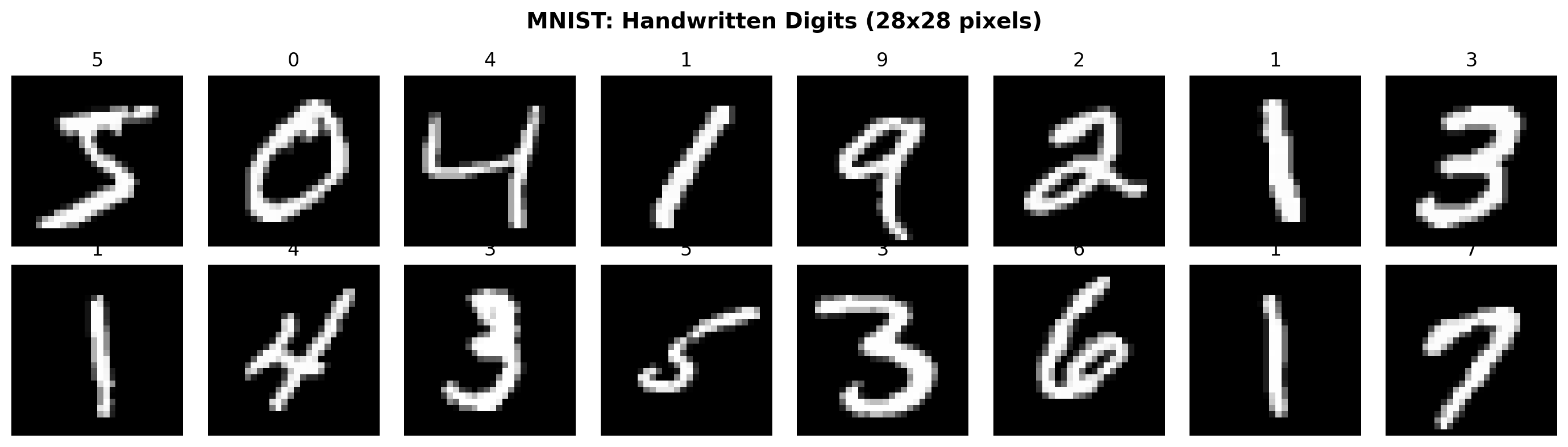
# Load MNISTfrom torchvision import datasets, transformsfrom sklearn.metrics import accuracy_scoremnist_train = datasets.MNIST('./data', train=True, download=True)mnist_test = datasets.MNIST('./data', train=False, download=True)# Convert to numpyX_train_img = mnist_train.data.numpy() # (60000, 28, 28)y_train_img = mnist_train.targets.numpy()X_test_img = mnist_test.data.numpy()y_test_img = mnist_test.targets.numpy()# Show some samplesfig, axes = plt.subplots(2, 8, figsize=(14, 4))for i, ax inenumerate(axes.ravel()): ax.imshow(X_train_img[i], cmap='gray') ax.set_title(f'{y_train_img[i]}', fontsize=12) ax.axis('off')plt.suptitle('MNIST: Handwritten Digits (28x28 pixels)', fontsize=14, fontweight='bold')plt.tight_layout()plt.show()print(f'Training set: {X_train_img.shape[0]} images, {X_train_img.shape[1]}x{X_train_img.shape[2]} pixels')print(f'Test set: {X_test_img.shape[0]} images')print(f'Task: classify each image into one of 10 digits (0-9)')
Training set: 60000 images, 28x28 pixels
Test set:     10000 images
Task: classify each image into one of 10 digits (0-9)
Approach 1: Hand-Crafted Features + Logistic Regression
The “old way” – before deep learning, you’d manually design features: - Raw pixels flattened into a vector (784 numbers) - Intensity features: mean brightness, how much ink, symmetry - HOG features: captures edge directions (the standard pre-deep-learning feature)
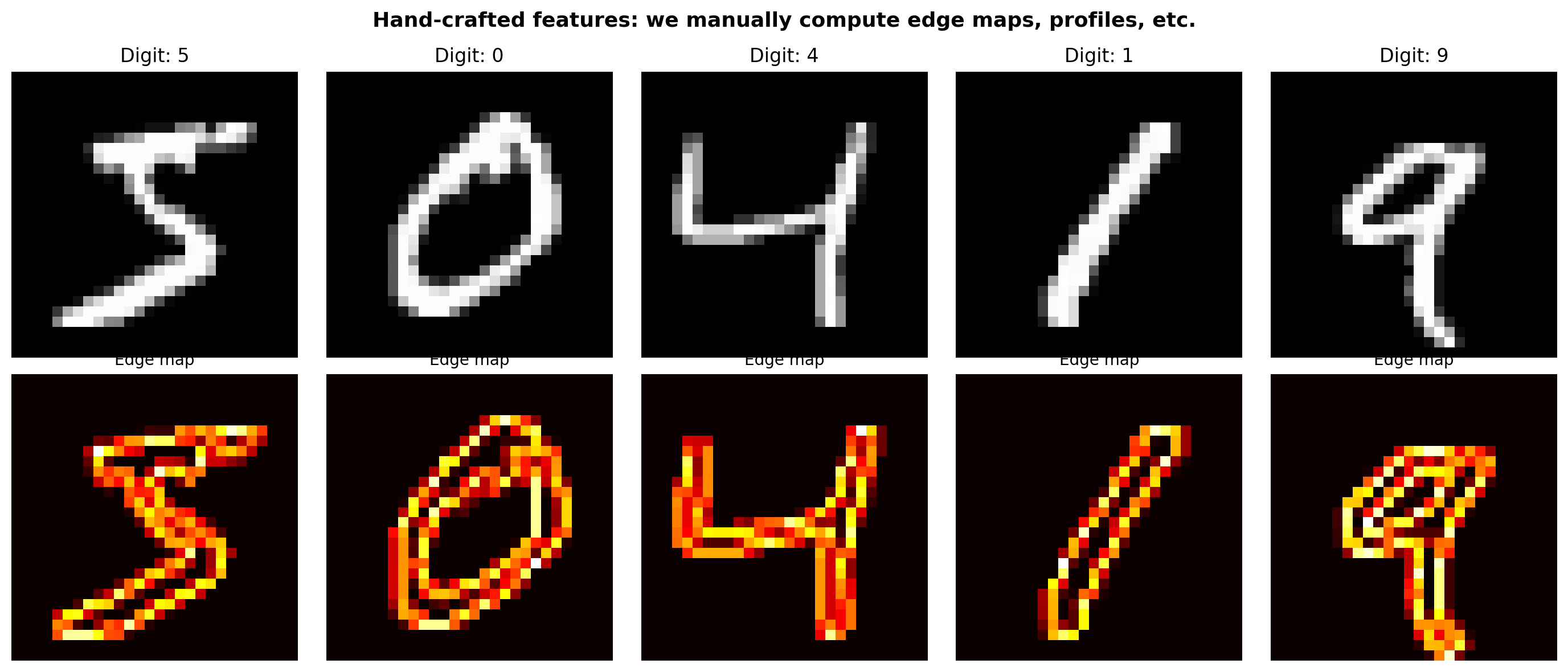
def extract_handcrafted_features(images):"""Extract hand-designed features from digit images. This is what engineers did BEFORE deep learning.""" features = []for img in images: img_f = img.astype(np.float32) /255.0# 1. Basic intensity features mean_intensity = img_f.mean() std_intensity = img_f.std() ink_ratio = (img_f >0.3).mean() # fraction of "ink" pixels# 2. Spatial features -- where is the ink? top_half = img_f[:14, :].mean() bottom_half = img_f[14:, :].mean() left_half = img_f[:, :14].mean() right_half = img_f[:, 14:].mean() vertical_symmetry = np.abs(top_half - bottom_half) horizontal_symmetry = np.abs(left_half - right_half)# 3. Quadrant features q1 = img_f[:14, :14].mean() q2 = img_f[:14, 14:].mean() q3 = img_f[14:, :14].mean() q4 = img_f[14:, 14:].mean()# 4. Simple edge features (horizontal & vertical gradients) grad_h = np.abs(np.diff(img_f, axis=1)).mean() grad_v = np.abs(np.diff(img_f, axis=0)).mean()# 5. Profile features -- project onto axes row_profile = img_f.mean(axis=1) # 28 values col_profile = img_f.mean(axis=0) # 28 values feat = [mean_intensity, std_intensity, ink_ratio, top_half, bottom_half, left_half, right_half, vertical_symmetry, horizontal_symmetry, q1, q2, q3, q4, grad_h, grad_v] feat.extend(row_profile) feat.extend(col_profile) features.append(feat)return np.array(features)# Extract featuresprint('Extracting hand-crafted features...')X_train_feat = extract_handcrafted_features(X_train_img)X_test_feat = extract_handcrafted_features(X_test_img)print(f'Hand-crafted features per image: {X_train_feat.shape[1]}')print(f' - 15 engineered features (intensity, symmetry, gradients, quadrants)')print(f' - 28 row profile + 28 column profile')# Visualize what HOG-like features look likefig, axes = plt.subplots(2, 5, figsize=(14, 6))for i inrange(5): img = X_train_img[i].astype(np.float32) /255.0 axes[0, i].imshow(img, cmap='gray') axes[0, i].set_title(f'Digit: {y_train_img[i]}', fontsize=12) axes[0, i].axis('off')# Show gradient magnitude (edge map) gx = np.abs(np.diff(img, axis=1, prepend=0)) gy = np.abs(np.diff(img, axis=0, prepend=0)) edges = np.sqrt(gx**2+ gy**2) axes[1, i].imshow(edges, cmap='hot') axes[1, i].set_title('Edge map', fontsize=10) axes[1, i].axis('off')axes[0, 0].set_ylabel('Original', fontsize=12)axes[1, 0].set_ylabel('Edges', fontsize=12)plt.suptitle('Hand-crafted features: we manually compute edge maps, profiles, etc.', fontsize=13, fontweight='bold')plt.tight_layout()plt.show()
Extracting hand-crafted features...
Hand-crafted features per image: 71
  - 15 engineered features (intensity, symmetry, gradients, quadrants)
  - 28 row profile + 28 column profile
# --- Model 1: Logistic Regression on raw pixels ---X_train_flat = X_train_img.reshape(-1, 784).astype(np.float32) /255.0X_test_flat = X_test_img.reshape(-1, 784).astype(np.float32) /255.0print('Training logistic regression on raw pixels (784 features)...')lr_pixels = LogisticRegression(max_iter=1000, solver='lbfgs')lr_pixels.fit(X_train_flat, y_train_img)acc_pixels = accuracy_score(y_test_img, lr_pixels.predict(X_test_flat))print(f' Test accuracy: {acc_pixels:.1%}')# --- Model 2: Logistic Regression on hand-crafted features ---print(f'\nTraining logistic regression on hand-crafted features ({X_train_feat.shape[1]} features)...')lr_feat = LogisticRegression(max_iter=1000, solver='lbfgs')lr_feat.fit(X_train_feat, y_train_img)acc_feat = accuracy_score(y_test_img, lr_feat.predict(X_test_feat))print(f' Test accuracy: {acc_feat:.1%}')
Training logistic regression on raw pixels (784 features)...
  Test accuracy: 92.6%

Training logistic regression on hand-crafted features (71 features)...
  Test accuracy: 84.5%
Approach 2: Simple CNN – Let the Network Learn Its Own Features
Instead of us designing edge detectors, the CNN learns what patterns matter.
A convolution layer is like a tiny sliding window that learns to detect edges, curves, loops – whatever helps classify the digit.
# Train the CNN# Prepare data as tensors -- images need shape (N, 1, 28, 28)X_train_cnn = torch.tensor(X_train_img, dtype=torch.float32).unsqueeze(1) /255.0y_train_cnn = torch.tensor(y_train_img, dtype=torch.long)X_test_cnn = torch.tensor(X_test_img, dtype=torch.float32).unsqueeze(1) /255.0y_test_cnn = torch.tensor(y_test_img, dtype=torch.long)optimizer = optim.Adam(cnn.parameters(), lr=0.001)loss_fn_ce = nn.CrossEntropyLoss()# Train for 3 epochs using mini-batchesbatch_size =256losses_cnn = []for epoch inrange(3): epoch_loss =0 n_batches =0# Shuffle perm = torch.randperm(len(X_train_cnn))for i inrange(0, len(X_train_cnn), batch_size): idx = perm[i:i+batch_size] X_batch = X_train_cnn[idx] y_batch = y_train_cnn[idx] pred = cnn(X_batch) loss = loss_fn_ce(pred, y_batch) optimizer.zero_grad() loss.backward() optimizer.step() epoch_loss += loss.item() n_batches +=1 losses_cnn.append(loss.item())# Evaluatewith torch.no_grad():# Test in batches to avoid memory issues correct =0for i inrange(0, len(X_test_cnn), 1000): preds = cnn(X_test_cnn[i:i+1000]).argmax(dim=1) correct += (preds == y_test_cnn[i:i+1000]).sum().item() acc_cnn = correct /len(y_test_cnn)print(f'Epoch {epoch+1}/3 -- Loss: {epoch_loss/n_batches:.4f} -- Test Accuracy: {acc_cnn:.1%}')print(f'\nFinal CNN test accuracy: {acc_cnn:.1%}')
Epoch 1/3 -- Loss: 0.4998 -- Test Accuracy: 94.6%
Epoch 2/3 -- Loss: 0.1225 -- Test Accuracy: 97.5%
Epoch 3/3 -- Loss: 0.0792 -- Test Accuracy: 98.0%

Final CNN test accuracy: 98.0%
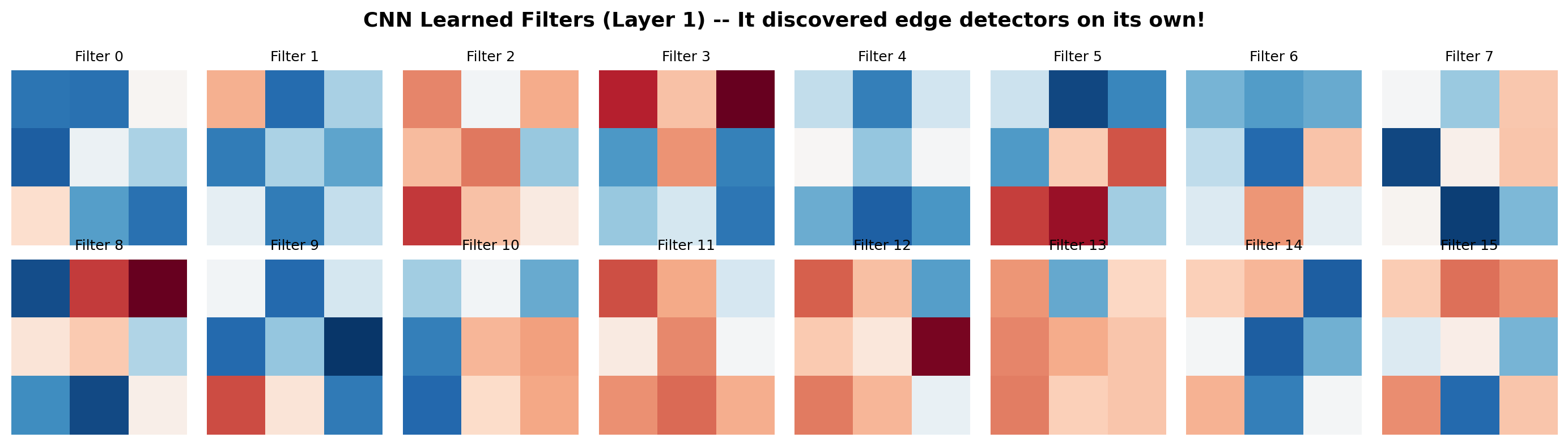
# What did the CNN learn? Visualize the first-layer filtersfig, axes = plt.subplots(2, 8, figsize=(14, 4))filters = cnn.features[0].weight.data.numpy() # (16, 1, 3, 3)for i, ax inenumerate(axes.ravel()): ax.imshow(filters[i, 0], cmap='RdBu', vmin=-0.5, vmax=0.5) ax.set_title(f'Filter {i}', fontsize=9) ax.axis('off')plt.suptitle('CNN Learned Filters (Layer 1) -- It discovered edge detectors on its own!', fontsize=13, fontweight='bold')plt.tight_layout()plt.show()print('These filters detect edges, corners, and gradients.')print('We never told the CNN to look for edges -- it figured it out from the data!')
These filters detect edges, corners, and gradients.
We never told the CNN to look for edges -- it figured it out from the data!
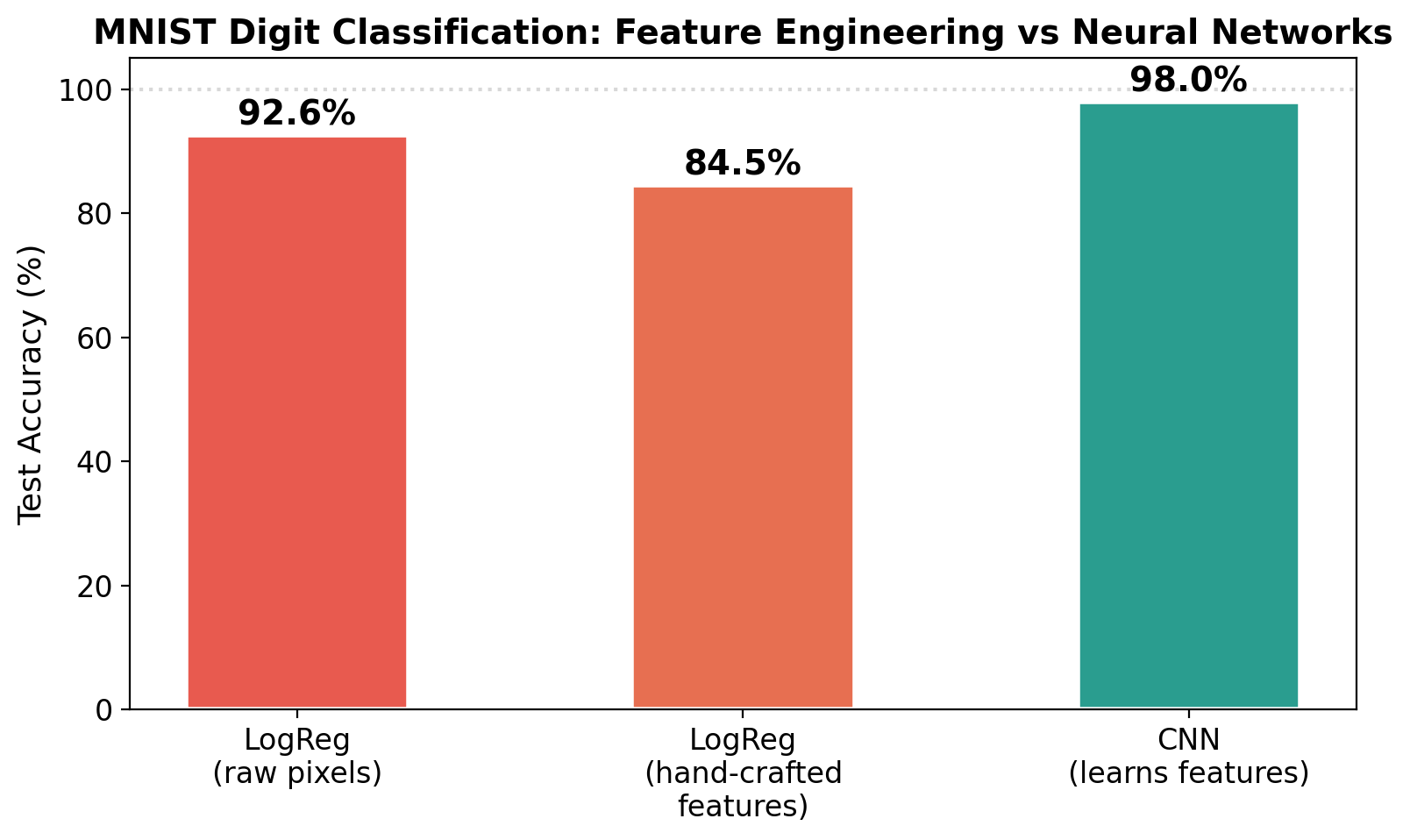
# The big comparison -- bar chartmodels = ['LogReg\n(raw pixels)', 'LogReg\n(hand-crafted\nfeatures)', 'CNN\n(learns features)']accs = [acc_pixels, acc_feat, acc_cnn]colors = ['#e85a4f', '#e76f51', '#2a9d8f']fig, ax = plt.subplots(figsize=(8, 5))bars = ax.bar(models, [a *100for a in accs], color=colors, edgecolor='white', linewidth=2, width=0.5)for bar, acc inzip(bars, accs): ax.text(bar.get_x() + bar.get_width()/2, bar.get_height() +0.5,f'{acc:.1%}', ha='center', va='bottom', fontsize=14, fontweight='bold')ax.set_ylabel('Test Accuracy (%)', fontsize=13)ax.set_title('MNIST Digit Classification: Feature Engineering vs Neural Networks', fontsize=14, fontweight='bold')ax.set_ylim(0, 105)ax.axhline(y=100, color='gray', linestyle=':', alpha=0.3)plt.tight_layout()plt.show()print(f'Logistic Regression (784 raw pixels): {acc_pixels:.1%}')print(f'Logistic Regression ({X_train_feat.shape[1]} hand-crafted features): {acc_feat:.1%}')print(f'Simple CNN (learns its own features): {acc_cnn:.1%}')print()print('The CNN beats both -- and we spent ZERO time designing features!')
Logistic Regression (784 raw pixels):        92.6%
Logistic Regression (71 hand-crafted features): 84.5%
Simple CNN (learns its own features):        98.0%

The CNN beats both -- and we spent ZERO time designing features!
The Full Picture
Problem
Feature Engineering
Neural Network
Circles (2D)
Polynomial degree 2 – works (easy to guess)
MLP – works
Spirals (2D)
Polynomial degree 6 – struggles
MLP – works
Sine wave (1D)
Polynomial degree 5 – works (if you guess right)
MLP – works
Digits (images)
Intensity + edges + profiles – OK (~91%)
CNN – great (~99%)
The pattern: - Simple problems: feature engineering can match neural networks - Complex problems: feature engineering breaks down; neural networks scale - Images, audio, text: forget manual features – neural networks dominate
This is the paradigm shift:
Old way: Human designs features → simple model
New way: Raw data → neural network learns everything
The hidden layers of a neural network are the feature engineering – learned from data instead of designed by hand.