Gemini API: Comprehensive Guide to Multimodal Capabilities

LLM
Gemini
multimodal
vision
audio
video
Author

Nipun Batra

Published

December 1, 2025

Introduction

This comprehensive notebook demonstrates the multimodal capabilities of Google’s Gemini API using the latest models and features.

What You’ll Learn

API Fundamentals

  • Single vs batch processing
  • Streaming responses
  • Configuration options
  • Error handling

Text Capabilities (10 examples)

  • Sentiment analysis, classification, NER
  • Summarization, Q&A, translation
  • Text completion and rewriting
  • Entity and keyword extraction

Vision Capabilities (8 examples)

  • Object counting and visual Q&A
  • Chart and document analysis
  • Image captioning and comparison
  • Visual reasoning and diagrams

Video Capabilities (3 examples)

  • Video understanding and analysis
  • Frame-by-frame analysis
  • Action recognition

Audio Capabilities (2 examples)

  • Speech transcription
  • Audio content analysis

PDF Capabilities (2 examples)

  • Document analysis
  • Multi-page extraction

Advanced Features (8 examples)

  • Structured JSON output
  • Function calling
  • Code execution
  • Search grounding
  • Long context (1M tokens)
  • Code generation
  • Mathematical and scientific reasoning
  • Creative writing

Model Used

Model: gemini-2.0-flash-thinking-exp-1219 - Input modalities: Text, Image, Video, Audio, PDF - Output: Text - Context: 1M+ tokens input, 65K+ tokens output - Special features: Code execution, search grounding, thinking mode

Setup and Configuration

# Install required packages
# !pip install google-genai pillow requests matplotlib pandas numpy
import os
import json
import time
from pathlib import Path
from typing import List, Dict, Any
from google import genai
from PIL import Image, ImageDraw, ImageFont
import requests
from io import BytesIO
import base64
import matplotlib.pyplot as plt
import numpy as np

# Check for API key
if 'GEMINI_API_KEY' not in os.environ:
    raise ValueError(
        "GEMINI_API_KEY not found in environment.\n"
        "Set it with: export GEMINI_API_KEY='your-key'\n"
        "Get your key at: https://aistudio.google.com/apikey"
    )

# Initialize client (new SDK)
client = genai.Client(api_key=os.environ['GEMINI_API_KEY'])

print(" Gemini client initialized successfully")
print("Using google-genai SDK (new version)")

# Note: We'll use gemini-2.0-flash-thinking-exp-1219 as the default model
MODEL = "gemini-2.0-flash-thinking-exp-1219"
print(f"Default model: {MODEL}")
 Gemini client initialized successfully
Using google-genai SDK (new version)
Default model: gemini-2.0-flash-thinking-exp-1219

Helper Functions

def print_section(title: str):
    """Print formatted section header."""
    print("\n" + "="*80)
    print(title)
    print("="*80)

def print_result(label: str, content: str, indent: int = 0):
    """Print formatted result."""
    prefix = "  " * indent
    print(f"{prefix}{label}: {content}")

def load_image_from_url(url: str) -> Image.Image:
    """Load an image from a URL."""
    response = requests.get(url)
    return Image.open(BytesIO(response.content))

def create_sample_image(text: str, size=(800, 600)) -> Image.Image:
    """Create a simple image with text for testing."""
    img = Image.new('RGB', size, color='white')
    draw = ImageDraw.Draw(img)
    draw.text((50, size[1]//2), text, fill='black')
    return img

print("Helper functions loaded")
Helper functions loaded

Part 1: API Usage Patterns

Single Request vs Batch Processing

print("Single Request")
print("="*80)

# Single request - simplest way
response = client.models.generate_content(
    model="gemini-3-pro-preview",
    contents="What is the capital of France?")
print_result("Question", "What is the capital of France?")
print_result("Answer", response.text)
Single Request
================================================================================
Question: What is the capital of France?
Answer: The capital of France is **Paris**.
print("\n" + "="*80)
print("Batch Processing")
print("="*80)

# Process multiple prompts efficiently
prompts = [
    "Translate 'Hello' to Spanish",
    "Translate 'Goodbye' to French",
    "Translate 'Thank you' to German",
    "Translate 'Welcome' to Italian"
]

# Method 1: Sequential (simple but slower)
print("Sequential processing:")
start = time.time()
results_seq = []
for prompt in prompts:
    response = client.models.generate_content(
        model="gemini-2.0-flash-thinking-exp-1219",
        contents=prompt
    )
    results_seq.append(response.text.strip())
time_seq = time.time() - start

for i, (prompt, result) in enumerate(zip(prompts, results_seq), 1):
    print(f"  {i}. {prompt}{result}")
print(f"Time: {time_seq:.2f}s")

================================================================================
Batch Processing
================================================================================
Sequential processing:
  1. Translate 'Hello' to Spanish → The most common way to say "Hello" in Spanish is **Hola**.
  2. Translate 'Goodbye' to French → The most common and direct translation of "Goodbye" in French is:

**Au revoir**
  3. Translate 'Thank you' to German → The most common and direct translation of 'Thank you' to German is:

**Danke**

For a slightly more formal or emphatic "Thank you" (similar to "Thank you very much"):

**Danke schön**

Or, to say "Many thanks" / "Thank you very much":

**Vielen Dank**
  4. Translate 'Welcome' to Italian → The most common translation for "Welcome" as a greeting in Italian is:

*   To a **man**: **Benvenuto**
*   To a **woman**: **Benvenuta**
*   To a **group** (mixed or all male): **Benvenuti**
*   To a **group** (all female): **Benvenute**

So, depending on who you are welcoming, you would use the appropriate form.

If you mean "You're welcome" in response to "Thank you," the common Italian phrases are:

*   **Prego**
*   **Di niente**
*   **Di nulla**
Time: 10.11s

Part 2: Text-Only Tasks (10 tasks)

print("\n" + "="*80)
print("Zero-Shot Sentiment Analysis")
print("="*80)

texts = [
    "This product is absolutely amazing! Best purchase I've made all year.",
    "Terrible experience. Waste of money and time.",
    "It's okay. Nothing special but does the job.",
    "I'm disappointed with the quality. Expected much better.",
    "Exceeded all my expectations! Highly recommend!"
]

prompt_template = """Classify the sentiment: Positive, Negative, or Neutral.
Reply with ONLY the sentiment label.

Text: {text}
Sentiment:"""

for i, text in enumerate(texts, 1):
    response = client.models.generate_content(
        model="gemini-2.0-flash-thinking-exp-1219",
        contents=prompt_template.format(text=text)
    )
    sentiment = response.text.strip()
    print(f"{i}. '{text[:50]}...'")
    print(f"   → {sentiment}\n")

================================================================================
Zero-Shot Sentiment Analysis
================================================================================
1. 'This product is absolutely amazing! Best purchase ...'
   → Positive

2. 'Terrible experience. Waste of money and time....'
   → Negative

3. 'It's okay. Nothing special but does the job....'
   → Neutral

4. 'I'm disappointed with the quality. Expected much b...'
   → Negative

5. 'Exceeded all my expectations! Highly recommend!...'
   → Positive
print("\n" + "="*80)
print("Few-Shot Text Classification")
print("="*80)

# Intent classification with examples
prompt = """Classify customer service queries into categories.

Examples:
"How do I reset my password?" → Technical Support
"I was charged twice" → Billing
"What are your hours?" → General Inquiry
"This is broken" → Complaint
"I want to cancel" → Account Management

Query: "{query}"
Category:"""

test_queries = [
    "My app keeps crashing when I upload photos",
    "Why was I charged for premium when I'm on free plan?",
    "Do you ship to Canada?",
    "The product arrived damaged",
    "How do I delete my account?"
]

for query in test_queries:
    response = client.models.generate_content(
        model="gemini-2.0-flash-thinking-exp-1219",
        contents=prompt.format(query=query)
    )
    print(f"Query: {query}")
    print(f"Category: {response.text.strip()}\n")

================================================================================
Few-Shot Text Classification
================================================================================
Query: My app keeps crashing when I upload photos
Category: Category: Technical Support

Query: Why was I charged for premium when I'm on free plan?
Category: Billing

Query: Do you ship to Canada?
Category: General Inquiry

Query: The product arrived damaged
Category: Complaint

Query: How do I delete my account?
Category: Account Management
print("\n" + "="*80)
print("Named Entity Recognition (NER)")
print("="*80)

text = """Apple Inc. CEO Tim Cook announced a $500 million investment in renewable 
energy projects across California next month. The announcement was made at the 
company's headquarters in Cupertino on December 15, 2024."""

prompt = f"""Extract all named entities and categorize them:
PERSON, ORGANIZATION, LOCATION, MONEY, DATE

Text: {text}

Format as JSON with entity type as key."""

response = client.models.generate_content(
    model="gemini-2.0-flash-thinking-exp-1219",
    contents=prompt)
print(f"Text: {text}\n")
print("Entities:")
print(response.text)

================================================================================
Named Entity Recognition (NER)
================================================================================
Text: Apple Inc. CEO Tim Cook announced a $500 million investment in renewable 
energy projects across California next month. The announcement was made at the 
company's headquarters in Cupertino on December 15, 2024.

Entities:
```json
{
  "ORGANIZATION": [
    "Apple Inc."
  ],
  "PERSON": [
    "Tim Cook"
  ],
  "MONEY": [
    "$500 million"
  ],
  "LOCATION": [
    "California",
    "Cupertino"
  ],
  "DATE": [
    "December 15, 2024"
  ]
}
```

Text Summarization

print("\n" + "="*80)
print("Text Summarization")
print("="*80)

article = """Artificial intelligence continues to transform industries worldwide. Recent
advances in large language models have enabled more natural conversations between humans
and machines. These models can understand context, generate coherent text, and even
perform complex reasoning tasks. However, challenges remain in ensuring factual accuracy,
reducing computational costs, and addressing ethical concerns around bias and privacy.
Researchers are actively working on making AI more efficient, transparent, and aligned
with human values. The field is evolving rapidly, with new breakthroughs announced weekly.
From healthcare to education, AI is reshaping how we work and live."""

prompts = [
    "Summarize in 1 sentence:",
    "Summarize in 3 bullet points:",
    "Create a tweet-length summary (280 chars):"
]

print(f"Original ({len(article)} chars):\n{article}\n")

for prompt_type in prompts:
    response = client.models.generate_content(
        model="gemini-2.0-flash-thinking-exp-1219",
        contents=f"{prompt_type}\n\n{article}"
    )
    print(f"{prompt_type}")
    print(f"  {response.text.strip()}\n")

================================================================================
Text Summarization
================================================================================
Original (671 chars):
Artificial intelligence continues to transform industries worldwide. Recent
advances in large language models have enabled more natural conversations between humans
and machines. These models can understand context, generate coherent text, and even
perform complex reasoning tasks. However, challenges remain in ensuring factual accuracy,
reducing computational costs, and addressing ethical concerns around bias and privacy.
Researchers are actively working on making AI more efficient, transparent, and aligned
with human values. The field is evolving rapidly, with new breakthroughs announced weekly.
From healthcare to education, AI is reshaping how we work and live.

Summarize in 1 sentence:
  Artificial intelligence, especially with advancements in large language models enabling natural interaction and complex reasoning, is rapidly transforming industries and daily life despite ongoing challenges in accuracy, cost, and ethical concerns that researchers are actively addressing.

Summarize in 3 bullet points:
  Here's a 3-bullet point summary:

*   Artificial intelligence (AI), particularly large language models, is transforming industries and enabling more natural human-machine interactions through advanced contextual understanding and reasoning.
*   Recent AI breakthroughs are reshaping various sectors like healthcare and education, fundamentally changing how we work and live.
*   Significant challenges remain, including ensuring factual accuracy, reducing computational costs, and addressing ethical concerns around bias and privacy, with ongoing research focused on making AI more efficient, transparent, and aligned with human values.

Create a tweet-length summary (280 chars):
  AI is rapidly transforming industries globally, with advanced LLMs now enabling natural conversations & complex reasoning. While exciting, key challenges include ensuring accuracy, reducing costs, and addressing ethical concerns like bias & privacy. Researchers are striving for efficient, transparent, and human-aligned AI that reshapes our world.
print("\n" + "="*80)
print("Question Answering")
print("="*80)

context = """The Eiffel Tower is a wrought-iron lattice tower located on the Champ de Mars
in Paris, France. It was constructed from 1887 to 1889 as the centerpiece of the 1889
World's Fair. The tower is 330 meters (1,083 feet) tall, about the same height as an
81-story building. It was the tallest man-made structure in the world until the Chrysler
Building was completed in New York in 1930."""

questions = [
    "When was the Eiffel Tower built?",
    "How tall is the Eiffel Tower?",
    "Where is it located?",
    "What material is it made of?",
    "When did it stop being the tallest structure?"
]

print(f"Context: {context}\n")

for q in questions:
    prompt = f"Context: {context}\n\nQuestion: {q}\nAnswer (concise):"
    response = client.models.generate_content(
        model="gemini-2.0-flash-thinking-exp-1219",
        contents=prompt
    )
    print(f"Q: {q}")
    print(f"A: {response.text.strip()}\n")

================================================================================
Question Answering
================================================================================
Context: The Eiffel Tower is a wrought-iron lattice tower located on the Champ de Mars
in Paris, France. It was constructed from 1887 to 1889 as the centerpiece of the 1889
World's Fair. The tower is 330 meters (1,083 feet) tall, about the same height as an
81-story building. It was the tallest man-made structure in the world until the Chrysler
Building was completed in New York in 1930.

Q: When was the Eiffel Tower built?
A: 1887 to 1889

Q: How tall is the Eiffel Tower?
A: 330 meters (1,083 feet)

Q: Where is it located?
A: On the Champ de Mars in Paris, France.

Q: What material is it made of?
A: Wrought-iron

Q: When did it stop being the tallest structure?
A: 1930
print("\n" + "="*80)
print("Multi-Language Translation")
print("="*80)

text = "Artificial intelligence is changing the world."
languages = ["Spanish", "French", "German", "Japanese", "Hindi", "Arabic"]

print(f"Original (English): {text}\n")

for lang in languages:
    prompt = f"Translate to {lang}: {text}"
    response = client.models.generate_content(
        model="gemini-2.0-flash-thinking-exp-1219",
        contents=prompt
    )
    print(f"{lang}: {response.text.strip()}")

================================================================================
Multi-Language Translation
================================================================================
Original (English): Artificial intelligence is changing the world.

Spanish: **Inteligencia artificial está cambiando el mundo.**
French: **L'intelligence artificielle change le monde.**
German: **Künstliche Intelligenz ändert die Welt.**
Japanese: **人工知能は世界を変えています。**

*   **人工知能 (Jinkō Chinō)**: Artificial intelligence
*   **は (wa)**: Topic particle (like "is" or "as for")
*   **世界 (sekai)**: World
*   **を (o)**: Object particle
*   **変えています (kaeteimasu)**: Is changing (from 変える "to change" in the -teiru form for continuous action, and -masu for politeness)

You could also use a slightly less polite form, which is common in general statements:
**人工知能は世界を変えている。**
Hindi: Here are a couple of ways to translate it, both common and correct:

**1. कृत्रिम बुद्धिमत्ता दुनिया को बदल रही है।**
(Kritrim Buddhimatta duniya ko badal rahi hai.)
*This is the most direct and common translation.*

**2. कृत्रिम बुद्धिमत्ता विश्व को बदल रही है।**
(Kritrim Buddhimatta vishva ko badal rahi hai.)
*This uses "विश्व" (vishva) for world, which is also correct and slightly more formal than "दुनिया" (duniya).*

Both are perfectly fine, with the first one being slightly more colloquial.
Arabic: **الذكاء الاصطناعي يغير العالم.**

(Adh-dhakā' al-iṣṭināʿī yughayyiru al-ʿālam.)
print("\n" + "="*80)
print("Text Completion")
print("="*80)

prompts = [
    "The secret to happiness is",
    "In the year 2050, technology will",
    "The most important skill for the future is"
]

for prompt in prompts:
    response = client.models.generate_content(
        model="gemini-2.0-flash-thinking-exp-1219",
        contents=f"Complete this sentence in 1-2 sentences: {prompt}"
    )
    print(f"Prompt: '{prompt}'")
    print(f"Completion: {response.text.strip()}\n")

================================================================================
Text Completion
================================================================================
Prompt: 'The secret to happiness is'
Completion: The secret to happiness is **not a destination, but a continuous journey of embracing the present moment and cultivating genuine connections.** It lies in finding joy in everyday experiences and nurturing relationships that bring meaning and support to your life.

Prompt: 'In the year 2050, technology will'
Completion: In the year 2050, technology will be seamlessly integrated into every facet of daily life, with advanced AI acting as a personal co-pilot, optimizing everything from urban infrastructure to individual health and learning pathways. This pervasive intelligence will anticipate our needs, enhance productivity, and enable sustainable living solutions across the globe.

Prompt: 'The most important skill for the future is'
Completion: Here are a few options, each focusing on a different crucial skill:

**Option 1 (Adaptability):**
The most important skill for the future is **adaptability**, as the pace of technological advancement and global change necessitates continuous learning and reinvention. The ability to quickly acquire new knowledge and unlearn outdated approaches will be paramount for navigating an ever-evolving landscape.

**Option 2 (Critical Thinking):**
The most important skill for the future is **critical thinking**, allowing individuals to analyze complex information, discern truth from misinformation, and solve novel problems. In an era of abundant data and AI-generated content, the capacity to evaluate, question, and innovate will be indispensable.

**Option 3 (Creativity):**
The most important skill for the future is **creativity**, as automation increasingly handles routine tasks, leaving uniquely human contributions like original thought and innovative problem-solving in high demand. The ability to generate novel ideas and solutions will drive progress in every field.
print("\n" + "="*80)
print("Structured Entity Extraction")
print("="*80)

resume = """JOHN DOE
john.doe@email.com | (555) 123-4567 | linkedin.com/in/johndoe

EXPERIENCE
Senior Software Engineer, TechCorp (2020-Present)
- Led team of 5 engineers in developing cloud infrastructure
- Expertise: Python, AWS, Docker, Kubernetes

EDUCATION
M.S. Computer Science, Stanford University (2018)
B.S. Computer Science, MIT (2016)"""

prompt = f"""Extract key information as JSON:
{{
  "name": "",
  "email": "",
  "phone": "",
  "current_role": "",
  "company": "",
  "skills": [],
  "education": []
}}

Resume:
{resume}

Return only valid JSON:"""

response = client.models.generate_content(
    model="gemini-2.0-flash-thinking-exp-1219",
    contents=prompt)
print("Extracted data:")
print(response.text)

================================================================================
Structured Entity Extraction
================================================================================
Extracted data:
```json
{
  "name": "JOHN DOE",
  "email": "john.doe@email.com",
  "phone": "(555) 123-4567",
  "current_role": "Senior Software Engineer",
  "company": "TechCorp",
  "skills": [
    "Python",
    "AWS",
    "Docker",
    "Kubernetes"
  ],
  "education": [
    "M.S. Computer Science, Stanford University (2018)",
    "B.S. Computer Science, MIT (2016)"
  ]
}
```

Keyword Extraction

print("\n" + "="*80)
print("Keyword Extraction")
print("="*80)

text = """Machine learning and deep learning are subsets of artificial intelligence 
that focus on training algorithms to recognize patterns in data. Neural networks, 
inspired by biological neurons, form the basis of deep learning systems. These 
technologies power applications like computer vision, natural language processing, 
and autonomous vehicles."""

prompt = f"""Extract the 5 most important keywords from this text.
Return as a comma-separated list.

Text: {text}

Keywords:"""

response = client.models.generate_content(
    model="gemini-2.0-flash-thinking-exp-1219",
    contents=prompt)
print(f"Text: {text}\n")
print(f"Keywords: {response.text.strip()}")

================================================================================
Keyword Extraction
================================================================================
Text: Machine learning and deep learning are subsets of artificial intelligence 
that focus on training algorithms to recognize patterns in data. Neural networks, 
inspired by biological neurons, form the basis of deep learning systems. These 
technologies power applications like computer vision, natural language processing, 
and autonomous vehicles.

Keywords: Artificial intelligence, Machine learning, Deep learning, Neural networks, Data

Text Rewriting

print("\n" + "="*80)
print("Text Rewriting for Different Audiences")
print("="*80)

original = """The algorithm leverages advanced neural architectures to optimize
multi-dimensional parameter spaces through stochastic gradient descent."""

audiences = [
    "Explain to a 10-year-old",
    "Make it poetic"
]

print(f"Original: {original}\n")

for audience in audiences:
    response = client.models.generate_content(
        model="gemini-2.0-flash-thinking-exp-1219",
        contents=f"{audience}:\n\n{original}"
    )
    print(f"{audience}:")
    print(f"  {response.text.strip()}\n")

================================================================================
Text Rewriting for Different Audiences
================================================================================
Original: The algorithm leverages advanced neural architectures to optimize
multi-dimensional parameter spaces through stochastic gradient descent.

Explain to a 10-year-old:
  Okay, imagine you have a super-smart robot, and you want it to learn how to do something really, really well – like drawing a perfect circle, or finding the absolute best way to win a tricky video game level.

Here's how that fancy sentence breaks down for our robot friend:

1.  **"The algorithm leverages advanced neural architectures..."**
    *   **Algorithm:** This is just a fancy word for a step-by-step plan or a recipe. So, the robot has a special plan.
    *   **Leverages:** Means it *uses* or *makes the most of*.
    *   **Advanced neural architectures:** This is the cool part! Think of it like giving our robot a very special, super-flexible "brain" – not a real brain like yours, but one inspired by how your brain learns. It has lots of tiny connections, like tiny puzzle pieces, that can change and adapt as it learns. So, our robot uses this special, smart brain-like structure.

2.  **"...to optimize multi-dimensional parameter spaces..."**
    *   **Optimize:** This means to find the *absolute best* way to do something, or the *perfect* settings.
    *   **Multi-dimensional parameter spaces:** Imagine our robot is trying to draw that perfect circle. There are so many things it can change, right? How much pressure to put on the pencil, how fast to move its arm, what angle to hold the pencil, how big the circle should be... Each of these is a "parameter" or a setting.
        *   "Multi-dimensional" means there are *hundreds* or even *thousands* of these settings it can change!
        *   "Spaces" means all the possible combinations of these settings. It's like a huge map where every spot on the map is a different way to draw the circle.
    *   So, our robot's goal is to find the *perfect spot* on that huge map of settings that makes the best circle.

3.  **"...through stochastic gradient descent."**
    *   This is how the robot *finds* that perfect spot! Imagine you're blindfolded on a giant, bumpy hill, and you want to find the very bottom of the valley.
        *   **Descent:** You take a small step, and if you feel like you're going downhill (getting closer to the bottom, or in our robot's case, getting closer to a perfect circle), you take another step in that general direction. The robot tries something, sees if it got better, and tries to keep improving.
        *   **Gradient:** This is like feeling which way is "downhill." The robot checks how much better (or worse) its circle got after changing a setting.
        *   **Stochastic:** Sometimes, when you're blindfolded, you might stumble a little, or take a step that isn't *perfectly* downhill, but it's generally in the right direction. The robot doesn't know the whole map perfectly, so it takes slightly random, small steps, learns from each one, and slowly but surely moves towards the best settings.

**Putting it all together for our robot:**

"Our robot uses its special, smart, brain-like structure (advanced neural architecture) and a step-by-step plan (algorithm) to find the absolute best way (optimize) to adjust hundreds of its settings (multi-dimensional parameter spaces). It does this by taking many small, slightly random steps, always trying to get a little bit better, like someone blindfolded carefully feeling their way downhill to find the bottom of a valley (stochastic gradient descent)."

It's basically a really smart way for a computer to learn and get better at something complicated, bit by bit!

Make it poetic:
  A silent spirit, born of code,
Through neural webs, profoundly wove,
Seeks to perfect, in realms untold,
Where countless futures softly flowed.

With steps both random, yet designed,
A slow descent, a path defined,
To sculpt the core, leave dross behind,
And find the perfect form enshrined.
print("\n" + "="*80)
print("Object Counting in Images")
print("="*80)

# Create a test image with multiple objects
fig, ax = plt.subplots(figsize=(10, 8))
ax.set_xlim(0, 10)
ax.set_ylim(0, 10)
ax.axis('off')

# Draw different shapes
circles = [(2, 2), (5, 5), (8, 3), (3, 7), (7, 8)]
squares_x = [1, 6, 9]
squares_y = [5, 2, 7]

for x, y in circles:
    circle = plt.Circle((x, y), 0.3, color='red', alpha=0.7)
    ax.add_patch(circle)

from matplotlib.patches import Rectangle
for x, y in zip(squares_x, squares_y):
    square = Rectangle((x-0.3, y-0.3), 0.6, 0.6, color='blue', alpha=0.7)
    ax.add_patch(square)

plt.title('Count the Objects', fontsize=16)
plt.savefig('/tmp/objects.png', dpi=150, bbox_inches='tight')

================================================================================
Object Counting in Images
================================================================================

plt.close()

image = Image.open('/tmp/objects.png')

prompt = """Count the objects in this image:
1. How many red circles?
2. How many blue squares?
3. Total number of objects?"""

response = client.models.generate_content(
    model="gemini-2.0-flash-thinking-exp-1219",
    contents=[prompt, image])
print(response.text)
Here are the counts for the objects in the image:

1.  **Red circles:** 5
2.  **Blue squares:** 3
3.  **Total number of objects:** 8

Visual Question Answering (VQA)

print("\n" + "="*80)
print("Visual Question Answering")
print("="*80)

# Use sample images from URLs
try:
    image_url = "https://images.unsplash.com/photo-1506905925346-21bda4d32df4?w=800"
    image = load_image_from_url(image_url)

    # Show image
    plt.imshow(image)
    
    questions = [
        "What is the dominant color in this image?",
        "Describe the scenery",
        "What time of day does it appear to be?",
        "What mood does this image convey?"
    ]

    for q in questions:
        response = client.models.generate_content(
            model="gemini-2.0-flash-thinking-exp-1219",
            contents=[q, image]
        )
        print(f"Q: {q}")
        print(f"A: {response.text.strip()}\n")

except Exception as e:
    print(f"Note: Image loading requires internet. Error: {str(e)[:100]}")

================================================================================
Visual Question Answering
================================================================================
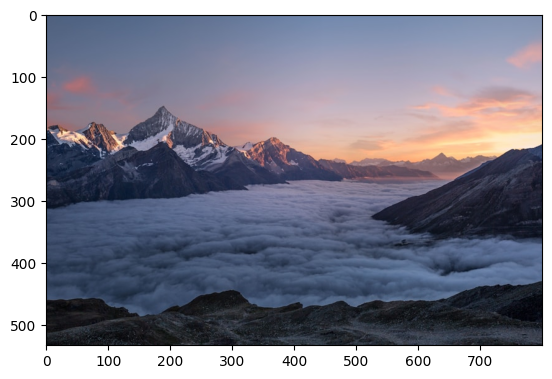
Q: What is the dominant color in this image?
A: The dominant color in this image is a **cool blue-grey**.

While there are beautiful warm orange and pink hues from the sunrise/sunset on the right and on some mountain peaks, the vast majority of the image is covered by the pale blue-grey sea of clouds in the valley and the cooler blue-purple tones of the sky, especially on the left side. The dark mountains also have a significant blue-grey cast.

Q: Describe the scenery
A: This image captures a breathtaking alpine landscape at either dawn or dusk, characterized by a stunning inversion layer.

In the foreground, the immediate terrain consists of dark, rugged, rocky ground, suggesting a high vantage point overlooking a vast valley. This dark, textured ground contrasts sharply with the brightness beyond.

Dominating the midground is an expansive, undulating sea of low-lying clouds. These clouds fill the valley below, resembling a soft, fluffy blanket of cotton or a tranquil, misty ocean. Their surface reflects the ambient light, appearing a luminous white and soft grey, with deeper shadows hinting at their depth and movement.

Above this cloud sea, a magnificent range of snow-capped mountains rises majestically. The prominent peaks, especially the central one, are rugged and jagged, still holding substantial snow and ice. These elevated summits are bathed in the warm, rosy glow of the rising or setting sun, with their snow and rock faces illuminated in hues of gold, pink, and orange. The shadowed sides of the mountains retain cooler tones of deep grey and blue, providing a dramatic contrast.

The sky above transitions gracefully from a clear, pale blue at its zenith to a vibrant canvas of soft purples, pinks, and oranges closer to the horizon, indicative of the golden hour. A few wispy clouds are scattered across the colorful horizon, catching the last (or first) rays of sunlight.

The overall impression is one of immense scale, serene beauty, and dramatic light. The scene evokes a sense of solitude and awe, placing the viewer high above the mundane world, looking out over a landscape transformed by light and cloud.

Q: What time of day does it appear to be?
A: It appears to be **sunrise**.

Here's why:
*   **Warm, low-angle light:** The mountain peaks are bathed in a beautiful, warm, golden light, indicating that the sun is low on the horizon.
*   **Sky colors:** The sky transitions from a soft blue/purple overhead to vibrant oranges, pinks, and yellows near the horizon, a classic characteristic of either sunrise or sunset.
*   **Cloud inversion:** The valley is filled with a sea of clouds (a cloud inversion), which frequently forms overnight in cool valleys and begins to burn off or dissipate as the sun rises and warms the air.
*   **Freshness of light:** There's a particular crispness to the light that often accompanies the early morning, as the world is just waking up and the sun's rays are just beginning to illuminate the highest points.

Q: What mood does this image convey?
A: This image conveys a mood of **profound serenity and majestic grandeur**.

The scene, likely captured at sunrise or sunset, features **snow-capped mountains rising above a vast, tranquil 'sea' of clouds** that fills the valley below. The soft, warm hues of the sky and the light catching the peaks create an **ethereal and dreamlike** atmosphere.

Overall, it evokes feelings of:
*   **Awe and wonder** at the beauty and scale of nature.
*   **Peace and tranquility** due to the still clouds and soft lighting.
*   **Inspiration and quiet contemplation**, suggesting a place of solitude and reflection far above the world.

print("\n" + "="*80)
print("Chart Analysis")
print("="*80)

# Create a complex chart
fig, (ax1, ax2) = plt.subplots(1, 2, figsize=(14, 6))

# Bar chart
months = ['Jan', 'Feb', 'Mar', 'Apr', 'May', 'Jun']
sales = [45000, 52000, 48000, 61000, 58000, 72000]
ax1.bar(months, sales, color='steelblue')
ax1.set_title('Monthly Sales 2024', fontsize=14, fontweight='bold')
ax1.set_ylabel('Sales ($)')
ax1.grid(axis='y', alpha=0.3)

# Line chart
days = list(range(1, 31))
visitors = [100 + 50*np.sin(x/5) + np.random.randint(-10, 10) for x in days]
ax2.plot(days, visitors, marker='o', linewidth=2, markersize=4)
ax2.set_title('Daily Website Visitors', fontsize=14, fontweight='bold')
ax2.set_xlabel('Day of Month')
ax2.set_ylabel('Visitors')
ax2.grid(alpha=0.3)

plt.tight_layout()
plt.savefig('/tmp/charts.png', dpi=150)

================================================================================
Chart Analysis
================================================================================
plt.close()

chart_image = Image.open('/tmp/charts.png')

prompt = """Analyze these charts:
1. What trends do you see in the sales data?
2. Which month had the highest sales?
3. What pattern is visible in the website visitors chart?
4. Any notable insights?"""

response = client.models.generate_content(
    model="gemini-2.0-flash-thinking-exp-1219",
    contents=[prompt, chart_image])
print(response.text)
Here's an analysis of the provided charts:

### 1. What trends do you see in the sales data?

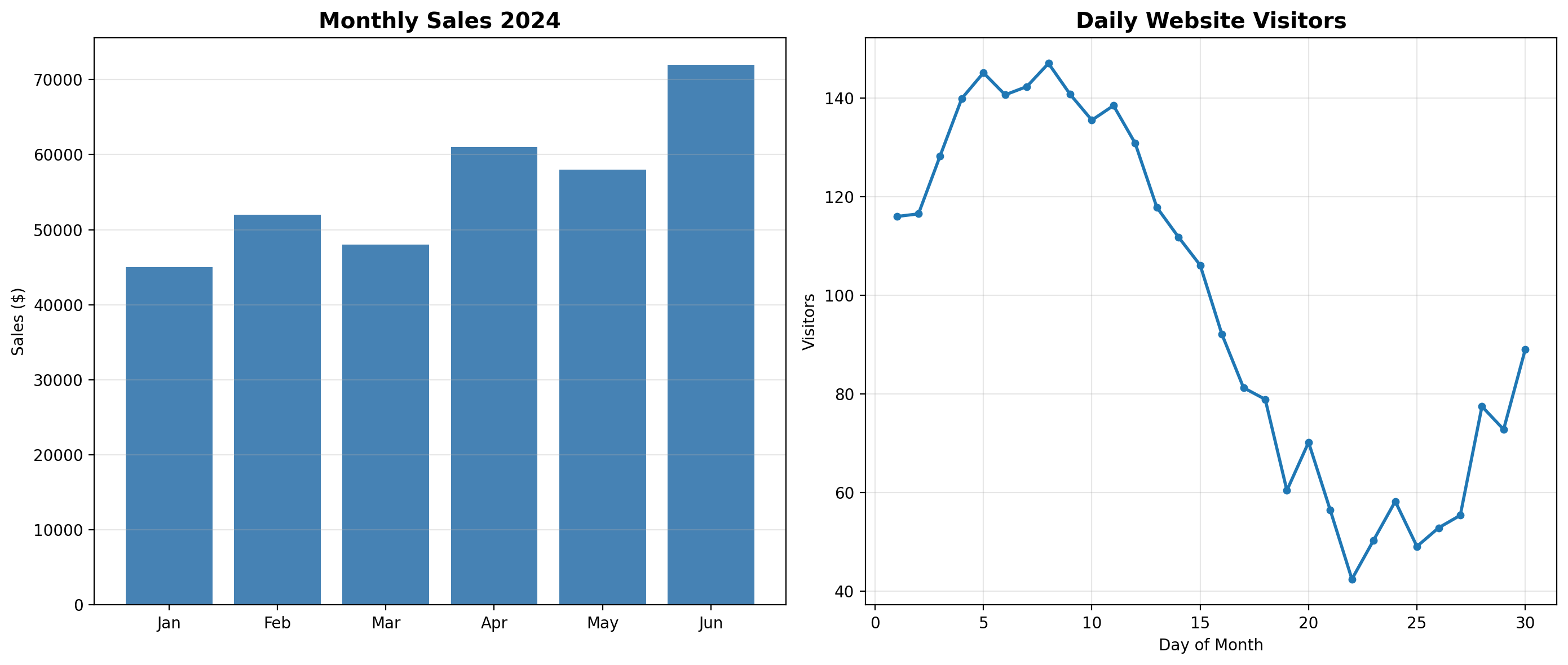
The monthly sales data for 2024 shows an overall upward trend from January to June, with some fluctuations:
*   Sales started around $45,000 in January.
*   They increased to approximately $52,000 in February.
*   There was a slight dip in March to about $48,000.
*   Sales then surged significantly in April, reaching around $61,000.
*   A minor decrease occurred in May, bringing sales to about $58,000.
*   Finally, June saw the highest sales figure, climbing to approximately $72,000.

In summary, the trend is generally positive, indicating growth over the first six months of 2024, with June being the strongest month by a considerable margin.

### 2. Which month had the highest sales?

**June** had the highest sales, reaching approximately $72,000.

### 3. What pattern is visible in the website visitors chart?

The daily website visitors chart shows a distinct "peak and trough" pattern within the month:
*   Visitors start strong at the beginning of the month (around 110-115 on Day 1).
*   They rapidly increase and peak around Day 8-9, reaching approximately 150 visitors.
*   Following this peak, there's a relatively sharp and sustained decline through the middle of the month.
*   The number of visitors hits its lowest point around Day 23-24, dropping significantly to about 40-42 visitors.
*   Towards the end of the month, there's a moderate recovery, with visitors climbing back to around 80 by Day 30.

This pattern suggests a strong initial engagement in the first week, followed by a substantial drop-off mid-month, and then a partial recovery.

### 4. Any notable insights?

*   **Positive Sales Momentum:** Despite some monthly fluctuations, the overall sales performance is robust, with a clear growth trajectory in the first half of 2024, culminating in an impressive June. This suggests effective sales strategies or increasing market demand.
*   **Volatile Website Traffic:** The daily website visitor data reveals significant volatility. The dramatic drop in visitors from the peak (Day 8-9) to the trough (Day 23-24) is substantial (over a 70% decrease). This might indicate cyclical behavior (e.g., strong weekday traffic, weekend dips, or specific campaign timing), or it could point to issues like expiring marketing campaigns, technical problems, or a lack of fresh content mid-month.
*   **Disconnection/Other Channels:** While website visitors fluctuate wildly within a month, the overall monthly sales are consistently growing. This could imply a few things:
    *   The website visitors shown might not be the primary driver of sales, or conversion rates are extremely high during peak visitor periods.
    *   Sales are heavily supported by other channels (offline, direct, recurring customers) not reflected in the daily website visitor chart.
    *   The "Daily Website Visitors" chart might represent a single, specific month where traffic was unusual, and not necessarily reflective of the visitor patterns for the months shown in the sales chart.
*   **Areas for Investigation:**
    *   **Sales:** Understanding the reasons for the dips in March and May could help stabilize and further boost sales. Identifying what drove the significant growth in April and June is crucial for replication.
    *   **Website Visitors:** The sharp decline in visitors mid-month needs investigation. Is this a recurring pattern? What external factors or internal strategies could be causing this? Can the strategies that drive the early-month peak be sustained or replicated to mitigate the mid-month slump? Increasing and stabilizing website traffic could potentially lead to even higher sales.

Document OCR and Understanding

print("\n" + "="*80)
print("Document OCR + Understanding")
print("="*80)

# Create a sample receipt
img = Image.new('RGB', (600, 800), color='white')
draw = ImageDraw.Draw(img)

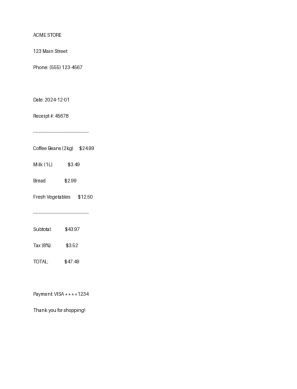
receipt_lines = [
    "ACME STORE",
    "123 Main Street",
    "Phone: (555) 123-4567",
    "",
    "Date: 2024-12-01",
    "Receipt #: 45678",
    "-" * 40,
    "Coffee Beans (2kg)      $24.99",
    "Milk (1L)                $3.49",
    "Bread                    $2.99",
    "Fresh Vegetables        $12.50",
    "-" * 40,
    "Subtotal:              $43.97",
    "Tax (8%):               $3.52",
    "TOTAL:                 $47.49",
    "",
    "Payment: VISA ****1234",
    "Thank you for shopping!"
]

y = 50
for line in receipt_lines:
    draw.text((50, y), line, fill='black')
    y += 35

img.save('/tmp/receipt.png')
receipt_img = Image.open('/tmp/receipt.png')
plt.imshow(receipt_img)
plt.axis('off')

================================================================================
Document OCR + Understanding
================================================================================
prompt = """Extract information from this receipt:
1. Store name and address
2. Date and receipt number
3. List of items purchased with prices
4. Total amount
5. Payment method

Format as structured JSON."""

response = client.models.generate_content(
    model="gemini-2.0-flash-thinking-exp-1219",
    contents=[prompt, receipt_img])
print(response.text)
```json
{
  "store_info": {
    "name": "ACME STORE",
    "address": "123 Main Street"
  },
  "transaction_info": {
    "date": "2024-12-01",
    "receipt_number": "45678"
  },
  "items": [
    {
      "name": "Coffee Beans (2kg)",
      "price": 24.99
    },
    {
      "name": "Milk (1L)",
      "price": 3.49
    },
    {
      "name": "Bread",
      "price": 2.99
    },
    {
      "name": "Fresh Vegetables",
      "price": 12.50
    }
  ],
  "summary": {
    "subtotal": 43.97,
    "tax_percentage": "8%",
    "tax_amount": 3.52,
    "total": 47.49
  },
  "payment_info": {
    "method": "VISA",
    "last_four_digits": "1234"
  }
}
```

Image Captioning

print("\n" + "="*80)
print("Image Captioning (Multiple Styles)")
print("="*80)

try:
    image_url = "https://images.unsplash.com/photo-1506905925346-21bda4d32df4?w=800"
    image = load_image_from_url(image_url)
    # Show image
    plt.imshow(image)
    plt.axis('off')
    
    
    caption_styles = [
        "Write a short caption (1 sentence)",
        "Write an Instagram caption with hashtags",
    ]

    for style in caption_styles:
        response = client.models.generate_content(
            model="gemini-2.0-flash-thinking-exp-1219",
            contents=[style, image]
        )
        print(f"{style}:")
        print(f"  {response.text.strip()}\n")

except Exception as e:
    print(f"Using local image. Error: {str(e)[:100]}")

================================================================================
Image Captioning (Multiple Styles)
================================================================================
Write a short caption (1 sentence):
  Majestic mountains rise above a vast sea of clouds, bathed in the golden light of sunrise.

Write an Instagram caption with hashtags:
  Here are a few options for an Instagram caption, ranging in tone:

**Option 1 (Evocative & Dreamy):**

Floating above the world on a sea of clouds. ✨ There's nothing quite like watching snow-capped peaks pierce through a golden hour glow, reminding you of the breathtaking magic our planet holds. Absolutely spellbinding.

#MountainViews #CloudInversion #GoldenHour #SunriseOrSunset #AlpineAdventures #NaturePhotography #BreathtakingViews #Wanderlust #AboveTheClouds #DreamyLandscape #EarthFocus #TravelGram

**Option 2 (Short & Sweet):**

When the sky meets the mountains, and the clouds fill the valley. Pure magic at golden hour! 🏔️☁️🧡

#Mountains #SeaOfClouds #SunsetVibes #SunriseMagic #NatureLover #EpicViews #HighAltitude #ExploreMore #LandscapePhotography

**Option 3 (Reflective):**

This view truly puts things into perspective. A blanket of clouds below, majestic peaks reaching for the pastel sky, and the quiet serenity of dawn or dusk. Grateful for moments like these that remind us to look up.

#Mountainscape #Cloudscape #PeacefulMoments #NatureHeals #Perspective #TravelInspiration #AdventureTime #PhotographyLovers #BeautifulDestinations #InstaNature

**Choose the one that best fits your personal style!**

print("\n" + "="*80)
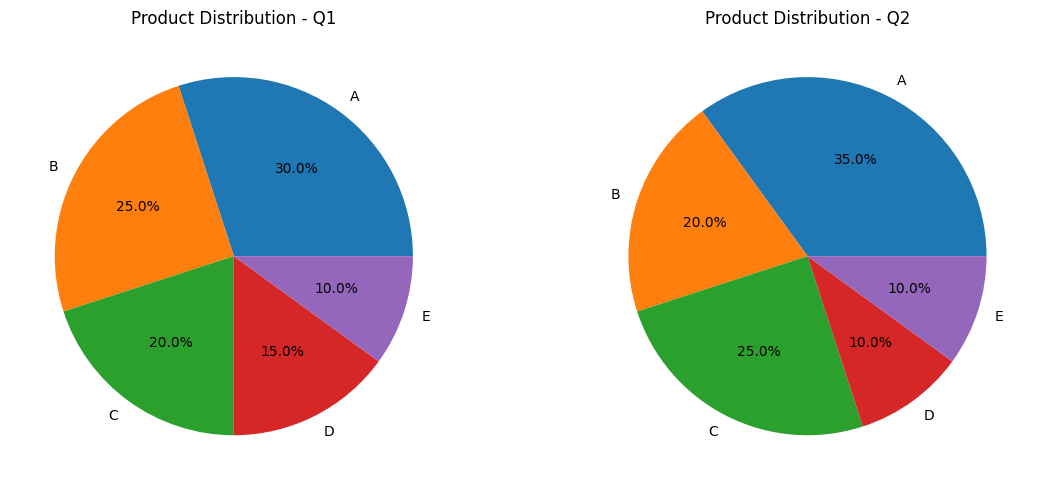
print("Multi-Image Comparison")
print("="*80)

# Create two different chart images
fig, axes = plt.subplots(1, 2, figsize=(12, 5))

# Image 1: Pie chart
sizes = [30, 25, 20, 15, 10]
labels = ['A', 'B', 'C', 'D', 'E']
axes[0].pie(sizes, labels=labels, autopct='%1.1f%%')
axes[0].set_title('Product Distribution - Q1')

# Image 2: Pie chart with different values
sizes2 = [35, 20, 25, 10, 10]
axes[1].pie(sizes2, labels=labels, autopct='%1.1f%%')
axes[1].set_title('Product Distribution - Q2')

plt.tight_layout()
plt.savefig('/tmp/comparison.png', dpi=150)

================================================================================
Multi-Image Comparison
================================================================================

plt.close()

comp_image = Image.open('/tmp/comparison.png')

prompt = """Compare these two pie charts:
1. What are the main differences?
2. Which products increased/decreased?
3. What insights can you derive?"""

response = client.models.generate_content(
    model="gemini-2.0-flash-thinking-exp-1219",
    contents=[prompt, comp_image])
print(response.text)
Here's a comparison of the two pie charts:

**1. What are the main differences?**

The main differences lie in the shifts of percentage distribution among products A, B, C, and D from Q1 to Q2, while product E remained stable.

*   **Product A** significantly increased its share, solidifying its position as the leading product.
*   **Product B** decreased its share, dropping from the second-largest product to the third.
*   **Product C** increased its share, moving up to become the second-largest product.
*   **Product D** saw a decrease in its share.
*   **Product E** maintained the exact same share in both quarters.

**2. Which products increased/decreased?**

*   **Increased:**
    *   **Product A:** Increased from 30.0% to 35.0% (an increase of 5.0 percentage points).
    *   **Product C:** Increased from 20.0% to 25.0% (an increase of 5.0 percentage points).

*   **Decreased:**
    *   **Product B:** Decreased from 25.0% to 20.0% (a decrease of 5.0 percentage points).
    *   **Product D:** Decreased from 15.0% to 10.0% (a decrease of 5.0 percentage points).

*   **Remained Stable:**
    *   **Product E:** Stayed at 10.0% in both quarters.

**3. What insights can you derive?**

1.  **Shifting Market Leadership and Competition:** Product A is strengthening its dominant position, while Product C is emerging as a stronger contender, effectively taking market share from Product B. The increases for A and C are directly offset by the decreases for B and D, suggesting a reallocation of customer preference or strategic focus within the existing market.
2.  **Product A's Strong Performance:** Product A is performing exceptionally well, gaining the most market share. This indicates either successful marketing, increased demand, superior product features, or issues with competing products. It is now the clear market leader.
3.  **Product C's Growth:** Product C has shown significant growth, moving into the second position. This product might be gaining popularity, benefiting from new initiatives, or capturing customers from declining competitors like Product B and D.
4.  **Challenges for Products B and D:** Products B and D are losing ground. This warrants investigation into their performance, customer satisfaction, competitive threats, or potential internal issues (e.g., supply chain, marketing, quality). Product D's share has dropped to match Product E, putting it at the bottom alongside E.
5.  **Product E's Stability:** Product E maintains a consistent 10% share. This could indicate a stable niche market, consistent baseline demand, or perhaps a product that is not heavily impacted by the market dynamics affecting A, B, C, and D. It's a reliable, though not growing, contributor.
6.  **Zero-Sum Game (in terms of distribution):** Since these are percentage distributions, the gains of 10% (5% for A + 5% for C) are exactly balanced by the losses of 10% (5% for B + 5% for D). This implies that customers are shifting between the existing products rather than a significant change in the overall product mix or total volume (though we cannot infer total volume from these charts alone).

Visual Reasoning

print("\n" + "="*80)
print("Visual Pattern Reasoning")
print("="*80)

# Create a visual pattern puzzle
fig, axes = plt.subplots(1, 4, figsize=(12, 3))

patterns = [
    {'shape': 'circle', 'color': 'red', 'size': 0.3},
    {'shape': 'square', 'color': 'blue', 'size': 0.4},
    {'shape': 'circle', 'color': 'red', 'size': 0.5},
    None  # To be predicted
]

for i, (ax, pattern) in enumerate(zip(axes, patterns)):
    ax.set_xlim(0, 1)
    ax.set_ylim(0, 1)
    ax.axis('off')
    
    if pattern:
        if pattern['shape'] == 'circle':
            circle = plt.Circle((0.5, 0.5), pattern['size'], color=pattern['color'])
            ax.add_patch(circle)
        else:
            square = Rectangle(
                (0.5-pattern['size'], 0.5-pattern['size']),
                2*pattern['size'], 2*pattern['size'],
                color=pattern['color']
            )
            ax.add_patch(square)
    else:
        ax.text(0.5, 0.5, '?', fontsize=60, ha='center', va='center')
    
    ax.set_title(f'Position {i+1}')

plt.tight_layout()
plt.savefig('/tmp/pattern.png', dpi=150)

================================================================================
Visual Pattern Reasoning
================================================================================

video_path = '14801276_2160_3840_30fps.mp4'
from IPython.display import Video
Video(video_path, embed=True)
print("\n" + "="*80)
print("Video Understanding")
print("="*80)

import time

# Upload video file (using available video)
video_path = '14801276_2160_3840_30fps.mp4'
print(f"Uploading video: {video_path}")

video_file = client.files.upload(file=video_path)
print(f"Video uploaded: {video_file.name}")

# Wait for processing
print("Processing video...")
while video_file.state == 'PROCESSING':
    time.sleep(2)
    video_file = client.files.get(name=video_file.name)
print(".", end="", flush=True)
print(f"\nVideo ready! State: {video_file.state}")

# Analyze video
prompt = 'Describe what happens in this video. What do you see?'
print(f"\nQuery: {prompt}\n")

response = client.models.generate_content(
    model="gemini-2.0-flash-thinking-exp-1219",
    contents=[prompt, video_file]
)
print(f"Response:\n{response.text}")

================================================================================
Video Understanding
================================================================================
Uploading video: 14801276_2160_3840_30fps.mp4
Video uploaded: files/0p35fqgrwleq
Processing video...
.
Video ready! State: FileState.ACTIVE

Query: Describe what happens in this video. What do you see?

Response:
The video shows an elderly man walking slowly away from the camera down a cobblestone path. He is wearing a grey jacket, dark trousers, and a dark baseball cap, and uses a wooden walking stick for support in his right hand.

To his right, on a grassy verge next to a narrow concrete sidewalk, several chickens are seen foraging. There are mostly dark (black) chickens, including a prominent rooster with a red comb, and one lighter-colored chicken. They peck at the ground, moving subtly as the man walks past them.

In the background, a large, light-colored stone building with a rounded roof or dome and an arched entrance dominates the scene, suggesting an ancient or historic structure. To the right of this building, a grey pole stands with a red circular "DUR" sign (which means "STOP" in Turkish) and a white information board. A brown wooden signpost with unreadable text is also visible.

Trees with some green leaves line the left side of the path, and fallen leaves are scattered on the cobblestones, suggesting autumn. The man continues to walk steadily throughout the short video, gradually moving further into the frame and past the chickens.

Diagram Understanding

print("\n" + "="*80)
print("Frame-by-Frame Video Analysis")
print("="*80)

# Reuse the uploaded video file from previous cell
# If running standalone, uncomment the upload code

queries = [
    "What are the main objects or subjects in this video?",
    "Describe any movements or actions you observe",
    "What is the setting or environment shown?"
]

for i, query in enumerate(queries, 1):
    print(f"\n{i}. Query: {query}")

    response = client.models.generate_content(
        model="gemini-2.0-flash-thinking-exp-1219",
        contents=[query, video_file]
    )
print(f"   Answer: {response.text}\n")

================================================================================
Frame-by-Frame Video Analysis
================================================================================

1. Query: What are the main objects or subjects in this video?

2. Query: Describe any movements or actions you observe

3. Query: What is the setting or environment shown?
   Answer: The setting shown is an outdoor, possibly historic or semi-rural area, characterized by:

*   **Cobblestone Path:** An old, uneven cobblestone path or street is visible in the foreground, with scattered fallen leaves.
*   **Historic Stone Building:** A large, light-colored stone building with a rounded or dome-like top and an arched entryway stands prominently in the background. Its architecture suggests it could be ancient, a mausoleum, or a part of a historical complex.
*   **Greenery:** There are trees with some autumnal foliage on the left, and sparse grass and dirt along a curb to the right of the path.
*   **Animals:** Several chickens, including a rooster, are foraging on the grassy verge to the right.
*   **Signs and Infrastructure:** A red "DUR" (Stop) sign (Turkish for "Stop") is visible next to a metal pole with a security camera. There's also a brown informational signpost.
*   **Fencing:** Parts of green metal fencing are visible on both sides of the scene.

Overall, it presents a blend of old-world charm (cobblestones, historic building, free-roaming chickens) with some modern elements (security camera, signs).
print("\n" + "="*80)
print("Action Recognition in Videos")
print("="*80)

# Analyze specific actions in the video
action_queries = [
    "List all distinct visual elements or objects in chronological order as they appear",
    "Are there any movements or transitions in this video?",
    "Describe the overall composition and visual style"
]

for query in action_queries:
    print(f"\nQuery: {query}")

    response = client.models.generate_content(
        model="gemini-2.0-flash-thinking-exp-1219",
        contents=[query, video_file]
    )
    print(f"Answer: {response.text}\n")
    print("-" * 80)

================================================================================
Action Recognition in Videos
================================================================================

Query: List all distinct visual elements or objects in chronological order as they appear
Answer: Here are the distinct visual elements or objects in chronological order as they appear, noting that most elements are visible from the very beginning of the video:

1.  **Old man:** Walking away from the camera, wearing a cap, grey jacket, and black trousers. (00:00)
2.  **Wooden walking stick:** Held by the old man. (00:00)
3.  **Cobblestone path:** The ground surface where the man is walking. (00:00)
4.  **Concrete curb:** Separating the cobblestone path from the grassy area on the right. (00:00)
5.  **Grass and dirt patch:** Along the right side of the path. (00:00)
6.  **Three chickens:** Two predominantly black, and one black and white, foraging on the grass/dirt patch. (00:00)
7.  **Green metal fence:** Partially visible on the far right. (00:00)
8.  **Brown signpost:** With text, located in the mid-ground. (00:00)
9.  **Red "DUR" (STOP) sign:** A circular sign attached to a tall metal pole. (00:00)
10. **Tall metal pole:** Holding the stop sign and what appears to be a security camera. (00:00)
11. **Security camera:** Mounted on top of the tall metal pole. (00:00)
12. **Large, light-colored stone building:** With a rounded or domed top, in the background. (00:00)
13. **Green trees/foliage:** In the upper left background. (00:00)

--------------------------------------------------------------------------------

Query: Are there any movements or transitions in this video?
Answer: Yes, there are several movements in this video, but no transitions between different shots.

**Movements:**

1.  **Human Movement:** An elderly man is walking away from the camera, moving from the foreground towards the background, using a cane.
2.  **Animal Movement:** Several chickens are moving around on the right side of the frame, pecking at the ground and shifting their positions.

**Transitions:**

*   There are **no cuts or transitions** between different shots; this is a single continuous video clip. The camera remains static throughout the recording.

--------------------------------------------------------------------------------

Query: Describe the overall composition and visual style
Answer: The video presents a serene and contemplative scene, shot with a static camera that creates a sense of observation and stillness.

**Overall Composition:**
*   **Focal Point:** The primary focal point is an elderly man, seen from behind, walking slowly away from the camera down a cobblestone path. He is positioned slightly left of center, holding a wooden cane that extends diagonally towards the lower left corner, subtly guiding the viewer's eye.
*   **Depth and Layers:** The composition expertly uses depth.
    *   **Foreground:** The textured cobblestone path dominates the bottom half of the frame, covered with scattered dry leaves, adding an earthy, rustic feel.
    *   **Midground:** The man occupies the central midground. To his right, a curb separates the path from a patch of dry grass and dirt where a small flock of chickens (mostly black, one white/grey) forage, adding a touch of natural life and movement. A "DUR" (Stop) sign and an informational plaque on poles are also visible in this layer.
    *   **Background:** A large, imposing, light-colored stone building with a rounded roof and an arched entrance dominates the background, grounding the scene with a sense of history and permanence. To the far left, a lush green tree branch provides a natural counterpoint to the architecture.
*   **Balance:** The shot feels well-balanced despite the man being off-center, with the chickens and signs providing visual weight on the right, and the large building and tree branch providing a solid backdrop. The vertical aspect ratio (portrait orientation) emphasizes the height of the building and the length of the path.
*   **Leading Lines:** The cobblestone path and the curb on the right subtly act as leading lines, drawing the eye towards the distant background.

**Visual Style:**
*   **Color Palette:** The visual style leans towards a muted, natural, and earthy color palette. Dominant tones include the warm beige/tan of the stone building, the cool grey of the man's jacket, the various browns and greys of the cobblestones and dirt, and the dull greens of the sparse foliage. A bright red "DUR" sign provides a small, vibrant pop of color. The chickens are predominantly dark, blending into the subdued environment.
*   **Lighting:** The lighting appears soft and diffused, likely from an overcast day or indirect sunlight. There are no harsh shadows, contributing to a gentle and quiet atmosphere. This soft light enhances the textures of the cobblestones and the stone building.
*   **Mood and Atmosphere:** The overall mood is quiet, contemplative, and perhaps a touch nostalgic or solitary. The slow pace of the man, the foraging chickens, and the ancient-looking architecture evoke a sense of timelessness and peaceful everyday life.
*   **Texture:** The video is rich in texture, from the individual stones of the cobblestone path to the rough-hewn blocks of the building and the scattered dry leaves. These textures contribute significantly to the visual interest and realism of the scene.
*   **Camera Work:** The static, steady camera work reinforces the observational quality, allowing the viewer to absorb the details and the quiet ambiance without distraction.

In summary, the video offers a beautifully composed and textured slice of life, using a muted color palette and soft lighting to create a calm and reflective visual experience centered around an elderly figure navigating a historic, natural environment.

--------------------------------------------------------------------------------
from IPython.display import Audio

audio_path = "sample-audio.mp3"
Audio(audio_path, embed=True)
print("\n" + "="*80)
print("Audio Transcription")
print("="*80)

import time


audio_file = client.files.upload(file=audio_path)
print(f"Audio uploaded: {audio_file.name}")

# Wait for processing
print("Processing audio...")
while audio_file.state == 'PROCESSING':
    time.sleep(1)
    audio_file = client.files.get(name=audio_file.name)
print(".", end="", flush=True)
print(f"\nAudio ready! State: {audio_file.state}")

# Transcribe
print("\nTranscription:\n")
response = client.models.generate_content(
    model="gemini-2.0-flash-thinking-exp-1219",
    contents=[
        'Transcribe this audio exactly as spoken. Include any speech, sounds, or notable audio features.',
        audio_file
    ]
)
print(response.text)

================================================================================
Audio Transcription
================================================================================
Audio uploaded: files/k8kuvxnv5o6n
Processing audio...
.
Audio ready! State: FileState.ACTIVE

Transcription:

Gemini is Google's latest multimodal AI model, built to understand and generate text, images, audio, and code in a unified way. Unlike earlier systems that stitch together separate models, Gemini works natively across modalities. This gives it stronger reasoning, smoother context integration, and more accurate real-world grounding.
[tone sound]

Frame-by-Frame Analysis

print("\n" + "="*80)
print("Audio Content Analysis")
print("="*80)

# Analyze audio content beyond transcription
analysis_prompts = [
    "What type of audio is this? (speech, music, ambient, etc.)",
    "Describe the audio quality and any notable characteristics",
    "What is the overall tone or mood of this audio?"
]

for prompt in analysis_prompts:
    print(f"\nAnalysis: {prompt}")

    response = client.models.generate_content(
        model="gemini-2.0-flash-thinking-exp-1219",
        contents=[prompt, audio_file]
    )
    print(f"Result: {response.text}\n")
    print("-" * 80)

================================================================================
Audio Content Analysis
================================================================================

Analysis: What type of audio is this? (speech, music, ambient, etc.)
Result: This audio is primarily **speech**.

There is a male voice speaking throughout most of the clip. At the very end, around 0:21, a distinct, high-pitched **alarm or tone** begins.

--------------------------------------------------------------------------------

Analysis: Describe the audio quality and any notable characteristics
Result: The audio quality is generally **very good to excellent**, characterized by a professional and clear recording.

Here are the notable characteristics:

*   **Clarity and Intelligibility:** The male speaker's voice is exceptionally clear, articulate, and easily understandable. Every word is distinct, with no mumbling or slurring.
*   **Professional Delivery:** The speaker maintains an even, moderate pace and a professional, informative tone, suitable for narration or presentation.
*   **Low Background Noise:** During the spoken content, there is virtually no discernible background noise, echo, or distortion, indicating a clean recording environment and good microphone quality.
*   **Consistent Volume:** The speaker's volume is consistent throughout the clip, making it easy to listen to.
*   **Electronic Hum/Whine:** The most notable characteristic that slightly detracts from the otherwise pristine quality is a distinct, high-pitched **electronic hum or whine** that becomes audible in the final second of the clip (starting around 0:21). It's brief but noticeable.

In summary, it's a high-quality vocal recording, marred only by the brief electronic noise at its conclusion.

--------------------------------------------------------------------------------

Analysis: What is the overall tone or mood of this audio?
Result: The overall tone of the audio is **informative, clear, and professional**.

The speaker's voice is articulate, calm, and steady, delivering technical information in a straightforward and objective manner, without any strong emotional inflection or urgency. It sounds like a presentation or an explanatory narration.

--------------------------------------------------------------------------------
print("\n" + "="*80)
print("PDF Document Understanding")
print("="*80)

import time

# Upload PDF (using available PDF file)
pdf_path = 'batra_nilmtk.pdf'
print(f"Uploading PDF: {pdf_path}")

pdf_file = client.files.upload(path=pdf_path)
print(f"PDF uploaded: {pdf_file.name}")

# Wait for processing
print("Processing PDF...")
while pdf_file.state == 'PROCESSING':
    time.sleep(2)
    pdf_file = client.files.get(name=pdf_file.name)
print(".", end="", flush=True)
print(f"\nPDF ready! State: {pdf_file.state}")

# Analyze document
prompts = [
    "What type of document is this? Provide a brief overview.",
    "What are the main sections or topics covered?",
    "Summarize the key points in 3-4 sentences."
]

for prompt in prompts:
    print(f"\nQuery: {prompt}")

    response = client.models.generate_content(
        model="gemini-2.0-flash-thinking-exp-1219",
        contents=[prompt, pdf_file]
    )
print(f"Answer: {response.text}\n")
print("-" * 80)

================================================================================
PDF Document Understanding
================================================================================
Uploading PDF: batra_nilmtk.pdf
---------------------------------------------------------------------------
TypeError                                 Traceback (most recent call last)
Cell In[51], line 11
      8 pdf_path = 'batra_nilmtk.pdf'
      9 print(f"Uploading PDF: {pdf_path}")
---> 11 pdf_file = client.files.upload(path=pdf_path)
     12 print(f"PDF uploaded: {pdf_file.name}")
     14 # Wait for processing

TypeError: Files.upload() got an unexpected keyword argument 'path'
print("\n" + "="*80)
print("PDF Document Understanding")
print("="*80)

import time

# Upload PDF (using available PDF file)
pdf_path = 'batra_nilmtk.pdf'
print(f"Uploading PDF: {pdf_path}")

pdf_file = client.files.upload(file=pdf_path)
print(f"PDF uploaded: {pdf_file.name}")

# Wait for processing
print("Processing PDF...")
while pdf_file.state == 'PROCESSING':
    time.sleep(2)
    pdf_file = client.files.get(name=pdf_file.name)
    print(".", end="", flush=True)

print(f"\nPDF ready! State: {pdf_file.state}")

# Analyze document
prompts = [
    "What type of document is this? Provide a brief overview.",
    "What are the main sections or topics covered?",
    "Summarize the key points in 3-4 sentences."
]

for prompt in prompts:
    print(f"\nQuery: {prompt}")

    response = client.models.generate_content(
        model="gemini-2.0-flash-thinking-exp-1219",
        contents=[prompt, pdf_file]
    )
    print(f"Answer: {response.text}\n")
    print("-" * 80)

================================================================================
PDF Document Understanding
================================================================================
Uploading PDF: batra_nilmtk.pdf
PDF uploaded: files/z185nj0b6092
Processing PDF...

PDF ready! State: FileState.ACTIVE

Query: What type of document is this? Provide a brief overview.
Answer: This document is a **conference paper** presented at an academic event.

**Brief Overview:**

The paper introduces **NILMTK**, an open-source toolkit designed to facilitate the reproducible comparison of Non-Intrusive Load Monitoring (NILM), or energy disaggregation, algorithms. It addresses key challenges in the NILM field, such as the diversity of datasets, lack of standardized algorithm implementations, and varying evaluation metrics, which currently make direct comparison of approaches difficult. NILMTK provides parsers for various public datasets, a suite of preprocessing and statistical analysis functions, implementations of benchmark disaggregation algorithms (like Combinatorial Optimisation and Factorial Hidden Markov Models), and a collection of accuracy metrics. The toolkit aims to lower the barrier for researchers to develop, test, and compare NILM techniques in a standardized and collaborative manner.

--------------------------------------------------------------------------------

Query: What are the main sections or topics covered?
Answer: The main sections and topics covered in the paper "NILMTK: An Open Source Toolkit for Non-intrusive Load Monitoring" are as follows:

1.  **Introduction:**
    *   Defines Non-intrusive Load Monitoring (NILM) or energy disaggregation.
    *   Outlines the motivations and benefits of NILM.
    *   Identifies the core obstacles preventing direct comparison of state-of-the-art NILM approaches (different datasets, lack of reference implementations, varied accuracy metrics).
    *   Introduces NILMTK as the proposed solution to enable reproducible comparison.

2.  **Background:**
    *   **Public Data Sets:** A review and comparison of existing publicly available NILM datasets (REDD, BLUED, Smart*, Pecan Street, HES, AMPds, iAWE, UK-DALE), highlighting their diverse formats.
    *   **Disaggregation Algorithms & Benchmarks:** Discussion of various existing disaggregation algorithms and the problem of inconsistent benchmarking across publications.
    *   **Evaluation Metrics:** Overview of different accuracy metrics used in NILM research and the need for common metrics.
    *   **General Purpose Toolkits:** Contextualizes NILMTK among general machine learning toolkits (like scikit-learn).
    *   **Energy Disaggregation Definition:** Formal definition of the NILM problem.

3.  **NILMTK Toolkit Components:** This section details the architecture and features of NILMTK.
    *   **Data Format (NILMTK-DF):** Introduction of a standard data structure for NILM data, including parsers for multiple existing datasets, metadata storage, and standardization of nomenclature.
    *   **Data Set Diagnostics:** Functions for identifying common data quality issues like gaps, dropout rates, and uptime.
    *   **Data Set Statistics:** Functions for analyzing appliance usage patterns and energy contributions.
    *   **Preprocessing of Data Sets:** Algorithms for cleaning and preparing data, such as downsampling, voltage normalization, and filtering.
    *   **Training and Disaggregation Algorithms:** Implementations of two benchmark algorithms:
        *   **Combinatorial Optimisation (CO)**
        *   **Factorial Hidden Markov Model (FHMM)**
    *   **Appliance Model Import and Export:** Functionality to save and load trained appliance models.
    *   **Accuracy Metrics:** A comprehensive suite of metrics for evaluating disaggregation performance, including error in total energy, normalized error, RMS error, confusion matrix, true/false positive/negative rates, precision, recall, F-score, and Hamming loss.

4.  **Evaluation:** Demonstrates how NILMTK is used for empirical analysis.
    *   **Data Set Diagnostics & Statistics:** Application of NILMTK's diagnostic and statistical functions to analyze various public datasets, showing data quality issues, appliance power demands, usage patterns, and correlations with external factors (e.g., weather).
    *   **Voltage Normalisation:** Demonstrating the effect of voltage normalization on power consumption data.
    *   **Disaggregation Across Data Sets:** Comparison of the performance of the benchmark CO and FHMM algorithms across multiple public datasets using the defined accuracy metrics.
    *   **Detailed Disaggregation Results:** In-depth analysis of algorithm performance for specific appliances within a single household.

5.  **Conclusions and Future Work:**
    *   Summarizes NILMTK's contributions.
    *   Outlines directions for future development, such as adding new algorithms, larger datasets, and incorporating a semantic wiki or household simulator.

6.  **Appendices:**
    *   Sample code for the NILMTK pipeline.
    *   Detailed hierarchical structure of NILMTK-DF.
    *   Examples of queries supported by NILMTK.
    *   Tables summarizing all statistical, diagnostic, and preprocessing functions.
    *   Guidelines for adding new NILM algorithms to the toolkit.

--------------------------------------------------------------------------------

Query: Summarize the key points in 3-4 sentences.
Answer: NILMTK is an open-source toolkit designed to address the significant challenges in empirically comparing non-intrusive load monitoring (NILM) algorithms, stemming from diverse datasets, varied evaluation metrics, and a lack of standardized implementations. It establishes a common data format (NILMTK-DF) and includes parsers for six public datasets, alongside preprocessing functions, statistical analysis tools, and a suite of accuracy metrics.

The toolkit also provides reference implementations for benchmark disaggregation algorithms like Combinatorial Optimization and Factorial Hidden Markov Models. By offering a standardized pipeline, NILMTK enables reproducible comparisons of algorithms across multiple datasets, significantly lowering the barrier for new research and fostering collaboration in the NILM community.

--------------------------------------------------------------------------------
print("\n" + "="*80)
print("Multi-Page PDF Data Extraction")
print("="*80)

# Extract structured information from the PDF
extraction_prompt = """Extract the following information from this PDF document:
1. Title/heading
2. Authors (if any)
3. Main topics or sections
4. Any key findings or conclusions
5. Number of pages (estimate)

Format your response as a structured summary."""

print("Extracting structured data from PDF...")
print()

response = client.models.generate_content(
    model="gemini-2.0-flash-thinking-exp-1219",
    contents=[extraction_prompt, pdf_file]
)
print(response.text)
print("\n" + "="*80)
print("PDF analysis demonstrates:")
print("- Multi-page document understanding")
print("- Structure extraction (headings, sections)")
print("- Content summarization")
print("- Data extraction from mixed content (text, tables, figures)")

================================================================================
Multi-Page PDF Data Extraction
================================================================================
Extracting structured data from PDF...

Here's a structured summary of the provided PDF document:

**1. Title/heading:**
NILMTK: An Open Source Toolkit for Non-intrusive Load Monitoring

**2. Authors:**
*   Nipun Batra
*   Jack Kelly
*   Oliver Parson
*   Haimonti Dutta
*   William Knottenbelt
*   Alex Rogers
*   Amarjeet Singh
*   Mani Srivastava

**3. Main topics or sections:**

*   **Introduction to Non-intrusive Load Monitoring (NILM):** Explains NILM, its motivations (energy reduction, personalized feedback, deferred appliance use), and the current challenges in comparing disaggregation algorithms due to diverse datasets, lack of reference implementations, and varied evaluation metrics.
*   **Background:** Provides an overview of existing public NILM datasets (REDD, BLUED, Smart*, Pecan Street, AMPds, UK-DALE, iAWE), disaggregation algorithms and benchmarks, evaluation metrics, and general-purpose machine learning toolkits.
*   **NILMTK - The Open Source Toolkit:** Detailed description of the proposed toolkit, including:
    *   **Data Format (NILMTK-DF):** A common, standardized format for energy disaggregation data, inspired by REDD, with parsers for six existing datasets.
    *   **Data Set Diagnostics & Statistics:** Functions to identify and quantify issues (gaps, dropout rates, up-time) and explore appliance usage patterns and energy contributions.
    *   **Preprocessing:** Functions for downsampling, voltage normalisation, handling missing data, and filtering appliances.
    *   **Training and Disaggregation Algorithms:** Implementations of two benchmark algorithms: Combinatorial Optimisation (CO) and Factorial Hidden Markov Model (FHMM), with import/export capabilities.
    *   **Accuracy Metrics:** A suite of metrics for evaluating algorithm performance, including error in total energy assigned, normalized error, RMS error, confusion matrix, true/false positive/negative rates, precision, recall, F-score, and Hamming loss.
*   **Evaluation:** Demonstrates the use of NILMTK for:
    *   Diagnosing and statistically analyzing six public datasets.
    *   Illustrating appliance power demands, usage patterns, and correlations with external factors (e.g., weather).
    *   Showing the effect of voltage normalisation.
    *   Comparing the performance (accuracy and time) of CO and FHMM across multiple datasets and for individual appliances.
*   **Conclusions and Future Work:** Summarizes NILMTK's contributions and outlines future development directions (adding new algorithms/datasets, semantic wiki for metadata, household simulator).

**4. Any key findings or conclusions:**

*   **NILMTK's Purpose:** It is the *first* open-source toolkit designed to enable reproducible empirical comparison of NILM algorithms across diverse public datasets, addressing the current impossibility of such comparisons.
*   **Toolkit Features:** NILMTK provides a common data format (NILMTK-DF), parsers for six major public datasets, a comprehensive set of diagnostic and statistical functions, preprocessing capabilities, implementations of two benchmark disaggregation algorithms (Combinatorial Optimisation and Factorial Hidden Markov Model), and a suite of accuracy metrics.
*   **Algorithm Performance:**
    *   FHMM generally shows *superior performance* (better FTE, F-score, lower NEP) compared to CO for datasets like REDD, Smart*, and AMPds.
    *   CO is *exponentially quicker* in training and disaggregation time than FHMM.
    *   For datasets where few appliances contribute significantly to the aggregate load (e.g., Pecan Street, iAWE, UK-DALE), CO performance is *similar* to FHMM. In such cases, CO might be preferable due to its speed.
    *   Performance varies greatly by appliance type; complex appliances (e.g., washing machines, laptop, entertainment unit) are significantly harder to disaggregate accurately than HVAC loads or simpler appliances.
*   **Data Set Insights:** The toolkit facilitates in-depth analysis of data quality (gaps, dropouts) and appliance behavior patterns (power demand distribution, daily usage histograms, correlation with temperature).
*   **Voltage Normalisation:** It helps tighten power distribution for linear resistive appliances (e.g., toaster) but has little effect on constant power appliances and can increase variance for non-linear ones.

**5. Number of pages (estimate):**
14 pages

================================================================================
PDF analysis demonstrates:
- Multi-page document understanding
- Structure extraction (headings, sections)
- Content summarization
- Data extraction from mixed content (text, tables, figures)

Part 7: Advanced Features (10 tasks)

Structured JSON Output

print("\n" + "="*80)
print("Structured JSON Output")
print("="*80)

text = """Sarah Johnson, 34, is a Senior Data Scientist at TechCorp in San Francisco. 
She specializes in machine learning and has 8 years of experience. Her skills include 
Python, TensorFlow, and SQL. Contact: sarah.j@techcorp.com, (555) 987-6543."""

schema = {
    "name": " ",
    "age": 0,
    "title": "",
    "company": "",
    "location": "",
    "experience_years": 0,
    "skills": [],
    "contact": {
        "email": "",
        "phone": ""
    }
}

prompt = f"""Extract information and return valid JSON matching this schema:
{json.dumps(schema, indent=2)}

Text: {text}

Return ONLY the JSON object, no markdown formatting:"""

response = client.models.generate_content(
    model="gemini-2.0-flash-thinking-exp-1219",
    contents=prompt)
result = response.text.strip()

# Clean up markdown if present
if result.startswith('```'):
    result = '\n'.join(result.split('\n')[1:-1])
    if result.startswith('json'):
        result = result[4:]

try:
    parsed = json.loads(result.strip())
    print("Extracted JSON:")
    print(json.dumps(parsed, indent=2))
except json.JSONDecodeError as e:
    print(f"Raw output:\n{result}")
    print(f"\nJSON parse error: {e}")   

================================================================================
Structured JSON Output
================================================================================
Extracted JSON:
{
  "name": "Sarah Johnson",
  "age": 34,
  "title": "Senior Data Scientist",
  "company": "TechCorp",
  "location": "San Francisco",
  "experience_years": 8,
  "skills": [
    "Python",
    "TensorFlow",
    "SQL"
  ],
  "contact": {
    "email": "sarah.j@techcorp.com",
    "phone": "(555) 987-6543"
  }
}

Function Calling

print("\n" + "="*80)
print("Function Calling / Tool Use")
print("="*80)

from google.genai import types

# Define the actual function implementation
def get_current_weather(location: str, unit: str = "celsius") -> dict:
    """Get the current weather for a location."""
    # Simulated weather data
    weather_data = {
        "london": {"temp": 15, "condition": "Cloudy", "humidity": 78},
        "new york": {"temp": 22, "condition": "Sunny", "humidity": 65},
        "tokyo": {"temp": 25, "condition": "Rainy", "humidity": 85},
        "paris": {"temp": 18, "condition": "Partly Cloudy", "humidity": 70},
    }

    data = weather_data.get(location.lower(), {"temp": 20, "condition": "Unknown", "humidity": 70})
    return {
        "location": location,
        "temperature": data["temp"],
        "unit": unit,
        "condition": data["condition"],
        "humidity": data["humidity"]
    }

# Define function schema for Gemini
get_weather_func = types.FunctionDeclaration(
    name="get_current_weather",
    description="Get the current weather in a location",
    parameters={
        "type": "object",
        "properties": {
            "location": {
                "type": "string",
                "description": "City name, e.g. London, New York, Tokyo"
            },
            "unit": {
                "type": "string",
                "enum": ["celsius", "fahrenheit"],
                "description": "Temperature unit"
            }
        },
        "required": ["location"]
    }
)

# Create tool
weather_tool = types.Tool(function_declarations=[get_weather_func])

# Test query
query = "What's the weather like in London?"
print(f"Query: {query}\n")

# Call with tools
response = client.models.generate_content(
    model="gemini-2.0-flash-thinking-exp-1219",
    contents=query,
    config=types.GenerateContentConfig(
        tools=[weather_tool]
    )
)

# Check for function call
function_called = False
for part in response.candidates[0].content.parts:
    if hasattr(part, 'function_call'):
        function_called = True
        func_call = part.function_call
        print(f"Function called: {func_call.name}")
        print(f"Arguments: {dict(func_call.args)}")

        # Execute the actual function
        result = get_current_weather(**dict(func_call.args))
        print(f"Function result: {result}\n")

        # Return result to model for final response
        response2 = client.models.generate_content(
            model="gemini-2.0-flash-thinking-exp-1219",
            contents=[
                query,
                response.candidates[0].content,
                types.Content(
                    role="function",
                    parts=[types.Part.from_function_response(
                        name=func_call.name,
                        response={"result": result}
                    )]
                )
            ]
        )
        print(f"Final response:\n{response2.text}")

if not function_called:
    print(f"Model responded directly without calling function:\n{response.text}")

print("\n" + "="*80)
print("Function calling allows the model to:")
print("- Request structured data from external sources")
print("- Perform calculations or operations")
print("- Access real-time information")
print("- Build agentic workflows")

================================================================================
Function Calling / Tool Use
================================================================================
Query: What's the weather like in London?

Function called: get_current_weather
Arguments: {'location': 'London'}
Function result: {'location': 'London', 'temperature': 15, 'unit': 'celsius', 'condition': 'Cloudy', 'humidity': 78}

Final response:
The weather in London is Cloudy with a temperature of 15 degrees Celsius and 78% humidity.

================================================================================
Function calling allows the model to:
- Request structured data from external sources
- Perform calculations or operations
- Access real-time information
- Build agentic workflows
print("\n" + "="*80)
print("Code Execution")
print("="*80)

from google.genai import types

# Enable code execution
code_execution_tool = types.Tool(code_execution={})

# Example 1: Fibonacci numbers
print("Example 1: Calculate Fibonacci numbers\n")
response = client.models.generate_content(
    model="gemini-2.0-flash-thinking-exp-1219",
    contents="Calculate the first 10 Fibonacci numbers and show them as a list",
    config=types.GenerateContentConfig(
        tools=[code_execution_tool]
    )
)
print("Response:")
print(response.text)
print()

# Example 2: Mathematical calculation
print("="*80)
print("Example 2: Solve quadratic equation\n")

response2 = client.models.generate_content(
    model="gemini-2.0-flash-thinking-exp-1219",
    contents="Solve the quadratic equation 2x² - 7x + 3 = 0. Show the solutions and verify them by substituting back.",
    config=types.GenerateContentConfig(
        tools=[code_execution_tool]
    )
)
print(response2.text)
print()

# Example 3: Statistical analysis
print("="*80)
print("Example 3: Statistical analysis\n")

response3 = client.models.generate_content(
    model="gemini-2.0-flash-thinking-exp-1219",
    contents="""Given this data: [12, 15, 18, 22, 25, 30, 35, 40, 45, 50]
Calculate and display:
- Mean
- Median
- Standard deviation
- Variance""",
    config=types.GenerateContentConfig(
        tools=[code_execution_tool]
    )
)
print(response3.text)
print()

# Example 4: Data visualization concept
print("="*80)
print("Example 4: Generate random data\n")

response4 = client.models.generate_content(
    model="gemini-2.0-flash-thinking-exp-1219",
    contents="Generate 20 random numbers between 1 and 100, then find the min, max, and average.",
    config=types.GenerateContentConfig(
        tools=[code_execution_tool]
    )
)
print(response4.text)
print("\n" + "="*80)
print("Code execution features:")
print(" Execute Python code safely in sandboxed environment")
print(" Perform calculations and verify results")
print(" Generate and analyze data")
print(" Solve mathematical problems")
print(" Model can write and run code to answer questions")
print("  Limited libraries available (basic Python only)")
print("  No file system or network access")

================================================================================
Code Execution
================================================================================
Example 1: Calculate Fibonacci numbers
Warning: there are non-text parts in the response: ['executable_code', 'code_execution_result'], returning concatenated text result from text parts. Check the full candidates.content.parts accessor to get the full model response.
Response:
The first 10 Fibonacci numbers are: `[0, 1, 1, 2, 3, 5, 8, 13, 21, 34]`

================================================================================
Example 2: Solve quadratic equation

To solve the quadratic equation 2x² - 7x + 3 = 0, we can use the quadratic formula, which states that for an equation in the form ax² + bx + c = 0, the solutions are given by x = [-b ± sqrt(b² - 4ac)] / 2a.

In this equation, a = 2, b = -7, and c = 3.

Let's use Python to compute the solutions.

The solutions to the quadratic equation 2x² - 7x + 3 = 0 are x = 1/2 and x = 3.

Now, let's verify these solutions by substituting them back into the original equation.

**Verification for x = 1/2:**
Substitute x = 1/2 into 2x² - 7x + 3:
2(1/2)² - 7(1/2) + 3
= 2(1/4) - 7/2 + 3
= 1/2 - 7/2 + 3
= -6/2 + 3
= -3 + 3
= 0

The equation holds true for x = 1/2.

**Verification for x = 3:**
Substitute x = 3 into 2x² - 7x + 3:
2(3)² - 7(3) + 3
= 2(9) - 21 + 3
= 18 - 21 + 3
= -3 + 3
= 0

The equation holds true for x = 3.

Both solutions satisfy the original equation.

**Solutions:**
The solutions to the quadratic equation 2x² - 7x + 3 = 0 are **x = 1/2** and **x = 3**.

================================================================================
Example 3: Statistical analysis

Here are the calculated statistics for the given data:

*   **Data:** [12, 15, 18, 22, 25, 30, 35, 40, 45, 50]
*   **Mean:** 29.2
*   **Median:** 27.5
*   **Standard Deviation:** 12.35
*   **Variance:** 152.56

================================================================================
Example 4: Generate random data

Here are 20 random numbers generated between 1 and 100, along with their minimum, maximum, and average:

Generated Numbers: `[18, 78, 44, 53, 43, 58, 98, 33, 31, 68, 27, 10, 29, 75, 7, 57, 83, 41, 88, 71]`

*   **Minimum Number:** 7
*   **Maximum Number:** 98
*   **Average Number:** 50.6

================================================================================
Code execution features:
 Execute Python code safely in sandboxed environment
 Perform calculations and verify results
 Generate and analyze data
 Solve mathematical problems
 Model can write and run code to answer questions
  Limited libraries available (basic Python only)
  No file system or network access

Search Grounding

print("\n" + "="*80)
print("Search Grounding (Google Search Integration)")
print("="*80)

from google.genai import types

# Enable Google Search grounding
google_search_tool = types.Tool(google_search={})

# Ask time-sensitive questions
queries = [
    "What are the latest developments in AI announced this month?",
    "What is the current stock price of NVIDIA?",
    "Who won the latest Nobel Prize in Physics?",
    "What are today's top technology news headlines?"
]

print("Using Google Search grounding for real-time information:\n")

for i, query in enumerate(queries, 1):
    print(f"{i}. Query: {query}")

    try:
        response = client.models.generate_content(
            model="gemini-2.0-flash-thinking-exp-1219",
            contents=query,
            config=types.GenerateContentConfig(
                tools=[google_search_tool]
            )
        )
        print(f"Answer: {response.text}")

        # Try to access grounding metadata if available
        if hasattr(response, 'grounding_metadata') and response.grounding_metadata:
            print(f"Response is grounded with search results")
            if hasattr(response.grounding_metadata, 'web_search_queries'):
                print(f"  Search queries used: {response.grounding_metadata.web_search_queries}")
        print()

    except Exception as e:
        print(f"Note: {str(e)[:100]}")
        print("Search grounding may not be available for all models/regions")
        print()
        break

print("="*80)
print("Search Grounding Benefits:")
print("- Access to real-time, up-to-date information")
print("- Factually grounded responses with web sources")
print("- Citations and sources can be included")
print("- Overcomes knowledge cutoff limitations")
print("- Great for current events, stock prices, news, etc.")
print()
print("Note: Search grounding availability may vary by:")
print("- Model version")
print("- Geographic region")
print("- API tier/quota")

================================================================================
Search Grounding (Google Search Integration)
================================================================================
Using Google Search grounding for real-time information:

1. Query: What are the latest developments in AI announced this month?
Answer: Here are the latest developments in AI announced in November 2025:

**New AI Model Releases and Enhancements:**

*   **OpenAI's GPT-5.1:** OpenAI rolled out GPT-5.1, featuring "Instant" and "Thinking" versions. GPT-5.1 Instant offers fast, natural conversations, while GPT-5.1 Thinking is designed for more complex tasks and deeper reasoning, with both models demonstrating improved instruction following and clearer answers. Paid users received access first, followed by free users. The Instant version is available via API as `gpt-5.1-chat-latest`. OpenAI also announced early experiments in accelerating science with GPT-5 and strengthened its safety ecosystem with external testing.
*   **Google's Gemini 3:** Google introduced Gemini 3, highlighting significant advancements in reasoning and multimodal capabilities. It is available across Google products, including the Gemini app, AI Studio, and Vertex AI. A "Deep Think" mode for Ultra subscribers is expected soon, pushing boundaries in complex problem-solving. Gemini 3 Pro notably surpassed an Elo score of 1501 on the LMArena leaderboard and scored 37.4 on the "Humanity's Last Exam" benchmark, outperforming GPT-5 Pro. Google also launched Antigravity, an agent-first IDE for developers, and DeepMind unveiled SIMA 2, a Gemini-powered gaming agent, and WeatherNext 2, an AI for faster weather forecasting.
*   **Anthropic's Claude Opus 4.5:** Anthropic released Claude Opus 4.5, an advanced AI model excelling in coding, agent tasks, and computer usage, alongside improvements in research and spreadsheet capabilities. It reportedly outperforms human candidates in technical skills and demonstrates state-of-the-art performance across various benchmarks. The model also includes enhanced safety features against prompt injection attacks and offers developers greater control through the Claude Developer Platform.

**Strategic Partnerships and Infrastructure Investments:**

*   The "race for AI infrastructure dominance" intensified, with over $100 billion in combined announcements in November 2025.
*   **AWS and OpenAI** announced a significant $38 billion multi-year strategic partnership.
*   **Nebius Group** signed a $3 billion deal with Meta for AI infrastructure.
*   **Microsoft** announced a $10 billion investment in a Portuguese AI data hub.
*   **Microsoft and NVIDIA** are set to invest up to $15 billion in Anthropic, with Microsoft investing up to $5 billion and NVIDIA up to $10 billion, bringing Anthropic's valuation to approximately $350 billion. Anthropic committed to purchasing $30 billion of Azure compute capacity.
*   **Apple** is reportedly nearing a $1 billion annual deal with Google to integrate Gemini AI into Siri, aiming to transform Siri into a more advanced, multimodal, and context-aware assistant.
*   NVIDIA announced partnerships with several companies, including Samsung, SK Group, and Hyundai, to build "AI Factories".

**Major AI Startup Funding Rounds:**

*   Over $3.5 billion was invested in AI startups during the first two weeks of November 2025, demonstrating strong investor confidence.
*   Significant funding rounds included Metropolis with $500 million, Armis with $435 million, Beacon Software with $250 million, Synchron with $200 million, and Braveheart Bio with $185 million. Investments primarily focused on AI infrastructure, enterprise tools, healthcare automation, and cybersecurity.

**New AI Features in Consumer Products:**

*   **Google Pixel Drop** update on November 12, 2025, brought several new AI-powered features, including advanced photo editing and smarter scam detection. Users can now use generative AI Nano to remix photos in Google Messages. Scam Detection, which uses on-device AI to recognize scammer speech patterns, is available on Pixel 9 and newer models in select countries.
*   **ChatGPT** introduced shopping research globally.

**Other Key Developments:**

*   Microsoft formed the MAI Superintelligence Team, led by Mustafa Suleyman.
*   Microsoft and NVIDIA launched the "Agentic Launchpad" in the UK and Ireland to support startups building agentic AI, signaling a move towards "action" AI systems that make autonomous decisions.
*   The AI Apps platform saw over 1,000 verified tools become available, with improved filtering and premium .ai domains.
*   The EU's Artificial Intelligence Act is under review.
*   AI is increasingly being applied to transform industries such as healthcare (speeding up drug discovery, improving diagnostics), manufacturing (optimizing complex processes), retail, and customer service.

2. Query: What is the current stock price of NVIDIA?
Answer: The current stock price of NVIDIA (NVDA) is approximately in the range of $174.92 to $176.67 as of Monday, December 1, 2025.

Specifically:
*   Kraken reported NVIDIA's stock price at $175.55 as of 12:34 AM on December 1st, 2025.
*   eToro indicated the price as $174.92, reflecting a -1.18% change over the last 24 hours.
*   Perplexity stated that shares traded at $176.67 on Monday, down 2.0%.
*   Robinhood listed the current NVIDIA (NVDA) stock price at $176.63.

3. Query: Who won the latest Nobel Prize in Physics?
Answer: John Hopfield and Geoffrey Hinton were awarded the latest Nobel Prize in Physics in 2024. The Royal Swedish Academy of Sciences recognized them for their foundational discoveries and inventions that have enabled machine learning with artificial neural networks. Their work utilized principles from physics to create methods that underpin today's powerful machine learning systems.

John Hopfield developed a structure capable of storing and reconstructing information, while Geoffrey Hinton invented a method that allows for the independent discovery of properties within data, which has been crucial for the large artificial neural networks currently in use. These breakthroughs have significantly impacted diverse fields, from image and speech recognition to medical applications.

4. Query: What are today's top technology news headlines?
Answer: Here are today's top technology news headlines:

*   Banks are reportedly in discussions to lend $38 billion to fund new OpenAI-related data center sites, according to the Financial Times.
*   Fujitsu Limited has announced the development of a multi-AI agent collaboration technology aimed at optimizing supply chains, with joint trials set to begin in January 2026.
*   Chinese technology firm Tencent has inaugurated a new office in Malaysia to strengthen its global digital innovation and technology operation capabilities.
*   Indian IT firms saw a significant 70% drop in H-1B initial employment approvals for FY 2025, reaching the lowest in a decade, while tech giants like Amazon and Meta now lead in new H-1B approvals.
*   Huawei was recognized as the Best Technology Provider at the Electricity Connect 2025 conference for its leadership in power sector digital transformation and smart grid innovations.
*   Adobe Analytics reported that U.S. Black Friday online sales reached a record $11.8 billion, significantly driven by a surge in AI-powered shopping tools.
*   Minitap, a startup focused on accelerating mobile development, secured $4.2 million in funding, and Europe's AI image startup Black Forest Labs raised $300 million from investors including a16z, NVIDIA, and Salesforce Ventures.
*   Palantir's stock fell 16% in November, marking its worst month in two years amidst a broader selloff in AI shares.
*   Amazon is highlighting how its Arlington HQ2 campus invests in the local community, supports education, and strengthens economic growth.
*   Meesho is launching a $606 million IPO, marking India's first major horizontal e-commerce listing, with top investors like SoftBank choosing to hold their stakes.
*   Today is the final day to take advantage of Amazon's Black Friday tech deals, with major discounts ending.
*   Black tech professionals report that the political policies and climate of 2025 are negatively impacting their job prospects within the industry.
*   Tech Mahindra Ltd. shares experienced a -0.16% decrease today, with the stock trading at ₹1,518.90.

================================================================================
Search Grounding Benefits:
- Access to real-time, up-to-date information
- Factually grounded responses with web sources
- Citations and sources can be included
- Overcomes knowledge cutoff limitations
- Great for current events, stock prices, news, etc.

Note: Search grounding availability may vary by:
- Model version
- Geographic region
- API tier/quota
print("\n" + "="*80)
print("Thinking Mode - Extended Reasoning")
print("="*80)

complex_problem = """A farmer has 17 sheep. All but 9 die. How many are left?
Explain your reasoning step by step."""

# Regular response
print("Without explicit thinking instructions:")
response_regular = client.models.generate_content(
    model="gemini-2.0-flash-thinking-exp-1219",
    contents=complex_problem
)
print(response_regular.text)

# With chain-of-thought prompting
print("\n" + "="*80)
print("With chain-of-thought reasoning:")

cot_prompt = f"""Let's solve this step by step:

{complex_problem}

Think through each step carefully:
Step 1: Identify what we know
Step 2: Identify what the question is asking
Step 3: Analyze the wording carefully
Step 4: Calculate the answer
Step 5: Verify the answer makes sense"""

response_cot = client.models.generate_content(
    model="gemini-2.0-flash-thinking-exp-1219",
    contents=cot_prompt
)
print(response_cot.text)

# More complex reasoning
print("\n" + "="*80)
print("Complex multi-step reasoning:")

logic_puzzle = """Three friends Alice, Bob, and Charlie have different jobs:
doctor, teacher, and engineer.
- The doctor is older than Alice
- Charlie is younger than the teacher
- Bob is not the youngest
- The engineer is the oldest

Who has which job? Explain your reasoning."""

response_puzzle = client.models.generate_content(
    model="gemini-2.0-flash-thinking-exp-1219",
    contents=f"Solve this logic puzzle step by step:\n\n{logic_puzzle}"
)
print(response_puzzle.text)

================================================================================
Thinking Mode - Extended Reasoning
================================================================================
Without explicit thinking instructions:
Here's how to solve it:

1.  **Understand the key phrase:** The phrase "All but 9 die" means that 9 sheep *did not* die.
2.  **Identify the survivors:** If 9 sheep did not die, those are the sheep that are left.

**Answer:** 9 sheep are left.

================================================================================
With chain-of-thought reasoning:
Let's solve this step by step:

**Step 1: Identify what we know**
*   The farmer starts with 17 sheep.
*   A specific number of sheep die, described by the phrase "All but 9 die."

**Step 2: Identify what the question is asking**
*   The question asks: "How many are left?" This means we need to find the number of sheep that *survived*.

**Step 3: Analyze the wording carefully**
*   The crucial part of the sentence is "All but 9 die."
*   This phrase means: "All of them died, *except for* 9."
*   Therefore, the 9 sheep mentioned are the ones that did *not* die. They are the survivors. The total number of sheep (17) is extra information for this specific phrasing, designed to be a distractor if one immediately tries to subtract.

**Step 4: Calculate the answer**
*   Based on the analysis in Step 3, the phrase "All but 9 die" directly tells us that the number of sheep that did not die is 9.
*   Since the question asks how many are *left*, and "left" refers to the survivors, the number is 9.

**Step 5: Verify the answer makes sense**
*   If 9 sheep are left, it means 9 sheep survived.
*   The statement "All but 9 die" confirms that the only sheep remaining are those 9.
*   The answer makes perfect logical sense according to the precise meaning of the phrase "all but X".

**Answer:** 9 sheep are left.

================================================================================
Complex multi-step reasoning:
Let's break down the logic step by step using a table to keep track of assignments for friends, jobs, and ages (Oldest, Middle, Youngest).

**Initial Setup:**

| Friend  | Job       | Age      |
| :------ | :-------- | :------- |
| Alice   |           |          |
| Bob     |           |          |
| Charlie |           |          |

**Clues:**

1.  The doctor is older than Alice.
2.  Charlie is younger than the teacher.
3.  Bob is not the youngest.
4.  The engineer is the oldest.

---

**Step 1: Deductions about Ages from Clues**

Let's deduce which ages are impossible for each person and job based on the clues:

*   **From Clue 1: "The doctor is older than Alice"**
    *   This means Alice cannot be the doctor (a person cannot be older than themselves).
    *   This means Alice cannot be the oldest person (if she were, no one could be older than her).
    *   This means the doctor cannot be the youngest job (if the doctor were the youngest, no one could be older than the doctor). So, the **Doctor is not Youngest.**

*   **From Clue 2: "Charlie is younger than the teacher"**
    *   This means Charlie cannot be the teacher (a person cannot be younger than themselves).
    *   This means Charlie cannot be the oldest person (if he were, no one could be older than him, so the teacher couldn't be older than him).
    *   This means the teacher cannot be the youngest job (if the teacher were the youngest, no one could be younger than the teacher). So, the **Teacher is not Youngest.**

*   **From Clue 3: "Bob is not the youngest"**
    *   This means Bob can be either Oldest or Middle.

*   **From Clue 4: "The engineer is the oldest"**
    *   This directly assigns an age to a job: **Engineer is Oldest.**
    *   This also implies the Engineer is not Middle or Youngest.

---

**Step 2: Identifying an Impossibility**

Let's summarize the "not Youngest" deductions for the jobs:

*   From Clue 1: The Doctor is not Youngest.
*   From Clue 2: The Teacher is not Youngest.
*   From Clue 4: The Engineer is not Youngest (because the Engineer is Oldest).

We have three jobs (Doctor, Teacher, Engineer) and three distinct ages (Oldest, Middle, Youngest). Each job must correspond to one of these ages.

However, our deductions show that:
*   The Doctor cannot be Youngest.
*   The Teacher cannot be Youngest.
*   The Engineer cannot be Youngest.

This means that none of the three jobs can be assigned the "Youngest" age. This is a contradiction, as one of the jobs *must* be the Youngest.

---

**Conclusion:**

Based on a thorough step-by-step analysis of the clues, the puzzle leads to a logical contradiction where no job can be assigned the "Youngest" age, yet one job must logically hold that age. Therefore, **this logic puzzle has no consistent solution as stated.**

Code Generation

print("\n" + "="*80)
print("Code Generation")
print("="*80)

code_tasks = [
    {
        "language": "Python",
        "task": """Create a decorator that measures function execution time
        and logs it with the function name."""
    },
    {
        "language": "JavaScript",
        "task": """Create an async function that fetches data from multiple
        URLs in parallel and returns combined results."""
    },
    {
        "language": "SQL",
        "task": """Write a query to find the top 5 customers by total
        purchase amount in the last 30 days."""
    }
]

for task in code_tasks:
    prompt = f"""Write {task['language']} code for this task:

{task['task']}

Include:
- Clean, production-ready code
- Type hints/comments where appropriate
- Error handling
- A brief explanation
"""

    response = client.models.generate_content(
        model="gemini-2.0-flash-thinking-exp-1219",
        contents=prompt
    )
    print(f"\n{task['language']} Task: {task['task'][:50]}...")
    print("-" * 80)
    print(response.text)
    print()

================================================================================
Code Generation
================================================================================

Python Task: Create a decorator that measures function executio...
--------------------------------------------------------------------------------
This Python code provides a decorator `time_logger` that measures and logs the execution time of any function it decorates. It's designed with clean, production-ready principles in mind, including type hints, error handling, and proper logging.

```python
import time
import logging
from functools import wraps
from typing import Callable, Any, TypeVar

# --- Logger Configuration ---
# It's good practice to configure a logger once, ideally at the module level
# or as part of a centralized application configuration.
# This ensures consistency and allows for flexible log handling (e.g., file, console).
LOGGER = logging.getLogger(__name__)
LOGGER.setLevel(logging.INFO)

# Prevent adding multiple handlers if the module is reloaded/imported multiple times
if not LOGGER.handlers:
    formatter = logging.Formatter('%(asctime)s - %(name)s - %(levelname)s - %(message)s')
    console_handler = logging.StreamHandler()
    console_handler.setFormatter(formatter)
    LOGGER.addHandler(console_handler)

# Define a TypeVar for generic return types to maintain type hints
R = TypeVar("R")

def time_logger(func: Callable[..., R]) -> Callable[..., R]:
    """
    A decorator that measures the execution time of a function and logs it.

    This decorator will:
    1. Record the start time before the decorated function executes.
    2. Execute the decorated function.
    3. Record the end time after the decorated function completes (or raises an error).
    4. Calculate the duration and log it along with the function's name.
    5. Ensure the original function's return value or raised exception is propagated.

    Args:
        func (Callable[..., R]): The function to be decorated.

    Returns:
        Callable[..., R]: The wrapped function, which includes time logging functionality.
    """
    @wraps(func)
    def wrapper(*args: Any, **kwargs: Any) -> R:
        """
        The wrapper function that implements the time measurement and logging.
        """
        start_time: float = time.perf_counter()
        result: R
        try:
            # Execute the original function with its arguments
            result = func(*args, **kwargs)
        except Exception as e:
            # If an error occurs, log it, then re-raise to propagate the original exception
            # This ensures the decorator doesn't suppress errors from the decorated function
            end_time: float = time.perf_counter()
            execution_time_ms: float = (end_time - start_time) * 1000
            LOGGER.error(
                f"Function '{func.__name__}' failed after {execution_time_ms:.4f} ms "
                f"with error: {type(e).__name__}: {e}"
            )
            raise  # Re-raise the caught exception
        finally:
            # This block ensures the time is logged even if the function raises an error
            end_time: float = time.perf_counter()
            execution_time_ms: float = (end_time - start_time) * 1000
            LOGGER.info(
                f"Function '{func.__name__}' executed in {execution_time_ms:.4f} ms"
            )
        return result
    return wrapper

# --- Example Usage ---

@time_logger
def simulate_task_one(duration: float) -> str:
    """Simulates a task that takes a given duration."""
    LOGGER.info(f"Starting simulate_task_one for {duration} seconds...")
    time.sleep(duration)
    LOGGER.info("Finished simulate_task_one.")
    return f"Task one completed in {duration}s"

@time_logger
def simulate_task_two(iterations: int, fail_on_negative: bool = False) -> list[int]:
    """Simulates a loop with a potential failure."""
    LOGGER.info(f"Starting simulate_task_two for {iterations} iterations...")
    results = []
    for i in range(iterations):
        if fail_on_negative and i < 0: # This condition will never be true for positive iterations
            raise ValueError("Iteration cannot be negative!")
        results.append(i * 2)
        time.sleep(0.01) # Small delay to make it measurable
    LOGGER.info("Finished simulate_task_two.")
    return results

@time_logger
def task_with_error(a: int, b: int) -> float:
    """A task that is designed to raise an error."""
    LOGGER.info(f"Attempting division for {a}/{b}...")
    time.sleep(0.05) # Small delay before error
    return a / b

# --- Running the examples ---
if __name__ == "__main__":
    print("\n--- Running successful task ---")
    result1 = simulate_task_one(0.5)
    print(f"Result 1: {result1}")

    print("\n--- Running another successful task ---")
    result2 = simulate_task_two(5)
    print(f"Result 2 (first 3 items): {result2[:3]}...")

    print("\n--- Running a task that is expected to fail ---")
    try:
        result3 = task_with_error(10, 0)
        print(f"Result 3: {result3}") # This line won't be reached
    except ZeroDivisionError:
        print("Caught expected ZeroDivisionError!")
    except Exception as e:
        print(f"Caught unexpected error: {e}")

    print("\n--- Running a task with explicit decorator error handling test ---")
    try:
        # Note: The `fail_on_negative` condition is hard to trigger positively
        # for a positive range, but demonstrates the exception path.
        # A more realistic error would be for `i > threshold`.
        simulate_task_two(3, fail_on_negative=True)
        # To truly test the exception branch, we'd need to modify the loop
        # or pass arguments that make `i < 0` relevant, e.g., for negative ranges.
        # Let's create another function for a clearer error demonstration.
    except Exception as e:
        print(f"Caught error from simulate_task_two (expected behavior): {e}")

    @time_logger
    def explicit_error_task():
        LOGGER.info("Task designed to fail...")
        time.sleep(0.1)
        raise RuntimeError("This task always fails!")

    print("\n--- Running a task designed to explicitly raise an error ---")
    try:
        explicit_error_task()
    except RuntimeError as e:
        print(f"Caught expected RuntimeError: {e}")
```

### Explanation:

1.  **Logger Configuration**:
    *   `logging.getLogger(__name__)`: Creates a logger specific to this module. Using `__name__` is a common pattern that makes logs traceable to their origin.
    *   `LOGGER.setLevel(logging.INFO)`: Sets the minimum level of messages to be processed by this logger. `INFO` means informational messages and above (WARNING, ERROR, CRITICAL) will be shown.
    *   `if not LOGGER.handlers:`: This check prevents the logger from adding duplicate handlers if the module is imported multiple times (e.g., in testing environments), which would result in duplicate log messages.
    *   `logging.Formatter(...)`: Defines the format of the log messages (timestamp, logger name, level, message).
    *   `logging.StreamHandler()`: Sends log output to the console (standard error by default).

2.  **`R = TypeVar("R")`**:
    *   This is a `TypeVar` from the `typing` module. It's used to make the decorator generic.
    *   It allows the type checker (like MyPy) to understand that the `wrapper` function will return the *same type* (`R`) as the `func` it wraps, maintaining correct type hints through the decoration process.

3.  **`time_logger(func: Callable[..., R]) -> Callable[..., R]:`**:
    *   This is the decorator function.
    *   `Callable[..., R]`: Type hint for the `func` parameter. It means `func` is any callable (function) that takes any arguments (`...`) and returns type `R`.
    *   The decorator itself also returns a `Callable[..., R]`, which is its `wrapper` function.

4.  **`@wraps(func)`**:
    *   This is crucial for decorators. `functools.wraps` is a decorator for decorators.
    *   It copies important metadata from the original function (`func`) to the `wrapper` function (like `__name__`, `__doc__`, `__module__`, etc.).
    *   Without `@wraps`, tools like debuggers, help functions (`help(my_function)`), and introspecting the function's name (`my_function.__name__`) would show details of the `wrapper` instead of the original `func`.

5.  **`wrapper(*args: Any, **kwargs: Any) -> R:`**:
    *   This is the actual function that replaces the original `func` when it's called.
    *   `*args: Any, **kwargs: Any`: Captures all positional and keyword arguments passed to the decorated function. `Any` is used because the decorator doesn't know the specific types of arguments the wrapped function will accept.
    *   `-> R`: Specifies that the wrapper will return a value of type `R`, consistent with the `TypeVar`.

6.  **`start_time: float = time.perf_counter()`**:
    *   `time.perf_counter()` provides a high-resolution performance counter, which is the recommended way to measure short durations for performance benchmarking. It's not affected by system clock changes.

7.  **`try...except...finally` Block (Error Handling)**:
    *   **`try`**: The original function `func(*args, **kwargs)` is called inside this block. If it executes successfully, its result is stored in `result`.
    *   **`except Exception as e`**: If any exception occurs during the execution of `func`, it's caught here.
        *   The decorator logs the error, including the function name, execution time up to the error, and the error message.
        *   `raise`: This is critical! After logging, the original exception is re-raised. This ensures that the decorated function's caller is still aware of and can handle the error, preventing the decorator from silently swallowing exceptions.
    *   **`finally`**: This block *always* executes, whether the `try` block completes successfully or an exception occurs.
        *   It records the `end_time` and calculates the `execution_time_ms`.
        *   `LOGGER.info(...)`: Logs the execution time using the configured logger. It formats the time to four decimal places for readability.

8.  **`return result`**:
    *   If the `try` block completes without an error, the `result` from the original function is returned by the `wrapper`.

This setup provides a robust, informative, and production-ready way to monitor function performance in a Python application.


JavaScript Task: Create an async function that fetches data from mu...
--------------------------------------------------------------------------------
This JavaScript code provides an `async` function `fetchParallel` that concurrently fetches data from a list of URLs. It uses `Promise.allSettled` to ensure that all fetch operations complete, regardless of individual success or failure, and then categorizes the results.

### Key Features:

1.  **Parallel Execution:** Utilizes `Promise.allSettled()` to initiate all fetch requests simultaneously.
2.  **Robust Error Handling:**
    *   Catches network errors (e.g., DNS issues, no internet).
    *   Explicitly checks for HTTP status codes (4xx, 5xx) using `response.ok`.
    *   Handles potential JSON parsing errors.
    *   Each URL's fetch operation is isolated, meaning one failure won't stop others from completing.
3.  **Combined Results:** Returns an object containing two arrays: `successes` (with URL and parsed data) and `failures` (with URL and error message).
4.  **Type Safety (with JSDoc):** Uses JSDoc comments to provide type hints for parameters and return structures, which can be leveraged by IDEs and static analysis tools like TypeScript.
5.  **Clean Code:** Follows best practices for readability and maintainability.

---

```javascript
/**
 * @typedef {Object} FetchResultSuccess
 * @property {string} url - The URL that was successfully fetched.
 * @property {any} data - The parsed data from the successful fetch (e.g., JSON object).
 */

/**
 * @typedef {Object} FetchResultFailure
 * @property {string} url - The URL that failed to fetch.
 * @property {string} error - The error message associated with the failure.
 */

/**
 * @typedef {Object} CombinedFetchResults
 * @property {FetchResultSuccess[]} successes - An array of successfully fetched results.
 * @property {FetchResultFailure[]} failures - An array of failed fetch operations.
 */

/**
 * Fetches data from multiple URLs in parallel and returns combined results,
 * separating successes from failures.
 *
 * @param {string[]} urls - An array of URLs to fetch data from.
 * @returns {Promise<CombinedFetchResults>} A promise that resolves to an object
 *   containing two arrays: 'successes' and 'failures'.
 */
async function fetchParallel(urls) {
    /** @type {Promise<any>[]} */
    const fetchPromises = urls.map(async (url) => {
        try {
            const response = await fetch(url);

            // Check for HTTP errors (status codes 4xx or 5xx)
            if (!response.ok) {
                const errorBody = await response.text().catch(() => 'No response body available');
                throw new Error(`HTTP error! Status: ${response.status}, URL: ${url}, Details: ${errorBody.substring(0, 200)}`);
            }

            // Attempt to parse response as JSON
            const data = await response.json();
            return data; // This will be the 'value' if fulfilled
        } catch (error) {
            // Catch network errors, JSON parsing errors, or custom HTTP errors thrown above
            // Re-throw the error so Promise.allSettled can capture it as 'rejected'
            const errorMessage = error instanceof Error ? error.message : String(error);
            throw new Error(`Failed to fetch or parse JSON for ${url}: ${errorMessage}`);
        }
    });

    // Use Promise.allSettled to wait for all promises to complete,
    // regardless of individual success or failure.
    const results = await Promise.allSettled(fetchPromises);

    /** @type {CombinedFetchResults} */
    const combinedResults = {
        successes: [],
        failures: [],
    };

    results.forEach((result, index) => {
        const url = urls[index]; // Get the original URL for context

        if (result.status === 'fulfilled') {
            combinedResults.successes.push({ url, data: result.value });
        } else {
            // result.reason contains the error object/message from the rejected promise
            const errorMessage = result.reason instanceof Error ? result.reason.message : String(result.reason);
            combinedResults.failures.push({ url, error: errorMessage });
        }
    });

    return combinedResults;
}

// --- Example Usage ---

// Define some example URLs (mix of valid, invalid, and potentially slow)
const exampleUrls = [
    'https://jsonplaceholder.typicode.com/todos/1', // Valid JSON
    'https://jsonplaceholder.typicode.com/posts/2',  // Another Valid JSON
    'https://nonexistent-domain-12345.com/data',     // Network error (DNS lookup failure)
    'https://jsonplaceholder.typicode.com/404-not-found', // HTTP 404 error
    'https://jsonplaceholder.typicode.com/users/3',   // Valid JSON
    'https://invalid-json-api.com/data',             // Will cause JSON parsing error (if it existed and returned bad JSON)
    'https://jsonplaceholder.typicode.com/comments/xyz' // Will likely return 404 if 'xyz' is not an ID
];

// Helper function to simulate a JSON parsing error if the URL was to return bad JSON
// (This is just for demonstration, the real fetch would catch it)
if (typeof fetch === 'function') {
    // Override fetch for a specific URL to simulate bad JSON response
    const originalFetch = fetch;
    window.fetch = async (input, init) => {
        if (typeof input === 'string' && input.includes('invalid-json-api.com')) {
            return new Response('{"key": "value", bad_json', {
                status: 200,
                headers: { 'Content-Type': 'application/json' }
            });
        }
        return originalFetch(input, init);
    };
}


(async () => {
    console.log('Fetching data from multiple URLs in parallel...');
    try {
        const results = await fetchParallel(exampleUrls);

        console.log('\n--- Combined Results ---');
        console.log('Number of successes:', results.successes.length);
        console.log('Number of failures:', results.failures.length);

        console.log('\n--- Successes ---');
        results.successes.forEach(s => {
            console.log(`✅ ${s.url}:`, s.data);
        });

        console.log('\n--- Failures ---');
        results.failures.forEach(f => {
            console.error(`❌ ${f.url}: ${f.error}`);
        });

    } catch (error) {
        console.error('An unexpected error occurred during parallel fetching:', error);
    }
})();
```


SQL Task: Write a query to find the top 5 customers by total...
--------------------------------------------------------------------------------
This SQL query identifies the top 5 customers who have spent the most money in the last 30 days. It aggregates purchase amounts from the `Orders` table, filters by date, and then ranks customers based on their total spending.

---

### Assumed Schema

For this query, we'll assume the following simplified schema:

1.  **`Customers` Table:**
    *   `customer_id` (Primary Key, INT)
    *   `customer_name` (VARCHAR)
    *   ... (other customer details)

2.  **`Orders` Table:**
    *   `order_id` (Primary Key, INT)
    *   `customer_id` (Foreign Key to `Customers.customer_id`, INT)
    *   `order_date` (DATE or DATETIME) - crucial for the date range
    *   `order_amount` (DECIMAL or NUMERIC) - the total amount for that specific order
    *   ... (other order details)

---

### SQL Query

This solution uses `MySQL` syntax for date functions (`DATE_SUB`, `CURDATE`) and `LIMIT`. Alternatives for other SQL dialects are provided in comments.

```sql
-- Type: SQL Query
-- Purpose: Find the top 5 customers by total purchase amount in the last 30 days.

SELECT
    c.customer_id,
    c.customer_name,
    -- Calculate the sum of order amounts for each customer.
    -- COALESCE handles potential NULL values in order_amount by treating them as 0,
    -- ensuring accurate sum calculation and preventing errors if data quality is inconsistent.
    SUM(COALESCE(o.order_amount, 0)) AS total_purchase_amount
FROM
    Customers c
INNER JOIN
    Orders o ON c.customer_id = o.customer_id
WHERE
    -- Filter orders placed within the last 30 days, inclusive of today.
    -- This ensures we only consider recent purchases.
    --
    -- Date Function Alternatives:
    -- PostgreSQL: o.order_date >= CURRENT_DATE - INTERVAL '30 days'
    -- SQL Server: o.order_date >= DATEADD(day, -30, CAST(GETDATE() AS DATE))
    -- Oracle: o.order_date >= TRUNC(SYSDATE) - 30
    o.order_date >= DATE_SUB(CURDATE(), INTERVAL 30 DAY)
    AND o.order_date <= CURDATE() -- Includes purchases made on the current date
GROUP BY
    c.customer_id,
    c.customer_name
HAVING
    -- Optional but good practice for robustness:
    -- Ensures that only customers who actually spent a positive amount in the period are included.
    -- This handles cases where COALESCE might turn all NULLs into 0, resulting in a sum of 0.
    SUM(COALESCE(o.order_amount, 0)) > 0
ORDER BY
    total_purchase_amount DESC
-- Limit the result set to the top 5 customers.
--
-- Limit Alternatives:
-- SQL Server: Add `TOP 5` directly after SELECT, e.g., `SELECT TOP 5 c.customer_id, ...`
-- Oracle: Add `FETCH FIRST 5 ROWS ONLY` at the very end of the query.
LIMIT 5;

```

### Brief Explanation:

1.  **`SELECT c.customer_id, c.customer_name, SUM(COALESCE(o.order_amount, 0)) AS total_purchase_amount`**:
    *   Selects the customer's ID and name.
    *   Calculates the `SUM` of `order_amount` for each customer.
    *   `COALESCE(o.order_amount, 0)` is used to treat any `NULL` `order_amount` values as `0`, preventing them from being ignored by `SUM` or causing errors.
    *   The sum is aliased as `total_purchase_amount` for clarity.

2.  **`FROM Customers c INNER JOIN Orders o ON c.customer_id = o.customer_id`**:
    *   Starts by selecting from the `Customers` table (aliased as `c`).
    *   `INNER JOIN`s with the `Orders` table (aliased as `o`) on `customer_id` to link customers with their respective orders. An `INNER JOIN` ensures that only customers with at least one order are considered.

3.  **`WHERE o.order_date >= DATE_SUB(CURDATE(), INTERVAL 30 DAY) AND o.order_date <= CURDATE()`**:
    *   This is the crucial filtering step for the "last 30 days".
    *   `CURDATE()` (or `CURRENT_DATE` / `GETDATE()` / `SYSDATE()` depending on the database) gets the current date.
    *   `DATE_SUB(CURDATE(), INTERVAL 30 DAY)` calculates the date 30 days ago from today.
    *   The `WHERE` clause filters out any orders not placed within this 30-day window (inclusive of today).

4.  **`GROUP BY c.customer_id, c.customer_name`**:
    *   Groups the results by `customer_id` and `customer_name` so that the `SUM` function aggregates purchases for each unique customer.

5.  **`HAVING SUM(COALESCE(o.order_amount, 0)) > 0`**:
    *   An optional but robust clause to ensure that only customers who actually made a *positive* total purchase in the last 30 days are included. This avoids showing customers with zero or negative total spend (if negative amounts were possible).

6.  **`ORDER BY total_purchase_amount DESC`**:
    *   Sorts the grouped results in descending order based on their `total_purchase_amount`, placing the highest spenders first.

7.  **`LIMIT 5`**:
    *   Restricts the output to only the top 5 rows after sorting, effectively giving us the top 5 customers.

### Error Handling Considerations:

*   **`COALESCE(o.order_amount, 0)`**: Handles `NULL` values in `order_amount`. Without it, `SUM` would ignore `NULL`s, potentially leading to an inaccurate total if `NULL` should signify `0`.
*   **`INNER JOIN`**: Ensures that only valid `customer_id`s (those existing in both `Customers` and `Orders`) are processed. If an order had a `customer_id` that didn't exist in the `Customers` table, it would be naturally excluded, preventing broken links.
*   **`HAVING SUM(...) > 0`**: Prevents customers with a total purchase amount of zero from appearing in the top results, which is typically desired for "top spenders."
*   **Database-Specific Date Functions**: The query provides comments for different SQL dialects. Using the correct function for your specific database prevents syntax errors.
*   **Data Types**: Assumes `order_amount` is a numeric type and `order_date` is a date/datetime type. Mismatched data types could lead to errors or unexpected behavior.
*   **Performance**: For very large `Orders` tables, ensure that `o.order_date` and `o.customer_id` columns are indexed. This will significantly speed up the `WHERE` clause filtering and `JOIN` operation.

print(“” + “=”80) print(“Code Generation”) print(“=”80)

code_tasks = [ { “language”: “Python”, “task”: “““Create a decorator that measures function execution time and logs it with the function name.”“” }, { “language”: “JavaScript”, “task”: “““Create an async function that fetches data from multiple URLs in parallel and returns combined results.”“” }, { “language”: “SQL”, “task”: “““Write a query to find the top 5 customers by total purchase amount in the last 30 days.”“” }]

for task in code_tasks: prompt = f”““Write {task[‘language’]} code for this task:

{task[‘task’]}

Include: - Clean, production-ready code - Type hints/comments where appropriate - Error handling - A brief explanation ““”

response = client.models.generate_content(
    model="gemini-2.0-flash-thinking-exp-1219",
    contents=prompt
)
print(f"\n{task['language']} Task: {task['task'][:50]}...")
print("-" * 80)
print(response.text)
print()

print(“” + “=”80) print(“Mathematical Problem Solving”) print(“=”80)

math_problems = [ { “type”: “Calculus”, “problem”: “Find the derivative of f(x) = (3x² + 2x - 1) * e^x” }, { “type”: “Linear Algebra”, “problem”: “““Find the eigenvalues of the matrix: [[2, 1], [1, 2]]”“” }, { “type”: “Statistics”, “problem”: “““Given data: [12, 15, 18, 22, 25, 30, 35] Calculate: mean, median, variance, and standard deviation”“” }, { “type”: “Optimization”, “problem”: “““A rectangular garden has perimeter of 60m. What dimensions maximize the area?”“” }]

for prob in math_problems: prompt = f”““Solve this {prob[‘type’]} problem step by step:

{prob[‘problem’]}

Show all work and explain each step.”“”

response = client.models.generate_content(
    model="gemini-2.0-flash-thinking-exp-1219",
    contents=prompt
)
print(f"\n{prob['type']}: {prob['problem'][:50]}...")
print("-" * 80)
print(response.text)
print()