SAM3 Video Tracking: Following a Tennis Ball

SAM3
video
tracking
segmentation
Author

Nipun Batra

Published

December 23, 2025

In the previous post, we explored SAM3’s image segmentation. Now let’s use SAM3 for video tracking - following a tennis ball across frames using just a text prompt.

Setup

try:
    import sam3
    import supervision
    print("SAM3 and supervision already installed")
except ImportError:
    import subprocess
    import sys
    
    # Clone and install SAM3
    subprocess.run(["git", "clone", "https://github.com/facebookresearch/sam3.git"], check=True)
    subprocess.run([sys.executable, "-m", "pip", "install", "-e", "sam3"], check=True)
    
    # Install supervision
    subprocess.run([sys.executable, "-m", "pip", "install", "supervision"], check=True)
    
    print("Installation complete! Please restart the kernel.")
SAM3 and supervision already installed
TqdmWarning: IProgress not found. Please update jupyter and ipywidgets. See https://ipywidgets.readthedocs.io/en/stable/user_install.html
import os
import cv2
import torch
import numpy as np
import matplotlib.pyplot as plt
from pathlib import Path
from PIL import Image
import supervision as sv
from sam3.model_builder import build_sam3_video_predictor

%config InlineBackend.figure_format = 'retina'
UserWarning: pkg_resources is deprecated as an API. See https://setuptools.pypa.io/en/latest/pkg_resources.html. The pkg_resources package is slated for removal as early as 2025-11-30. Refrain from using this package or pin to Setuptools<81.
# Initialize SAM3 video predictor
if torch.cuda.is_available():
    gpus = list(range(torch.cuda.device_count()))
else:
    gpus = []  # CPU

# Get the path to SAM3's BPE vocab file (needed for text prompts)
import sam3
sam3_path = Path(sam3.__path__[0]) / "sam3"
bpe_path = sam3_path / "assets" / "bpe_simple_vocab_16e6.txt.gz"

predictor = build_sam3_video_predictor(gpus_to_use=gpus, bpe_path=str(bpe_path))
INFO 2025-12-24 11:19:25,703 395991 sam3_video_predictor.py: 299: using the following GPU IDs: [0, 1]

INFO 2025-12-24 11:19:25,831 395991 sam3_video_predictor.py: 315: 


    *** START loading model on all ranks ***


INFO 2025-12-24 11:19:25,832 395991 sam3_video_predictor.py: 317: loading model on rank=0 with world_size=2 -- this could take a while ...

INFO 2025-12-24 11:19:34,851 395991 sam3_video_base.py: 124: setting max_num_objects=10000 and num_obj_for_compile=16

INFO 2025-12-24 11:19:40,034 395991 sam3_video_predictor.py: 319: loading model on rank=0 with world_size=2 -- DONE locally

INFO 2025-12-24 11:19:40,037 395991 sam3_video_predictor.py: 376: spawning 1 worker processes

INFO 2025-12-24 11:19:41,600 396055 sam3_video_predictor.py: 460: starting worker process rank=1 with world_size=2

INFO 2025-12-24 11:19:41,798 396055 sam3_video_predictor.py: 317: loading model on rank=1 with world_size=2 -- this could take a while ...

/home/nipun.batra/git/blog/posts/sam3/sam3/model_builder.py:6: UserWarning: pkg_resources is deprecated as an API. See https://setuptools.pypa.io/en/latest/pkg_resources.html. The pkg_resources package is slated for removal as early as 2025-11-30. Refrain from using this package or pin to Setuptools<81.

  import pkg_resources

INFO 2025-12-24 11:19:52,827 396055 sam3_video_base.py: 124: setting max_num_objects=10000 and num_obj_for_compile=16

INFO 2025-12-24 11:19:57,916 396055 sam3_video_predictor.py: 319: loading model on rank=1 with world_size=2 -- DONE locally

INFO 2025-12-24 11:19:57,916 396055 sam3_video_predictor.py: 469: started worker rank=1 with world_size=2

INFO 2025-12-24 11:19:57,918 395991 sam3_video_predictor.py: 410: spawned 1 worker processes

INFO 2025-12-24 11:19:58,214 395991 sam3_video_predictor.py: 330: 


    *** DONE loading model on all ranks ***


Load Video

video_path = "992695-hd_1920_1080_25fps.mp4"
print(f"Video: {video_path}")
Video: 992695-hd_1920_1080_25fps.mp4
# Show the original video
from IPython.display import Video
Video(video_path, embed=True, width=640)
# Load video frames (first 3 seconds)
cap = cv2.VideoCapture(video_path)
fps = cap.get(cv2.CAP_PROP_FPS)
max_frames = int(fps * 3)  # 3 seconds

video_frames = []
while len(video_frames) < max_frames:
    ret, frame = cap.read()
    if not ret:
        break
    video_frames.append(cv2.cvtColor(frame, cv2.COLOR_BGR2RGB))
cap.release()

print(f"Loaded {len(video_frames)} frames ({len(video_frames)/fps:.1f}s at {fps} fps)")
Loaded 75 frames (3.0s at 25.0 fps)

Track with Text Prompt

Track “tennis ball” across all frames using just text.

# Save frames temporarily for SAM3
temp_dir = Path("temp_frames")
temp_dir.mkdir(exist_ok=True)

for i, frame in enumerate(video_frames):
    Image.fromarray(frame).save(temp_dir / f"{i:05d}.jpg")

print(f"Saved {len(video_frames)} frames to {temp_dir}")
Saved 75 frames to temp_frames
# Start inference session
response = predictor.handle_request(
    request=dict(
        type="start_session",
        resource_path=str(temp_dir),
    )
)
session_id = response["session_id"]
print(f"Session started: {session_id}")
frame loading (image folder) [rank=1]: 100%|██████████| 75/75 [00:06<00:00, 12.00it/s]
frame loading (image folder) [rank=0]: 100%|██████████| 75/75 [00:06<00:00, 11.68it/s]
Session started: 22d49edc-883e-4b20-9d34-34e24cf9ebdf
# Add text prompt for "tennis ball"
response = predictor.handle_request(
    request=dict(
        type="add_prompt",
        session_id=session_id,
        frame_index=0,
        text="tennis ball",
    )
)
print(f"Prompt added, objects detected: {len(response.get('outputs', {}))}")

# Check what we got - SAM3 returns obj_ids with scores
outputs = response.get('outputs', {})
print(f"Output keys: {outputs.keys()}")
if 'out_obj_ids' in outputs:
    for obj_id, score in zip(outputs['out_obj_ids'], outputs['out_probs']):
        print(f"  Object {obj_id}: score={score:.3f}")
[Gloo] Rank [Gloo] Rank 1 is connected to 1 peer ranks. 0Expected number of connected peer ranks is :  is connected to 11 peer ranks. 
Expected number of connected peer ranks is : 1
Prompt added, objects detected: 5
Output keys: dict_keys(['out_obj_ids', 'out_probs', 'out_boxes_xywh', 'out_binary_masks', 'frame_stats'])
  Object 0: score=0.652
  Object 1: score=0.586
# Propagate through video
outputs_per_frame = {}

for response in predictor.handle_stream_request(
    request=dict(
        type="propagate_in_video",
        session_id=session_id,
    )
):
    frame_idx = response["frame_index"]
    outputs = response["outputs"]
    outputs_per_frame[frame_idx] = outputs

print(f"Tracked {len(outputs_per_frame)} frames")

# Show sample output structure
sample_frame = list(outputs_per_frame.keys())[0]
sample_output = outputs_per_frame[sample_frame]
print(f"\nSample output keys: {sample_output.keys()}")
propagate_in_video: 100%|██████████| 75/75 [00:13<00:00,  5.68it/s]
propagate_in_video: 0it [00:00, ?it/s]
Tracked 75 frames

Sample output keys: dict_keys(['out_obj_ids', 'out_probs', 'out_boxes_xywh', 'out_binary_masks', 'frame_stats'])

Visualize with Supervision

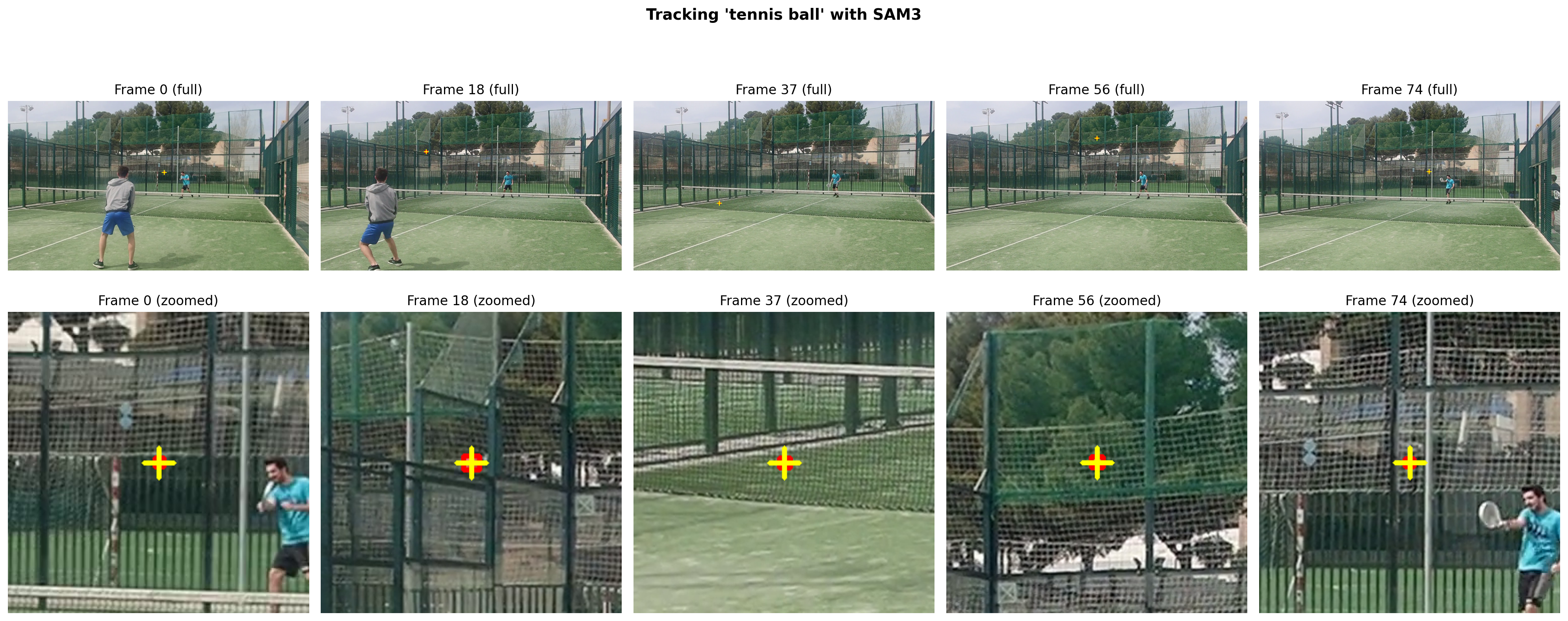
# Show tracking on key frames with ZOOMED IN views around the ball
key_frames = [0, len(video_frames)//4, len(video_frames)//2, 3*len(video_frames)//4, len(video_frames)-1]
key_frames = [f for f in key_frames if f in outputs_per_frame]

fig, axes = plt.subplots(2, len(key_frames), figsize=(4*len(key_frames), 8))

for i, frame_idx in enumerate(key_frames):
    frame = video_frames[frame_idx].copy()
    output = outputs_per_frame.get(frame_idx, {})
    
    h, w = frame.shape[:2]
    cx, cy = w // 2, h // 2  # default center
    
    if 'out_obj_ids' in output and len(output['out_obj_ids']) > 0:
        probs = output['out_probs']
        masks = output['out_binary_masks']
        boxes_xywh = output['out_boxes_xywh']
        
        # Select only the best object (highest score)
        best_idx = np.argmax(probs)
        best_mask = masks[best_idx]
        best_box_xywh = boxes_xywh[best_idx]
        
        # Get center of the ball for zooming
        x, y, bw, bh = best_box_xywh
        cx = int((x + bw/2) * w)
        cy = int((y + bh/2) * h)
        
        # Draw on frame - use cv2 for more control
        # Draw filled mask
        mask_overlay = frame.copy()
        mask_overlay[best_mask] = [255, 0, 0]  # Red
        frame = cv2.addWeighted(frame, 0.5, mask_overlay, 0.5, 0)
        
        # Draw bounding box
        x1, y1 = int(x * w), int(y * h)
        x2, y2 = int((x + bw) * w), int((y + bh) * h)
        cv2.rectangle(frame, (x1, y1), (x2, y2), (255, 0, 0), 3)
        
        # Draw crosshair at center
        cv2.drawMarker(frame, (cx, cy), (255, 255, 0), cv2.MARKER_CROSS, 30, 3)
    
    # Top row: full frame
    axes[0, i].imshow(frame)
    axes[0, i].set_title(f"Frame {frame_idx} (full)")
    axes[0, i].axis('off')
    
    # Bottom row: zoomed in (200x200 crop around the ball)
    zoom_size = 150
    x1_crop = max(0, cx - zoom_size)
    x2_crop = min(w, cx + zoom_size)
    y1_crop = max(0, cy - zoom_size)
    y2_crop = min(h, cy + zoom_size)
    
    zoomed = frame[y1_crop:y2_crop, x1_crop:x2_crop]
    axes[1, i].imshow(zoomed)
    axes[1, i].set_title(f"Frame {frame_idx} (zoomed)")
    axes[1, i].axis('off')

plt.suptitle("Tracking 'tennis ball' with SAM3", fontweight='bold', fontsize=14)
plt.tight_layout()
plt.show()
Save Tracked Video

# Create annotated frames - use only the best (highest score) object
annotated_frames = []

for frame_idx, frame in enumerate(video_frames):
    frame = frame.copy()
    output = outputs_per_frame.get(frame_idx, {})
    
    h, w = frame.shape[:2]
    
    if 'out_obj_ids' in output and len(output['out_obj_ids']) > 0:
        probs = output['out_probs']
        masks = output['out_binary_masks']
        boxes_xywh = output['out_boxes_xywh']
        
        # Select only the best object
        best_idx = np.argmax(probs)
        best_mask = masks[best_idx]
        best_box_xywh = boxes_xywh[best_idx]
        
        # Get box coordinates
        x, y, bw, bh = best_box_xywh
        x1, y1 = int(x * w), int(y * h)
        x2, y2 = int((x + bw) * w), int((y + bh) * h)
        cx = int((x + bw/2) * w)
        cy = int((y + bh/2) * h)
        
        # Draw filled mask with red overlay
        mask_overlay = frame.copy()
        mask_overlay[best_mask] = [255, 0, 0]  # Red
        frame = cv2.addWeighted(frame, 0.5, mask_overlay, 0.5, 0)
        
        # Draw thick bounding box
        cv2.rectangle(frame, (x1, y1), (x2, y2), (255, 0, 0), 4)
        
        # Draw crosshair marker
        cv2.drawMarker(frame, (cx, cy), (255, 255, 0), cv2.MARKER_CROSS, 40, 3)
        
        # Add label
        cv2.putText(frame, "tennis ball", (x1, y1 - 10), 
                    cv2.FONT_HERSHEY_SIMPLEX, 1, (255, 0, 0), 2)
    
    annotated_frames.append(frame)

print(f"Annotated {len(annotated_frames)} frames")
Annotated 75 frames
# Save video using imageio for better browser compatibility
import imageio.v3 as iio

output_path = "tennis_tracked.mp4"

# imageio handles H.264 encoding properly
iio.imwrite(
    output_path,
    annotated_frames,
    fps=fps,
    codec='libx264',
    pixelformat='yuv420p',  # Required for browser compatibility
)

print(f"Saved: {output_path}")
WARNING:imageio_ffmpeg:IMAGEIO FFMPEG_WRITER WARNING: input image is not divisible by macro_block_size=16, resizing from (1920, 1080) to (1920, 1088) to ensure video compatibility with most codecs and players. To prevent resizing, make your input image divisible by the macro_block_size or set the macro_block_size to 1 (risking incompatibility).
Saved: tennis_tracked.mp4
# Display the tracked video
from IPython.display import Video
Video(output_path, embed=True, width=640)

Improved Tracking: Filtering and Smoothing

The raw SAM3 detections sometimes include a stationary ball near the net. Let’s:

  1. Identify and filter the stationary ball
  2. Track the moving ball using nearest-neighbor matching with velocity prediction
  3. Smooth the trajectory with light Gaussian filtering
# Extract ball positions directly from SAM3 outputs
# Simpler approach: use the raw detections with smart filtering

def extract_all_ball_detections(outputs_per_frame, video_frames):
    """
    Extract ALL ball detections from SAM3 outputs.
    Returns list of detections per frame.
    """
    h, w = video_frames[0].shape[:2]
    all_detections = []
    
    for frame_idx in range(len(video_frames)):
        output = outputs_per_frame.get(frame_idx, {})
        frame_dets = []
        
        if 'out_obj_ids' in output and len(output['out_obj_ids']) > 0:
            for i in range(len(output['out_obj_ids'])):
                x, y, bw, bh = output['out_boxes_xywh'][i]
                cx = (x + bw/2) * w
                cy = (y + bh/2) * h
                box_w = bw * w
                box_h = bh * h
                score = output['out_probs'][i]
                
                frame_dets.append({
                    'cx': cx, 'cy': cy, 
                    'w': box_w, 'h': box_h,
                    'score': score,
                    'frame': frame_idx
                })
        
        all_detections.append(frame_dets)
    
    return all_detections

def identify_stationary_ball(all_detections, min_frames=10, max_movement=30):
    """
    Identify stationary ball by finding detections that appear in many frames
    without significant movement.
    """
    # Collect positions from all frames
    from collections import defaultdict
    position_grid = defaultdict(list)
    
    for frame_idx, dets in enumerate(all_detections):
        for det in dets:
            # Grid key (50px cells)
            key = (int(det['cx'] / 50), int(det['cy'] / 50))
            position_grid[key].append((det['cx'], det['cy'], frame_idx))
    
    # Find stationary clusters
    for key, positions in position_grid.items():
        if len(positions) >= min_frames:
            xs = [p[0] for p in positions]
            ys = [p[1] for p in positions]
            if np.std(xs) < max_movement and np.std(ys) < max_movement:
                return (np.mean(xs), np.mean(ys))
    
    return None

def track_moving_ball(all_detections, stationary_pos=None, stationary_radius=100):
    """
    Track the moving ball using simple nearest-neighbor tracking.
    Much more robust than complex trackers for single object.
    """
    positions = []
    last_pos = None
    last_velocity = np.array([0.0, 0.0])
    
    for frame_idx, dets in enumerate(all_detections):
        # Filter out stationary ball
        if stationary_pos is not None:
            dets = [d for d in dets if 
                   np.sqrt((d['cx'] - stationary_pos[0])**2 + 
                          (d['cy'] - stationary_pos[1])**2) > stationary_radius]
        
        if not dets:
            # No detection - use velocity prediction
            if last_pos is not None:
                predicted = last_pos + last_velocity * 0.9  # Slight decay
                positions.append({
                    'cx': predicted[0], 'cy': predicted[1],
                    'detected': False, 'score': 0.0
                })
                last_pos = predicted
            else:
                positions.append({'cx': None, 'cy': None, 'detected': False, 'score': 0.0})
            continue
        
        # Find best detection
        if last_pos is None:
            # First frame - pick highest score
            best = max(dets, key=lambda d: d['score'])
        else:
            # Predict where ball should be
            predicted = last_pos + last_velocity
            
            # Find detection closest to prediction
            best = min(dets, key=lambda d: 
                      np.sqrt((d['cx'] - predicted[0])**2 + (d['cy'] - predicted[1])**2))
            
            # Sanity check - if too far from prediction, might be wrong detection
            dist = np.sqrt((best['cx'] - predicted[0])**2 + (best['cy'] - predicted[1])**2)
            if dist > 200 and len(dets) > 1:
                # Try second best by score
                sorted_by_score = sorted(dets, key=lambda d: d['score'], reverse=True)
                for alt in sorted_by_score:
                    alt_dist = np.sqrt((alt['cx'] - predicted[0])**2 + (alt['cy'] - predicted[1])**2)
                    if alt_dist < dist:
                        best = alt
                        break
        
        new_pos = np.array([best['cx'], best['cy']])
        
        # Update velocity
        if last_pos is not None:
            new_velocity = new_pos - last_pos
            # Smooth velocity update
            last_velocity = 0.7 * last_velocity + 0.3 * new_velocity
        
        positions.append({
            'cx': best['cx'], 'cy': best['cy'],
            'detected': True, 'score': best['score']
        })
        last_pos = new_pos
    
    return positions

# Extract detections
all_detections = extract_all_ball_detections(outputs_per_frame, video_frames)

# Find stationary ball
stationary_ball = identify_stationary_ball(all_detections)
if stationary_ball:
    print(f"Stationary ball at: ({stationary_ball[0]:.0f}, {stationary_ball[1]:.0f})")

# Track moving ball
ball_positions = track_moving_ball(all_detections, stationary_ball)

detected_count = sum(1 for p in ball_positions if p['detected'])
print(f"Detected in {detected_count}/{len(ball_positions)} frames")
print(f"Predicted in {len(ball_positions) - detected_count}/{len(ball_positions)} frames")
Stationary ball at: (382, 660)
Detected in 72/75 frames
Predicted in 3/75 frames
# Visualize detection quality per frame
detected_frames = [i for i, p in enumerate(ball_positions) if p['detected']]
predicted_frames = [i for i, p in enumerate(ball_positions) if not p['detected'] and p['cx'] is not None]

print(f"Detection timeline:")
timeline = ""
for i, p in enumerate(ball_positions):
    if p['detected']:
        timeline += "D"  # Detected
    elif p['cx'] is not None:
        timeline += "p"  # Predicted
    else:
        timeline += "."  # Missing
print(timeline)
print(f"\nD=detected, p=predicted, .=missing")
Detection timeline:
DDDDDDDpDDDDDDDDDDDDDDDDDppDDDDDDDDDDDDDDDDDDDDDDDDDDDDDDDDDDDDDDDDDDDDDDDD

D=detected, p=predicted, .=missing
# Simple smoothing - just light Gaussian filter on detected positions
from scipy.ndimage import gaussian_filter1d

def smooth_ball_positions(positions, sigma=1.5):
    """
    Apply light Gaussian smoothing to reduce jitter while keeping trajectory accurate.
    """
    n = len(positions)
    xs = np.array([p['cx'] if p['cx'] is not None else np.nan for p in positions])
    ys = np.array([p['cy'] if p['cy'] is not None else np.nan for p in positions])
    
    # Interpolate missing values first
    valid_mask = ~np.isnan(xs)
    if valid_mask.sum() < 2:
        return [(p['cx'], p['cy']) for p in positions]
    
    # Linear interpolation for missing values
    indices = np.arange(n)
    xs_interp = np.interp(indices, indices[valid_mask], xs[valid_mask])
    ys_interp = np.interp(indices, indices[valid_mask], ys[valid_mask])
    
    # Apply light Gaussian smoothing
    xs_smooth = gaussian_filter1d(xs_interp, sigma=sigma, mode='nearest')
    ys_smooth = gaussian_filter1d(ys_interp, sigma=sigma, mode='nearest')
    
    return list(zip(xs_smooth, ys_smooth))

smoothed_positions = smooth_ball_positions(ball_positions, sigma=1.5)
print(f"Smoothed {len(smoothed_positions)} positions")
Smoothed 75 positions
# Create video using supervision annotators for cleaner visualization
import supervision as sv

# Initialize annotators with INDEX color lookup (since we don't have class_id)
circle_annotator = sv.CircleAnnotator(
    color=sv.Color.RED,
    thickness=3,
    color_lookup=sv.ColorLookup.INDEX,
)
triangle_annotator = sv.TriangleAnnotator(
    color=sv.Color.YELLOW,
    base=20,
    height=15,
    color_lookup=sv.ColorLookup.INDEX,
)
label_annotator = sv.LabelAnnotator(
    color=sv.Color.RED,
    text_color=sv.Color.WHITE,
    text_scale=0.6,
    text_padding=5,
    color_lookup=sv.ColorLookup.INDEX,
)

smoothed_frames = []

for frame_idx, frame in enumerate(video_frames):
    frame = frame.copy()
    h, w = frame.shape[:2]
    
    pos = smoothed_positions[frame_idx]
    if pos[0] is not None:
        cx, cy = int(pos[0]), int(pos[1])
        
        # Create a detection for supervision annotators
        # Box around the ball position
        box_size = 30
        xyxy = np.array([[
            max(0, cx - box_size),
            max(0, cy - box_size),
            min(w, cx + box_size),
            min(h, cy + box_size)
        ]])
        
        detection = sv.Detections(
            xyxy=xyxy,
            confidence=np.array([1.0]),
        )
        
        # Annotate with circle
        frame = circle_annotator.annotate(frame, detection)
        
        # Add a triangle pointing at the ball
        frame = triangle_annotator.annotate(frame, detection)
        
        # Add label
        labels = ["tennis ball"]
        frame = label_annotator.annotate(frame, detection, labels=labels)
        
        # Draw crosshair manually (supervision doesn't have this)
        cv2.drawMarker(frame, (cx, cy), (255, 255, 0), cv2.MARKER_CROSS, 40, 2)
    
    smoothed_frames.append(frame)

# Save smoothed video
smoothed_path = "tennis_tracked_smoothed.mp4"
iio.imwrite(
    smoothed_path,
    smoothed_frames,
    fps=fps,
    codec='libx264',
    pixelformat='yuv420p',
)
print(f"Saved: {smoothed_path}")
WARNING:imageio_ffmpeg:IMAGEIO FFMPEG_WRITER WARNING: input image is not divisible by macro_block_size=16, resizing from (1920, 1080) to (1920, 1088) to ensure video compatibility with most codecs and players. To prevent resizing, make your input image divisible by the macro_block_size or set the macro_block_size to 1 (risking incompatibility).
Saved: tennis_tracked_smoothed.mp4
Video(smoothed_path, embed=True, width=640)

Trajectory Visualization with Supervision

Now let’s use supervision’s TraceAnnotator for a professional trajectory trail visualization.

# Create detections for supervision's TraceAnnotator
def create_trace_detections(smoothed_positions, video_frames):
    """Create detections with tracker IDs for supervision's TraceAnnotator."""
    h, w = video_frames[0].shape[:2]
    detections_list = []
    
    for frame_idx, pos in enumerate(smoothed_positions):
        if pos[0] is not None and not np.isnan(pos[0]):
            cx, cy = pos[0], pos[1]
            box_size = 25
            xyxy = np.array([[
                max(0, cx - box_size),
                max(0, cy - box_size),
                min(w, cx + box_size),
                min(h, cy + box_size)
            ]])
            
            detection = sv.Detections(
                xyxy=xyxy,
                confidence=np.array([1.0]),
                tracker_id=np.array([1]),  # Same ID for the ball across all frames
            )
            detections_list.append(detection)
        else:
            detections_list.append(sv.Detections.empty())
    
    return detections_list

trace_detections = create_trace_detections(smoothed_positions, video_frames)
valid_trace = sum(1 for d in trace_detections if len(d) > 0)
print(f"Created trace detections for {valid_trace}/{len(trace_detections)} frames")
Created trace detections for 75/75 frames
# Create trail video using supervision's TraceAnnotator
trace_annotator = sv.TraceAnnotator(
    color=sv.Color.from_hex("#FF4444"),
    thickness=3,
    trace_length=25,  # Show last 25 frames of trajectory
    position=sv.Position.CENTER,
    color_lookup=sv.ColorLookup.INDEX,
)

# Also add a dot annotator for the current ball position
dot_annotator = sv.DotAnnotator(
    color=sv.Color.from_hex("#FFFF00"),
    radius=8,
    color_lookup=sv.ColorLookup.INDEX,
)

trail_frames = []

for frame_idx, frame in enumerate(video_frames):
    frame = frame.copy()
    
    detection = trace_detections[frame_idx]
    
    if len(detection) > 0:
        # Draw trace (trajectory line)
        frame = trace_annotator.annotate(frame, detection)
        
        # Draw current position dot
        frame = dot_annotator.annotate(frame, detection)
    
    # Add title
    cv2.putText(frame, "Tennis Ball Trajectory", (30, 50), 
                cv2.FONT_HERSHEY_SIMPLEX, 1.2, (255, 255, 255), 4)
    cv2.putText(frame, "Tennis Ball Trajectory", (30, 50), 
                cv2.FONT_HERSHEY_SIMPLEX, 1.2, (255, 68, 68), 2)
    
    trail_frames.append(frame)

# Save trail video
trail_path = "tennis_tracked_trail.mp4"
iio.imwrite(
    trail_path,
    trail_frames,
    fps=fps,
    codec='libx264',
    pixelformat='yuv420p',
)
print(f"Saved: {trail_path}")
WARNING:imageio_ffmpeg:IMAGEIO FFMPEG_WRITER WARNING: input image is not divisible by macro_block_size=16, resizing from (1920, 1080) to (1920, 1088) to ensure video compatibility with most codecs and players. To prevent resizing, make your input image divisible by the macro_block_size or set the macro_block_size to 1 (risking incompatibility).
Saved: tennis_tracked_trail.mp4
Video(trail_path, embed=True, width=640)

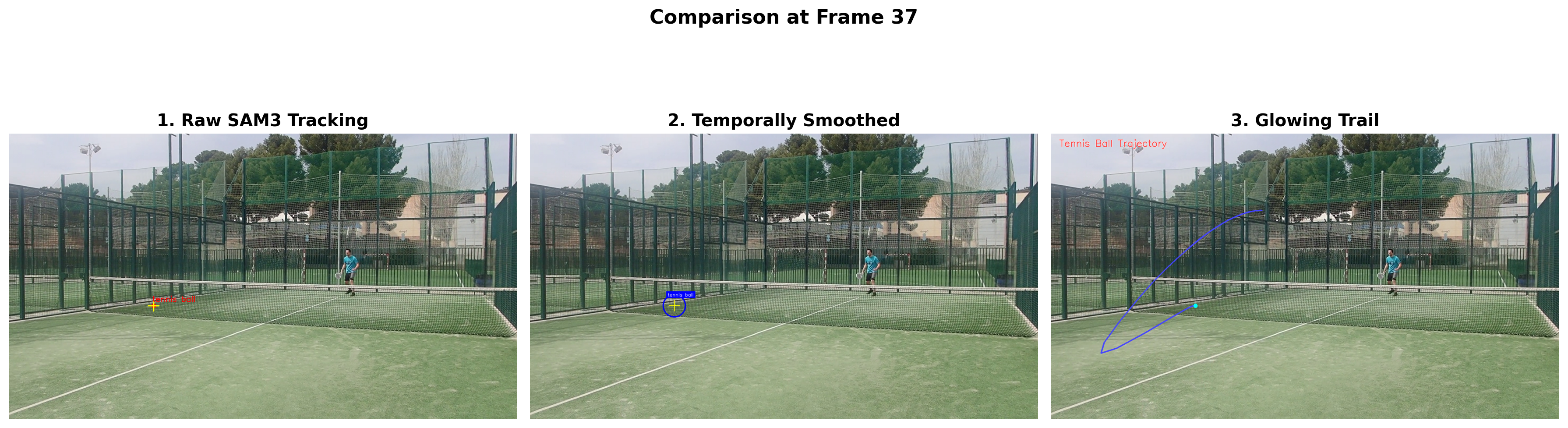
Comparison: All Three Videos

Let’s show a side-by-side comparison of key frames from all three approaches:

# Compare all three approaches on a key frame
compare_frame = len(video_frames) // 2  # Middle frame

fig, axes = plt.subplots(1, 3, figsize=(18, 6))

# Raw tracking
axes[0].imshow(annotated_frames[compare_frame])
axes[0].set_title("1. Raw SAM3 Tracking", fontsize=14, fontweight='bold')
axes[0].axis('off')

# Smoothed tracking
axes[1].imshow(smoothed_frames[compare_frame])
axes[1].set_title("2. Temporally Smoothed", fontsize=14, fontweight='bold')
axes[1].axis('off')

# Trail effect
axes[2].imshow(trail_frames[compare_frame])
axes[2].set_title("3. Glowing Trail", fontsize=14, fontweight='bold')
axes[2].axis('off')

plt.suptitle(f"Comparison at Frame {compare_frame}", fontsize=16, fontweight='bold')
plt.tight_layout()
plt.show()

print("\nVideo files created:")
print(f"  1. {output_path} - Raw SAM3 tracking with mask overlay")
print(f"  2. {smoothed_path} - Temporally smoothed positions")
print(f"  3. {trail_path} - Glowing trail showing trajectory")


Video files created:
  1. tennis_tracked.mp4 - Raw SAM3 tracking with mask overlay
  2. tennis_tracked_smoothed.mp4 - Temporally smoothed positions
  3. tennis_tracked_trail.mp4 - Glowing trail showing trajectory
# Cleanup
predictor.handle_request(
    request=dict(type="close_session", session_id=session_id)
)
predictor.shutdown()

# Remove temp frames
import shutil
shutil.rmtree(temp_dir)
INFO 2025-12-24 11:20:38,165 396055 sam3_video_predictor.py: 250: removed session 22d49edc-883e-4b20-9d34-34e24cf9ebdf; live sessions: [], GPU memory: 5120 MiB used and 7382 MiB reserved (max over time: 6736 MiB used and 7382 MiB reserved)

INFO 2025-12-24 11:20:38,219 395991 sam3_video_predictor.py: 250: removed session 22d49edc-883e-4b20-9d34-34e24cf9ebdf; live sessions: [], GPU memory: 5120 MiB used and 7536 MiB reserved (max over time: 7038 MiB used and 7536 MiB reserved)

INFO 2025-12-24 11:20:38,221 395991 sam3_video_predictor.py: 512: shutting down 1 worker processes

INFO 2025-12-24 11:20:38,222 396055 sam3_video_predictor.py: 484: worker rank=1 shutting down

INFO 2025-12-24 11:20:38,707 395991 sam3_video_predictor.py: 518: shut down 1 worker processes

Summary

We explored tracking a tennis ball with SAM3 and supervision:

  1. Raw SAM3 Tracking (tennis_tracked.mp4)
    • Direct mask overlay from SAM3’s text-prompted detection
    • Shows the actual segmentation mask and bounding box
  2. Filtered + Smoothed (tennis_tracked_smoothed.mp4)
    • Identifies and filters out stationary ball near the net
    • Nearest-neighbor tracking with velocity prediction
    • Light Gaussian smoothing for stable trajectory
  3. Trajectory Trail (tennis_tracked_trail.mp4)
    • Uses supervision’s TraceAnnotator for visualization
    • Shows last 25 frames of ball trajectory
    • DotAnnotator highlights current position

Key Techniques

  • Stationary ball detection: Grid-based clustering to find non-moving objects
  • Velocity prediction: Predicts ball position when detection is lost
  • Nearest-neighbor tracking: Simple but robust for single object
  • Gaussian smoothing: Reduces jitter while preserving trajectory

supervision Features Used

  • sv.Detections - Unified detection format
  • sv.TraceAnnotator - Trajectory visualization
  • sv.CircleAnnotator - Circle around detections
  • sv.DotAnnotator - Dot at detection center
  • sv.LabelAnnotator - Text labels

References