!uv pip install -q transformers datasets torch torchvision pillow accelerate einops timmIntroduction
Vision-Language Models (VLMs) have revolutionized how AI systems understand and reason about images. Models like GPT-4V, LLaVA, and Gemini can describe images, answer questions about them, and even follow complex visual instructions.
But how do these models actually work? At their core, VLMs combine three key components:
- Vision Encoder: Converts images into meaningful feature representations
- Projection Layer: Bridges the gap between vision and language embedding spaces
- Language Model: Generates text conditioned on the visual features
In this notebook, we’ll build a minimal VLM from scratch using small, publicly available models: - Vision: Google’s ViT-Large (304M parameters) - Language: HuggingFace’s SmolLM-360M (360M parameters) - Dataset: Flickr8k (a small subset for educational purposes)
The goal is educational - understanding the architecture, not building a production model.
Setup
import torch
import torch.nn as nn
import torch.nn.functional as F
from torch.utils.data import DataLoader, Dataset
from transformers import (
    AutoModelForCausalLM,
    AutoTokenizer,
    ViTModel,
    ViTImageProcessor,
)
from datasets import load_dataset
from PIL import Image
import requests
from io import BytesIO
import matplotlib.pyplot as plt
from tqdm.auto import tqdm
import warnings
warnings.filterwarnings('ignore')

device = torch.device("cuda" if torch.cuda.is_available() else "cpu")
print(f"Using device: {device}")

# Print torch version
print(f"Torch version :{torch.__version__}")
/home/nipun.batra/.uv/nb-base/lib/python3.12/site-packages/tqdm/auto.py:21: TqdmWarning: IProgress not found. Please update jupyter and ipywidgets. See https://ipywidgets.readthedocs.io/en/stable/user_install.html
from .autonotebook import tqdm as notebook_tqdmUsing device: cuda
Torch version :2.6.0+cu124%config InlineBackend.figure_format = 'retina'The vision encoder’s job is to convert an image into a sequence of meaningful feature vectors. We’ll use a pretrained Vision Transformer (ViT) which:
- Splits the image into 16x16 patches
- Projects each patch into an embedding
- Processes patches through transformer layers
- Outputs a sequence of features (one per patch + a CLS token)
For a 224x224 image with 16x16 patches, we get: - (224/16) x (224/16) = 14 x 14 = 196 patches - Plus 1 CLS token = 197 tokens total - Each token has dimension 1024 (for ViT-Large)
# Load pretrained ViT-Large (larger than ViT-Base for better performance)
vision_model_name = "google/vit-large-patch16-224"
vision_encoder = ViTModel.from_pretrained(vision_model_name)
image_processor = ViTImageProcessor.from_pretrained(vision_model_name)

# Freeze the vision encoder - we won't train it
for param in vision_encoder.parameters():
    param.requires_grad = False

vision_encoder = vision_encoder.to(device)
vision_encoder.eval()

print(f"Vision encoder hidden size: {vision_encoder.config.hidden_size}")
print(f"Number of patches: {(224//16)**2} + 1 CLS token = {(224//16)**2 + 1} tokens")
Some weights of ViTModel were not initialized from the model checkpoint at google/vit-large-patch16-224 and are newly initialized: ['pooler.dense.bias', 'pooler.dense.weight']
You should probably TRAIN this model on a down-stream task to be able to use it for predictions and inference.Vision encoder hidden size: 1024
Number of patches: 196 + 1 CLS token = 197 tokens# Test the vision encoder with a sample image
url = "http://images.cocodataset.org/val2017/000000039769.jpg"
response = requests.get(url)
sample_image = Image.open(BytesIO(response.content))
plt.figure(figsize=(6, 6))
plt.imshow(sample_image)
plt.title("Sample Image from COCO")
plt.axis('off')
plt.show()
# Process the image
inputs = image_processor(sample_image, return_tensors="pt").to(device)
with torch.no_grad():
vision_outputs = vision_encoder(**inputs)
# Get the sequence of patch features (excluding pooler output)
image_features = vision_outputs.last_hidden_state
print(f"Image features shape: {image_features.shape}")
print(f" - Batch size: {image_features.shape[0]}")
print(f" - Sequence length (patches + CLS): {image_features.shape[1]}")
print(f" - Hidden dimension: {image_features.shape[2]}")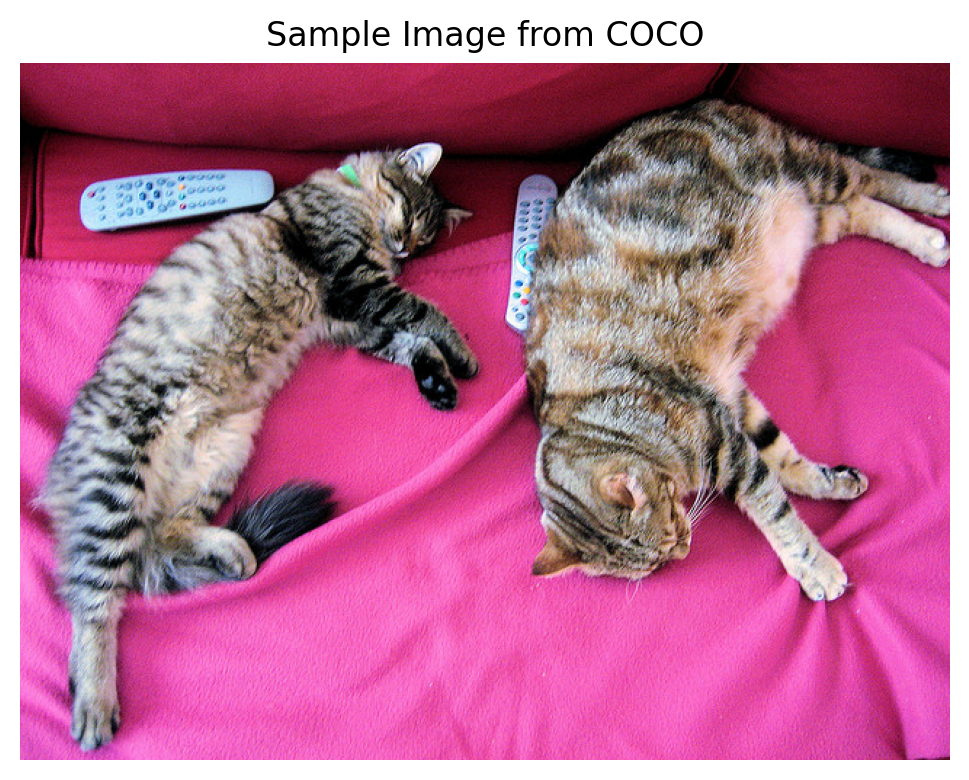
Image features shape: torch.Size([1, 197, 1024])
  - Batch size: 1
  - Sequence length (patches + CLS): 197
  - Hidden dimension: 1024
Part 2: The Language Model
For the language model, we’ll use SmolLM-360M - a small but capable language model from HuggingFace. It has: - 360M parameters (larger than 135M, better performance) - Hidden dimension of 960 - Can run on modest hardware
The key insight is that we need to project our vision features (1024-dim from ViT-Large) into the LLM’s embedding space (960-dim).
# Load the language model (SmolLM-360M for better performance)
lm_model_name = "HuggingFaceTB/SmolLM-360M"
tokenizer = AutoTokenizer.from_pretrained(lm_model_name)
language_model = AutoModelForCausalLM.from_pretrained(lm_model_name)

# Add padding token if not present
if tokenizer.pad_token is None:
    tokenizer.pad_token = tokenizer.eos_token

language_model = language_model.to(device)

print(f"Language model hidden size: {language_model.config.hidden_size}")
print(f"Vocabulary size: {language_model.config.vocab_size}")
print(f"Number of layers: {language_model.config.num_hidden_layers}")
Language model hidden size: 960
Vocabulary size: 49152
Number of layers: 32# Test the language model
test_text = "A photo of"
inputs = tokenizer(test_text, return_tensors="pt").to(device)
with torch.no_grad():
outputs = language_model.generate(
**inputs,
max_new_tokens=20,
do_sample=True,
temperature=0.7,
pad_token_id=tokenizer.pad_token_id
)
print(f"Generated text: {tokenizer.decode(outputs[0], skip_special_tokens=True)}")Generated text: A photo of a school playground with a huge number of kids playing with their friends. Kids are using their hands toPart 3: The Projection Layer
The projection layer is the bridge between vision and language. It transforms: - From: Vision features (batch, 197, 1024) - To: Language-compatible embeddings (batch, 197, 960)
We’ll use a simple multi-layer projection with: 1. Linear layer (1024 -> 960) 2. GELU activation 3. LayerNorm for stability
This is similar to what LLaVA uses, but simpler.
class VisionProjector(nn.Module):
    """Projects vision features into the language model's embedding space."""

    def __init__(self, vision_dim: int, language_dim: int):
        super().__init__()
        self.projection = nn.Sequential(
            nn.Linear(vision_dim, language_dim),
            nn.GELU(),
            nn.LayerNorm(language_dim),
            nn.Linear(language_dim, language_dim),  # Additional layer for better alignment
        )

    def forward(self, vision_features: torch.Tensor) -> torch.Tensor:
        """Project vision features to language embedding space.

        Args:
            vision_features: (batch, seq_len, vision_dim)
        Returns:
            projected: (batch, seq_len, language_dim)
        """
        return self.projection(vision_features)


# Create projector
vision_dim = vision_encoder.config.hidden_size  # 1024 (ViT-Large)
language_dim = language_model.config.hidden_size  # 960 (SmolLM-360M)

projector = VisionProjector(vision_dim, language_dim).to(device)

print(f"Projector: {vision_dim} -> {language_dim}")
print(f"Trainable parameters: {sum(p.numel() for p in projector.parameters()):,}")
Projector: 1024 -> 960
Trainable parameters: 1,908,480# Test the projector
with torch.no_grad():
projected_features = projector(image_features)
print(f"Original vision features: {image_features.shape}")
print(f"Projected features: {projected_features.shape}")Original vision features: torch.Size([1, 197, 1024])
Projected features: torch.Size([1, 197, 960])Part 4: The Complete VLM Architecture
Now let’s combine everything into a single model. The forward pass:
- Encode image -> vision features (batch, 197, 768)
- Project -> language-space features (batch, 197, 576)
- Embed text -> text embeddings (batch, text_len, 576)
- Concatenate -> [image_embeds, text_embeds] (batch, 197 + text_len, 576)
- Generate -> use LLM to generate caption tokens
class MiniVLM(nn.Module):
    """A minimal Vision-Language Model."""

    def __init__(
        self,
        vision_encoder: ViTModel,
        language_model: AutoModelForCausalLM,
        projector: VisionProjector,
        tokenizer: AutoTokenizer,
    ):
        super().__init__()
        self.vision_encoder = vision_encoder
        self.language_model = language_model
        self.projector = projector
        self.tokenizer = tokenizer

        # Freeze vision encoder
        for param in self.vision_encoder.parameters():
            param.requires_grad = False

    def encode_image(self, pixel_values: torch.Tensor) -> torch.Tensor:
        """Encode image and project to language space."""
        with torch.no_grad():
            vision_outputs = self.vision_encoder(pixel_values=pixel_values)
        image_features = vision_outputs.last_hidden_state
        projected = self.projector(image_features)
        return projected

    def forward(
        self,
        pixel_values: torch.Tensor,
        input_ids: torch.Tensor,
        attention_mask: torch.Tensor,
        labels: torch.Tensor = None,
    ):
        """Forward pass for training.

        Args:
            pixel_values: Image tensor (batch, 3, 224, 224)
            input_ids: Text token IDs (batch, text_len)
            attention_mask: Attention mask for text (batch, text_len)
            labels: Target token IDs for loss computation (batch, text_len)
        """
        batch_size = pixel_values.shape[0]

        # 1. Encode and project image
        image_embeds = self.encode_image(pixel_values)  # (batch, 197, hidden)
        num_image_tokens = image_embeds.shape[1]

        # 2. Get text embeddings from LLM's embedding layer
        text_embeds = self.language_model.get_input_embeddings()(input_ids)  # (batch, text_len, hidden)

        # 3. Concatenate: [IMAGE TOKENS] [TEXT TOKENS]
        combined_embeds = torch.cat([image_embeds, text_embeds], dim=1)

        # 4. Create attention mask for combined sequence
        image_attention = torch.ones(
            (batch_size, num_image_tokens),
            dtype=attention_mask.dtype,
            device=attention_mask.device
        )
        combined_attention = torch.cat([image_attention, attention_mask], dim=1)

        # 5. Create labels: -100 for image tokens (ignore in loss), actual labels for text
        if labels is not None:
            image_labels = torch.full(
                (batch_size, num_image_tokens),
                fill_value=-100,  # -100 is ignored by CrossEntropyLoss
                dtype=labels.dtype,
                device=labels.device
            )
            combined_labels = torch.cat([image_labels, labels], dim=1)
        else:
            combined_labels = None

        # 6. Forward through language model
        outputs = self.language_model(
            inputs_embeds=combined_embeds,
            attention_mask=combined_attention,
            labels=combined_labels,
            return_dict=True,
        )

        return outputs

    @torch.no_grad()
    def generate(
        self,
        pixel_values: torch.Tensor,
        max_new_tokens: int = 50,
        temperature: float = 0.7,
        do_sample: bool = True,
    ) -> str:
        """Generate a caption for an image."""
        self.eval()

        # Encode image
        image_embeds = self.encode_image(pixel_values)  # (1, 197, hidden)

        # Start with a prompt
        prompt = "This image shows"
        prompt_ids = self.tokenizer.encode(prompt, return_tensors="pt").to(pixel_values.device)
        prompt_embeds = self.language_model.get_input_embeddings()(prompt_ids)

        # Combine image and prompt embeddings
        combined_embeds = torch.cat([image_embeds, prompt_embeds], dim=1)

        # Generate token by token
        generated_ids = prompt_ids.clone()

        for _ in range(max_new_tokens):
            # Get current embeddings
            current_embeds = self.language_model.get_input_embeddings()(generated_ids)
            full_embeds = torch.cat([image_embeds, current_embeds], dim=1)

            # Forward pass
            outputs = self.language_model(inputs_embeds=full_embeds)
            next_token_logits = outputs.logits[:, -1, :]

            # Sample or greedy
            if do_sample:
                probs = F.softmax(next_token_logits / temperature, dim=-1)
                next_token = torch.multinomial(probs, num_samples=1)
            else:
                next_token = next_token_logits.argmax(dim=-1, keepdim=True)

            generated_ids = torch.cat([generated_ids, next_token], dim=1)

            # Stop if EOS
            if next_token.item() == self.tokenizer.eos_token_id:
                break

        return self.tokenizer.decode(generated_ids[0], skip_special_tokens=True)


# Create the VLM
vlm = MiniVLM(
    vision_encoder=vision_encoder,
    language_model=language_model,
    projector=projector,
    tokenizer=tokenizer,
)
vlm = vlm.to(device)

# Count parameters
total_params = sum(p.numel() for p in vlm.parameters())
trainable_params = sum(p.numel() for p in vlm.parameters() if p.requires_grad)

print(f"Total parameters: {total_params:,}")
print(f"Trainable parameters: {trainable_params:,}")
print(f"Frozen parameters: {total_params - trainable_params:,}")
Total parameters: 668,080,832
Trainable parameters: 363,729,600
Frozen parameters: 304,351,232Part 5: Loading the Flickr8k Dataset
We’ll use a subset of the Flickr8k dataset - a popular image captioning benchmark with 8000 images. Each image has 5 captions - we’ll randomly sample one per image during training.
# Load Flickr8k captions dataset
dataset = load_dataset("jxie/flickr8k", split="train")

# Use 2000 samples for better training
num_samples = 2000
dataset = dataset.shuffle(seed=42).select(range(num_samples))

print(f"Dataset size: {len(dataset)}")
print(f"Sample item keys: {dataset[0].keys()}")
Generating train split: 100%|██████████| 6000/6000 [00:01<00:00, 4764.89 examples/s]
Generating validation split: 100%|██████████| 1000/1000 [00:00<00:00, 4347.67 examples/s]
Generating test split: 100%|██████████| 1000/1000 [00:00<00:00, 5419.11 examples/s]Dataset size: 2000
Sample item keys: dict_keys(['image', 'caption_0', 'caption_1', 'caption_2', 'caption_3', 'caption_4'])# Look at a sample - Flickr8k has caption_0 through caption_4
sample = dataset[0]
print(f"Image: {type(sample['image'])}")
print(f"Captions:")
for i in range(5):
print(f" {i}: {sample[f'caption_{i}']}")
plt.figure(figsize=(6, 6))
plt.imshow(sample['image'])
plt.title(f"Caption: {sample['caption_0'][:60]}...")
plt.axis('off')
plt.show()Image: <class 'PIL.JpegImagePlugin.JpegImageFile'>
Captions:
0: Boys with their backs against an incoming wave .
1: Four boys are about to be hit by an approaching wave .
2: Four people sitting in the path of a wave .
3: Four young men are sitting on the beach under a crashing wave .
4: three boys sitting in sand getting splashed by wave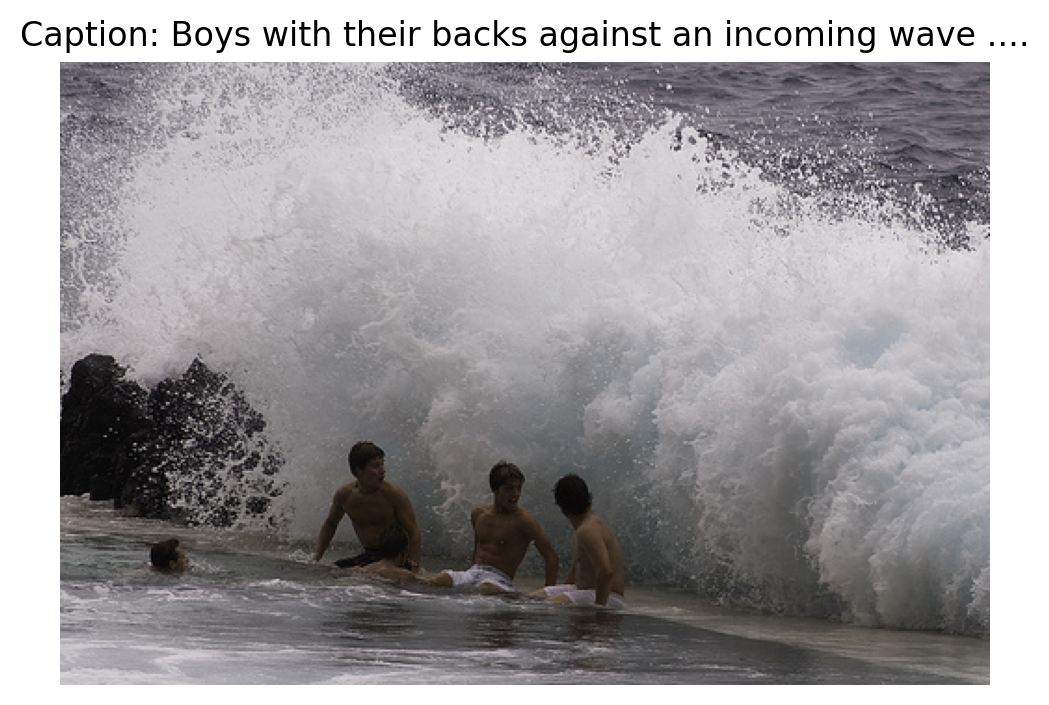
import random

class Flickr8kDataset(Dataset):
    """Dataset for Flickr8k image-caption pairs."""

    def __init__(self, hf_dataset, image_processor, tokenizer, max_length=64):
        self.dataset = hf_dataset
        self.image_processor = image_processor
        self.tokenizer = tokenizer
        self.max_length = max_length

    def __len__(self):
        return len(self.dataset)

    def __getitem__(self, idx):
        item = self.dataset[idx]

        # Process image
        image = item['image'].convert('RGB')
        pixel_values = self.image_processor(image, return_tensors="pt").pixel_values.squeeze(0)

        # Randomly select one of the 5 captions
        caption_idx = random.randint(0, 4)
        caption = item[f'caption_{caption_idx}']

        # Tokenize caption
        encoding = self.tokenizer(
            caption,
            max_length=self.max_length,
            padding='max_length',
            truncation=True,
            return_tensors='pt'
        )

        input_ids = encoding['input_ids'].squeeze(0)
        attention_mask = encoding['attention_mask'].squeeze(0)

        # Labels: mask padding tokens with -100
        labels = input_ids.clone()
        labels[attention_mask == 0] = -100

        return {
            'pixel_values': pixel_values,
            'input_ids': input_ids,
            'attention_mask': attention_mask,
            'labels': labels,
        }


# Create dataset and dataloader
train_dataset = Flickr8kDataset(dataset, image_processor, tokenizer)

train_loader = DataLoader(
    train_dataset,
    batch_size=4,  # Small batch for memory
    shuffle=True,
    num_workers=0,  # Avoid multiprocessing issues
)

print(f"Number of batches: {len(train_loader)}")
Number of batches: 500# Test a batch
batch = next(iter(train_loader))
print(f"Batch pixel_values shape: {batch['pixel_values'].shape}")
print(f"Batch input_ids shape: {batch['input_ids'].shape}")
print(f"Batch labels shape: {batch['labels'].shape}")Batch pixel_values shape: torch.Size([4, 3, 224, 224])
Batch input_ids shape: torch.Size([4, 64])
Batch labels shape: torch.Size([4, 64])Part 6: Untrained Model Predictions (Baseline)
Before training, let’s see what our VLM generates. Since the projection layer has random weights, the model has no way to understand the image - it will just generate random/nonsensical text. This establishes a baseline to appreciate the improvement after training.
# Store some test images and their ground truth captions for before/after comparison
test_indices = [0, 10, 50, 100]
test_samples = [(dataset[i]['image'].convert('RGB'), dataset[i]['caption_0']) for i in test_indices]

# Generate captions with UNTRAINED model
print("=" * 60)
print("UNTRAINED MODEL PREDICTIONS (Random projector weights)")
print("=" * 60)

untrained_captions = []
for i, (image, gt_caption) in enumerate(test_samples):
    caption, _ = generate_caption(vlm, image, image_processor, device)
    untrained_captions.append(caption)
    print(f"\nImage {i+1}:")
    print(f"  Generated: {caption}")
    print(f"  GT: {gt_caption[:80]}...")
============================================================
UNTRAINED MODEL PREDICTIONS (Random projector weights)
============================================================
Image 1:
Generated: This image shows cross-hat on the back of the dinosaur, showing that the massive scales are the Z-axis. This is a rebound, not a right-
GT: Boys with their backs against an incoming wave ....
Image 2:
Generated: This image shows the two simple types of the intonation of the vowel.
Comments (28) (Comment)
Create and save a GAMS model from
GT: A child wearing a white shirt hangs from the playground equipment ....
Image 3:
Generated: This image shows alert WLLK wordword w wordword message w wordw w wordw
K-word w w w w w w w w w w
GT: Two girls take in the view ....
Image 4:
Generated: This image shows the former Prinsland Castle at the Pematang Ilir. It is one of the most important and largest 5-meters buildings in
GT: A black dog barking ....# Visualize the untrained predictions
import textwrap
def wrap_text(text, width=40):
"""Wrap text for better display in titles."""
return '\n'.join(textwrap.wrap(text, width=width))
fig, axes = plt.subplots(2, 2, figsize=(14, 16))
axes = axes.flatten()
for i, ((image, gt_caption), ax) in enumerate(zip(test_samples, axes)):
ax.imshow(image)
# Create wrapped title text
gen_text = wrap_text(f"UNTRAINED: {untrained_captions[i]}", 45)
gt_text = wrap_text(f"GT: {gt_caption}", 45)
ax.set_xlabel(f"{gen_text}\n\n{gt_text}", fontsize=9, ha='center')
ax.set_xticks([])
ax.set_yticks([])
plt.suptitle("Untrained VLM Predictions (Random noise!)", fontsize=14, fontweight='bold', y=1.02)
plt.tight_layout()
plt.show()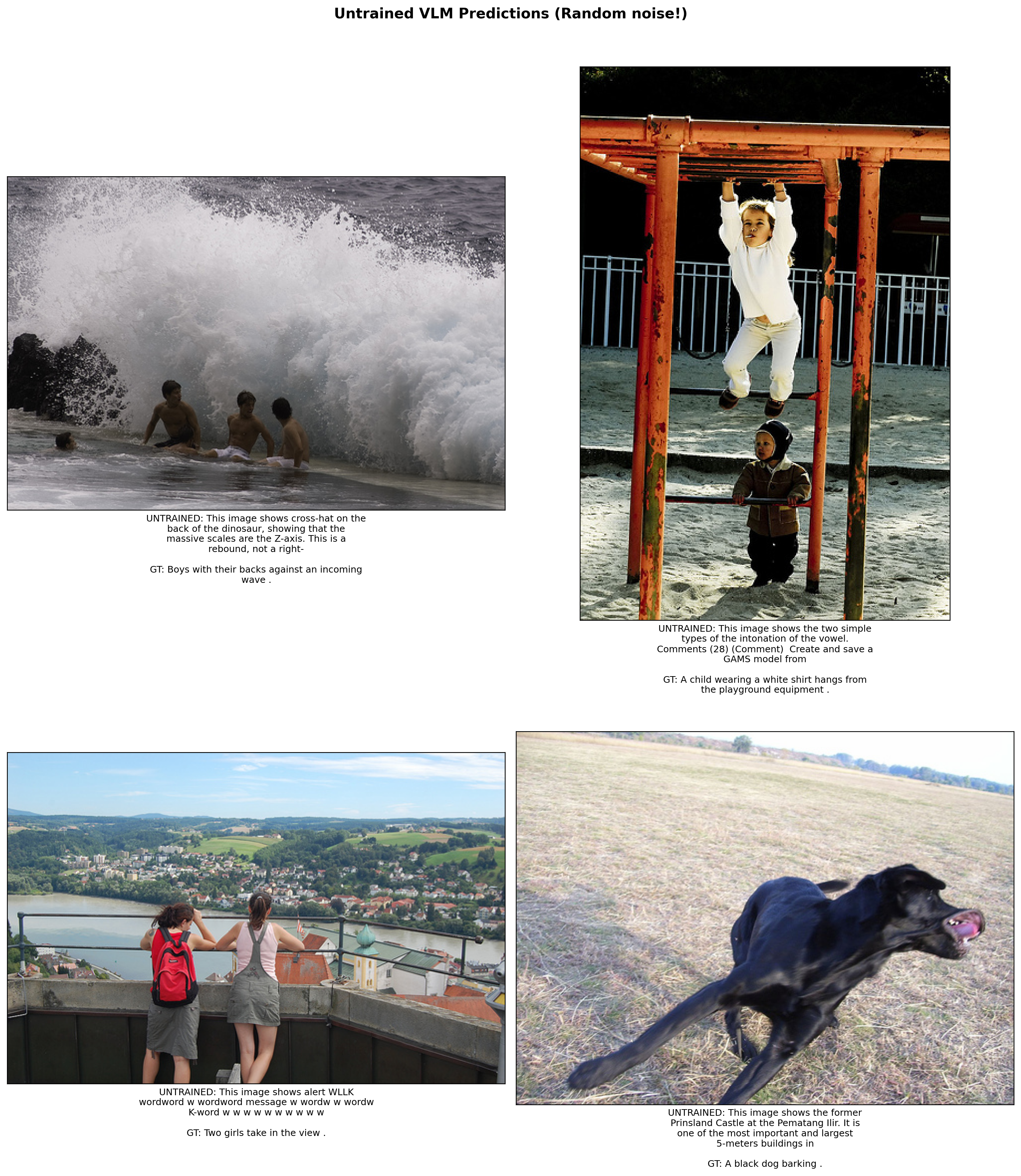
Part 7: Training Loop
Now let’s train our VLM! We’ll only train: 1. The projection layer (bridges vision to language) 2. The language model (learns to generate captions)
The vision encoder stays frozen.
import os

def train_vlm(model, train_loader, num_epochs=3, lr=1e-4, checkpoint_path="vlm_checkpoint.pt"):
    """Train the VLM with checkpoint support for preemptible/resumable training."""

    # Only optimize trainable parameters
    trainable_params = [p for p in model.parameters() if p.requires_grad]
    optimizer = torch.optim.AdamW(trainable_params, lr=lr)

    # Try to load checkpoint for resumable training
    start_epoch = 0
    losses = []

    if os.path.exists(checkpoint_path):
        print(f"Found checkpoint: {checkpoint_path}")
        try:
            checkpoint = torch.load(checkpoint_path, map_location='cpu')
            start_epoch = checkpoint.get('epoch', 0)
            losses = checkpoint.get('losses', [])
            model.projector.load_state_dict(checkpoint['projector_state_dict'])
            model.language_model.load_state_dict(checkpoint['language_model_state_dict'])
            optimizer.load_state_dict(checkpoint['optimizer_state_dict'])
            # Move optimizer state to device
            for state in optimizer.state.values():
                for k, v in state.items():
                    if isinstance(v, torch.Tensor):
                        state[k] = v.to(device)
            print(f"Resumed from epoch {start_epoch}")
        except Exception as e:
            print(f"Could not load checkpoint: {e}")

    model.train()
    # But keep vision encoder in eval mode
    model.vision_encoder.eval()

    try:
        for epoch in range(start_epoch, num_epochs):
            epoch_loss = 0
            progress_bar = tqdm(train_loader, desc=f"Epoch {epoch+1}/{num_epochs}")

            for batch in progress_bar:
                # Move batch to device
                pixel_values = batch['pixel_values'].to(device)
                input_ids = batch['input_ids'].to(device)
                attention_mask = batch['attention_mask'].to(device)
                labels = batch['labels'].to(device)

                # Forward pass
                outputs = model(
                    pixel_values=pixel_values,
                    input_ids=input_ids,
                    attention_mask=attention_mask,
                    labels=labels,
                )

                loss = outputs.loss

                # Backward pass
                optimizer.zero_grad()
                loss.backward()
                torch.nn.utils.clip_grad_norm_(trainable_params, max_norm=1.0)
                optimizer.step()

                epoch_loss += loss.item()
                progress_bar.set_postfix({'loss': f"{loss.item():.4f}"})

            avg_loss = epoch_loss / len(train_loader)
            losses.append(avg_loss)
            print(f"Epoch {epoch+1} - Average Loss: {avg_loss:.4f}")

            # Save checkpoint after each epoch
            torch.save({
                'epoch': epoch + 1,
                'losses': losses,
                'projector_state_dict': model.projector.state_dict(),
                'language_model_state_dict': model.language_model.state_dict(),
                'optimizer_state_dict': optimizer.state_dict(),
            }, checkpoint_path)
            print(f"Checkpoint saved to {checkpoint_path}")

    except KeyboardInterrupt:
        print("\n" + "="*70)
        print("Training interrupted!")
        print(f"Completed {len(losses)} epochs")
        # Save checkpoint on interrupt
        torch.save({
            'epoch': len(losses),
            'losses': losses,
            'projector_state_dict': model.projector.state_dict(),
            'language_model_state_dict': model.language_model.state_dict(),
            'optimizer_state_dict': optimizer.state_dict(),
        }, checkpoint_path)
        print(f"Checkpoint saved to {checkpoint_path}")
        print("Run training again to resume from this checkpoint.")
        print("="*70)

    return losses
# Train for more epochs with larger dataset
# Training is preemptible - interrupt with Ctrl+C and re-run to resume
losses = train_vlm(vlm, train_loader, num_epochs=6, lr=2e-4, checkpoint_path="vlm_caption_checkpoint.pt")Found checkpoint: vlm_caption_checkpoint.pt
Resumed from epoch 2Epoch 3/6: 100%|██████████| 500/500 [03:46<00:00, 2.21it/s, loss=1.7564]Epoch 3 - Average Loss: 2.3993
Checkpoint saved to vlm_caption_checkpoint.ptEpoch 4/6: 67%|██████▋ | 336/500 [03:37<01:46, 1.55it/s, loss=2.3601]
======================================================================
Training interrupted!
Completed 3 epochs
Checkpoint saved to vlm_caption_checkpoint.pt
Run training again to resume from this checkpoint.
======================================================================
# Plot training loss
plt.figure(figsize=(8, 4))
plt.plot(range(1, len(losses)+1), losses, marker='o')
plt.xlabel('Epoch')
plt.ylabel('Loss')
plt.title('Training Loss')
plt.grid(True, alpha=0.3)
plt.show()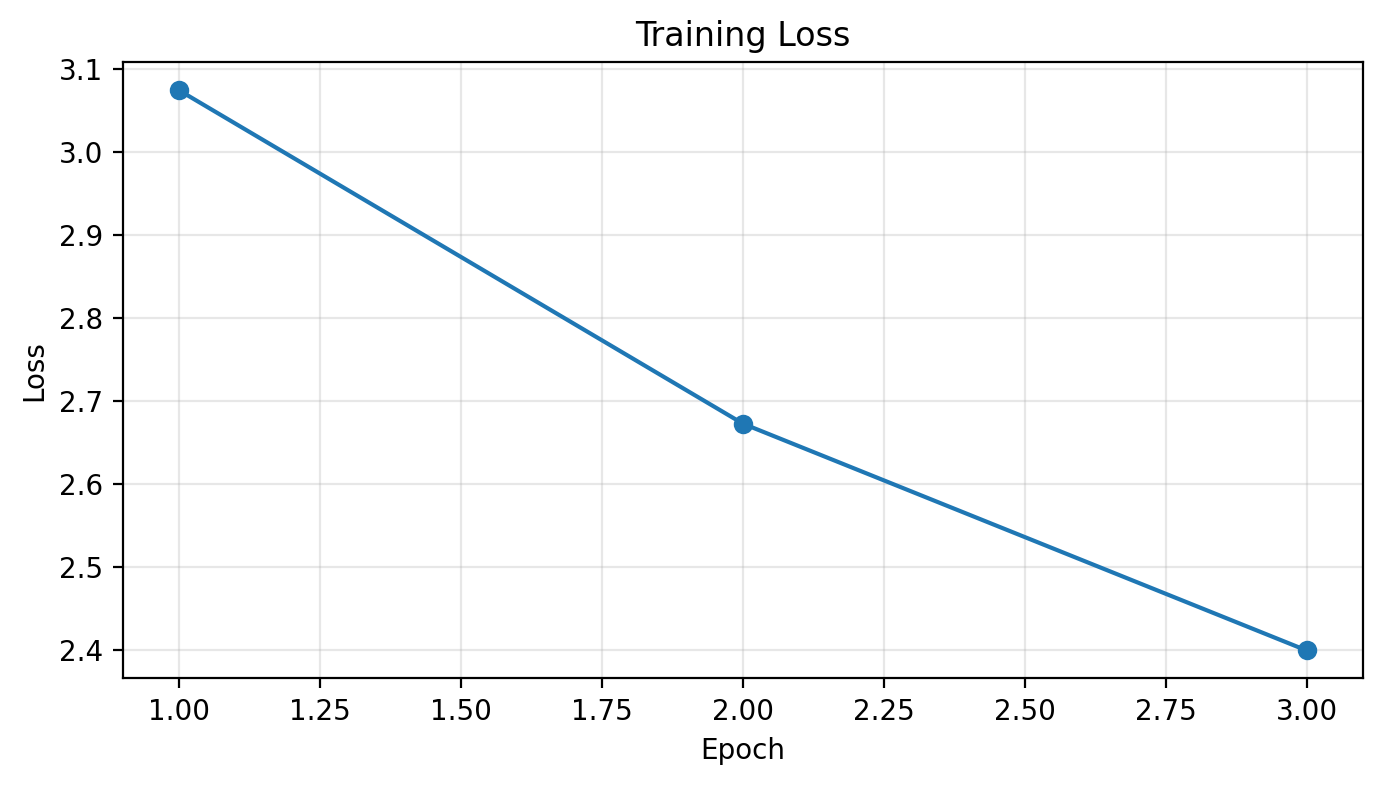
Part 8: Trained Model Predictions - Before vs After!
Let’s compare the untrained vs trained model on the same images. You should see a dramatic improvement!
# Generate captions with TRAINED model on the same test images
print("=" * 60)
print("TRAINED MODEL PREDICTIONS (After training)")
print("=" * 60)

trained_captions = []
for i, (image, gt_caption) in enumerate(test_samples):
    caption, _ = generate_caption(vlm, image, image_processor, device)
    trained_captions.append(caption)
    print(f"\nImage {i+1}:")
    print(f"  BEFORE (untrained): {untrained_captions[i]}")
    print(f"  AFTER (trained):    {caption}")
    print(f"  Ground Truth:       {gt_caption[:80]}...")
============================================================
TRAINED MODEL PREDICTIONS (After training)
============================================================
Image 1:
BEFORE (untrained): This image shows cross-hat on the back of the dinosaur, showing that the massive scales are the Z-axis. This is a rebound, not a right-
AFTER (trained): This image shows three people or one-two aged people on a huge wave .A group is sitting on a bench and taking pictures .The two people and a lake
Ground Truth: Boys with their backs against an incoming wave ....
Image 2:
BEFORE (untrained): This image shows the two simple types of the intonation of the vowel.
Comments (28) (Comment)
Create and save a GAMS model from
AFTER (trained): This image shows a child in a red dress in jumping up in the air .a boy in a pink striped shirt is skating .A child in blue is climbing over
Ground Truth: A child wearing a white shirt hangs from the playground equipment ....
Image 3:
BEFORE (untrained): This image shows alert WLLK wordword w wordword message w wordw w wordw
K-word w w w w w w w w w w
AFTER (trained): This image shows two women standing in front of a building . One is sitting alone and one is sitting in a crowd . a woman and one child reach for the fountain
Ground Truth: Two girls take in the view ....
Image 4:
BEFORE (untrained): This image shows the former Prinsland Castle at the Pematang Ilir. It is one of the most important and largest 5-meters buildings in
AFTER (trained): This image shows a dog with a red muzzle in its mouth is running . smiling . in the middle of the field . .A black dog is shaking its ear over
Ground Truth: A black dog barking ....# Side-by-side visual comparison: BEFORE vs AFTER training
fig, axes = plt.subplots(4, 2, figsize=(16, 24))
for i, (image, gt_caption) in enumerate(test_samples):
# Left column: Untrained
axes[i, 0].imshow(image)
untrained_text = wrap_text(f"BEFORE: {untrained_captions[i]}", 40)
axes[i, 0].set_xlabel(untrained_text, fontsize=9, color='red', ha='center')
axes[i, 0].set_xticks([])
axes[i, 0].set_yticks([])
# Right column: Trained
axes[i, 1].imshow(image)
trained_text = wrap_text(f"AFTER: {trained_captions[i]}", 40)
gt_text = wrap_text(f"GT: {gt_caption}", 40)
axes[i, 1].set_xlabel(f"{trained_text}\n\n{gt_text}", fontsize=9, color='green', ha='center')
axes[i, 1].set_xticks([])
axes[i, 1].set_yticks([])
plt.suptitle("Before vs After Training Comparison", fontsize=16, fontweight='bold', y=1.01)
plt.tight_layout()
plt.show()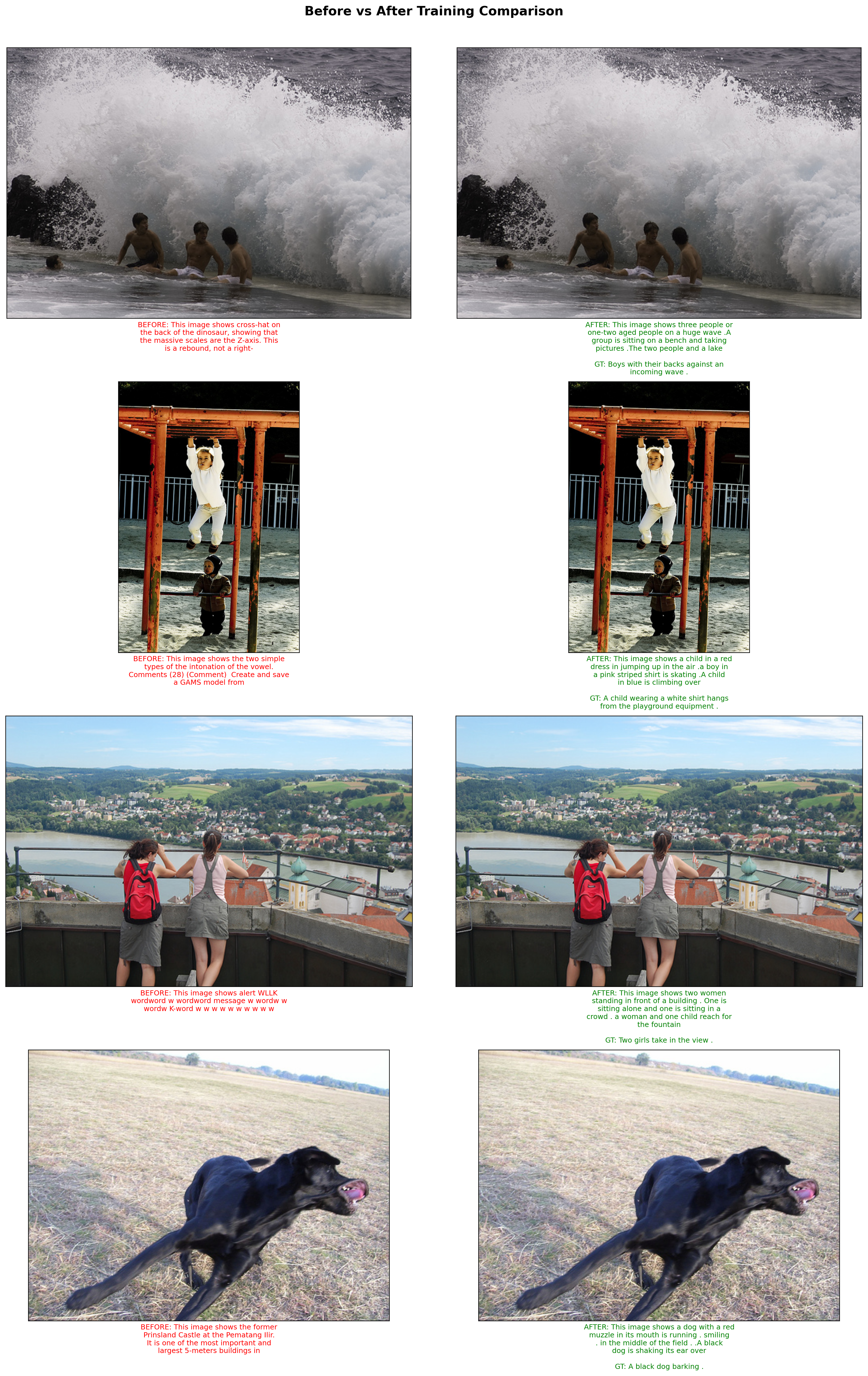
# Test on completely new images from the web (not in training set)
test_urls = [
    "http://images.cocodataset.org/val2017/000000039769.jpg",  # cats
    "http://images.cocodataset.org/val2017/000000037777.jpg",  # sports
    "http://images.cocodataset.org/val2017/000000087038.jpg",  # food
]

fig, axes = plt.subplots(1, 3, figsize=(15, 6))

for url, ax in zip(test_urls, axes):
    caption, image = generate_caption(vlm, url, image_processor, device)

    ax.imshow(image)
    caption_text = wrap_text(f"Generated: {caption}", 35)
    ax.set_xlabel(caption_text, fontsize=10, ha='center')
    ax.set_xticks([])
    ax.set_yticks([])

plt.suptitle("Trained VLM on New Images (Not in Training Set)", fontsize=14, fontweight='bold', y=1.02)
plt.tight_layout()
plt.show()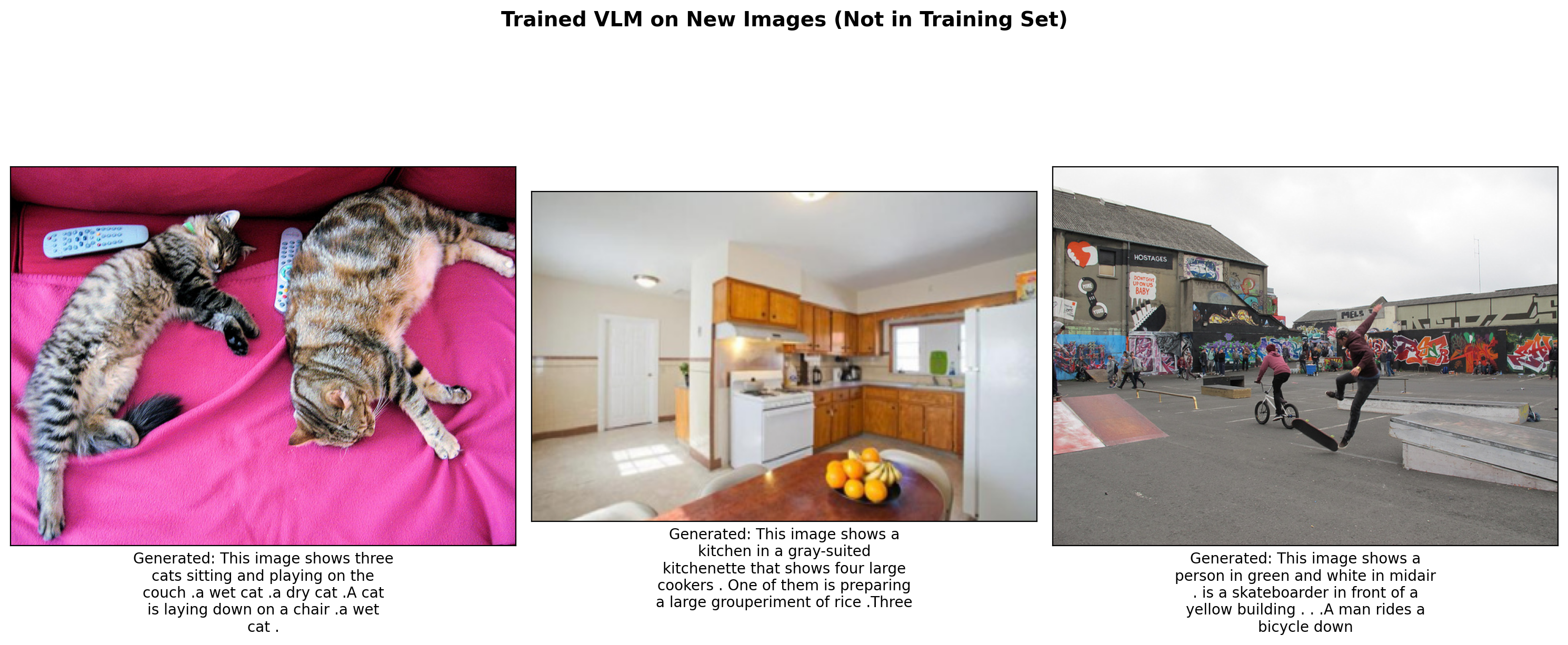
Part 9: Understanding the Architecture
Let’s visualize what’s happening inside our VLM:
# Visualize the flow of information
sample = dataset[0]
image = sample['image'].convert('RGB')
pixel_values = image_processor(image, return_tensors="pt").pixel_values.to(device)

with torch.no_grad():
    # Step 1: Vision encoding
    vision_outputs = vlm.vision_encoder(pixel_values=pixel_values)
    vision_features = vision_outputs.last_hidden_state
    print(f"Step 1 - Vision Encoder Output: {vision_features.shape}")
    print(f"         Shape meaning: (batch={vision_features.shape[0]}, patches={vision_features.shape[1]}, dim={vision_features.shape[2]})")

    # Step 2: Projection
    projected = vlm.projector(vision_features)
    print(f"\nStep 2 - After Projection: {projected.shape}")
    print(f"         Shape meaning: (batch={projected.shape[0]}, patches={projected.shape[1]}, lm_dim={projected.shape[2]})")

    # Step 3: Text embedding (example)
    sample_text = "A photo of"
    text_ids = tokenizer.encode(sample_text, return_tensors="pt").to(device)
    text_embeds = vlm.language_model.get_input_embeddings()(text_ids)
    print(f"\nStep 3 - Text Embeddings: {text_embeds.shape}")
    print(f"         Shape meaning: (batch={text_embeds.shape[0]}, tokens={text_embeds.shape[1]}, lm_dim={text_embeds.shape[2]})")

    # Step 4: Concatenation
    combined = torch.cat([projected, text_embeds], dim=1)
    print(f"\nStep 4 - Combined Embeddings: {combined.shape}")
    print(f"         Total sequence: {projected.shape[1]} image tokens + {text_embeds.shape[1]} text tokens = {combined.shape[1]}")
Step 1 - Vision Encoder Output: torch.Size([1, 197, 1024])
Shape meaning: (batch=1, patches=197, dim=1024)
Step 2 - After Projection: torch.Size([1, 197, 960])
Shape meaning: (batch=1, patches=197, lm_dim=960)
Step 3 - Text Embeddings: torch.Size([1, 3, 960])
Shape meaning: (batch=1, tokens=3, lm_dim=960)
Step 4 - Combined Embeddings: torch.Size([1, 200, 960])
Total sequence: 197 image tokens + 3 text tokens = 200# Visualize attention over patches (simplified)
# This shows which patches the model might be attending to
# Get patch features (excluding CLS token)
patch_features = vision_features[0, 1:, :] # Remove CLS token
patch_norms = torch.norm(patch_features, dim=-1) # Feature magnitude per patch
# Reshape to 14x14 grid
patch_grid = patch_norms.reshape(14, 14).cpu().numpy()
fig, (ax1, ax2) = plt.subplots(1, 2, figsize=(12, 5))
ax1.imshow(image)
ax1.set_title("Original Image")
ax1.axis('off')
im = ax2.imshow(patch_grid, cmap='hot')
ax2.set_title("Vision Feature Magnitude per Patch")
ax2.axis('off')
plt.colorbar(im, ax=ax2, fraction=0.046)
plt.tight_layout()
plt.show()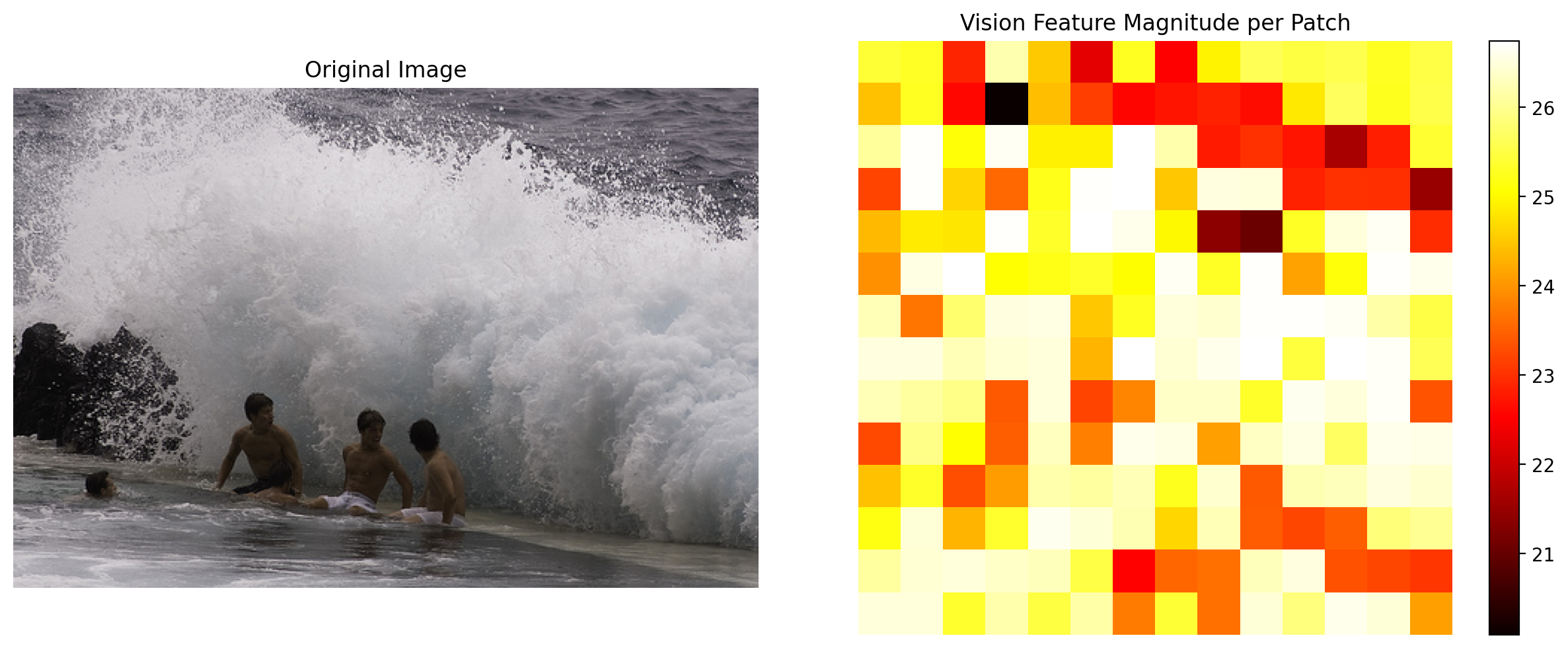
Part 10: Save Model for Future Use
Let’s save the trained model so we can use it in future notebooks (e.g., for instruction fine-tuning or object detection tasks).
import os

# Create directory for saving the model
save_dir = "mini-vlm-flickr8k"
os.makedirs(save_dir, exist_ok=True)

# Save the projector weights (the main trained component)
torch.save(vlm.projector.state_dict(), f"{save_dir}/projector.pt")

# Save the full VLM state dict (projector + language model weights)
torch.save({
    'projector_state_dict': vlm.projector.state_dict(),
    'language_model_state_dict': vlm.language_model.state_dict(),
    'config': {
        'vision_model_name': vision_model_name,
        'lm_model_name': lm_model_name,
        'vision_dim': vision_dim,
        'language_dim': language_dim,
    }
}, f"{save_dir}/mini_vlm_full.pt")

# Also save the tokenizer and image processor config for easy loading
tokenizer.save_pretrained(f"{save_dir}/tokenizer")
image_processor.save_pretrained(f"{save_dir}/image_processor")

print(f"Model saved to {save_dir}/")
print(f"Contents: {os.listdir(save_dir)}")
Model saved to mini-vlm-flickr8k/
Contents: ['image_processor', 'mini_vlm_full.pt', 'projector.pt', 'tokenizer']# Helper function to load the model (useful for next notebook)
def load_mini_vlm(save_dir, device='cuda'):
"""Load the saved MiniVLM model."""
from transformers import AutoModelForCausalLM, AutoTokenizer, ViTModel, ViTImageProcessor
# Load checkpoint
checkpoint = torch.load(f"{save_dir}/mini_vlm_full.pt", map_location=device)
config = checkpoint['config']
# Recreate components
vision_encoder = ViTModel.from_pretrained(config['vision_model_name'])
language_model = AutoModelForCausalLM.from_pretrained(config['lm_model_name'])
tokenizer = AutoTokenizer.from_pretrained(f"{save_dir}/tokenizer")
image_processor = ViTImageProcessor.from_pretrained(f"{save_dir}/image_processor")
# Recreate projector and load weights
projector = VisionProjector(config['vision_dim'], config['language_dim'])
projector.load_state_dict(checkpoint['projector_state_dict'])
# Load language model weights
language_model.load_state_dict(checkpoint['language_model_state_dict'])
# Create VLM
vlm = MiniVLM(vision_encoder, language_model, projector, tokenizer)
vlm = vlm.to(device)
return vlm, image_processor, tokenizer
print("Helper function 'load_mini_vlm' defined for loading in future notebooks.")Helper function 'load_mini_vlm' defined for loading in future notebooks.Summary
We built a minimal Vision-Language Model with three key components:
| Component | Model | Parameters | Trainable |
|---|---|---|---|
| Vision Encoder | ViT-Large-16-224 | 304M | No (frozen) |
| Projection | 2-layer MLP | ~2M | Yes |
| Language Model | SmolLM-360M | 360M | Yes |
Key Takeaways
- Architecture: VLMs combine vision encoders and language models with a projection layer
- Training: We freeze the vision encoder and train only the projector + LLM
- Data: Image-caption pairs (Flickr8k) teach the model to describe images
- Scaling: Production VLMs use larger models and much more data
- Resumable Training: Training is preemptible - interrupt with Ctrl+C and re-run to resume from checkpoint
Limitations of This Minimal Model
- Small training set (2000 images) vs millions in production
- Simple projection (MLP) vs sophisticated cross-attention mechanisms
- No instruction tuning for chat-like interactions
- No visual grounding or object detection capabilities
Next Steps
In the next blog post, we’ll take this trained VLM and: 1. Instruction fine-tune it on object detection data 2. Teach it to respond to questions like “What objects are in this image?” 3. Explore visual grounding capabilities
The saved model is in mini-vlm-flickr8k/ and can be loaded with load_mini_vlm().
Cleanup: Release GPU Memory
When done with the notebook, run this cell to free up GPU memory for other tasks.
def cleanup_gpu_memory():
    """Clean up GPU memory by deleting models and clearing cache."""
    import gc

    # List of global variables that might hold GPU tensors
    global vlm, vision_encoder, language_model, projector
    global image_features, projected_features, vision_features
    global train_loader, train_dataset, dataset

    # Delete model components
    try:
        del vlm
        print("Deleted vlm")
    except NameError:
        pass

    try:
        del vision_encoder
        print("Deleted vision_encoder")
    except NameError:
        pass

    try:
        del language_model
        print("Deleted language_model")
    except NameError:
        pass

    try:
        del projector
        print("Deleted projector")
    except NameError:
        pass

    # Delete any cached tensors
    try:
        del image_features
        del projected_features
        del vision_features
    except NameError:
        pass

    # Delete data loaders
    try:
        del train_loader
        del train_dataset
        del dataset
        print("Deleted data loaders and dataset")
    except NameError:
        pass

    # Force garbage collection
    gc.collect()

    # Clear CUDA cache
    if torch.cuda.is_available():
        torch.cuda.empty_cache()
        torch.cuda.synchronize()

        # Print memory stats
        allocated = torch.cuda.memory_allocated() / 1024**3
        reserved = torch.cuda.memory_reserved() / 1024**3
        print(f"\nGPU Memory after cleanup:")
        print(f"  Allocated: {allocated:.2f} GB")
        print(f"  Reserved:  {reserved:.2f} GB")

    print("\nGPU memory cleanup complete!")

# Run cleanup
cleanup_gpu_memory()
Deleted vlm
Deleted vision_encoder
Deleted language_model
Deleted projector
Deleted data loaders and dataset
GPU Memory after cleanup:
Allocated: 0.02 GB
Reserved: 0.05 GB
GPU memory cleanup complete!