Week 7: Model Evaluation

CS 203 – Software Tools and Techniques for AI

Prof. Nipun Batra, IIT Gandhinagar

Previously on CS 203…

Over the past six weeks, we have built up a solid foundation:

  • Weeks 1–5: We built a complete data pipeline: collect, validate, label, augment.
  • Week 6: We used foundation models (LLM APIs, multimodal AI).

We have clean, labeled, augmented data and models. Now what?

Data (Weeks 1-5)  ->  Models (Weeks 6-8)  ->  Engineering (Weeks 9-13)
                         ^
                    You are here

This week: How do we know if a model is good? How do we trust a number like “92% accuracy”?

Lecture Slide: This notebook follows the structure of the Week 7 lecture slides. Each section references the corresponding lecture section so you can connect the hands-on code to the theory.

What you will learn

By the end of this notebook you will understand:

  1. The i.i.d. assumption and why it matters for evaluation
  2. Why training accuracy is misleading
  3. How train/test split works and why a single split is unstable
  4. How model complexity causes overfitting (bias-variance tradeoff)
  5. Why validation sets are needed for model selection
  6. How to implement cross-validation – manually and with scikit-learn
  7. Stratified, Time Series, and Group K-Fold for special data structures
  8. The correct end-to-end evaluation protocol: Train -> Validate / Cross-Validate -> Test

This notebook prepares you for Week 8: Hyperparameter Tuning and AutoML, where we will use cross-validation inside automated search methods.

Section 0: Setup

Libraries we will use:

Library Purpose
numpy / pandas Data manipulation
matplotlib Plotting
torch PyTorch distributions for i.i.d. demo
sklearn.model_selection Train/test splits and cross-validation
sklearn.tree / sklearn.linear_model Models
sklearn.preprocessing / sklearn.pipeline Data transformations
import numpy as np
import pandas as pd
import matplotlib.pyplot as plt
import torch

from sklearn.model_selection import (
    train_test_split,
    cross_val_score,
    KFold,
    StratifiedKFold,
    TimeSeriesSplit,
    GroupKFold,
)

from sklearn.linear_model import LogisticRegression, LinearRegression
from sklearn.tree import DecisionTreeClassifier, DecisionTreeRegressor
from sklearn.preprocessing import PolynomialFeatures, StandardScaler
from sklearn.pipeline import Pipeline

import warnings
warnings.filterwarnings('ignore')

plt.style.use('seaborn-v0_8-whitegrid')
print('All imports successful!')
%config InlineBackend.figure_format = 'retina'
All imports successful!

Section 1: Create a Custom Dataset (Student Performance)

Lecture Slide: This dataset is used throughout the lecture. See the “Running Example” in Section 2 of the slides.

We will create a student performance dataset that mirrors a scenario you can relate to. Each row represents a student with four features:

Feature Description Range
study_hours Hours studied per week 0 – 10
attendance Class attendance percentage 50 – 100
sleep_hours Average sleep per night 4 – 9
previous_score Score in prerequisite course 40 – 95

Target: pass_fail (1 = passed, 0 = failed)

The pass probability depends on a combination of these features, with some randomness – just like real life.

np.random.seed(42)
n_students = 500

# Generate features
study_hours = np.random.uniform(0, 10, n_students)
attendance = np.random.uniform(50, 100, n_students)
sleep_hours = np.random.uniform(4, 9, n_students)
previous_score = np.random.uniform(40, 95, n_students)

# Compute pass probability using a logistic function
# More study, higher attendance, better sleep, higher prev score -> more likely to pass
z = (
    0.4 * study_hours
    + 0.03 * attendance
    + 0.3 * sleep_hours
    + 0.02 * previous_score
    - 5.0  # offset to center the probabilities
)

# Sigmoid function converts z to a probability between 0 and 1
prob_pass = 1 / (1 + np.exp(-z))

# Sample pass/fail from these probabilities (adds randomness)
pass_fail = (np.random.random(n_students) < prob_pass).astype(int)

# Create a DataFrame for easy viewing
df = pd.DataFrame({
    'study_hours': study_hours,
    'attendance': attendance,
    'sleep_hours': sleep_hours,
    'previous_score': previous_score,
    'pass_fail': pass_fail
})

print(f"Dataset: {len(df)} students")
print(f"Pass rate: {df['pass_fail'].mean():.1%}")
Dataset: 500 students
Pass rate: 89.4%
# Quick look at the data
df.head(10)
study_hours attendance sleep_hours previous_score pass_fail
0 3.745401 84.908086 4.925665 68.549498 1
1 9.507143 76.804818 6.709505 66.355003 1
2 7.319939 65.476381 8.364729 41.410314 1
3 5.986585 90.689751 7.661124 58.768631 1
4 1.560186 84.236559 8.032806 60.910759 1
5 1.559945 58.130847 7.293917 61.935253 0
6 0.580836 95.546359 7.461383 71.909480 1
7 8.661761 91.126862 8.245978 69.348140 1
8 6.011150 97.489996 5.248340 73.434780 1
9 7.080726 86.285975 6.447125 82.068579 1
df.describe().round(2)
study_hours attendance sleep_hours previous_score pass_fail
count 500.00 500.00 500.00 500.00 500.00
mean 4.99 74.10 6.59 67.31 0.89
std 2.99 14.27 1.49 15.79 0.31
min 0.05 50.23 4.02 40.18 0.00
25% 2.41 61.45 5.21 53.26 1.00
50% 5.13 73.59 6.70 67.99 1.00
75% 7.56 86.32 7.89 80.56 1.00
max 9.93 99.99 9.00 94.91 1.00

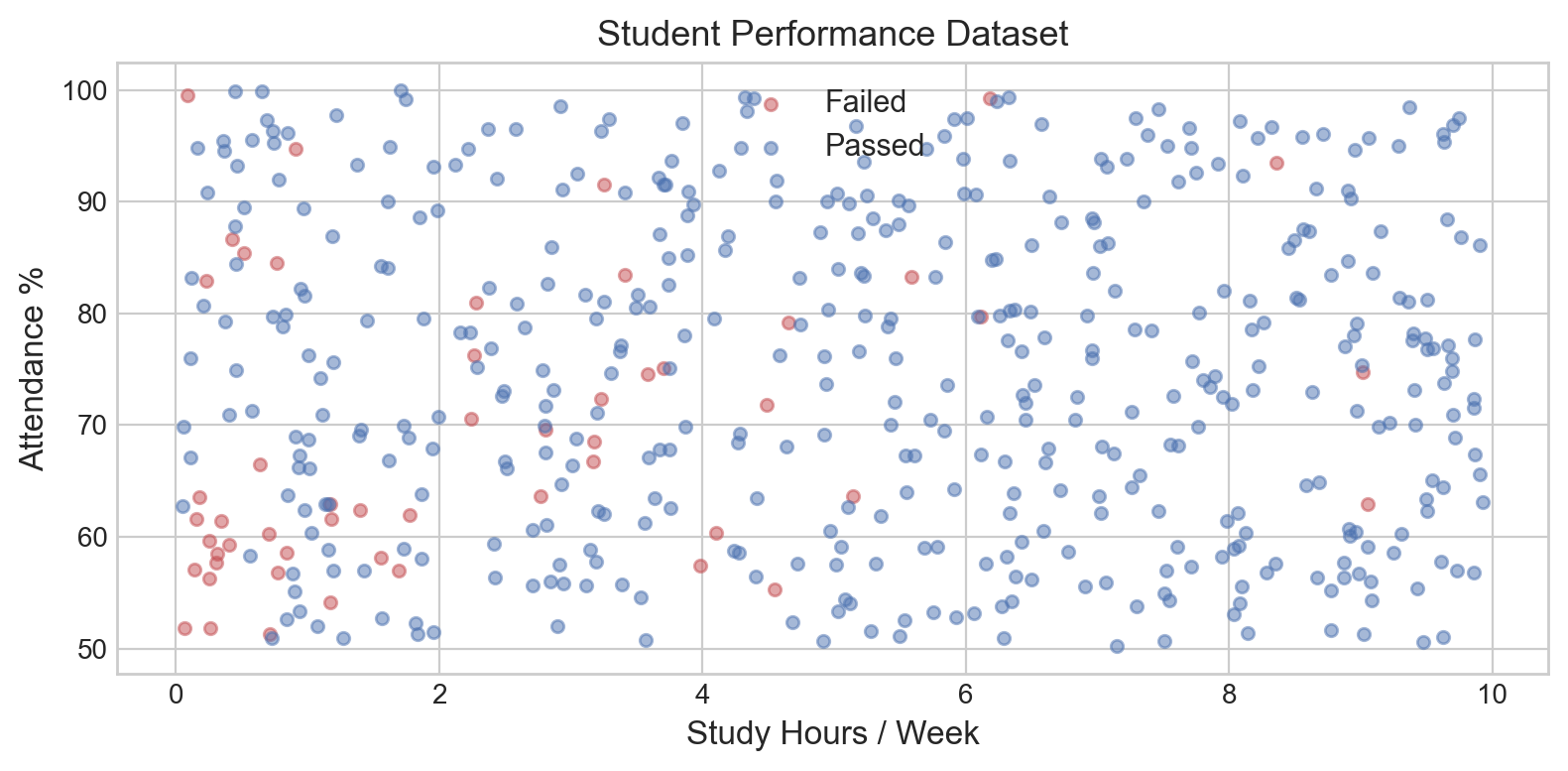
The summary statistics above confirm our features span their intended ranges. The pass rate tells us whether we have a roughly balanced dataset or a skewed one – this will matter later when we discuss stratification (Section 10).

# Visualize: study_hours vs attendance, colored by pass/fail
fig, ax = plt.subplots(figsize=(8, 4))

passed = df[df['pass_fail'] == 1]
failed = df[df['pass_fail'] == 0]

ax.scatter(failed['study_hours'], failed['attendance'],
           c='#C44E52', alpha=0.5, s=20, label='Failed')
ax.scatter(passed['study_hours'], passed['attendance'],
           c='#4C72B0', alpha=0.5, s=20, label='Passed')

ax.set_xlabel('Study Hours / Week', fontsize=12)
ax.set_ylabel('Attendance %', fontsize=12)
ax.set_title('Student Performance Dataset', fontsize=13)
ax.legend(fontsize=11)
plt.tight_layout()
plt.show()

print("Students who study more and attend class more tend to pass.")
print("But there is overlap -- the boundary is not clean.")

Students who study more and attend class more tend to pass.
But there is overlap -- the boundary is not clean.

Interpretation: The scatter plot shows a general trend (more study hours and higher attendance correlate with passing), but the two classes overlap significantly. This means no model can achieve 100% accuracy on truly new data – there is irreducible noise in the system. Keep this in mind as we proceed: any model claiming perfect accuracy is almost certainly overfitting.

# Prepare features (X) and target (y) as numpy arrays
X = df[['study_hours', 'attendance', 'sleep_hours', 'previous_score']].values
y = df['pass_fail'].values

print(f"Features shape: {X.shape}  (500 students, 4 features)")
print(f"Target shape:   {y.shape}")
Features shape: (500, 4)  (500 students, 4 features)
Target shape:   (500,)

Now that we have our dataset ready, let us first understand the fundamental assumption that makes machine learning evaluation possible: the i.i.d. assumption.

Section 2: The i.i.d. Assumption

Lecture Slide: See Section 1 of the lecture – “The Data Distribution and i.i.d.”

All our data comes from some unknown probability distribution D over (x, y) pairs. We never see D directly – we only get samples drawn from it.

We assume our data points are i.i.d.: independent and identically distributed.

  • Identically distributed: Every data point comes from the same distribution D.
  • Independent: Knowing one data point tells you nothing about another.

If i.i.d. holds, then patterns learned from training data should apply to test data (because both come from the same D). Let us demonstrate this with PyTorch distributions.

2a. Drawing i.i.d. samples from the same distribution

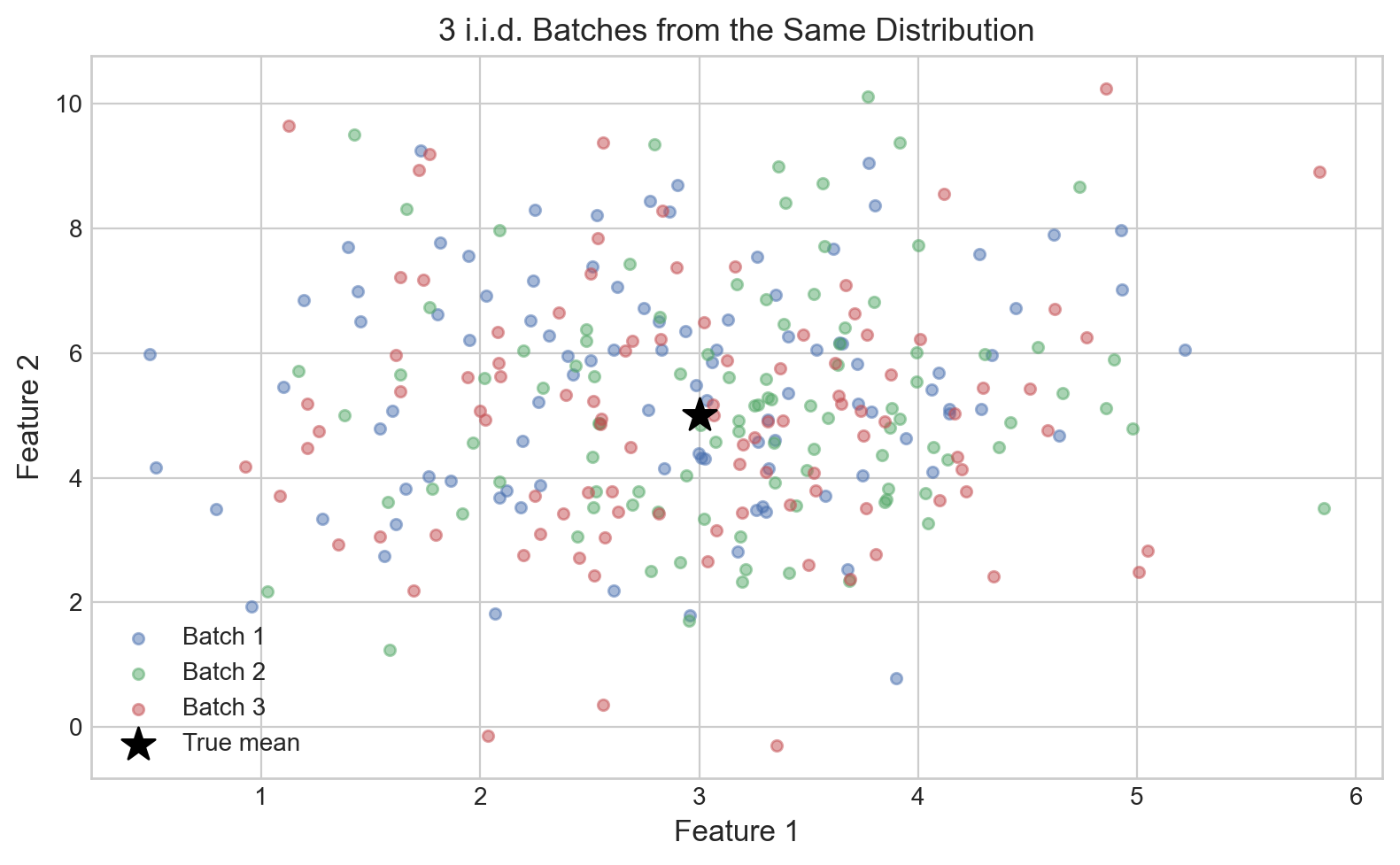
We will create a “true” 2D Normal distribution and draw multiple independent batches of samples. Since they are all i.i.d. from the same D, their statistics should be similar.

# Define a 2D Normal distribution (the "true" unknown distribution D)
torch.manual_seed(42)

true_mean = torch.tensor([3.0, 5.0])
true_std = torch.tensor([1.0, 2.0])
D = torch.distributions.Independent(
    torch.distributions.Normal(loc=true_mean, scale=true_std),
    reinterpreted_batch_ndims=1
)

print(f"True distribution: 2D Normal")
print(f"  Mean: {true_mean.numpy()}")
print(f"  Std:  {true_std.numpy()}")
print()

# Draw 3 independent batches of i.i.d. samples
batch_sizes = [100, 100, 100]
batches = [D.sample((n,)) for n in batch_sizes]

print("Statistics of 3 independent i.i.d. batches (each 100 samples):")
print(f"{'Batch':>6s}  {'Mean[0]':>8s}  {'Mean[1]':>8s}  {'Std[0]':>7s}  {'Std[1]':>7s}")
print('=' * 42)
for i, batch in enumerate(batches):
    m = batch.mean(dim=0)
    s = batch.std(dim=0)
    print(f"{i+1:>6d}  {m[0]:>8.2f}  {m[1]:>8.2f}  {s[0]:>7.2f}  {s[1]:>7.2f}")

print(f"{'True':>6s}  {true_mean[0]:>8.2f}  {true_mean[1]:>8.2f}  {true_std[0]:>7.2f}  {true_std[1]:>7.2f}")
True distribution: 2D Normal
  Mean: [3. 5.]
  Std:  [1. 2.]

Statistics of 3 independent i.i.d. batches (each 100 samples):
 Batch   Mean[0]   Mean[1]   Std[0]   Std[1]
==========================================
     1      2.85      5.49     1.03     1.78
     2      3.17      5.18     0.91     1.84
     3      2.98      4.95     1.02     2.01
  True      3.00      5.00     1.00     2.00
# Visualize: all 3 batches on the same scatter plot
fig, ax = plt.subplots(figsize=(8, 5))

colors = ['#4C72B0', '#55A868', '#C44E52']
for i, batch in enumerate(batches):
    ax.scatter(batch[:, 0].numpy(), batch[:, 1].numpy(),
              c=colors[i], alpha=0.5, s=20, label=f'Batch {i+1}')

ax.scatter(*true_mean.numpy(), c='black', s=200, marker='*',
           zorder=5, label='True mean')

ax.set_xlabel('Feature 1', fontsize=12)
ax.set_ylabel('Feature 2', fontsize=12)
ax.set_title('3 i.i.d. Batches from the Same Distribution', fontsize=13)
ax.legend(fontsize=10)
plt.tight_layout()
plt.show()

print("All three batches cluster around the same region.")
print("This is WHY train/test split works: both sets come from the same D.")

All three batches cluster around the same region.
This is WHY train/test split works: both sets come from the same D.

Interpretation: All three batches have similar means and standard deviations, and they overlap in the scatter plot. This is the i.i.d. property in action: because every sample comes from the same distribution D, any subset of data is statistically similar to any other. This is precisely why we can train on one subset and expect the model to generalize to another.

2b. Distribution shift: What happens when i.i.d. breaks (not identically distributed)

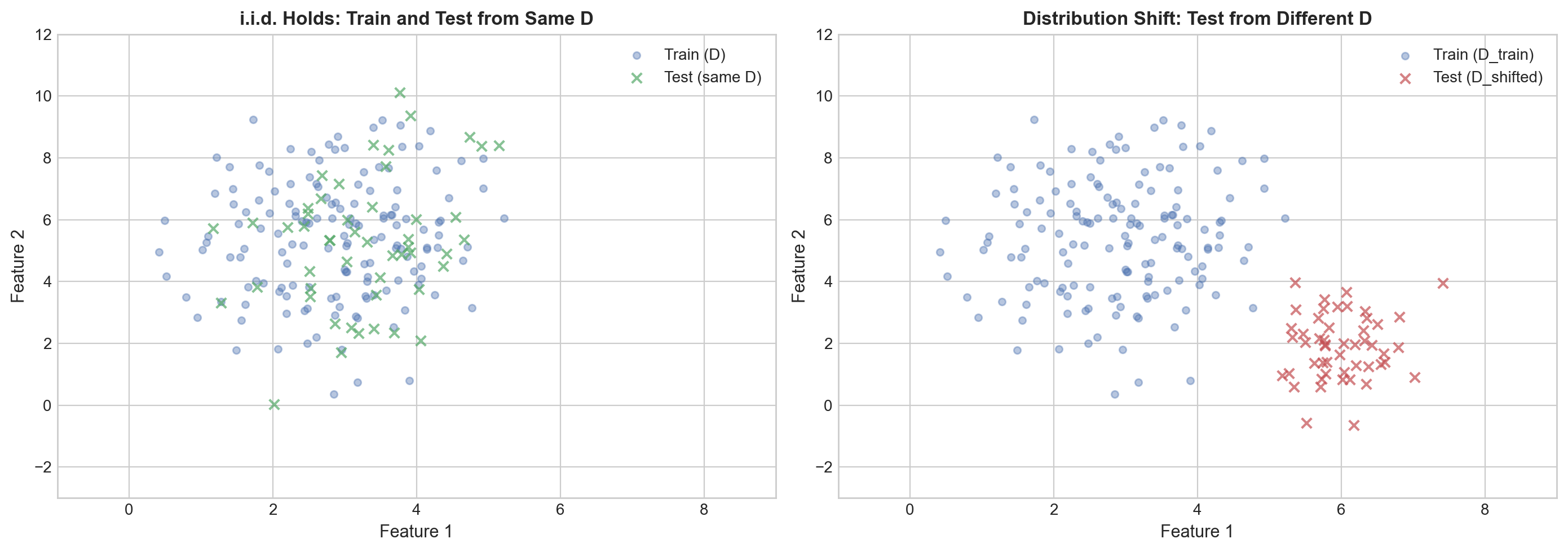
Now let us see what happens when the test data comes from a different distribution. This is called distribution shift – the model was trained on one population but deployed on a different one.

# Same training distribution
torch.manual_seed(42)
D_train = torch.distributions.Independent(
    torch.distributions.Normal(loc=torch.tensor([3.0, 5.0]),
                                scale=torch.tensor([1.0, 2.0])),
    reinterpreted_batch_ndims=1
)

# DIFFERENT test distribution (shifted mean, different spread)
D_test_shifted = torch.distributions.Independent(
    torch.distributions.Normal(loc=torch.tensor([6.0, 2.0]),
                                scale=torch.tensor([0.5, 1.0])),
    reinterpreted_batch_ndims=1
)

train_samples = D_train.sample((150,))
test_iid = D_train.sample((50,))          # i.i.d. test set (same D)
test_shifted = D_test_shifted.sample((50,)) # shifted test set (different D!)

print("Train samples (from D_train):")
print(f"  Mean: [{train_samples[:, 0].mean():.2f}, {train_samples[:, 1].mean():.2f}]")
print()
print("Test i.i.d. (from D_train):")
print(f"  Mean: [{test_iid[:, 0].mean():.2f}, {test_iid[:, 1].mean():.2f}]")
print()
print("Test SHIFTED (from D_test_shifted):")
print(f"  Mean: [{test_shifted[:, 0].mean():.2f}, {test_shifted[:, 1].mean():.2f}]")
print()
print("The shifted test set has very different statistics!")
Train samples (from D_train):
  Mean: [2.87, 5.38]

Test i.i.d. (from D_train):
  Mean: [3.26, 5.27]

Test SHIFTED (from D_test_shifted):
  Mean: [5.99, 1.89]

The shifted test set has very different statistics!
# Visualize distribution shift
fig, axes = plt.subplots(1, 2, figsize=(14, 5))

# Left: i.i.d. case
axes[0].scatter(train_samples[:, 0].numpy(), train_samples[:, 1].numpy(),
               c='#4C72B0', alpha=0.4, s=20, label='Train (D)')
axes[0].scatter(test_iid[:, 0].numpy(), test_iid[:, 1].numpy(),
               c='#55A868', alpha=0.7, s=40, marker='x', label='Test (same D)')
axes[0].set_title('i.i.d. Holds: Train and Test from Same D', fontsize=12, fontweight='bold')
axes[0].set_xlabel('Feature 1', fontsize=11)
axes[0].set_ylabel('Feature 2', fontsize=11)
axes[0].legend(fontsize=10)
axes[0].set_xlim(-1, 9)
axes[0].set_ylim(-3, 12)

# Right: distribution shift
axes[1].scatter(train_samples[:, 0].numpy(), train_samples[:, 1].numpy(),
               c='#4C72B0', alpha=0.4, s=20, label='Train (D_train)')
axes[1].scatter(test_shifted[:, 0].numpy(), test_shifted[:, 1].numpy(),
               c='#C44E52', alpha=0.7, s=40, marker='x', label='Test (D_shifted)')
axes[1].set_title('Distribution Shift: Test from Different D', fontsize=12, fontweight='bold')
axes[1].set_xlabel('Feature 1', fontsize=11)
axes[1].set_ylabel('Feature 2', fontsize=11)
axes[1].legend(fontsize=10)
axes[1].set_xlim(-1, 9)
axes[1].set_ylim(-3, 12)

plt.tight_layout()
plt.show()

print("Left: train and test overlap -- model generalizes well.")
print("Right: train and test are in different regions -- model will fail!")

Left: train and test overlap -- model generalizes well.
Right: train and test are in different regions -- model will fail!

Interpretation: When the test data comes from the same distribution as the training data (left), they overlap and a model trained on the blue points will generalize to the green points. When the test data comes from a shifted distribution (right), the red test points are in a completely different region of the feature space. A model trained on the blue points has never seen anything like the red points and will likely make poor predictions. This is distribution shift – examples include training on summer data but deploying in winter, or training in a lab but deploying in the real world.

2c. Independence violation: correlated samples

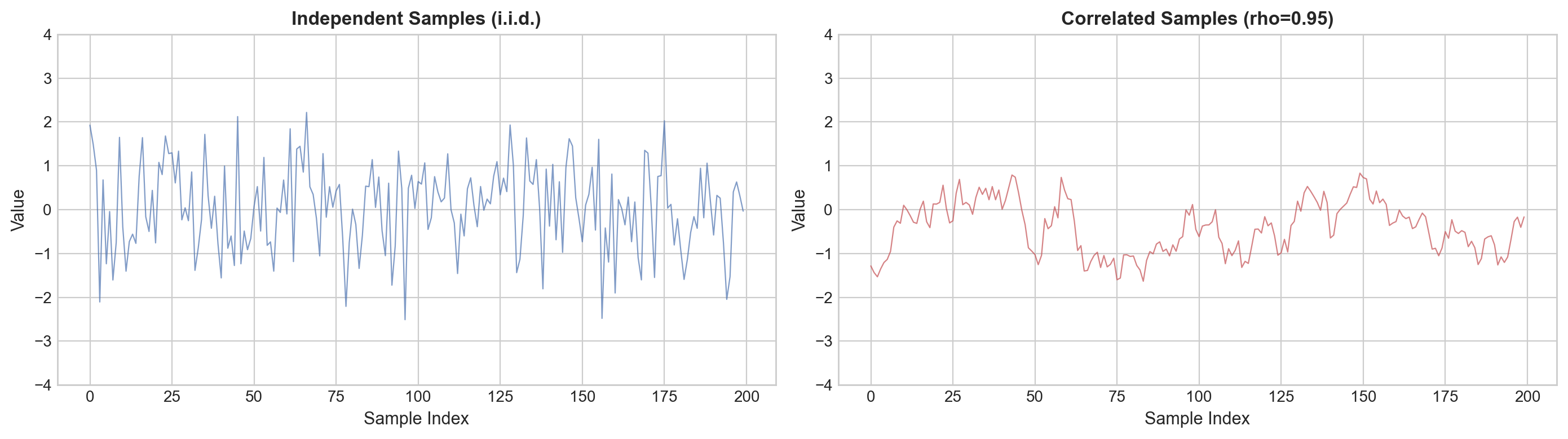
The other half of i.i.d. is independence – knowing one sample should tell you nothing about the next. Let us see what happens when samples are correlated (e.g., time series data where each value depends on the previous one).

torch.manual_seed(42)
n_samples = 200

# Independent samples from Normal(0, 1)
D_indep = torch.distributions.Normal(0, 1)
independent_samples = D_indep.sample((n_samples,))

# Correlated samples: each depends on the previous (AR(1) process)
correlated_samples = torch.zeros(n_samples)
correlated_samples[0] = D_indep.sample()
rho = 0.95  # strong correlation with previous sample
for t in range(1, n_samples):
    correlated_samples[t] = rho * correlated_samples[t-1] + D_indep.sample() * np.sqrt(1 - rho**2)

# Both have the same marginal distribution (mean~0, std~1) but very different behavior
print(f"Independent samples:  mean={independent_samples.mean():.3f}, std={independent_samples.std():.3f}")
print(f"Correlated samples:   mean={correlated_samples.mean():.3f}, std={correlated_samples.std():.3f}")
print()
print("Similar marginal statistics, but the samples behave very differently!")
Independent samples:  mean=0.046, std=0.982
Correlated samples:   mean=-0.414, std=0.597

Similar marginal statistics, but the samples behave very differently!
# Visualize: time series of independent vs correlated
fig, axes = plt.subplots(1, 2, figsize=(14, 4))

axes[0].plot(independent_samples.numpy(), color='#4C72B0', alpha=0.7, linewidth=0.8)
axes[0].set_title('Independent Samples (i.i.d.)', fontsize=12, fontweight='bold')
axes[0].set_xlabel('Sample Index', fontsize=11)
axes[0].set_ylabel('Value', fontsize=11)
axes[0].set_ylim(-4, 4)

axes[1].plot(correlated_samples.numpy(), color='#C44E52', alpha=0.7, linewidth=0.8)
axes[1].set_title(f'Correlated Samples (rho={rho})', fontsize=12, fontweight='bold')
axes[1].set_xlabel('Sample Index', fontsize=11)
axes[1].set_ylabel('Value', fontsize=11)
axes[1].set_ylim(-4, 4)

plt.tight_layout()
plt.show()

print("Left: independent -- each sample jumps around randomly.")
print("Right: correlated -- each sample is close to the previous one (smooth trends).")
print()
print("If you randomly split the right plot into train/test, nearby points")
print("in the test set are predictable from nearby training points.")
print("This is data leakage -- the model gets unfairly 'easy' test points.")

Left: independent -- each sample jumps around randomly.
Right: correlated -- each sample is close to the previous one (smooth trends).

If you randomly split the right plot into train/test, nearby points
in the test set are predictable from nearby training points.
This is data leakage -- the model gets unfairly 'easy' test points.
# Histograms: both look similar despite different dependence structure
fig, axes = plt.subplots(1, 2, figsize=(12, 4))

axes[0].hist(independent_samples.numpy(), bins=25, color='#4C72B0',
            edgecolor='black', alpha=0.7)
axes[0].set_title('Histogram: Independent', fontsize=12)
axes[0].set_xlabel('Value', fontsize=11)
axes[0].set_ylabel('Count', fontsize=11)

axes[1].hist(correlated_samples.numpy(), bins=25, color='#C44E52',
            edgecolor='black', alpha=0.7)
axes[1].set_title('Histogram: Correlated', fontsize=12)
axes[1].set_xlabel('Value', fontsize=11)
axes[1].set_ylabel('Count', fontsize=11)

plt.tight_layout()
plt.show()

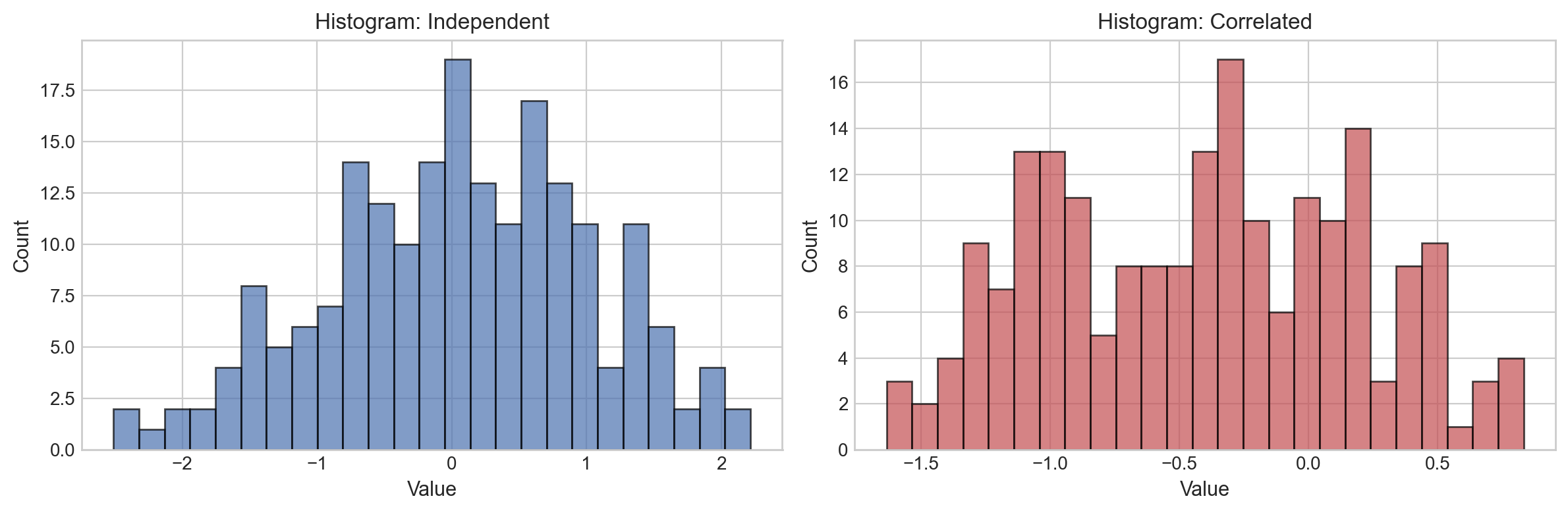
print("The histograms look similar -- both are roughly Normal(0, 1).")
print("You cannot detect dependence from marginal distributions alone!")
print("This is why you need domain knowledge to know when independence is violated.")

The histograms look similar -- both are roughly Normal(0, 1).
You cannot detect dependence from marginal distributions alone!
This is why you need domain knowledge to know when independence is violated.

Interpretation: The key lesson is that independence violations are invisible in histograms or summary statistics. Both samples have the same marginal distribution, but the correlated samples have strong sequential dependence. When independence is violated:

  • Random train/test splits create data leakage (nearby correlated points end up in both sets)
  • Standard cross-validation gives optimistically biased estimates
  • We need special evaluation strategies like TimeSeriesSplit or GroupKFold (Section 10)

Most of this notebook assumes i.i.d. holds. When it does not (time series, grouped data), we will use special CV strategies in Section 10.

Section 3: Why Training Accuracy Is Misleading

Lecture Slide: See Section 2 of the lecture – “Why Not Evaluate on Training Data?”

A common beginner mistake: train a model on the entire dataset, then check its accuracy on that same dataset.

Let us see why this gives a false sense of performance.

# Train a decision tree on ALL the data (no depth limit)
model = DecisionTreeClassifier(random_state=42)  # unlimited depth
model.fit(X, y)

train_score = model.score(X, y)
print(f"Training accuracy: {train_score:.1%}")
Training accuracy: 100.0%

100% accuracy! Should we celebrate?

No. The model memorized every single training example. An unlimited-depth decision tree can create a unique leaf for each data point, effectively building a lookup table rather than learning general patterns.

Think of it this way: a student who memorizes all practice problems word-for-word will score 100% on those exact problems, but likely much lower on the actual exam with new questions.

Key insight: Training accuracy measures how well the model memorizes, not how well it generalizes. We need to evaluate on data the model has never seen.

Lecture Slide: This is the core argument of Lecture Section 2 – training error is an optimistic (and often useless) estimate of true performance.

We have established that training accuracy is misleading. The natural next step is to hold out some data for testing. That is exactly what train/test split does.

Section 4: Train/Test Split

Lecture Slide: See Section 2 of the lecture – “The Basic Idea: Hold Out Test Data.”

Idea: Hold out some data that the model never sees during training. Evaluate on that held-out data.

Typical split: 80% train, 20% test.

# Split: 80% for training, 20% for testing
X_train, X_test, y_train, y_test = train_test_split(
    X, y, test_size=0.2, random_state=42
)

print(f"Training samples: {len(X_train)}")
print(f"Test samples:     {len(X_test)}")
Training samples: 400
Test samples:     100
# Train a decision tree (no depth limit) on the TRAINING set only
model = DecisionTreeClassifier(random_state=42)
model.fit(X_train, y_train)

# Evaluate on BOTH sets
train_acc = model.score(X_train, y_train)
test_acc = model.score(X_test, y_test)

print(f"Training accuracy: {train_acc:.1%}")
print(f"Test accuracy:     {test_acc:.1%}")
print(f"Gap:               {train_acc - test_acc:.1%}")
Training accuracy: 100.0%
Test accuracy:     83.0%
Gap:               17.0%

Interpretation:

  • Training accuracy is very high – the model memorized the training data.
  • Test accuracy is notably lower – on new data, those memorized rules break down.
  • The gap between train and test accuracy is our overfitting indicator. A large gap means the model learned noise rather than signal.

The test accuracy is our actual estimate of real-world performance. But can we trust this single number? What if we happened to get an “easy” or “hard” test set? Let us find out.

Section 5: Instability of a Single Split

Lecture Slide: See Section 2 of the lecture – “Problem: One Split Is Unreliable.”

The test accuracy depends on which students happened to end up in the test set. Different random splits produce different results.

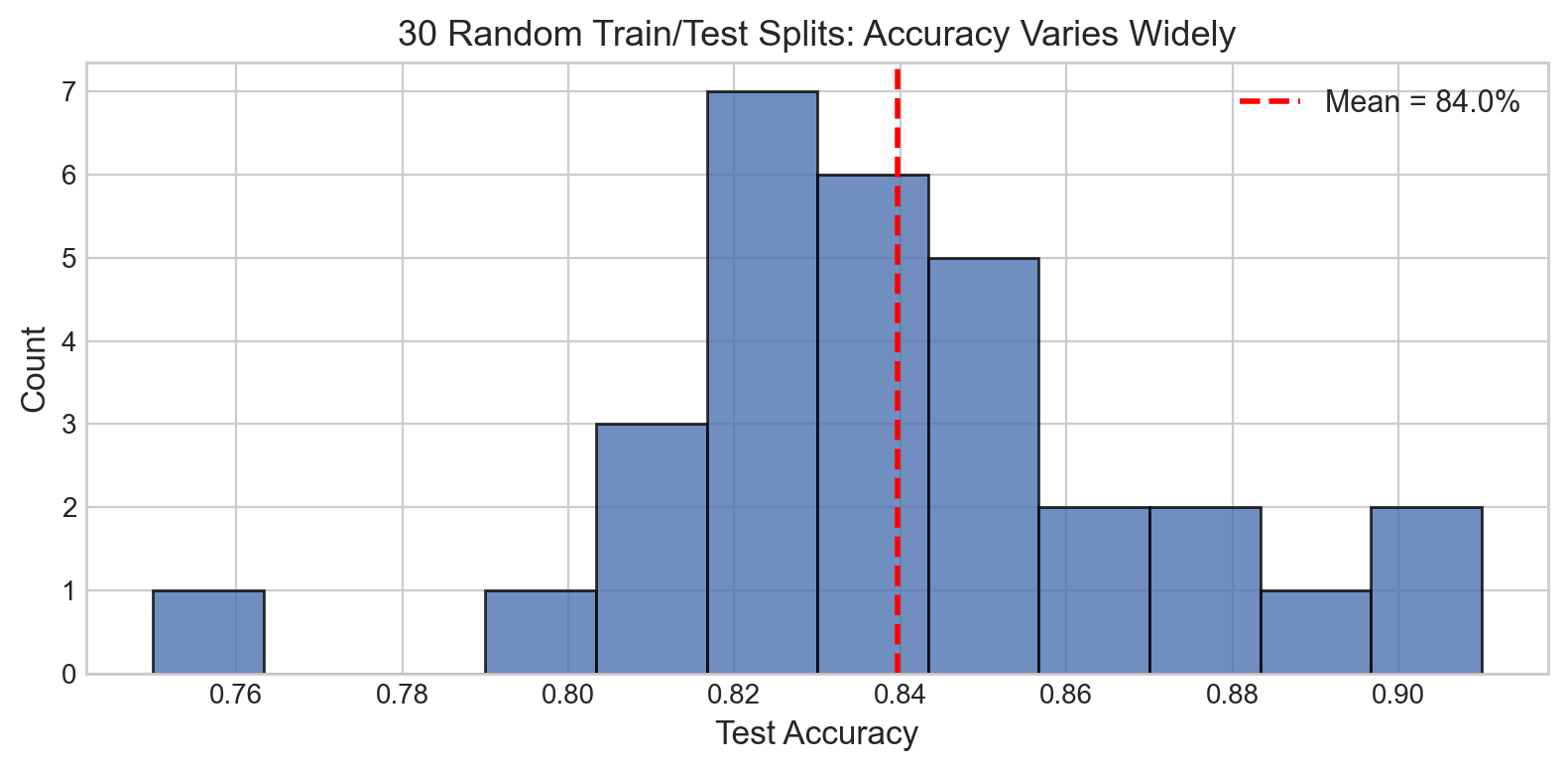
Let us run 30 different splits and observe how much the score varies.

# Try 30 different random splits
scores = []

for seed in range(30):
    # Each seed gives a different random split
    X_tr, X_te, y_tr, y_te = train_test_split(
        X, y, test_size=0.2, random_state=seed
    )
    model = DecisionTreeClassifier(random_state=42)
    model.fit(X_tr, y_tr)
    scores.append(model.score(X_te, y_te))

scores = np.array(scores)

print(f"Min test accuracy:  {scores.min():.1%}")
print(f"Max test accuracy:  {scores.max():.1%}")
print(f"Range:              {scores.max() - scores.min():.1%}")
print(f"Mean:               {scores.mean():.1%}")
print(f"Std:                {scores.std():.1%}")
Min test accuracy:  75.0%
Max test accuracy:  91.0%
Range:              16.0%
Mean:               84.0%
Std:                3.3%

Interpretation: The accuracy can swing by several percentage points depending purely on which students ended up in the test set. If you reported just one of these numbers, you could be unlucky (low estimate) or lucky (high estimate). Neither tells the full story.

# Plot the distribution of test accuracies
fig, ax = plt.subplots(figsize=(8, 4))

ax.hist(scores, bins=12, color='#4C72B0', edgecolor='black', alpha=0.8)
ax.axvline(scores.mean(), color='red', linestyle='--', linewidth=2,
           label=f'Mean = {scores.mean():.1%}')

ax.set_xlabel('Test Accuracy', fontsize=12)
ax.set_ylabel('Count', fontsize=12)
ax.set_title('30 Random Train/Test Splits: Accuracy Varies Widely', fontsize=13)
ax.legend(fontsize=11)
plt.tight_layout()
plt.show()

Key takeaway: A single train/test split gives a noisy estimate. The histogram above shows a wide spread – you would not want to make deployment decisions based on a single draw from this distribution.

We need a more stable evaluation method. That is cross-validation, which we will get to in Section 8.

But first, let us understand WHY overfitting happens by examining model complexity.

Section 6: Model Complexity and Overfitting

Lecture Slide: See Section 3 of the lecture – “Model Complexity: Underfitting, Overfitting, and the Sweet Spot.”

Every model has a “complexity knob.” Turning it up makes the model more flexible:

  • Polynomial regression: the degree of the polynomial
  • Decision trees: the maximum depth
  • Neural networks: the number of layers and neurons

Too little complexity: the model cannot capture the true pattern (underfitting). Too much complexity: the model memorizes noise instead of learning patterns (overfitting).

The sweet spot in between is what we are looking for.

6a. Regression Example: Polynomial Fits

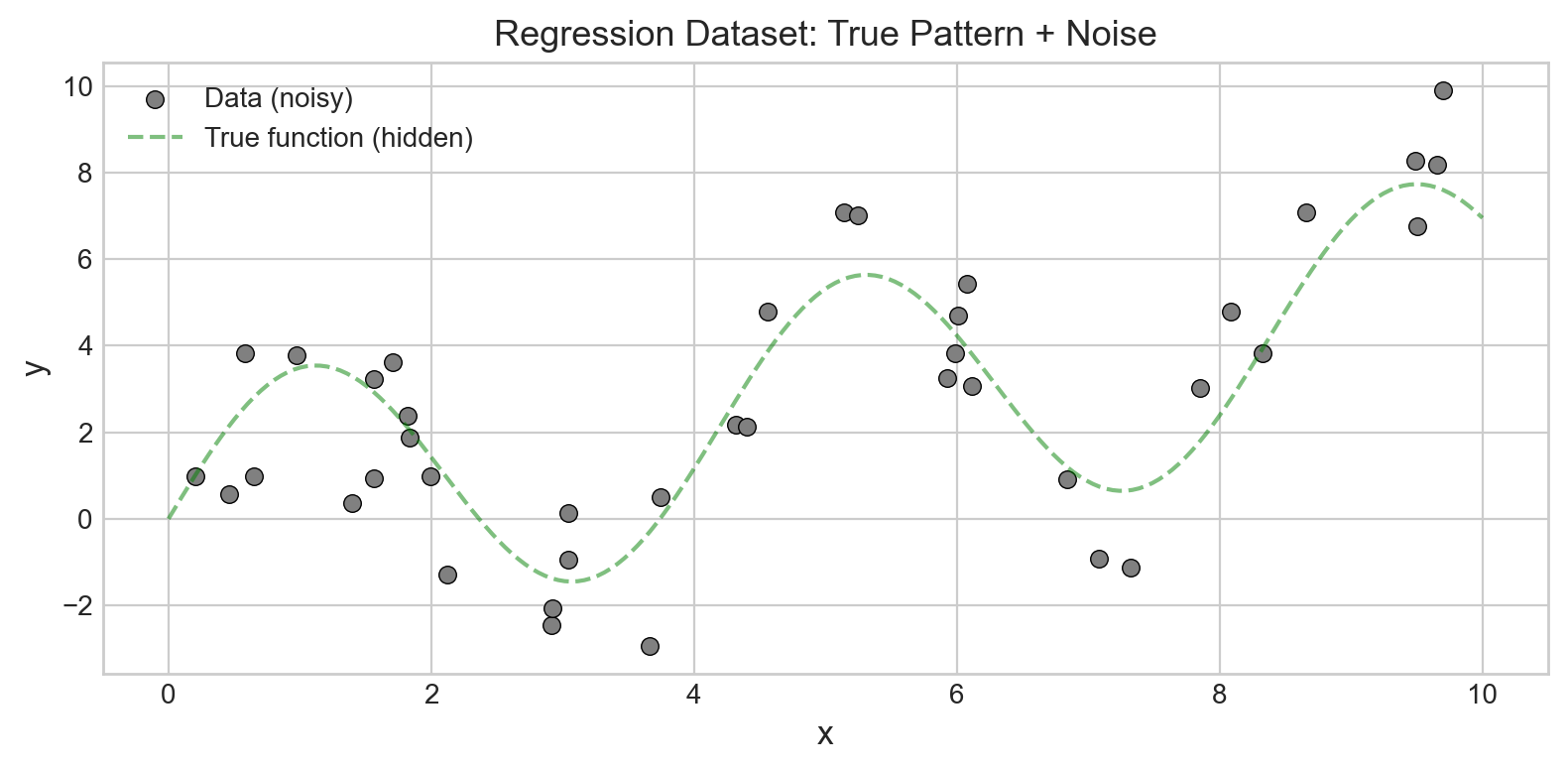
Let us create a simple 1D regression dataset where the true relationship is a smooth curve. We will fit polynomials of increasing degree and watch what happens.

# Create a nonlinear regression dataset
np.random.seed(42)
n_points = 40

x = np.sort(np.random.uniform(0, 10, n_points))
y_true = np.sin(1.5 * x) * 3 + 0.5 * x  # the true underlying pattern
noise = np.random.normal(0, 1.5, n_points)
y_noisy = y_true + noise

# Reshape for sklearn (needs 2D input)
X_reg = x.reshape(-1, 1)
y_reg = y_noisy

# Plot
fig, ax = plt.subplots(figsize=(8, 4))
ax.scatter(x, y_noisy, c='gray', s=40, edgecolors='black',
           linewidths=0.5, label='Data (noisy)')
x_smooth = np.linspace(0, 10, 200)
ax.plot(x_smooth, np.sin(1.5 * x_smooth) * 3 + 0.5 * x_smooth,
        'g--', alpha=0.5, label='True function (hidden)')
ax.set_xlabel('x', fontsize=12)
ax.set_ylabel('y', fontsize=12)
ax.set_title('Regression Dataset: True Pattern + Noise', fontsize=13)
ax.legend(fontsize=10)
plt.tight_layout()
plt.show()

print("The model only sees the gray dots. It does NOT know the green dashed line.")
print("Can it learn the pattern without memorizing the noise?")

The model only sees the gray dots. It does NOT know the green dashed line.
Can it learn the pattern without memorizing the noise?

Interpretation: The gray dots are our observed data – they follow a smooth trend (green dashed line) but with random noise added. A good model should recover the smooth trend. A bad model will either ignore the curve (too simple) or chase every noisy bump (too complex).

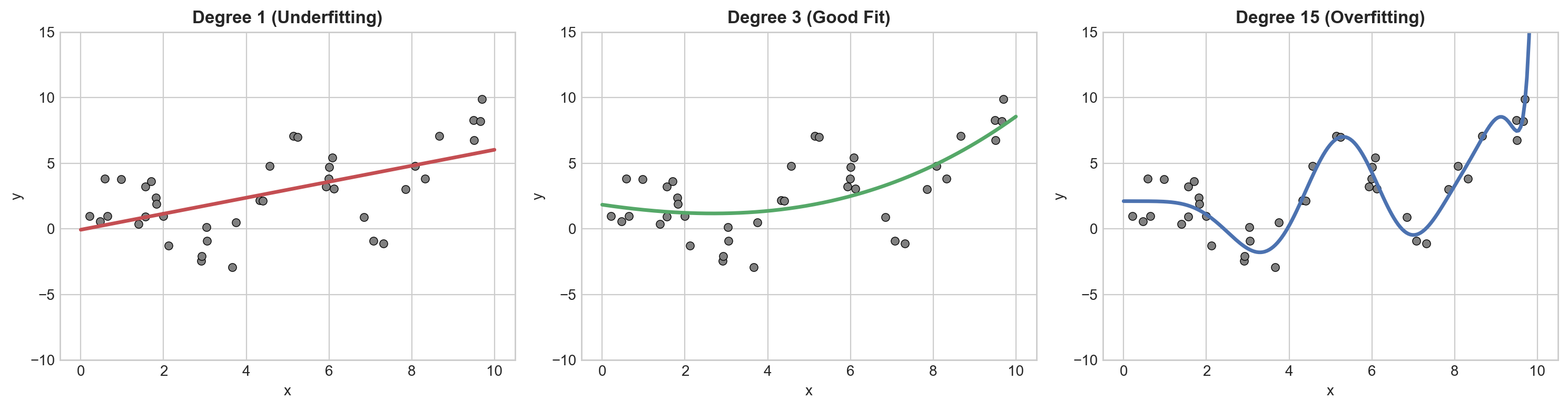
Let us see all three scenarios side by side.

# Fit polynomials of degree 1, 3, and 15
fig, axes = plt.subplots(1, 3, figsize=(15, 4))
degrees = [1, 3, 15]
titles = ['Degree 1 (Underfitting)', 'Degree 3 (Good Fit)', 'Degree 15 (Overfitting)']
colors = ['#C44E52', '#55A868', '#4C72B0']

x_plot = np.linspace(0, 10, 200).reshape(-1, 1)

for ax, deg, title, color in zip(axes, degrees, titles, colors):
    # Build a polynomial regression pipeline
    pipe = Pipeline([
        ('poly', PolynomialFeatures(degree=deg)),
        ('lr', LinearRegression())
    ])
    pipe.fit(X_reg, y_reg)
    y_pred = pipe.predict(x_plot)

    # Plot
    ax.scatter(x, y_noisy, c='gray', s=30, edgecolors='black', linewidths=0.5)
    ax.plot(x_plot, y_pred, color=color, linewidth=2.5)
    ax.set_title(title, fontsize=12, fontweight='bold')
    ax.set_xlabel('x')
    ax.set_ylabel('y')
    ax.set_ylim(-10, 15)

plt.tight_layout()
plt.show()

print("Degree 1:  Too simple -- misses the curve entirely (UNDERFITTING)")
print("Degree 3:  Captures the pattern without memorizing noise (GOOD FIT)")
print("Degree 15: Wiggles through every data point -- memorizes noise (OVERFITTING)")

Degree 1:  Too simple -- misses the curve entirely (UNDERFITTING)
Degree 3:  Captures the pattern without memorizing noise (GOOD FIT)
Degree 15: Wiggles through every data point -- memorizes noise (OVERFITTING)

Interpretation:

  • Degree 1 (left): A straight line cannot capture the sinusoidal pattern. This is underfitting – the model is too simple for the data. It has high bias.
  • Degree 3 (center): A cubic polynomial captures the overall shape without chasing individual noisy points. This is the sweet spot.
  • Degree 15 (right): The polynomial wiggles wildly to pass through (or near) every data point. If we added one new data point, the prediction could be way off. This is overfitting – the model has high variance.

Lecture Slide: This is the visual intuition behind the bias-variance tradeoff discussed in Section 3 of the lecture.

6b. Training Error vs Test Error as Complexity Increases

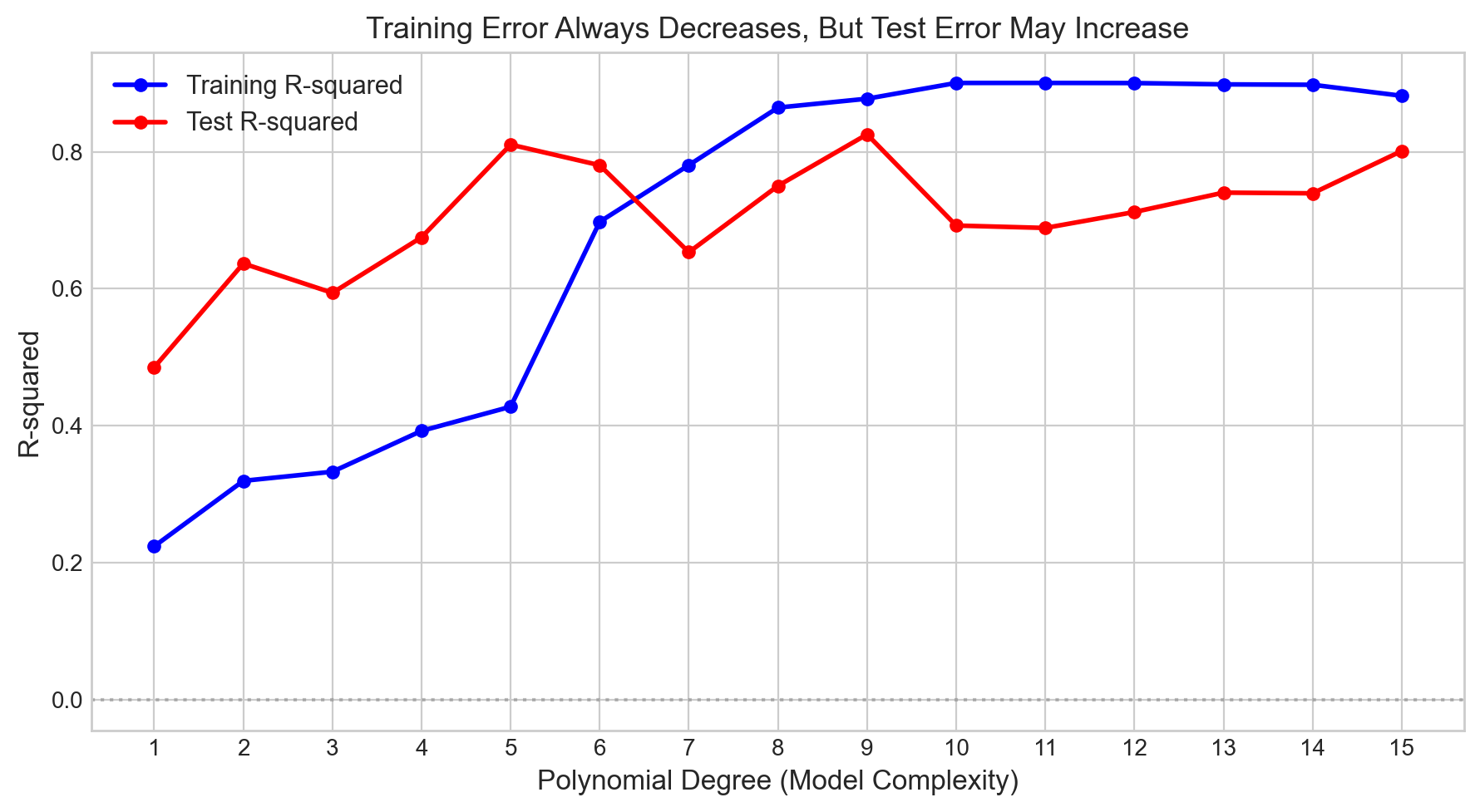
Let us quantify this: how do training and test scores change as polynomial degree increases? This produces the classic “U-shaped” test error curve from the lecture.

# Split regression data into train/test
X_r_train, X_r_test, y_r_train, y_r_test = train_test_split(
    X_reg, y_reg, test_size=0.3, random_state=42
)

# Track train/test R-squared for degrees 1 through 15
degrees_range = range(1, 16)
train_r2 = []
test_r2 = []

for deg in degrees_range:
    pipe = Pipeline([
        ('poly', PolynomialFeatures(degree=deg)),
        ('lr', LinearRegression())
    ])
    pipe.fit(X_r_train, y_r_train)
    train_r2.append(pipe.score(X_r_train, y_r_train))
    test_r2.append(pipe.score(X_r_test, y_r_test))

# Plot both curves
fig, ax = plt.subplots(figsize=(9, 5))
ax.plot(list(degrees_range), train_r2, 'b-o', linewidth=2, markersize=5,
        label='Training R-squared')
ax.plot(list(degrees_range), test_r2, 'r-o', linewidth=2, markersize=5,
        label='Test R-squared')
ax.axhline(0, color='gray', linestyle=':', alpha=0.5)
ax.set_xlabel('Polynomial Degree (Model Complexity)', fontsize=12)
ax.set_ylabel('R-squared', fontsize=12)
ax.set_title('Training Error Always Decreases, But Test Error May Increase', fontsize=13)
ax.legend(fontsize=11)
ax.set_xticks(list(degrees_range))
plt.tight_layout()
plt.show()

best_deg = list(degrees_range)[np.argmax(test_r2)]
print(f"Key lesson:")
print(f"  Training R-squared always goes up (more complex = better memorization)")
print(f"  Test R-squared peaks at degree {best_deg} then drops (overfitting!)")

Key lesson:
  Training R-squared always goes up (more complex = better memorization)
  Test R-squared peaks at degree 9 then drops (overfitting!)

Interpretation: This plot is one of the most important diagrams in machine learning.

  • The blue line (training R-squared) steadily increases – a more complex model can always fit the training data better.
  • The red line (test R-squared) rises initially, peaks at a moderate complexity, then drops as the model starts overfitting.
  • The gap between the two lines is the overfitting gap. When they diverge sharply, the model is memorizing rather than learning.

If we only looked at training R-squared, we would always pick the most complex model. That is why we need test (or validation) data to make good decisions.

Lecture Slide: Compare this plot to the theoretical bias-variance curve in Section 3 of the lecture slides.

6c. Decision Tree Depth: Same Story for Classification

The same pattern applies to our student classification problem. The complexity knob for decision trees is max_depth. Let us see what happens as we increase it.

# Track train/test accuracy for different tree depths
depths = [1, 2, 3, 5, 7, 10, 15, 20, None]  # None = unlimited
train_accs = []
test_accs = []

for depth in depths:
    dt = DecisionTreeClassifier(max_depth=depth, random_state=42)
    dt.fit(X_train, y_train)
    train_accs.append(dt.score(X_train, y_train))
    test_accs.append(dt.score(X_test, y_test))

# Print as a table
print(f"{'Depth':>6s}  {'Train Acc':>10s}  {'Test Acc':>10s}  {'Gap':>6s}")
print('=' * 38)
for d, tr, te in zip(depths, train_accs, test_accs):
    d_str = str(d) if d is not None else 'None'
    print(f"{d_str:>6s}  {tr:>10.1%}  {te:>10.1%}  {tr - te:>6.1%}")
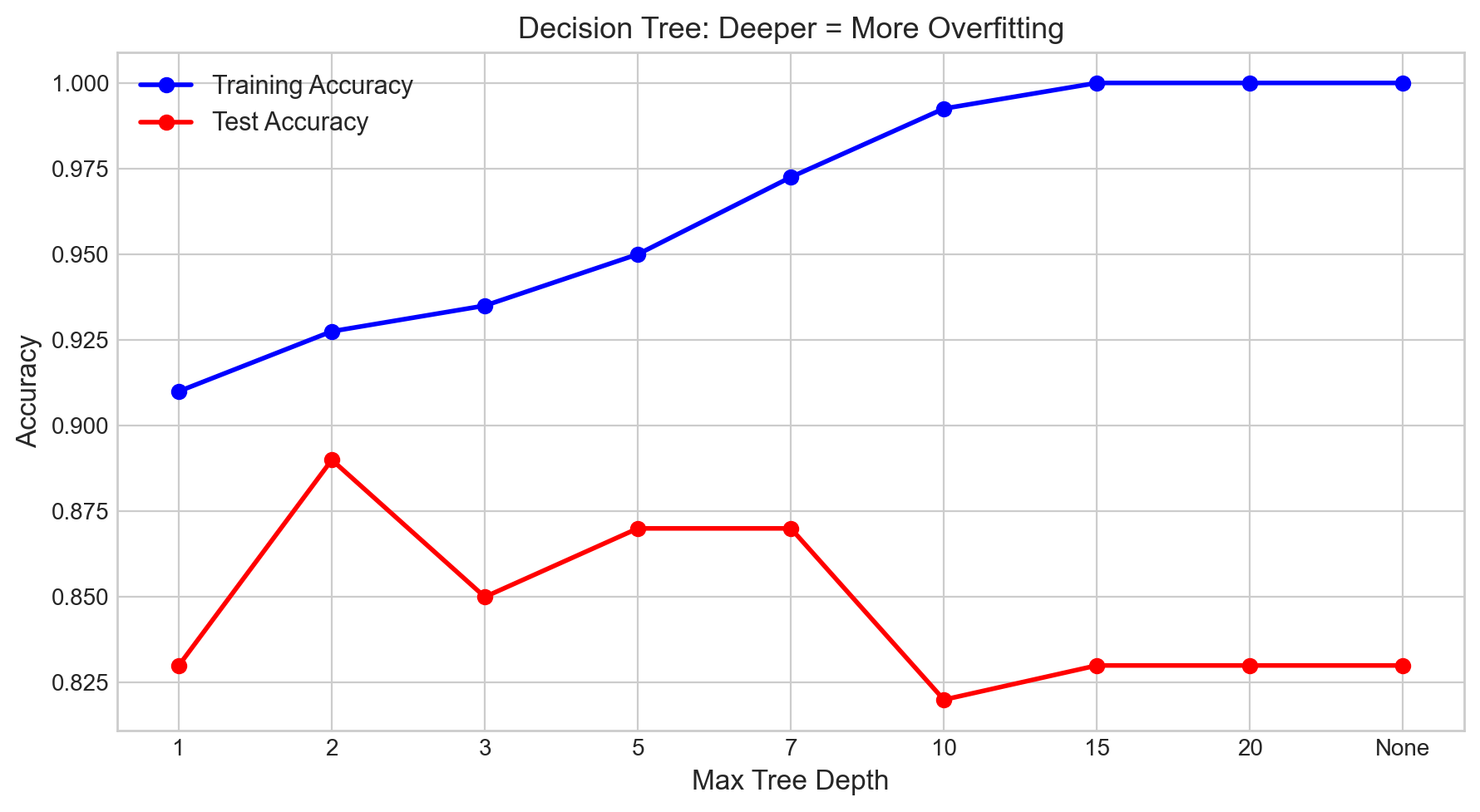
 Depth   Train Acc    Test Acc     Gap
======================================
     1       91.0%       83.0%    8.0%
     2       92.8%       89.0%    3.7%
     3       93.5%       85.0%    8.5%
     5       95.0%       87.0%    8.0%
     7       97.2%       87.0%   10.3%
    10       99.2%       82.0%   17.3%
    15      100.0%       83.0%   17.0%
    20      100.0%       83.0%   17.0%
  None      100.0%       83.0%   17.0%

Interpretation: Notice the pattern in the table:

  • At depth 1, both train and test accuracy are low – the tree is too shallow to capture meaningful patterns (underfitting).
  • At moderate depths (3–7), test accuracy is at its best, and the gap is small.
  • At depth None (unlimited), training accuracy hits 100% but test accuracy drops. The gap is largest here – classic overfitting.

The question is: which depth should we pick? We cannot use the test set to decide (that would contaminate our final evaluation). We need a validation set.

# Plot train vs test accuracy
fig, ax = plt.subplots(figsize=(9, 5))

x_labels = [str(d) if d is not None else 'None' for d in depths]
x_pos = range(len(depths))

ax.plot(x_pos, train_accs, 'b-o', linewidth=2, markersize=6, label='Training Accuracy')
ax.plot(x_pos, test_accs, 'r-o', linewidth=2, markersize=6, label='Test Accuracy')

ax.set_xticks(list(x_pos))
ax.set_xticklabels(x_labels)
ax.set_xlabel('Max Tree Depth', fontsize=12)
ax.set_ylabel('Accuracy', fontsize=12)
ax.set_title('Decision Tree: Deeper = More Overfitting', fontsize=13)
ax.legend(fontsize=11)
plt.tight_layout()
plt.show()

print("The pattern matches the polynomial regression case:")
print("  Training accuracy reaches 100% with unlimited depth.")
print("  Test accuracy peaks and then drops.")
print("  The GAP between train and test = overfitting indicator.")

The pattern matches the polynomial regression case:
  Training accuracy reaches 100% with unlimited depth.
  Test accuracy peaks and then drops.
  The GAP between train and test = overfitting indicator.

We have seen that both polynomial regression and decision trees exhibit the same pattern: more complexity helps up to a point, then hurts. The challenge is finding that sweet spot. We cannot use the test set to search for it (that would be cheating). We need a separate piece of data dedicated to model selection. That is the validation set.

Section 7: Validation Set

Lecture Slide: See Section 4 of the lecture – “The Validation Set.”

We need to choose the best tree depth. But:

  • Cannot use training accuracy: it always prefers more complex models.
  • Cannot use test accuracy: peeking at the test set contaminates our final evaluation.

Solution: Split the data three ways.

Train (60%)      -> model learns parameters
Validation (20%) -> choose best hyperparameters
Test (20%)       -> final one-time evaluation (sealed envelope)

Think of the test set as a sealed exam that you open only once, after all preparation is done.

# Three-way split: 60% train, 20% validation, 20% test
X_trainval, X_test_final, y_trainval, y_test_final = train_test_split(
    X, y, test_size=0.2, random_state=42
)
X_train_v, X_val, y_train_v, y_val = train_test_split(
    X_trainval, y_trainval, test_size=0.25, random_state=42  # 0.25 of 80% = 20%
)

print(f"Training:   {len(X_train_v)} samples (60%)")
print(f"Validation: {len(X_val)} samples (20%)")
print(f"Test:       {len(X_test_final)} samples (20%)")
Training:   300 samples (60%)
Validation: 100 samples (20%)
Test:       100 samples (20%)
# Try different tree depths, evaluate on the VALIDATION set
depths_to_try = [1, 2, 3, 5, 7, 10, 15, 20]
val_scores = []

print(f"{'Depth':>6s}  {'Train Acc':>10s}  {'Val Acc':>10s}")
print('=' * 30)

for depth in depths_to_try:
    dt = DecisionTreeClassifier(max_depth=depth, random_state=42)
    dt.fit(X_train_v, y_train_v)
    train_acc = dt.score(X_train_v, y_train_v)
    val_acc = dt.score(X_val, y_val)
    val_scores.append(val_acc)
    print(f"{depth:>6d}  {train_acc:>10.1%}  {val_acc:>10.1%}")

# Find the best depth
best_depth = depths_to_try[np.argmax(val_scores)]
print(f"\nBest depth (by validation): {best_depth}")
 Depth   Train Acc     Val Acc
==============================
     1       91.0%       91.0%
     2       91.0%       91.0%
     3       92.3%       86.0%
     5       96.3%       85.0%
     7       98.3%       84.0%
    10      100.0%       83.0%
    15      100.0%       83.0%
    20      100.0%       83.0%

Best depth (by validation): 1

Interpretation: We used the validation set to compare different hyperparameter choices. The depth with the highest validation accuracy is our best candidate. Crucially, we have not touched the test set yet – it remains sealed.

# Step 1: Retrain best model on ALL training + validation data
best_model = DecisionTreeClassifier(max_depth=best_depth, random_state=42)
best_model.fit(X_trainval, y_trainval)  # uses 80% of data

# Step 2: Evaluate ONCE on the test set
final_test_acc = best_model.score(X_test_final, y_test_final)

print(f"Best depth: {best_depth}")
print(f"Final test accuracy: {final_test_acc:.1%}")
print()
print("This is our HONEST estimate of real-world performance.")
print("We used the test set exactly ONCE -- no contamination.")
Best depth: 1
Final test accuracy: 83.0%

This is our HONEST estimate of real-world performance.
We used the test set exactly ONCE -- no contamination.

Interpretation: Notice that after choosing the best depth, we retrained on all non-test data (train + validation combined). This is important – why waste the validation data once we have made our decision? More training data generally means a better model.

Problem with this approach: We trained on only 60% of the data. With small datasets, this hurts model quality. Also, the validation score depends on which 20% of students ended up in the validation set – the same variance problem we saw in Section 5!

Solution: Cross-validation – use ALL data for both training and validation.

Section 8: Manual Cross-Validation

Lecture Slide: See Section 5 of the lecture – “K-Fold Cross-Validation.”

K-Fold Cross-Validation solves both problems of the validation set approach:

  1. Every data point gets used for both training and validation.
  2. We get K different estimates, so we can compute a mean and standard deviation.

The algorithm:

  1. Split the data into K equal-sized folds.
  2. For each fold k: use fold k as validation, train on the remaining K-1 folds.
  3. Average all K scores.

\[\text{CV Score} = \frac{1}{K} \sum_{k=1}^{K} \text{score}_k\]

Let us implement this from scratch before using scikit-learn’s shortcut. Understanding the internals will help you debug issues and make informed choices later.

# Step 1: Shuffle the data and split into K folds
K = 5

indices = np.arange(len(X))
np.random.seed(42)
np.random.shuffle(indices)

# Split into K roughly equal-sized groups
folds = np.array_split(indices, K)

print(folds)
print(f"Total samples: {len(X)}")
print(f"Number of folds: {K}")
print(f"Fold sizes: {[len(f) for f in folds]}")
[array([361,  73, 374, 155, 104, 394, 377, 124,  68, 450,   9, 194, 406,
        84, 371, 388, 495,  30, 316, 408, 490, 491, 280, 356,  76, 461,
       497, 211, 101, 334, 475, 336, 440, 173,   2, 333, 409,  70, 209,
        63, 384,  93, 485, 185,  33,  77,   0,  11, 415,  22,  72, 182,
       131, 410, 193,  55, 148,  18, 204,  78, 494, 262, 323, 483,  79,
        39, 451,  46, 238, 391, 352, 341, 277, 290, 317, 304, 268,  69,
       455, 465, 154,  82, 477, 172, 321,  90, 180, 414, 312, 278, 381,
       472, 362, 324, 431, 347,  86,  75, 438,  15]), array([249, 433,  19, 322, 332,  56, 301, 229, 331, 132, 137, 423, 335,
        25, 464, 281, 247, 237, 117,  42, 220, 176, 320, 153, 231, 227,
       417, 203, 126, 329,  31, 113, 470, 271, 140,  57, 192,  24,  17,
       265,  66, 208, 479,  94, 253, 266,  23, 222, 261, 426,   5, 116,
        45,  16, 462, 357,   3, 218, 405,  60, 110, 318, 428,  29, 437,
       471,  26,   7, 453, 108,  37, 157, 489, 118, 114, 175, 373, 181,
       144, 369, 390, 195, 404, 275, 454, 141, 365,  67, 210, 168, 493,
       375, 400, 272, 109, 248, 145,  92, 152, 367]), array([467,  83, 245, 165, 163, 199, 228,  74, 478, 358, 250, 119, 310,
       299, 255, 354, 399, 225, 353, 234, 382, 274,  36, 196, 139, 364,
       244, 439, 286,  59, 111,  89, 436,   6, 360, 346, 338, 158, 150,
       177, 393, 184, 449,  10, 380, 103,  81,  38, 314, 167, 469, 296,
       474, 198, 297, 416, 146, 392, 147, 447, 287, 123, 368,  96, 143,
       239, 442,  97, 407, 122, 183, 202, 246, 305, 298, 351, 386, 395,
       284, 125, 302, 223, 418, 219, 129, 420, 289, 444, 376, 291, 355,
       294, 396, 340, 112, 179, 307, 432, 487, 481]), array([422, 233, 311, 164, 136, 197, 258, 232, 115, 120, 349, 224, 402,
       397, 127, 285, 411, 107, 370, 325, 133, 452,  44, 460,  65, 283,
        85, 242, 186, 383, 159,  12,  35,  28, 170, 142, 398, 342, 221,
        95,  51, 240, 484, 378, 178,  41, 498, 421, 206, 282, 254, 412,
         4, 256, 448, 100, 226, 429, 213, 171,  98, 292, 215,  61,  47,
        32, 267, 327, 200, 446,  27, 424, 230, 260, 288, 162, 425, 138,
        62, 135, 128, 476,   8, 326, 463,  64, 300,  14, 156,  40, 379,
       468, 403, 216, 279, 434, 430, 337, 236, 207]), array([212, 295, 457, 251, 488, 486, 303, 350, 269, 201, 161,  43, 217,
       401, 190, 309, 259, 105,  53, 389,   1, 441, 482,  49, 419,  80,
       205,  34, 263, 427, 366,  91, 339, 473,  52, 345, 264, 241,  13,
       315,  88, 387, 273, 166, 328, 492, 134, 306, 480, 319, 243,  54,
       363,  50, 456, 174, 445, 189, 496, 187, 169,  58,  48, 344, 235,
       252,  21, 313, 459, 160, 276, 443, 191, 385, 293, 413, 343, 257,
       308, 149, 130, 151, 359,  99, 372,  87, 458, 330, 214, 466, 121,
       499,  20, 188,  71, 106, 270, 348, 435, 102])]
Total samples: 500
Number of folds: 5
Fold sizes: [100, 100, 100, 100, 100]
# Step 2: For each fold, train on K-1 folds, evaluate on the held-out fold
scores_manual = []

for k in range(K):
    # This fold is held out for validation
    val_idx = folds[k]
    
    # All other folds are used for training
    train_idx = np.concatenate([folds[j] for j in range(K) if j != k])

    # Split the data
    X_train_cv = X[train_idx]
    y_train_cv = y[train_idx]
    X_val_cv = X[val_idx]
    y_val_cv = y[val_idx]

    # Train and evaluate
    model = DecisionTreeClassifier(max_depth=5, random_state=42)
    model.fit(X_train_cv, y_train_cv)
    score = model.score(X_val_cv, y_val_cv)
    scores_manual.append(score)

    print(f"Fold {k+1}: trained on {len(train_idx)} samples, "
          f"validated on {len(val_idx)} samples -> accuracy = {score:.3f}")

# Step 3: Average the scores
print(f"\nCV Score: {np.mean(scores_manual):.3f} +/- {np.std(scores_manual):.3f}")
Fold 1: trained on 400 samples, validated on 100 samples -> accuracy = 0.870
Fold 2: trained on 400 samples, validated on 100 samples -> accuracy = 0.920
Fold 3: trained on 400 samples, validated on 100 samples -> accuracy = 0.840
Fold 4: trained on 400 samples, validated on 100 samples -> accuracy = 0.890
Fold 5: trained on 400 samples, validated on 100 samples -> accuracy = 0.900

CV Score: 0.884 +/- 0.027

Interpretation: Let us unpack what just happened:

  • Each student was in the validation set exactly once.
  • Each student was in the training set 4 out of 5 times (K-1 out of K).
  • We got 5 accuracy estimates and averaged them.
  • The standard deviation tells us how stable the estimate is. A small standard deviation means the model performs consistently across different subsets of the data.

This is much more reliable than a single train/test split! We are effectively using 100% of the data for both training and validation, just not at the same time.

Lecture Slide: Compare this to the K-fold diagram in Section 5 of the lecture slides, where each colored block rotates through being the validation fold.

Now that we understand the mechanics of cross-validation, let us see how scikit-learn makes this much simpler in practice.

Section 9: scikit-learn Cross-Validation

Lecture Slide: See Section 5 of the lecture (continued).

Everything we just did manually can be done in two lines with scikit-learn’s cross_val_score function.

# The sklearn way: two lines!
model = DecisionTreeClassifier(max_depth=5, random_state=42)
scores = cross_val_score(model, X, y, cv=5)

print(f"Fold scores: {scores}")
print(f"Mean:        {scores.mean():.3f}")
print(f"Std:         {scores.std():.3f}")
print(f"\nReport as: {scores.mean():.1%} +/- {scores.std():.1%} (5-fold CV)")
Fold scores: [0.9  0.86 0.9  0.88 0.8 ]
Mean:        0.868
Std:         0.037

Report as: 86.8% +/- 3.7% (5-fold CV)

Interpretation: The cross_val_score function handles all the folding, training, and evaluation internally. The convention for reporting is: mean +/- std (K-fold CV). This gives both the estimated performance and the uncertainty around it.

Advantages of cross_val_score:

  • Simpler code (2 lines vs 15+)
  • Less error-prone (no manual index shuffling)
  • Standard practice in ML research and industry
  • For classifiers, it uses stratified folds by default (more on this in Section 10)

Let us use it to find the best tree depth – the same task we did with the validation set, but now with cross-validation.

# Use CV to find the best tree depth
depths_to_try = [1, 2, 3, 5, 7, 10, 15, 20]
cv_means = []
cv_stds = []

print(f"{'Depth':>6s}  {'CV Mean':>10s}  {'CV Std':>10s}")
print('=' * 30)

for depth in depths_to_try:
    model = DecisionTreeClassifier(max_depth=depth, random_state=42)
    scores = cross_val_score(model, X, y, cv=5)
    cv_means.append(scores.mean())
    cv_stds.append(scores.std())
    print(f"{depth:>6d}  {scores.mean():>10.3f}  {scores.std():>10.3f}")

best_cv_depth = depths_to_try[np.argmax(cv_means)]
print(f"\nBest depth by CV: {best_cv_depth} (CV = {max(cv_means):.3f})")
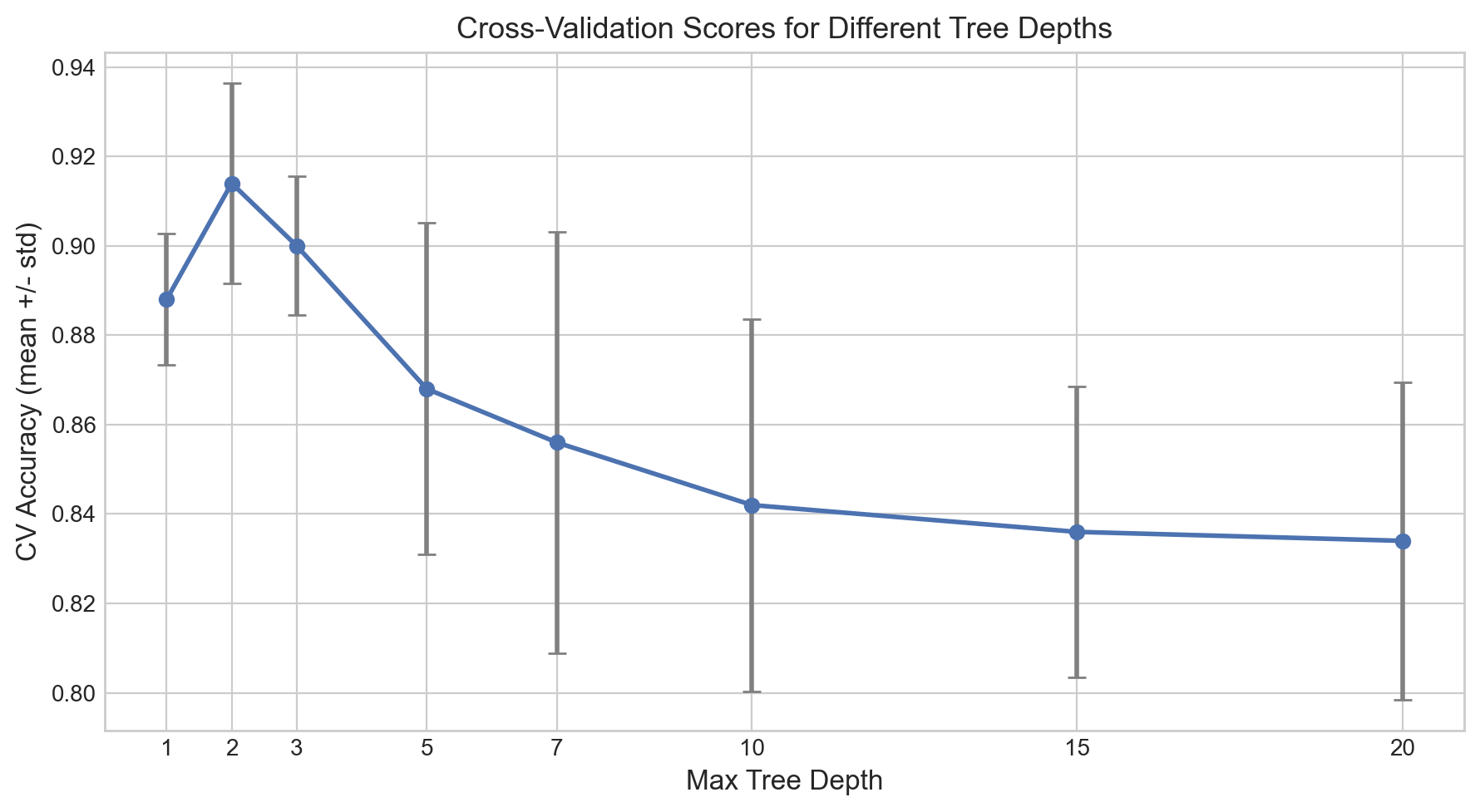
 Depth     CV Mean      CV Std
==============================
     1       0.888       0.015
     2       0.914       0.022
     3       0.900       0.015
     5       0.868       0.037
     7       0.856       0.047
    10       0.842       0.042
    15       0.836       0.033
    20       0.834       0.036

Best depth by CV: 2 (CV = 0.914)

Interpretation: Cross-validation gives us a more reliable ranking of hyperparameters than a single validation split. Notice that the standard deviations tell us which differences are meaningful: if two depths have overlapping error bars, they are not significantly different, and we should prefer the simpler model.

# Plot CV scores with error bars
fig, ax = plt.subplots(figsize=(9, 5))

ax.errorbar(depths_to_try, cv_means, yerr=cv_stds,
            fmt='o-', linewidth=2, markersize=6, capsize=4,
            color='#4C72B0', ecolor='gray')

ax.set_xlabel('Max Tree Depth', fontsize=12)
ax.set_ylabel('CV Accuracy (mean +/- std)', fontsize=12)
ax.set_title('Cross-Validation Scores for Different Tree Depths', fontsize=13)
ax.set_xticks(depths_to_try)
plt.tight_layout()
plt.show()

print(f"Best depth: {best_cv_depth}")
print(f"The error bars show the uncertainty in each estimate.")
print(f"Overlapping error bars = not significantly different.")

Best depth: 2
The error bars show the uncertainty in each estimate.
Overlapping error bars = not significantly different.

Interpretation: The error bar plot is a powerful way to visualize model comparison. Look for the depth where the mean is highest and the error bars are tight. If several depths have similar means with overlapping error bars, prefer the simpler (shallower) model – it will generalize better and be more interpretable.

Lecture Slide: This plot directly corresponds to the “model selection via CV” diagram in Section 5 of the lecture.

Cross-validation is a big improvement over a single validation split. But there are important variations we need to learn: what happens with imbalanced classes, time series data, or grouped data?

Section 10: Stratified, Time Series, and Group K-Fold

Lecture Slide: See Section 5 of the lecture – “Stratified K-Fold”, “Time Series Split”, and “Group K-Fold.”

Standard K-Fold works well when the i.i.d. assumption holds and the classes are balanced. But in practice, we often face:

  1. Imbalanced classes – some folds might accidentally miss the minority class
  2. Time series data – random splits create data leakage (model sees the future)
  3. Grouped data – samples from the same source (patient, user, document) are not independent

Each of these requires a specialized CV strategy.

10a. Stratified Cross-Validation

Problem: If the dataset is imbalanced (e.g., 90% pass, 10% fail), a random fold might accidentally contain all pass students and no fail students. The model trained on that fold would get a misleading score.

Stratified K-Fold ensures each fold has the same class ratio as the full dataset. Let us compare the two approaches.

# Check our class distribution
print(f"Overall pass rate: {y.mean():.1%}")
print()

# Compare regular KFold vs StratifiedKFold
print("=== Regular KFold ===")
kf = KFold(n_splits=5, shuffle=True, random_state=42)
for fold_num, (train_idx, val_idx) in enumerate(kf.split(X)):
    fold_pass_rate = y[val_idx].mean()
    print(f"  Fold {fold_num+1}: pass rate = {fold_pass_rate:.1%}")

print()
print("=== Stratified KFold ===")
skf = StratifiedKFold(n_splits=5, shuffle=True, random_state=42)
for fold_num, (train_idx, val_idx) in enumerate(skf.split(X, y)):
    fold_pass_rate = y[val_idx].mean()
    print(f"  Fold {fold_num+1}: pass rate = {fold_pass_rate:.1%}")
Overall pass rate: 89.4%

=== Regular KFold ===
  Fold 1: pass rate = 83.0%
  Fold 2: pass rate = 94.0%
  Fold 3: pass rate = 92.0%
  Fold 4: pass rate = 86.0%
  Fold 5: pass rate = 92.0%

=== Stratified KFold ===
  Fold 1: pass rate = 90.0%
  Fold 2: pass rate = 90.0%
  Fold 3: pass rate = 89.0%
  Fold 4: pass rate = 89.0%
  Fold 5: pass rate = 89.0%

Interpretation: Compare the pass rates across folds:

  • Regular KFold: The pass rate varies across folds. Some folds may have more “easy” or “hard” compositions than others.
  • Stratified KFold: Every fold has nearly the same pass rate as the overall dataset. This means each fold is a fair, representative sample.

For our dataset, the difference might be small because the classes are not heavily imbalanced. But for datasets with rare events (e.g., fraud detection with 1% fraud rate), stratification is essential.

# Use StratifiedKFold with cross_val_score
skf = StratifiedKFold(n_splits=5, shuffle=True, random_state=42)

model = DecisionTreeClassifier(max_depth=5, random_state=42)
scores_stratified = cross_val_score(model, X, y, cv=skf)

print(f"Stratified CV scores: {scores_stratified}")
print(f"Mean: {scores_stratified.mean():.3f} +/- {scores_stratified.std():.3f}")
print()
print("Good news: cross_val_score uses StratifiedKFold by DEFAULT for classifiers!")
print("So 'cross_val_score(model, X, y, cv=5)' already does stratification.")
Stratified CV scores: [0.89 0.89 0.86 0.9  0.85]
Mean: 0.878 +/- 0.019

Good news: cross_val_score uses StratifiedKFold by DEFAULT for classifiers!
So 'cross_val_score(model, X, y, cv=5)' already does stratification.

Interpretation: The good news is that cross_val_score already uses StratifiedKFold by default when it detects a classification task. So if you have been using cross_val_score(model, X, y, cv=5), you were already getting stratified folds without realizing it.

You only need to create a StratifiedKFold object explicitly when you want more control (e.g., specific random state, or when using it with other scikit-learn tools like GridSearchCV).

10b. Stratified K-Fold from Scratch

Lecture Slide: See the “Stratified K-Fold: From Scratch” slide in Section 5.

To truly understand stratified K-Fold, let us implement it ourselves. The algorithm is:

  1. For each class, get the indices of all samples belonging to that class.
  2. Shuffle those indices.
  3. Deal them round-robin into K folds (like dealing cards).
  4. This guarantees each fold gets roughly the same proportion of each class.
def stratified_kfold_from_scratch(y, K, seed=42):
    """Implement stratified K-fold from scratch.
    
    For each class:
      1. Get all indices for that class
      2. Shuffle them
      3. Deal round-robin into K folds
    """
    np.random.seed(seed)
    classes = np.unique(y)
    folds = [[] for _ in range(K)]
    
    for cls in classes:
        # Get indices of all samples with this class label
        cls_indices = np.where(y == cls)[0]
        np.random.shuffle(cls_indices)
        
        # Deal indices round-robin into folds (like dealing cards)
        for i, idx in enumerate(cls_indices):
            folds[i % K].append(idx)
    
    return [np.array(f) for f in folds]


# Create our stratified folds
K = 5
strat_folds = stratified_kfold_from_scratch(y, K)

print(f"Overall class distribution: {y.mean():.3f} (positive rate)")
print(f"Overall: {(y == 0).sum()} negatives, {(y == 1).sum()} positives")
print()

# Verify class ratios match across folds
print(f"{'Fold':>6s}  {'Size':>5s}  {'Pos Rate':>9s}  {'Neg':>4s}  {'Pos':>4s}")
print('=' * 35)
for k, fold in enumerate(strat_folds):
    n_pos = (y[fold] == 1).sum()
    n_neg = (y[fold] == 0).sum()
    print(f"{k+1:>6d}  {len(fold):>5d}  {y[fold].mean():>9.3f}  {n_neg:>4d}  {n_pos:>4d}")

print()
print("Each fold has approximately the same positive rate as the full dataset!")
Overall class distribution: 0.894 (positive rate)
Overall: 53 negatives, 447 positives

  Fold   Size   Pos Rate   Neg   Pos
===================================
     1    101      0.891    11    90
     2    101      0.891    11    90
     3    100      0.890    11    89
     4     99      0.899    10    89
     5     99      0.899    10    89

Each fold has approximately the same positive rate as the full dataset!
# Compare: our from-scratch version vs sklearn's StratifiedKFold
model = DecisionTreeClassifier(max_depth=5, random_state=42)

# Our manual stratified CV
manual_scores = []
for k in range(K):
    val_idx = strat_folds[k]
    train_idx = np.concatenate([strat_folds[j] for j in range(K) if j != k])
    model_k = DecisionTreeClassifier(max_depth=5, random_state=42)
    model_k.fit(X[train_idx], y[train_idx])
    manual_scores.append(model_k.score(X[val_idx], y[val_idx]))

# sklearn's StratifiedKFold
skf = StratifiedKFold(n_splits=5, shuffle=True, random_state=42)
sklearn_scores = cross_val_score(model, X, y, cv=skf)

print("Manual Stratified CV:")
print(f"  Scores: {[f'{s:.3f}' for s in manual_scores]}")
print(f"  Mean: {np.mean(manual_scores):.3f} +/- {np.std(manual_scores):.3f}")
print()
print("sklearn StratifiedKFold:")
print(f"  Scores: {[f'{s:.3f}' for s in sklearn_scores]}")
print(f"  Mean: {sklearn_scores.mean():.3f} +/- {sklearn_scores.std():.3f}")
print()
print("Both give similar results -- the class ratios are preserved in each fold.")
print("(Exact scores differ because the fold assignments differ slightly.)")
Manual Stratified CV:
  Scores: ['0.881', '0.792', '0.860', '0.899', '0.828']
  Mean: 0.852 +/- 0.038

sklearn StratifiedKFold:
  Scores: ['0.890', '0.890', '0.860', '0.900', '0.850']
  Mean: 0.878 +/- 0.019

Both give similar results -- the class ratios are preserved in each fold.
(Exact scores differ because the fold assignments differ slightly.)

Interpretation: Our from-scratch implementation produces folds with nearly identical class ratios, matching what sklearn does internally. The key idea is the round-robin dealing: by cycling through folds as we assign indices for each class, we guarantee that no fold gets an unusually high or low proportion of any class. This is especially critical for heavily imbalanced datasets.

10c. Time Series Split

Lecture Slide: See the “Time Series: When i.i.d. Breaks” slides in Section 5.

With time series data, the i.i.d. assumption does not hold – tomorrow depends on today. Random splits let the model peek at the future, which is data leakage.

BAD (random split):
  Train: [Jan, Mar, Jun, Aug]  Test: [Feb, May]  -- model sees the future!

GOOD (temporal split):
  Train: [Jan, Feb, Mar]  Test: [Apr]  -- always past -> future

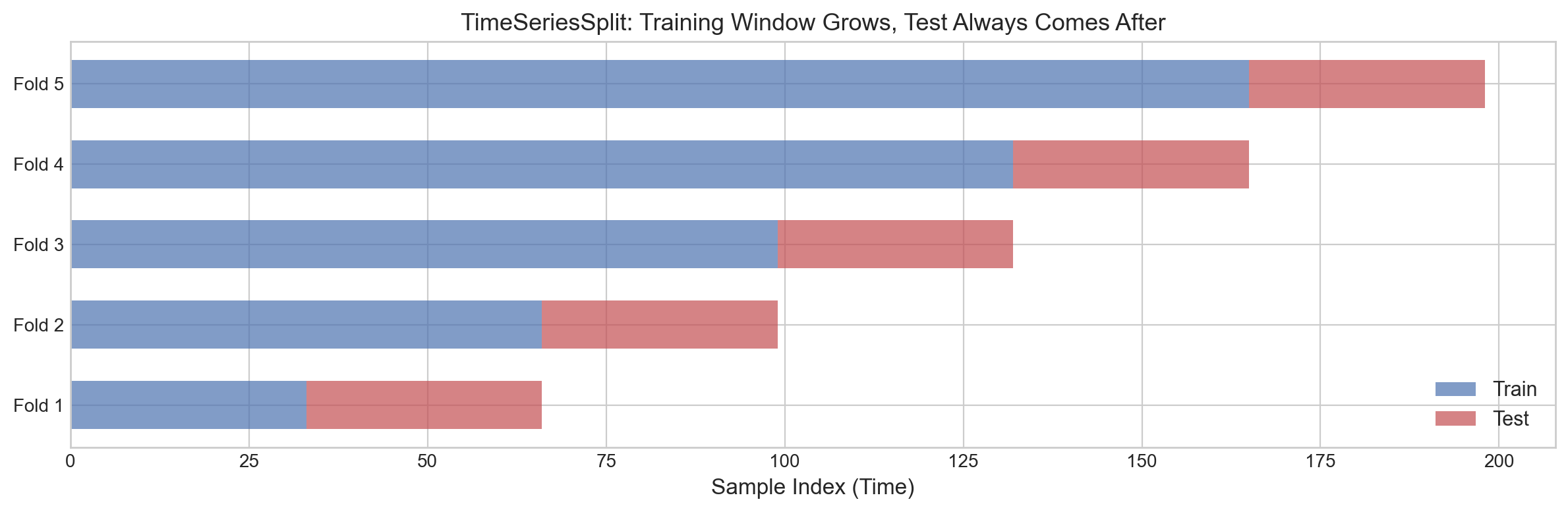
TimeSeriesSplit ensures the training set is always before the test set.

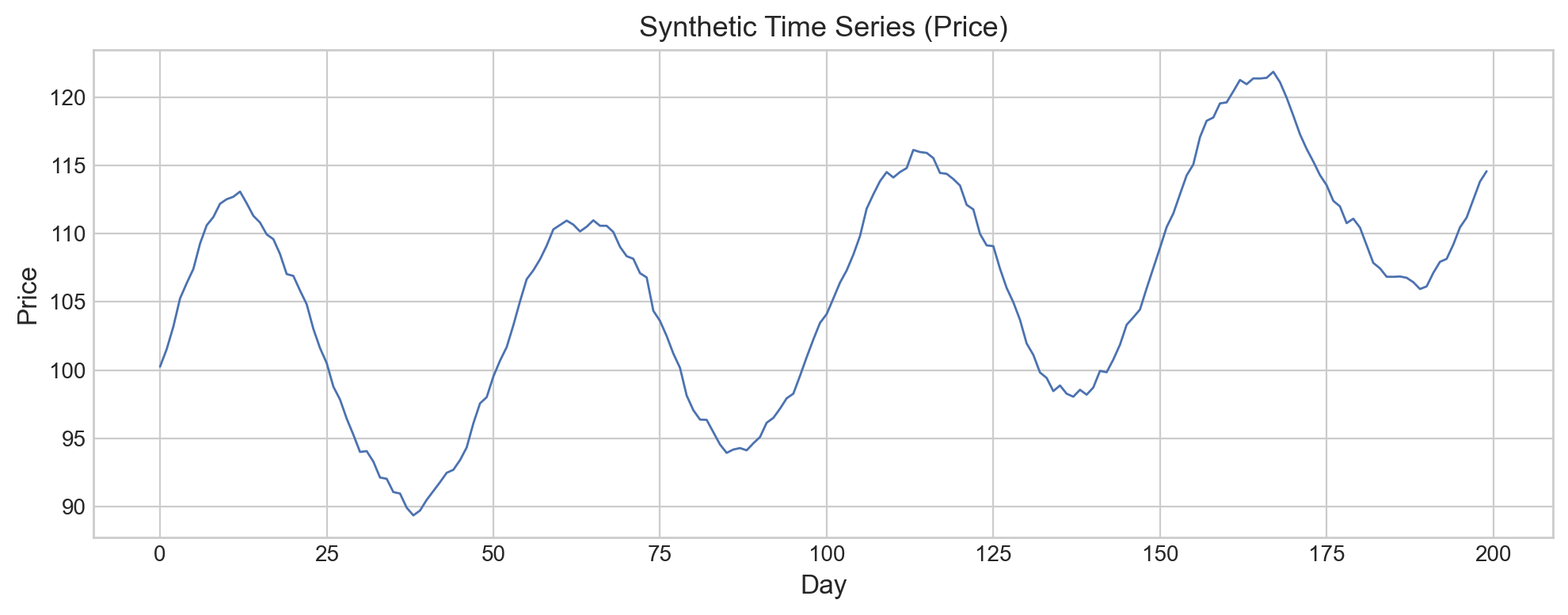
# Create a synthetic time series: sinusoidal + upward trend + noise
np.random.seed(42)
n_days = 200

t = np.arange(n_days)
# Underlying pattern: sine wave + linear trend
prices = 100 + 0.1 * t + 10 * np.sin(2 * np.pi * t / 50) + np.cumsum(np.random.randn(n_days) * 0.5)

# Features: today's return predicts tomorrow's direction
returns = np.diff(prices)
X_ts = returns[:-1].reshape(-1, 1)  # today's return
y_ts = (returns[1:] > 0).astype(int)  # tomorrow up (1) or down (0)?

fig, ax = plt.subplots(figsize=(10, 4))
ax.plot(prices, color='#4C72B0', linewidth=1)
ax.set_xlabel('Day', fontsize=12)
ax.set_ylabel('Price', fontsize=12)
ax.set_title('Synthetic Time Series (Price)', fontsize=13)
plt.tight_layout()
plt.show()

print(f"Time series length: {n_days} days")
print(f"Features (X_ts): {X_ts.shape[0]} samples (today's return)")
print(f"Target (y_ts): predicting tomorrow's direction (up=1, down=0)")
print(f"Positive rate: {y_ts.mean():.1%}")

Time series length: 200 days
Features (X_ts): 198 samples (today's return)
Target (y_ts): predicting tomorrow's direction (up=1, down=0)
Positive rate: 51.5%
# Compare: Random CV (WRONG for time series) vs TimeSeriesSplit (RIGHT)
model_ts = DecisionTreeClassifier(max_depth=3, random_state=42)

# WRONG: random 5-fold CV (shuffles time order)
wrong_scores = cross_val_score(model_ts, X_ts, y_ts, cv=5)

# RIGHT: TimeSeriesSplit (respects temporal order)
tscv = TimeSeriesSplit(n_splits=5)
right_scores = cross_val_score(model_ts, X_ts, y_ts, cv=tscv)

print("=== Random CV (WRONG for time series) ===")
print(f"  Fold scores: {[f'{s:.3f}' for s in wrong_scores]}")
print(f"  Mean: {wrong_scores.mean():.3f} +/- {wrong_scores.std():.3f}")
print()
print("=== TimeSeriesSplit (CORRECT) ===")
print(f"  Fold scores: {[f'{s:.3f}' for s in right_scores]}")
print(f"  Mean: {right_scores.mean():.3f} +/- {right_scores.std():.3f}")
print()
print(f"Difference: {wrong_scores.mean() - right_scores.mean():.3f}")
print("Random CV is optimistically biased -- it leaks future information!")
=== Random CV (WRONG for time series) ===
  Fold scores: ['0.900', '0.825', '0.875', '0.718', '0.769']
  Mean: 0.817 +/- 0.067

=== TimeSeriesSplit (CORRECT) ===
  Fold scores: ['0.848', '0.909', '0.909', '0.606', '0.818']
  Mean: 0.818 +/- 0.112

Difference: -0.001
Random CV is optimistically biased -- it leaks future information!
# Visualize which indices go to train/test per fold in TimeSeriesSplit
fig, ax = plt.subplots(figsize=(12, 4))

tscv = TimeSeriesSplit(n_splits=5)
cmap_train = '#4C72B0'
cmap_test = '#C44E52'

for fold_num, (train_idx, test_idx) in enumerate(tscv.split(X_ts)):
    y_pos = fold_num
    ax.barh(y_pos, len(train_idx), left=train_idx[0], height=0.6,
            color=cmap_train, alpha=0.7,
            label='Train' if fold_num == 0 else '')
    ax.barh(y_pos, len(test_idx), left=test_idx[0], height=0.6,
            color=cmap_test, alpha=0.7,
            label='Test' if fold_num == 0 else '')

ax.set_yticks(range(5))
ax.set_yticklabels([f'Fold {i+1}' for i in range(5)])
ax.set_xlabel('Sample Index (Time)', fontsize=12)
ax.set_title('TimeSeriesSplit: Training Window Grows, Test Always Comes After', fontsize=13)
ax.legend(fontsize=11, loc='lower right')
plt.tight_layout()
plt.show()

print("Blue = training set, Red = test set")
print("Notice: the training window grows with each fold.")
print("Test data is ALWAYS in the future relative to training data.")
print("This prevents data leakage from future to past.")

Blue = training set, Red = test set
Notice: the training window grows with each fold.
Test data is ALWAYS in the future relative to training data.
This prevents data leakage from future to past.

Interpretation: The visualization shows how TimeSeriesSplit works:

  • The training set (blue) always comes before the test set (red) in time.
  • The training window grows with each fold, giving the model more historical data.
  • This prevents the model from seeing future data during training.

The random CV score was optimistically biased because the model could “peek at the future” – nearby time points that ended up in the training set leaked information about the test points. TimeSeriesSplit gives a more realistic (and typically lower) estimate of real-world performance.

10d. Group K-Fold

Lecture Slide: See the “Group K-Fold” slides in Section 5.

When multiple data points come from the same source (e.g., multiple scans from the same patient), they are not independent. If the same patient appears in both train and test, the model might recognize the patient rather than learn the disease pattern.

Domain Group Problem if split randomly
Medical imaging Patient ID Model recognizes the patient, not the disease
NLP Document ID Model memorizes writing style
Audio Speaker ID Model recognizes the voice, not the word

GroupKFold ensures that all samples from the same group stay together – either all in train or all in test, never split across both.

# Create a dataset with groups: 10 patients, 5-10 samples each
np.random.seed(42)

n_patients = 10
samples_per_patient = np.random.randint(5, 11, size=n_patients)  # 5-10 samples each

# Each patient has a "base health" that affects all their samples
patient_base_health = np.random.uniform(0, 1, n_patients)

X_group_list = []
y_group_list = []
groups_list = []

for pid in range(n_patients):
    n_s = samples_per_patient[pid]
    # Features: base health + some per-scan noise
    features = np.column_stack([
        patient_base_health[pid] + np.random.randn(n_s) * 0.1,  # feature 1
        np.random.randn(n_s) * 0.5 + patient_base_health[pid] * 2,  # feature 2
    ])
    # Label: mostly determined by patient's base health
    labels = (patient_base_health[pid] + np.random.randn(n_s) * 0.15 > 0.5).astype(int)
    
    X_group_list.append(features)
    y_group_list.append(labels)
    groups_list.extend([pid] * n_s)

X_group = np.vstack(X_group_list)
y_group = np.concatenate(y_group_list)
groups = np.array(groups_list)

print(f"Total samples: {len(X_group)}")
print(f"Number of patients (groups): {n_patients}")
print(f"Samples per patient: {samples_per_patient}")
print(f"Positive rate: {y_group.mean():.1%}")
Total samples: 78
Number of patients (groups): 10
Samples per patient: [8 9 7 9 9 6 7 7 7 9]
Positive rate: 47.4%
# Compare: Regular KFold (WRONG) vs GroupKFold (RIGHT)
model_grp = DecisionTreeClassifier(max_depth=3, random_state=42)

# WRONG: random KFold -- same patient can appear in both train and test
kf = KFold(n_splits=5, shuffle=True, random_state=42)
wrong_group_scores = cross_val_score(model_grp, X_group, y_group, cv=kf)

# RIGHT: GroupKFold -- each patient stays together
gkf = GroupKFold(n_splits=5)
right_group_scores = cross_val_score(model_grp, X_group, y_group,
                                      cv=gkf, groups=groups)

print("=== Regular KFold (WRONG -- leaks patient info) ===")
print(f"  Fold scores: {[f'{s:.3f}' for s in wrong_group_scores]}")
print(f"  Mean: {wrong_group_scores.mean():.3f} +/- {wrong_group_scores.std():.3f}")
print()
print("=== GroupKFold (CORRECT -- keeps patients together) ===")
print(f"  Fold scores: {[f'{s:.3f}' for s in right_group_scores]}")
print(f"  Mean: {right_group_scores.mean():.3f} +/- {right_group_scores.std():.3f}")
print()
print(f"Difference: {wrong_group_scores.mean() - right_group_scores.mean():.3f}")
print("Regular KFold is optimistically biased -- it leaks patient identity!")
=== Regular KFold (WRONG -- leaks patient info) ===
  Fold scores: ['0.812', '0.812', '0.625', '0.733', '0.667']
  Mean: 0.730 +/- 0.076

=== GroupKFold (CORRECT -- keeps patients together) ===
  Fold scores: ['0.625', '1.000', '1.000', '0.867', '0.533']
  Mean: 0.805 +/- 0.193

Difference: -0.075
Regular KFold is optimistically biased -- it leaks patient identity!
# Show which patients end up in train vs test for each fold
print("GroupKFold: Patient assignment per fold")
print("="*55)

gkf = GroupKFold(n_splits=5)
for fold_num, (train_idx, test_idx) in enumerate(gkf.split(X_group, y_group, groups=groups)):
    train_patients = sorted(set(groups[train_idx]))
    test_patients = sorted(set(groups[test_idx]))
    # Check: no patient appears in both
    overlap = set(train_patients) & set(test_patients)
    print(f"Fold {fold_num+1}: Train patients: {train_patients}")
    print(f"         Test patients:  {test_patients}")
    print(f"         Overlap: {overlap if overlap else 'NONE (correct!)'}")
    print()
GroupKFold: Patient assignment per fold
=======================================================
Fold 1: Train patients: [np.int64(0), np.int64(1), np.int64(2), np.int64(3), np.int64(4), np.int64(5), np.int64(6), np.int64(8)]
         Test patients:  [np.int64(7), np.int64(9)]
         Overlap: NONE (correct!)

Fold 2: Train patients: [np.int64(0), np.int64(1), np.int64(2), np.int64(3), np.int64(5), np.int64(7), np.int64(8), np.int64(9)]
         Test patients:  [np.int64(4), np.int64(6)]
         Overlap: NONE (correct!)

Fold 3: Train patients: [np.int64(0), np.int64(1), np.int64(4), np.int64(5), np.int64(6), np.int64(7), np.int64(8), np.int64(9)]
         Test patients:  [np.int64(2), np.int64(3)]
         Overlap: NONE (correct!)

Fold 4: Train patients: [np.int64(0), np.int64(2), np.int64(3), np.int64(4), np.int64(6), np.int64(7), np.int64(8), np.int64(9)]
         Test patients:  [np.int64(1), np.int64(5)]
         Overlap: NONE (correct!)

Fold 5: Train patients: [np.int64(1), np.int64(2), np.int64(3), np.int64(4), np.int64(5), np.int64(6), np.int64(7), np.int64(9)]
         Test patients:  [np.int64(0), np.int64(8)]
         Overlap: NONE (correct!)

Interpretation: With GroupKFold, no patient ever appears in both the training and test sets for the same fold. This prevents the model from learning patient-specific patterns (like their baseline health) and then being unfairly evaluated on other samples from the same patient.

The regular KFold score is higher because the model can “cheat” – it sees some of a patient’s samples during training and is tested on other samples from that same patient, which are very similar. GroupKFold gives a more realistic estimate of how the model would perform on completely new patients.

Rule of thumb: If your data has natural groups (patients, users, documents, locations), always use GroupKFold.

CV Variant Cheat Sheet

Your Data Use Why
Classification (default) StratifiedKFold Maintains class balance
Time series TimeSeriesSplit Respects temporal order
Grouped samples GroupKFold Prevents group leakage
Tiny dataset (< 50) LeaveOneOut Maximum data for training
Everything else KFold Simple, effective

We now have all the individual pieces: train/test splits, understanding of model complexity, validation sets, cross-validation, and specialized CV strategies. Let us put them all together into the correct end-to-end evaluation protocol.

Section 11: Compare Model Families with CV

Lecture Slide: See Section 6 of the lecture – “The Gold Standard: Compare Model Families with CV.”

This is the protocol you should follow: use cross-validation to compare model types (not hyperparameters – that is Week 8). Pick the best family, retrain on all data.

# =========================================
# COMPARE MODEL FAMILIES WITH CV
# =========================================

# STEP 1: Define candidate model families (default hyperparameters)
models_to_try = [
    ("LogReg", LogisticRegression(max_iter=1000)),
    ("Tree (d=3)", DecisionTreeClassifier(max_depth=3, random_state=42)),
    ("Tree (d=5)", DecisionTreeClassifier(max_depth=5, random_state=42)),
    ("Tree (d=10)", DecisionTreeClassifier(max_depth=10, random_state=42)),
    ("Random Forest", RandomForestClassifier(n_estimators=100, random_state=42)),
]

# STEP 2: Run K-fold CV on each candidate
best_name, best_score, best_model_obj = None, 0, None

print(f"{'Model':>15s}  {'CV Mean':>10s}  {'CV Std':>10s}")
print('=' * 40)
for name, model in models_to_try:
    cv_scores = cross_val_score(model, X, y, cv=5)  # stratified by default
    print(f"{name:>15s}  {cv_scores.mean():>10.3f}  {cv_scores.std():>10.3f}")
    if cv_scores.mean() > best_score:
        best_name = name
        best_score = cv_scores.mean()
        best_model_obj = model

print(f"\nStep 3: Best model family = {best_name} (CV = {best_score:.3f})")
---------------------------------------------------------------------------
NameError                                 Traceback (most recent call last)
Cell In[130], line 11
      1 # =========================================
      2 # COMPARE MODEL FAMILIES WITH CV
      3 # =========================================
      4 
      5 # STEP 1: Define candidate model families (default hyperparameters)
      6 models_to_try = [
      7     ("LogReg", LogisticRegression(max_iter=1000)),
      8     ("Tree (d=3)", DecisionTreeClassifier(max_depth=3, random_state=42)),
      9     ("Tree (d=5)", DecisionTreeClassifier(max_depth=5, random_state=42)),
     10     ("Tree (d=10)", DecisionTreeClassifier(max_depth=10, random_state=42)),
---> 11     ("Random Forest", RandomForestClassifier(n_estimators=100, random_state=42)),
     12 ]
     14 # STEP 2: Run K-fold CV on each candidate
     15 best_name, best_score, best_model_obj = None, 0, None

NameError: name 'RandomForestClassifier' is not defined

Steps 1–3 explanation: We compare multiple model families using 5-fold cross-validation on ALL the data. No separate test holdout needed – CV gives us a reliable estimate. We pick the model with the highest mean CV score.

Note: We are comparing model types here, not tuning hyperparameters. Hyperparameter tuning is covered in Week 8.

# STEP 4: Retrain the winner on ALL data
print(f"Step 4: Retrain {best_name} on all {len(X)} samples")
best_model_obj.fit(X, y)
print("Done! Model is ready for deployment.")
Step 2: Compare models using 5-fold CV on dev set

          Model     CV Mean      CV Std
========================================
         LogReg       0.895       0.006
     Tree (d=3)       0.887       0.021
     Tree (d=5)       0.873       0.027
    Tree (d=10)       0.835       0.033

Step 3: Best model = LogReg (CV = 0.895)

Step 4 explanation: Now that we have chosen our best model family, we retrain it on ALL the data. During CV, each fold only trained on 80% of data. Now we give the model everything to maximize what it learns before deployment.

The Evaluation Protocol (Cheat Sheet)

1. Pick candidate model families (default hyperparameters).
2. Run K-fold CV on each candidate.
3. Compare CV scores (mean +/- std). Pick the best family.
4. Retrain the winner on ALL data. Deploy.

Next week (Week 8): Once you know the best model type, tune its hyperparameters with grid search, random search, and Bayesian optimization.

Summary

Here is what we covered and the key takeaway from each section:

Section Topic Key Takeaway
1 Custom dataset A student performance dataset with overlapping classes – no model can be perfect
2 i.i.d. assumption Data must be independent and identically distributed for standard evaluation to work
3 Training accuracy Measures memorization, not generalization. Never report it as your result
4 Train/test split Better than training accuracy, but the score depends on a single random split
5 Instability of one split Different splits give different scores – one number is not reliable
6 Model complexity More complex is not always better. Underfitting vs overfitting (bias-variance tradeoff)
7 Validation set Separate model selection from final evaluation. Three-way split: train/val/test
8 Manual cross-validation Use all data for both training and validation. K estimates instead of one
9 scikit-learn CV cross_val_score does it in two lines. Report as mean +/- std
10a Stratified CV Maintain class ratios in each fold. Default for classifiers in scikit-learn
10b Stratified K-Fold from scratch Round-robin dealing of class indices guarantees balanced folds
10c Time Series Split Respects temporal order. Random splits leak future information
10d Group K-Fold Keeps grouped samples together. Prevents identity leakage
11 Model comparison CV all candidates, pick the best family, retrain on all data

The Evaluation Protocol (Cheat Sheet)

1. Pick candidate model families (default hyperparameters).
2. Run K-fold CV on each candidate.
3. Compare CV scores (mean +/- std). Pick the best family.
4. Retrain the winner on ALL data. Deploy.

Do NOT tune hyperparameters by trying random values manually. Use grid search / random search / Bayesian optimization (Week 8).

What is Next: Week 8

In this notebook, we manually tried a handful of hyperparameter values (tree depths 1, 2, 3, 5, …). But real models have many hyperparameters, and trying all combinations by hand is tedious and error-prone.

In Week 8: Hyperparameter Tuning and AutoML, we will automate this process:

  • Grid Search: Exhaustively try all combinations of hyperparameters.
  • Random Search: Sample random combinations (often more efficient).
  • Bayesian Optimization: Use past results to intelligently pick the next combination to try.
  • AutoML: Let the machine search for the best model and hyperparameters automatically.
  • Experiment Tracking: Log all your experiments so you can reproduce and compare results.

All of these methods use cross-validation internally – exactly the protocol we learned today. The foundation you built this week is what makes next week possible.