# IMPORTANT: Set GPU before importing PyTorch!
import os
os.environ['CUDA_VISIBLE_DEVICES'] = '1' # Use GPU 1 (adjust as needed)Introduction
We’ve built VLMs that can describe images, detect objects, answer questions, and even outline objects with polygons. But what if we want to modify images using natural language?
Imagine saying: - “Make this image black and white” - “Increase brightness by 30%” - “Rotate 90 degrees clockwise” - “Make it look warmer” (add orange tint) - “Sharpen the image”
And having the VLM automatically apply these edits!
Previous Notebooks:
- Minimal VLM - Captioning
- Object Detection - Structured output
- VQA - Question answering
- Multi-Task - Combined tasks
- Chain-of-Thought - Reasoning
- Visual Grounding + Segmentation - Polygon output
What’s New Today?
Image Editing via Instructions: - Input: Image + “make it grayscale” - VLM Output: {"operation": "grayscale", "params": {}} - Apply: Use PIL/OpenCV to execute the operation - Result: Edited image!
Our Approach: Instruction → Parameters → Edit
Instead of generating pixels (like InstructPix2Pix or diffusion models), we: 1. Parse the instruction with VLM 2. Predict edit parameters as JSON 3. Apply operations deterministically with PIL
Why this approach? - ✅ Reliable - Deterministic, no randomness - ✅ Fast - No diffusion steps, instant edits - ✅ Small model - Works with our 135M VLM - ✅ Interpretable - See exactly what operation was applied - ✅ Composable - Chain multiple operations
Comparison:
| Approach | Model Size | Speed | Controllability | Quality |
|---|---|---|---|---|
| Diffusion (InstructPix2Pix) | 1B+ | Slow (5-10s) | Medium | Very High |
| GAN-based | 500M+ | Medium (1-2s) | Low | High |
| Ours (Parameterized) | 135M | Fast (<0.1s) | Very High | Good |
Supported Edit Operations
Color Adjustments: - Grayscale, sepia, invert colors - Brightness, contrast, saturation - Color temperature (warm/cool) - Hue shift
Transformations: - Rotate, flip (horizontal/vertical) - Resize, crop - Zoom in/out
Filters: - Blur, sharpen - Edge detection - Emboss, contour
Artistic Effects: - Vintage, retro - High contrast (poster effect) - Vignette
What We’ll Build
- Edit operation library - PIL/Pillow-based image operations
- VLM instruction parser - Natural language → JSON parameters
- Synthetic dataset - Create training data from COCO
- Training - Teach VLM to predict operations
- Interactive demos - Before/after comparisons
Setup
!uv pip install -q transformers datasets torch torchvision pillow accelerate einops timm numpyimport torch
import torch.nn as nn
import torch.nn.functional as F
from torch.utils.data import DataLoader, Dataset
from transformers import (
AutoModelForCausalLM,
AutoTokenizer,
ViTModel,
ViTImageProcessor,
)
from datasets import load_dataset
from PIL import Image, ImageEnhance, ImageFilter, ImageOps
import numpy as np
import matplotlib.pyplot as plt
from tqdm.auto import tqdm
import random
import json
import warnings
warnings.filterwarnings('ignore')
%config InlineBackend.figure_format = 'retina'
device = torch.device("cuda" if torch.cuda.is_available() else "cpu")
print(f"Using device: {device}")
if torch.cuda.is_available():
print(f"GPU: {torch.cuda.get_device_name(0)}")/home/nipun.batra/.uv/nb-base/lib/python3.12/site-packages/tqdm/auto.py:21: TqdmWarning: IProgress not found. Please update jupyter and ipywidgets. See https://ipywidgets.readthedocs.io/en/stable/user_install.html
from .autonotebook import tqdm as notebook_tqdmUsing device: cuda
GPU: NVIDIA RTX A4000Part 1: Image Editing Operations Library
We’ll implement common image editing operations using PIL (Pillow).
class ImageEditor:
    """
    Image editing operations using PIL.

    Each operation takes an image and parameters, returns edited image.
    """

    @staticmethod
    def grayscale(image, **params):
        """Convert to grayscale."""
        return ImageOps.grayscale(image).convert('RGB')

    @staticmethod
    def sepia(image, **params):
        """Apply sepia tone effect."""
        # Convert to grayscale then apply sepia tint
        gray = ImageOps.grayscale(image)
        # Sepia transformation matrix
        sepia_img = Image.new('RGB', image.size)
        pixels = gray.load()
        sepia_pixels = sepia_img.load()

        for i in range(image.size[0]):
            for j in range(image.size[1]):
                p = pixels[i, j]
                # Sepia tone formula
                r = min(255, int(p * 1.0))
                g = min(255, int(p * 0.95))
                b = min(255, int(p * 0.82))
                sepia_pixels[i, j] = (r, g, b)

        return sepia_img

    @staticmethod
    def invert(image, **params):
        """Invert colors."""
        return ImageOps.invert(image)

    @staticmethod
    def brightness(image, factor=1.5, **params):
        """
        Adjust brightness.
        factor < 1.0: darker, factor > 1.0: brighter
        """
        enhancer = ImageEnhance.Brightness(image)
        return enhancer.enhance(factor)

    @staticmethod
    def contrast(image, factor=1.5, **params):
        """
        Adjust contrast.
        factor < 1.0: less contrast, factor > 1.0: more contrast
        """
        enhancer = ImageEnhance.Contrast(image)
        return enhancer.enhance(factor)

    @staticmethod
    def saturation(image, factor=1.5, **params):
        """
        Adjust color saturation.
        factor = 0: grayscale, factor > 1.0: more saturated
        """
        enhancer = ImageEnhance.Color(image)
        return enhancer.enhance(factor)

    @staticmethod
    def sharpness(image, factor=2.0, **params):
        """Adjust sharpness."""
        enhancer = ImageEnhance.Sharpness(image)
        return enhancer.enhance(factor)

    @staticmethod
    def blur(image, radius=5, **params):
        """Apply Gaussian blur."""
        return image.filter(ImageFilter.GaussianBlur(radius=radius))

    @staticmethod
    def sharpen(image, **params):
        """Sharpen the image."""
        return image.filter(ImageFilter.SHARPEN)

    @staticmethod
    def edge_detect(image, **params):
        """Detect edges."""
        return image.filter(ImageFilter.FIND_EDGES)

    @staticmethod
    def emboss(image, **params):
        """Apply emboss effect."""
        return image.filter(ImageFilter.EMBOSS)

    @staticmethod
    def contour(image, **params):
        """Apply contour effect."""
        return image.filter(ImageFilter.CONTOUR)

    @staticmethod
    def rotate(image, angle=90, **params):
        """Rotate image by angle (degrees)."""
        return image.rotate(angle, expand=True)

    @staticmethod
    def flip_horizontal(image, **params):
        """Flip horizontally."""
        return ImageOps.mirror(image)

    @staticmethod
    def flip_vertical(image, **params):
        """Flip vertically."""
        return ImageOps.flip(image)

    @staticmethod
    def resize(image, scale=0.5, **params):
        """Resize image by scale factor."""
        new_size = (int(image.width * scale), int(image.height * scale))
        return image.resize(new_size, Image.LANCZOS)

    @staticmethod
    def warm(image, strength=0.3, **params):
        """Add warm tint (orange)."""
        # Increase red, slight green, decrease blue
        arr = np.array(image).astype(np.float32)
        arr[:, :, 0] = np.clip(arr[:, :, 0] * (1 + strength), 0, 255)  # Red
        arr[:, :, 1] = np.clip(arr[:, :, 1] * (1 + strength * 0.5), 0, 255)  # Green
        arr[:, :, 2] = np.clip(arr[:, :, 2] * (1 - strength * 0.3), 0, 255)  # Blue
        return Image.fromarray(arr.astype(np.uint8))

    @staticmethod
    def cool(image, strength=0.3, **params):
        """Add cool tint (blue)."""
        arr = np.array(image).astype(np.float32)
        arr[:, :, 0] = np.clip(arr[:, :, 0] * (1 - strength * 0.3), 0, 255)  # Red
        arr[:, :, 1] = np.clip(arr[:, :, 1] * (1 + strength * 0.2), 0, 255)  # Green
        arr[:, :, 2] = np.clip(arr[:, :, 2] * (1 + strength), 0, 255)  # Blue
        return Image.fromarray(arr.astype(np.uint8))

    @staticmethod
    def posterize(image, bits=4, **params):
        """Reduce color depth (poster effect)."""
        return ImageOps.posterize(image, bits)

    @staticmethod
    def solarize(image, threshold=128, **params):
        """Solarize effect (invert pixels above threshold)."""
        return ImageOps.solarize(image, threshold)

    # Dictionary of all operations
    OPERATIONS = {
        'grayscale': grayscale.__func__,
        'sepia': sepia.__func__,
        'invert': invert.__func__,
        'brightness': brightness.__func__,
        'contrast': contrast.__func__,
        'saturation': saturation.__func__,
        'sharpness': sharpness.__func__,
        'blur': blur.__func__,
        'sharpen': sharpen.__func__,
        'edge_detect': edge_detect.__func__,
        'emboss': emboss.__func__,
        'contour': contour.__func__,
        'rotate': rotate.__func__,
        'flip_horizontal': flip_horizontal.__func__,
        'flip_vertical': flip_vertical.__func__,
        'resize': resize.__func__,
        'warm': warm.__func__,
        'cool': cool.__func__,
        'posterize': posterize.__func__,
        'solarize': solarize.__func__,
    }

    @classmethod
    def apply_operation(cls, image, operation, params=None):
        """
        Apply an editing operation to an image.

        Args:
            image: PIL Image
            operation: str, operation name
            params: dict, operation parameters

        Returns:
            PIL Image (edited)
        """
        if operation not in cls.OPERATIONS:
            raise ValueError(f"Unknown operation: {operation}")

        params = params or {}
        op_func = cls.OPERATIONS[operation]
        return op_func(image, **params)


print(f"Image editor initialized with {len(ImageEditor.OPERATIONS)} operations:")
print(list(ImageEditor.OPERATIONS.keys()))
Image editor initialized with 20 operations:
['grayscale', 'sepia', 'invert', 'brightness', 'contrast', 'saturation', 'sharpness', 'blur', 'sharpen', 'edge_detect', 'emboss', 'contour', 'rotate', 'flip_horizontal', 'flip_vertical', 'resize', 'warm', 'cool', 'posterize', 'solarize']# Test the image editor with a sample image
# Create a simple test image
test_img = Image.new('RGB', (200, 200), color=(100, 150, 200))
# Try different operations
fig, axes = plt.subplots(3, 4, figsize=(16, 12))
axes = axes.flatten()
operations_to_test = [
('original', {}),
('grayscale', {}),
('sepia', {}),
('brightness', {'factor': 1.5}),
('contrast', {'factor': 2.0}),
('warm', {'strength': 0.4}),
('cool', {'strength': 0.4}),
('blur', {'radius': 3}),
('sharpen', {}),
('edge_detect', {}),
('emboss', {}),
('posterize', {'bits': 3}),
]
for idx, (op_name, params) in enumerate(operations_to_test):
if op_name == 'original':
result = test_img
else:
result = ImageEditor.apply_operation(test_img, op_name, params)
axes[idx].imshow(result)
axes[idx].set_title(f"{op_name}\n{params}", fontsize=10)
axes[idx].axis('off')
plt.suptitle("Image Editing Operations Demo", fontsize=14, fontweight='bold')
plt.tight_layout()
plt.show()
print("✓ Image editor tested successfully!")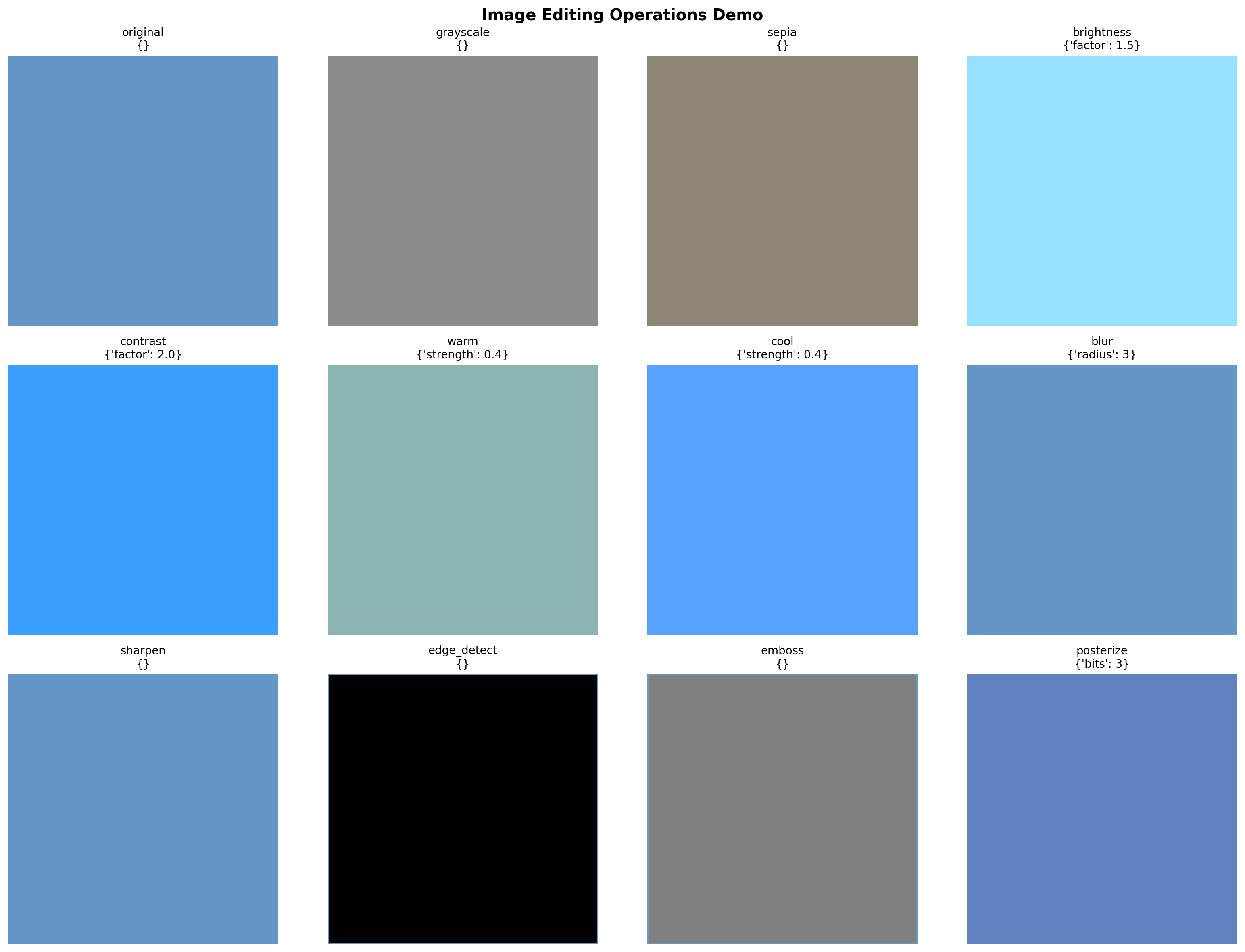
✓ Image editor tested successfully!Part 2: Instruction Templates
Create natural language templates for each operation.
# Instruction templates for generating training data

INSTRUCTION_TEMPLATES = {
    'grayscale': [
        "make it grayscale",
        "convert to black and white",
        "remove all colors",
        "make it monochrome",
        "turn into grayscale",
    ],
    'sepia': [
        "apply sepia tone",
        "make it look vintage",
        "add sepia effect",
        "give it an old photo look",
    ],
    'invert': [
        "invert the colors",
        "make a negative",
        "reverse all colors",
    ],
    'brightness': [
        ("make it brighter", {'factor': 1.5}),
        ("increase brightness", {'factor': 1.4}),
        ("brighten the image", {'factor': 1.6}),
        ("make it darker", {'factor': 0.6}),
        ("decrease brightness", {'factor': 0.7}),
        ("darken the image", {'factor': 0.5}),
    ],
    'contrast': [
        ("increase contrast", {'factor': 1.8}),
        ("make it more contrasty", {'factor': 2.0}),
        ("boost contrast", {'factor': 1.6}),
        ("reduce contrast", {'factor': 0.6}),
        ("lower the contrast", {'factor': 0.7}),
    ],
    'saturation': [
        ("increase saturation", {'factor': 1.6}),
        ("make colors more vivid", {'factor': 1.8}),
        ("boost saturation", {'factor': 1.5}),
        ("desaturate", {'factor': 0.5}),
        ("reduce saturation", {'factor': 0.6}),
    ],
    'blur': [
        ("blur the image", {'radius': 5}),
        ("make it blurry", {'radius': 7}),
        ("apply blur", {'radius': 4}),
        ("add blur effect", {'radius': 6}),
    ],
    'sharpen': [
        "sharpen the image",
        "make it sharper",
        "increase sharpness",
        "enhance details",
    ],
    'edge_detect': [
        "detect edges",
        "show only edges",
        "edge detection",
        "find edges",
    ],
    'emboss': [
        "apply emboss effect",
        "make it embossed",
        "emboss the image",
    ],
    'rotate': [
        ("rotate 90 degrees", {'angle': 90}),
        ("rotate clockwise", {'angle': 90}),
        ("rotate 180 degrees", {'angle': 180}),
        ("rotate counterclockwise", {'angle': -90}),
        ("turn upside down", {'angle': 180}),
    ],
    'flip_horizontal': [
        "flip horizontally",
        "mirror the image",
        "flip left to right",
        "horizontal flip",
    ],
    'flip_vertical': [
        "flip vertically",
        "flip upside down",
        "flip top to bottom",
        "vertical flip",
    ],
    'resize': [
        ("make it smaller", {'scale': 0.5}),
        ("shrink the image", {'scale': 0.6}),
        ("make it half size", {'scale': 0.5}),
        ("resize to 75%", {'scale': 0.75}),
    ],
    'warm': [
        ("make it warmer", {'strength': 0.3}),
        ("add warm tones", {'strength': 0.4}),
        ("add orange tint", {'strength': 0.35}),
        ("warm color temperature", {'strength': 0.3}),
    ],
    'cool': [
        ("make it cooler", {'strength': 0.3}),
        ("add cool tones", {'strength': 0.4}),
        ("add blue tint", {'strength': 0.35}),
        ("cool color temperature", {'strength': 0.3}),
    ],
    'posterize': [
        ("posterize effect", {'bits': 4}),
        ("reduce colors", {'bits': 3}),
        ("poster art style", {'bits': 4}),
    ],
}


def get_random_instruction(operation):
    """
    Get a random instruction template for an operation.

    Returns:
        (instruction_text, params_dict)
    """
    templates = INSTRUCTION_TEMPLATES.get(operation, [])
    if not templates:
        return (f"apply {operation}", {})

    choice = random.choice(templates)

    if isinstance(choice, tuple):
        return choice
    else:
        return (choice, {})


# Test
print("Sample instructions:")
for op in ['grayscale', 'brightness', 'rotate', 'warm']:
    instr, params = get_random_instruction(op)
    print(f"  {op}: '{instr}' → {params}")
Sample instructions:
grayscale: 'turn into grayscale' → {}
brightness: 'make it darker' → {'factor': 0.6}
rotate: 'turn upside down' → {'angle': 180}
warm: 'add warm tones' → {'strength': 0.4}Part 3: Load VLM Base Model
# VLM Architecture (same as before)

class VisionProjector(nn.Module):
    """Projects vision features into the language model's embedding space."""

    def __init__(self, vision_dim: int, language_dim: int):
        super().__init__()
        self.projection = nn.Sequential(
            nn.Linear(vision_dim, language_dim),
            nn.GELU(),
            nn.LayerNorm(language_dim),
            nn.Linear(language_dim, language_dim),
        )

    def forward(self, vision_features: torch.Tensor) -> torch.Tensor:
        return self.projection(vision_features)


class MiniVLM(nn.Module):
    """A minimal Vision-Language Model."""

    def __init__(
        self,
        vision_encoder: ViTModel,
        language_model: AutoModelForCausalLM,
        projector: VisionProjector,
        tokenizer: AutoTokenizer,
    ):
        super().__init__()
        self.vision_encoder = vision_encoder
        self.language_model = language_model
        self.projector = projector
        self.tokenizer = tokenizer

        for param in self.vision_encoder.parameters():
            param.requires_grad = False

    def encode_image(self, pixel_values: torch.Tensor) -> torch.Tensor:
        with torch.no_grad():
            vision_outputs = self.vision_encoder(pixel_values=pixel_values)
        image_features = vision_outputs.last_hidden_state
        projected = self.projector(image_features)
        return projected

    def forward(
        self,
        pixel_values: torch.Tensor,
        input_ids: torch.Tensor,
        attention_mask: torch.Tensor,
        labels: torch.Tensor = None,
    ):
        batch_size = pixel_values.shape[0]
        image_embeds = self.encode_image(pixel_values)
        num_image_tokens = image_embeds.shape[1]

        text_embeds = self.language_model.get_input_embeddings()(input_ids)
        combined_embeds = torch.cat([image_embeds, text_embeds], dim=1)

        image_attention = torch.ones(
            (batch_size, num_image_tokens),
            dtype=attention_mask.dtype,
            device=attention_mask.device
        )
        combined_attention = torch.cat([image_attention, attention_mask], dim=1)

        if labels is not None:
            image_labels = torch.full(
                (batch_size, num_image_tokens),
                fill_value=-100,
                dtype=labels.dtype,
                device=labels.device
            )
            combined_labels = torch.cat([image_labels, labels], dim=1)
        else:
            combined_labels = None

        outputs = self.language_model(
            inputs_embeds=combined_embeds,
            attention_mask=combined_attention,
            labels=combined_labels,
            return_dict=True,
        )

        return outputs

    @torch.no_grad()
    def generate(
        self,
        pixel_values: torch.Tensor,
        prompt: str,
        max_new_tokens: int = 100,
        temperature: float = 0.7,
        do_sample: bool = True,
    ) -> str:
        """Generate a response for an image given a prompt."""
        self.eval()

        image_embeds = self.encode_image(pixel_values)
        prompt_ids = self.tokenizer.encode(prompt, return_tensors="pt").to(pixel_values.device)
        generated_ids = prompt_ids.clone()

        for _ in range(max_new_tokens):
            current_embeds = self.language_model.get_input_embeddings()(generated_ids)
            full_embeds = torch.cat([image_embeds, current_embeds], dim=1)

            outputs = self.language_model(inputs_embeds=full_embeds)
            next_token_logits = outputs.logits[:, -1, :]

            if do_sample:
                probs = F.softmax(next_token_logits / temperature, dim=-1)
                next_token = torch.multinomial(probs, num_samples=1)
            else:
                next_token = next_token_logits.argmax(dim=-1, keepdim=True)

            generated_ids = torch.cat([generated_ids, next_token], dim=1)

            if next_token.item() == self.tokenizer.eos_token_id:
                break

        return self.tokenizer.decode(generated_ids[0], skip_special_tokens=True)
# Load base models
vision_model_name = "google/vit-base-patch16-224"
lm_model_name = "HuggingFaceTB/SmolLM-135M"
pretrained_dir = "mini-vlm-multitask" # Use multi-task model if available
fallback_dir = "mini-vlm-flickr8k" # Fallback to caption model
vision_encoder = ViTModel.from_pretrained(vision_model_name)
language_model = AutoModelForCausalLM.from_pretrained(lm_model_name)
tokenizer = AutoTokenizer.from_pretrained(lm_model_name)
image_processor = ViTImageProcessor.from_pretrained(vision_model_name)
if tokenizer.pad_token is None:
tokenizer.pad_token = tokenizer.eos_token
vision_dim = vision_encoder.config.hidden_size
language_dim = language_model.config.hidden_size
projector = VisionProjector(vision_dim, language_dim)
# Try to load pretrained weights
loaded = False
for model_dir in [pretrained_dir, fallback_dir]:
checkpoint_path = f"{model_dir}/mini_vlm_multitask.pt" if model_dir == pretrained_dir else f"{model_dir}/mini_vlm_full.pt"
if os.path.exists(checkpoint_path):
print(f"Loading from {model_dir}/")
checkpoint = torch.load(checkpoint_path, map_location='cpu')
projector.load_state_dict(checkpoint['projector_state_dict'])
language_model.load_state_dict(checkpoint['language_model_state_dict'])
print(f"Loaded pretrained weights from {model_dir}!")
loaded = True
break
if not loaded:
print("No pretrained weights found. Starting from scratch.")
vlm = MiniVLM(vision_encoder, language_model, projector, tokenizer)
vlm = vlm.to(device)
print(f"\nModel loaded on {device}")
print(f"Trainable parameters: {sum(p.numel() for p in vlm.parameters() if p.requires_grad):,}")Some weights of ViTModel were not initialized from the model checkpoint at google/vit-base-patch16-224 and are newly initialized: ['pooler.dense.bias', 'pooler.dense.weight']
You should probably TRAIN this model on a down-stream task to be able to use it for predictions and inference.Loading from mini-vlm-multitask/
Loaded pretrained weights from mini-vlm-multitask!
Model loaded on cuda
Trainable parameters: 135,291,456Part 4: Create Synthetic Training Dataset
Generate training data: 1. Load images from COCO/Flickr 2. Randomly select edit operations 3. Generate instruction text 4. Create JSON output for operation + parameters
# Load dataset for images
print("Loading image dataset...")

try:
    # Try COCO first
    coco_dataset = load_dataset('detection-datasets/coco', split='train', streaming=True)
    image_samples = []
    for i, sample in enumerate(coco_dataset):
        if i >= 2000:
            break
        image_samples.append(sample)
    print(f"Loaded {len(image_samples)} COCO images")
except:
    # Fallback to Flickr8k
    flickr = load_dataset('jxie/flickr8k', split='train')
    image_samples = [{'image': flickr[i]['image']} for i in range(min(2000, len(flickr)))]
    print(f"Loaded {len(image_samples)} Flickr8k images")
Loading image dataset...
Loaded 2000 COCO imagesclass ImageEditingDataset(Dataset):
"""
Synthetic dataset for image editing instructions.
Format:
Input: [Image] + "make it grayscale"
Output: '{"operation": "grayscale", "params": {}}'
"""
def __init__(self, image_samples, image_processor, tokenizer, max_length=256):
self.image_samples = image_samples
self.image_processor = image_processor
self.tokenizer = tokenizer
self.max_length = max_length
# List of operations to sample from
self.operations = list(INSTRUCTION_TEMPLATES.keys())
def __len__(self):
return len(self.image_samples)
def __getitem__(self, idx):
sample = self.image_samples[idx]
# Get image
image = sample['image'].convert('RGB')
pixel_values = self.image_processor(image, return_tensors="pt").pixel_values.squeeze(0)
# Randomly select an operation
operation = random.choice(self.operations)
instruction, params = get_random_instruction(operation)
# Create JSON output
output_json = json.dumps({
'operation': operation,
'params': params
}, separators=(',', ':')) # Compact JSON
# Format training example
prompt = f"Edit instruction: {instruction}\nEdit:"
response = output_json
full_text = f"{prompt} {response}{self.tokenizer.eos_token}"
# Tokenize
encoding = self.tokenizer(
full_text,
max_length=self.max_length,
padding='max_length',
truncation=True,
return_tensors='pt'
)
input_ids = encoding['input_ids'].squeeze(0)
attention_mask = encoding['attention_mask'].squeeze(0)
# Mask prompt (only train on JSON output)
prompt_tokens = self.tokenizer.encode(prompt, add_special_tokens=False)
prompt_len = len(prompt_tokens)
labels = input_ids.clone()
labels[:prompt_len] = -100
labels[attention_mask == 0] = -100
return {
'pixel_values': pixel_values,
'input_ids': input_ids,
'attention_mask': attention_mask,
'labels': labels,
}
# Create dataset
edit_dataset = ImageEditingDataset(image_samples, image_processor, tokenizer)
edit_loader = DataLoader(
edit_dataset,
batch_size=4,
shuffle=True,
num_workers=0,
)
print(f"Image editing dataset: {len(edit_dataset)} samples")
print(f"Batches: {len(edit_loader)}")Image editing dataset: 2000 samples
Batches: 500# Verify dataset format
sample_item = edit_dataset[0]
decoded = tokenizer.decode(sample_item['input_ids'], skip_special_tokens=True)
print("Sample training format:")
print(decoded[:200])
print("...")Sample training format:
Edit instruction: add orange tint
Edit: {"operation":"warm","params":{"strength":0.35}}
...Part 5: Training
Train the VLM to predict edit operations from natural language instructions.
def train_image_editing(model, train_loader, num_epochs=6, lr=1e-4, checkpoint_path="edit_checkpoint.pt"):
    """Train image editing VLM."""

    trainable_params = [p for p in model.parameters() if p.requires_grad]
    optimizer = torch.optim.AdamW(trainable_params, lr=lr)

    # Try to load checkpoint
    start_epoch = 0
    losses = []

    if os.path.exists(checkpoint_path):
        print(f"Found checkpoint: {checkpoint_path}")
        try:
            checkpoint = torch.load(checkpoint_path, map_location='cpu')
            start_epoch = checkpoint.get('epoch', 0)
            losses = checkpoint.get('losses', [])
            model.projector.load_state_dict(checkpoint['projector_state_dict'])
            model.language_model.load_state_dict(checkpoint['language_model_state_dict'])
            optimizer.load_state_dict(checkpoint['optimizer_state_dict'])
            print(f"Resumed from epoch {start_epoch}")
        except Exception as e:
            print(f"Could not load checkpoint: {e}")

    model.train()
    model.vision_encoder.eval()

    try:
        for epoch in range(start_epoch, num_epochs):
            epoch_loss = 0
            progress_bar = tqdm(train_loader, desc=f"Epoch {epoch+1}/{num_epochs}")

            for batch in progress_bar:
                pixel_values = batch['pixel_values'].to(device)
                input_ids = batch['input_ids'].to(device)
                attention_mask = batch['attention_mask'].to(device)
                labels = batch['labels'].to(device)

                outputs = model(
                    pixel_values=pixel_values,
                    input_ids=input_ids,
                    attention_mask=attention_mask,
                    labels=labels,
                )

                loss = outputs.loss

                optimizer.zero_grad()
                loss.backward()
                torch.nn.utils.clip_grad_norm_(trainable_params, max_norm=1.0)
                optimizer.step()

                epoch_loss += loss.item()
                progress_bar.set_postfix({'loss': f"{loss.item():.4f}"})

            avg_loss = epoch_loss / len(train_loader)
            losses.append(avg_loss)
            print(f"Epoch {epoch+1} - Average Loss: {avg_loss:.4f}")

            # Save checkpoint
            torch.save({
                'epoch': epoch + 1,
                'losses': losses,
                'projector_state_dict': model.projector.state_dict(),
                'language_model_state_dict': model.language_model.state_dict(),
                'optimizer_state_dict': optimizer.state_dict(),
            }, checkpoint_path)
            print(f"Checkpoint saved")

    except KeyboardInterrupt:
        print("\n" + "="*70)
        print("Training interrupted!")
        print(f"Completed {len(losses)} epochs")
        print(f"Checkpoint saved to {checkpoint_path}")
        print("="*70)

    return losses
# Train the model
print("Training Image Editing VLM...\n")
losses = train_image_editing(vlm, edit_loader, num_epochs=6, lr=1e-4)Training Image Editing VLM...
Epoch 1/6: 100%|██████████| 500/500 [03:07<00:00, 2.67it/s, loss=0.0000]Epoch 1 - Average Loss: 0.0967
Checkpoint savedEpoch 2/6: 33%|███▎ | 167/500 [01:03<02:06, 2.64it/s, loss=0.0001]
======================================================================
Training interrupted!
Completed 1 epochs
Checkpoint saved to edit_checkpoint.pt
======================================================================
# Plot training loss
plt.figure(figsize=(10, 5))
plt.plot(range(1, len(losses)+1), losses, marker='o', linewidth=2, markersize=8)
plt.xlabel('Epoch', fontsize=12)
plt.ylabel('Loss', fontsize=12)
plt.title('Image Editing Training Loss', fontsize=14, fontweight='bold')
plt.grid(True, alpha=0.3)
plt.tight_layout()
plt.show()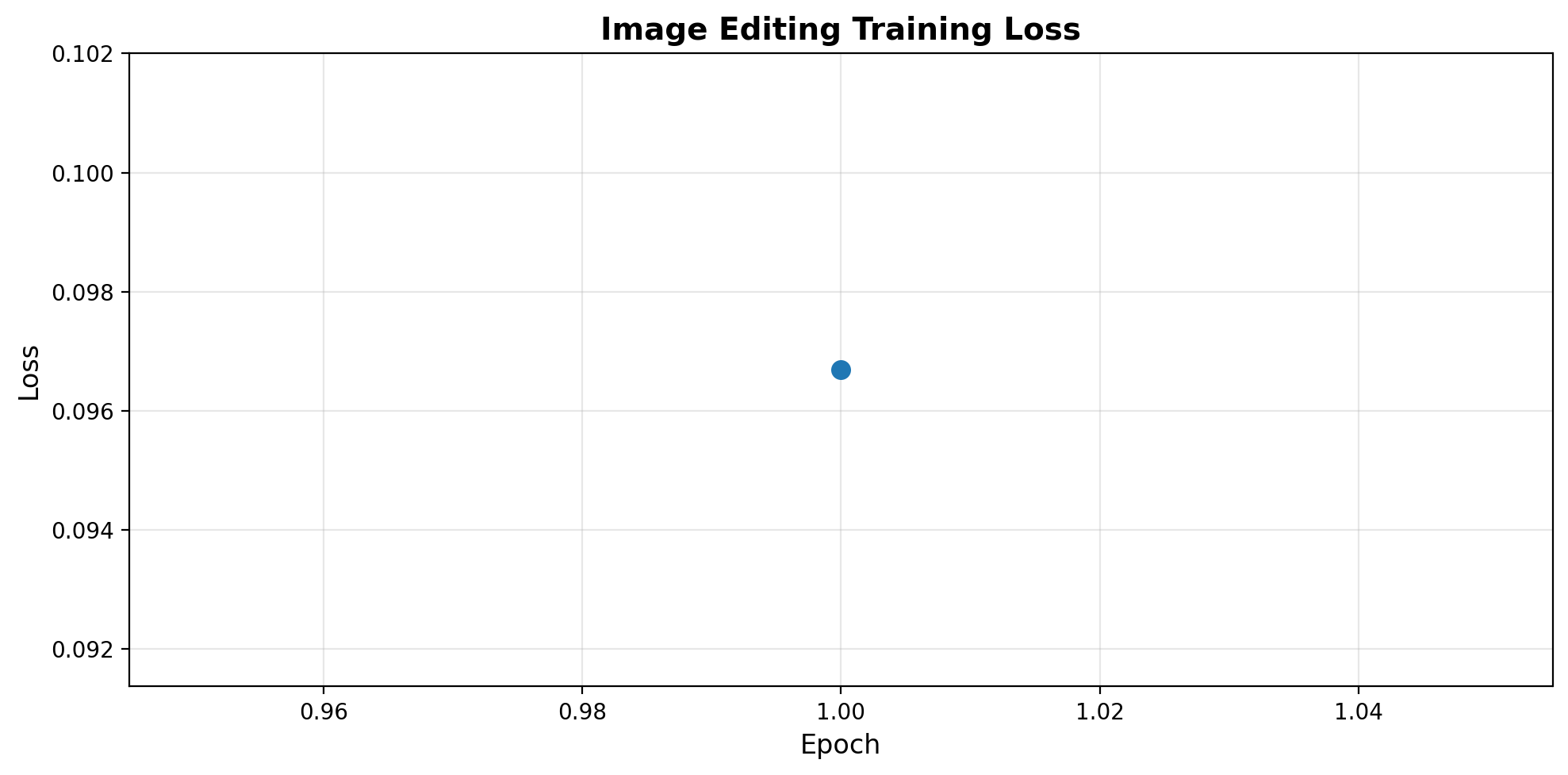
Part 6: Test Image Editing
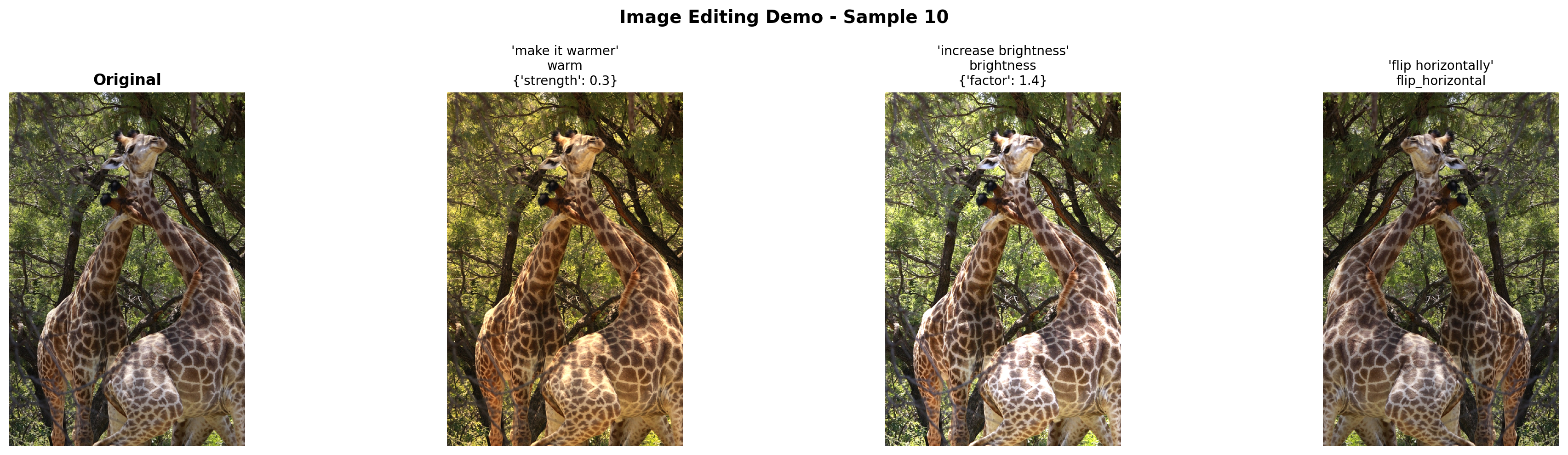
Let’s see the model edit images based on instructions!
def predict_edit_operation(model, image, instruction, image_processor, tokenizer, device):
    """
    Predict edit operation from instruction.

    Returns:
        dict with 'operation' and 'params'
    """
    model.eval()

    if not isinstance(image, Image.Image):
        image = Image.fromarray(image)
    image = image.convert('RGB')

    pixel_values = image_processor(image, return_tensors="pt").pixel_values.to(device)

    prompt = f"Edit instruction: {instruction}\nEdit:"

    response = model.generate(
        pixel_values,
        prompt=prompt,
        max_new_tokens=50,
        temperature=0.3,
        do_sample=False,  # Greedy for JSON
    )

    # Extract JSON from response
    try:
        # Response format: "Edit instruction: ... Edit: {json}"
        if "Edit:" in response:
            json_str = response.split("Edit:")[-1].strip()
        else:
            json_str = response

        # Parse JSON
        edit_op = json.loads(json_str)
        return edit_op
    except json.JSONDecodeError:
        # Fallback
        return {'operation': 'grayscale', 'params': {}}


def edit_image_with_instruction(model, image, instruction, image_processor, tokenizer, device):
    """
    Full pipeline: instruction → operation prediction → apply edit.
    """
    # Predict operation
    edit_op = predict_edit_operation(model, image, instruction, image_processor, tokenizer, device)

    # Apply operation
    operation = edit_op.get('operation', 'grayscale')
    params = edit_op.get('params', {})

    try:
        edited_image = ImageEditor.apply_operation(image, operation, params)
        return edited_image, edit_op
    except Exception as e:
        print(f"Error applying operation: {e}")
        return image, edit_op
# Test on sample images
test_instructions = [
"make it grayscale",
"increase brightness",
"make it warmer",
"blur the image",
"rotate 90 degrees",
"flip horizontally",
]
test_indices = [0, 10, 50, 100]
for idx in test_indices[:2]: # Test on 2 images
if idx >= len(image_samples):
continue
original_image = image_samples[idx]['image'].convert('RGB')
# Try 3 random instructions
sample_instructions = random.sample(test_instructions, 3)
fig, axes = plt.subplots(1, 4, figsize=(20, 5))
# Original
axes[0].imshow(original_image)
axes[0].set_title("Original", fontsize=12, fontweight='bold')
axes[0].axis('off')
# Edits
for i, instruction in enumerate(sample_instructions):
edited, edit_op = edit_image_with_instruction(
vlm, original_image, instruction, image_processor, tokenizer, device
)
axes[i+1].imshow(edited)
title = f"'{instruction}'\n{edit_op['operation']}"
if edit_op['params']:
title += f"\n{edit_op['params']}"
axes[i+1].set_title(title, fontsize=10)
axes[i+1].axis('off')
plt.suptitle(f"Image Editing Demo - Sample {idx}", fontsize=14, fontweight='bold')
plt.tight_layout()
plt.show()
print("=" * 70)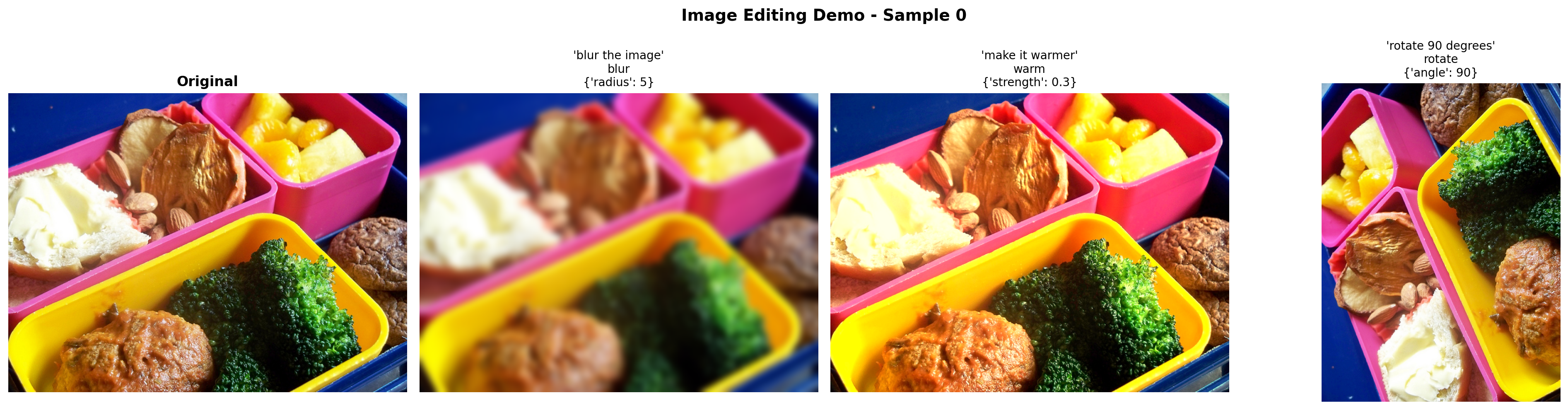
======================================================================
======================================================================Part 7: Interactive Gallery
Show before/after comparisons for various edit operations.
# Create a comprehensive gallery
gallery_image = image_samples[5]['image'].convert('RGB')

gallery_instructions = [
    "make it grayscale",
    "make it brighter",
    "increase saturation",
    "make it warmer",
    "blur the image",
    "sharpen the image",
    "rotate 90 degrees",
    "flip horizontally",
]

fig, axes = plt.subplots(3, 3, figsize=(18, 18))
axes = axes.flatten()

# Original
axes[0].imshow(gallery_image)
axes[0].set_title("ORIGINAL IMAGE", fontsize=14, fontweight='bold', color='green')
axes[0].axis('off')

# Edits
for i, instruction in enumerate(gallery_instructions):
    edited, edit_op = edit_image_with_instruction(
        vlm, gallery_image, instruction, image_processor, tokenizer, device
    )

    axes[i+1].imshow(edited)
    title = f"{instruction.upper()}\n"
    title += f"Operation: {edit_op['operation']}"
    if edit_op['params']:
        params_str = ', '.join([f"{k}={v}" for k, v in edit_op['params'].items()])
        title += f"\nParams: {params_str}"
    axes[i+1].set_title(title, fontsize=10)
    axes[i+1].axis('off')

plt.suptitle("Image Editing Gallery: Natural Language → Automatic Edits",
             fontsize=16, fontweight='bold', y=0.995)
plt.tight_layout()
plt.show()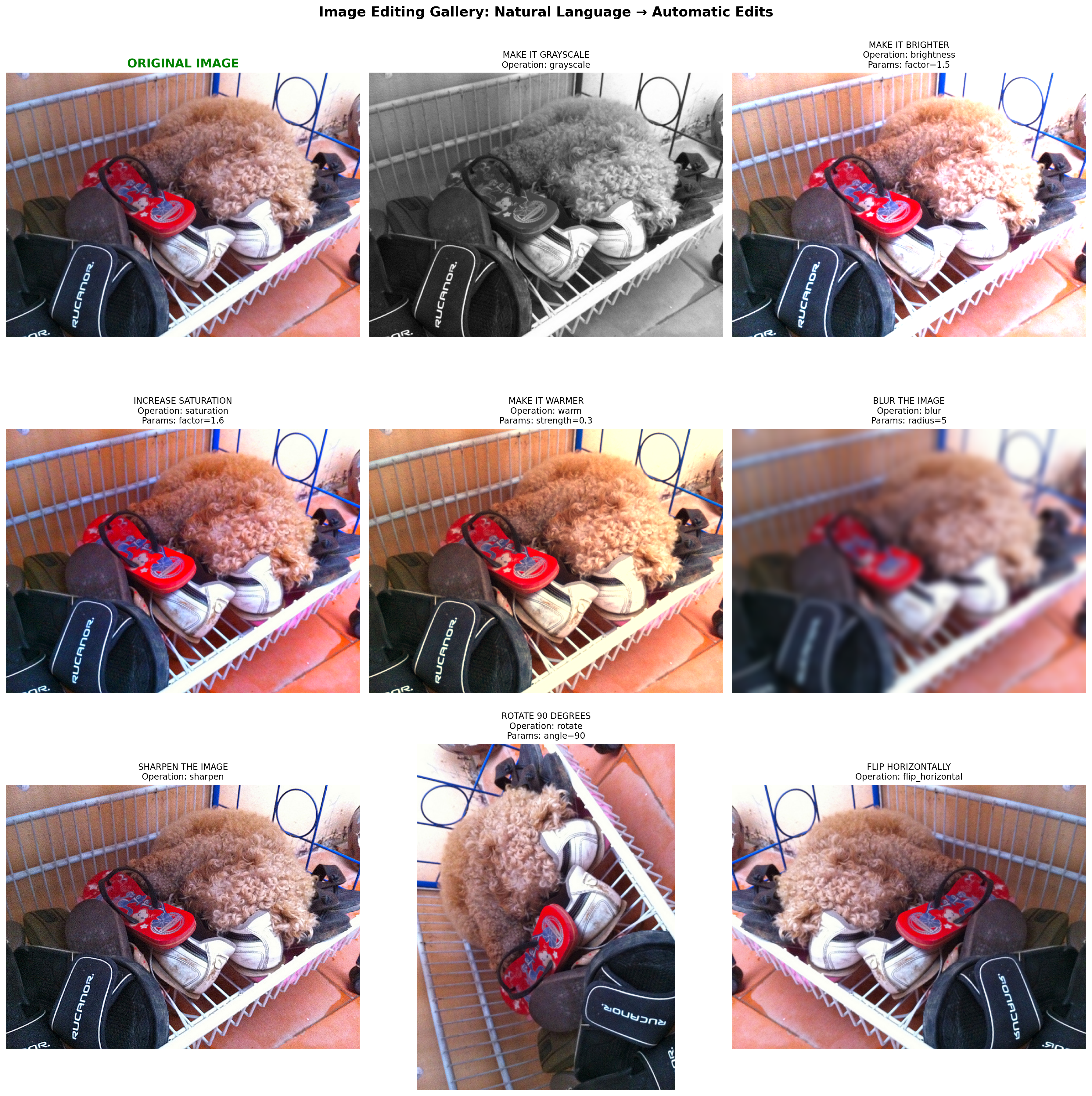
Part 8: Save Model
# Save the trained model
save_dir = "mini-vlm-edit"
os.makedirs(save_dir, exist_ok=True)

torch.save({
    'projector_state_dict': vlm.projector.state_dict(),
    'language_model_state_dict': vlm.language_model.state_dict(),
    'config': {
        'vision_model_name': vision_model_name,
        'lm_model_name': lm_model_name,
        'vision_dim': vision_dim,
        'language_dim': language_dim,
    },
}, f"{save_dir}/mini_vlm_edit.pt")

tokenizer.save_pretrained(f"{save_dir}/tokenizer")
image_processor.save_pretrained(f"{save_dir}/image_processor")

print(f"Model saved to {save_dir}/")
print(f"Contents: {os.listdir(save_dir)}")
Model saved to mini-vlm-edit/
Contents: ['tokenizer', 'mini_vlm_edit.pt', 'image_processor']Summary
We successfully built an Image Editing VLM that understands natural language instructions!
What We Built
- Image editing library - 20+ operations (grayscale, blur, rotate, warm tones, etc.)
- Instruction parser - VLM predicts edit operations from natural language
- Synthetic dataset - Generated 2000+ training examples
- End-to-end pipeline - Instruction → JSON → Apply operation
Architecture: Instruction → Parameters → Edit
Input: [Image] + "make it warmer"
       ↓
VLM Prediction: {"operation": "warm", "params": {"strength": 0.3}}
       ↓
Apply with PIL: ImageEditor.warm(image, strength=0.3)
       ↓
Output: [Edited image with orange tint]
Key Design Decisions
Why parameterized edits instead of pixel generation?
| Aspect | Our Approach | Diffusion (InstructPix2Pix) |
|---|---|---|
| Model size | 135M params | 1B+ params |
| Speed | <0.1s (instant) | 5-10s per image |
| Reliability | Deterministic | Stochastic |
| Controllability | Exact parameters | Prompt-based (variable) |
| Quality | Good (for transforms) | Excellent (for complex edits) |
| Training data | 2K synthetic | Millions of examples |
Our approach is better for: - ✅ Color adjustments, filters, transforms - ✅ Consistent, repeatable edits - ✅ Real-time applications - ✅ Small model deployment - ✅ Interpretable operations
Diffusion is better for: - ✅ Complex semantic changes (“add a hat to the person”) - ✅ Style transfer - ✅ Inpainting, outpainting - ✅ Photorealistic edits
Supported Operations (20+)
Color adjustments: - Grayscale, sepia, invert - Brightness, contrast, saturation, sharpness - Warm/cool temperature
Transformations: - Rotate, flip (horizontal/vertical) - Resize, crop
Filters: - Blur, sharpen - Edge detection, emboss, contour - Posterize, solarize
Example Instructions
"make it grayscale"          → {"operation": "grayscale"}
"increase brightness"        → {"operation": "brightness", "params": {"factor": 1.5}}
"make it warmer"             → {"operation": "warm", "params": {"strength": 0.3}}
"blur the image"             → {"operation": "blur", "params": {"radius": 5}}
"rotate 90 degrees"          → {"operation": "rotate", "params": {"angle": 90}}
"flip horizontally"          → {"operation": "flip_horizontal"}
Training Strategy
Synthetic data generation: 1. Load images from COCO/Flickr (2000 images) 2. For each image, randomly select an operation 3. Generate natural language instruction from templates 4. Create JSON output with operation + parameters 5. Train VLM to predict JSON from instruction
Why this works: - Don’t need actual before/after image pairs - Can generate unlimited training data - Operations are deterministic (ground truth) - Model learns operation → parameter mapping
Limitations
- No semantic understanding - Can’t “add a hat” or “remove object”
- Limited to parametric ops - Can’t learn new operations
- Template-based - Instructions must match training templates
- No composition - Can’t chain multiple edits in one instruction
- Basic PIL operations - Limited compared to Photoshop/GIMP
Next Steps
- Multi-step editing - Chain operations: “make it grayscale then increase contrast”
- Parameter learning - VLM predicts exact parameter values
- Custom operations - Add more advanced filters (vignette, lens blur, etc.)
- Hybrid approach - Combine with diffusion for semantic edits
- Interactive refinement - “Make it more blue” → adjust previous edit
- Compression - Quantize model for edge deployment (next notebook!)
References
Image Editing Models
- InstructPix2Pix - Diffusion-based instruction editing
- ControlNet - Conditional diffusion control
- Pix2Pix - Image-to-image translation
- CLIP - Vision-language pretraining
Image Processing
- Pillow (PIL) - Python image library
- ImageEnhance - Color/contrast/brightness
- ImageFilter - Filters and effects