Short lessons for ES 112 Computing at IIT Gandhinagar, a first course in programming with Python. Each Short teaches one idea by running real code line by line, in under a minute.
77 Shorts so far, with more on the way.
77 Shorts
No matches
Try a broader word such as list, string or function.
All Shorts
In course order.
-
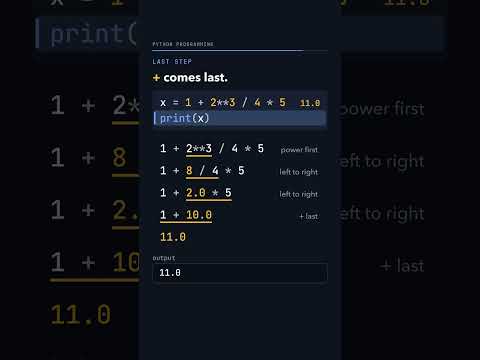
x = 1 + 2**3 / 4 * 5. What does print(x) show?
Python works out 2**3 first, which is 8, because ** (power) comes before the other operators. Then / and * go from left to right: 8 / 4 is 2.0 and 2.0 * 5 is 10.0. The + comes last, so x is 11.0 and print(x) prints 11.0, a float because / always gives a float. Brackets change the order: print(1 + 8 / (4 * 5)) prints 1.4.
-

print(6 // 2, 6 / 2, 6 % 2): three kinds of division. What prints?
Python has three kinds of division. 6 // 2 is floor division, the number of whole 2s that fit in 6, so it gives the int 3; 6 / 2 is true division and always gives a float, 3.0; 6 % 2 is the remainder, 0. So the first line prints 3 3.0 0, and print(2 // 5, 2 % 5) prints 0 2, because 2 = 5 x 0 + 2.
-

print(365 ^ 365) was meant to give 365 to the power 365. Why does it print 0?
In Python ^ is not power. It compares two numbers bit by bit (XOR): a result bit is 1 where the bits differ and 0 where they match, so 2 ^ 5 is 7 because 010 and 101 give 111. A number XOR itself has no differing bits, so 365 ^ 365 is 0. Power is written **: 2 ** 5 is 32, and 365 ** 365 has 936 digits.
-

a = 10, b = 5, a = a + b, b = a + b. What does print(a, b) show?
In Python = is not an equation: it means work out the right side now, then store the result in the name on the left. So a = a + b adds the current values, 10 + 5, and a becomes 15. The next line, b = a + b, reads the new a, 15 + 5, so b becomes 20 and print(a, b) prints 15 20.
-

print("Hello", "World") prints Hello World. Where does the space come from?
print puts sep between its values, and the default sep is one space, so print("Hello", "World") prints Hello World. With sep="" it prints HelloWorld, and with sep="-" it prints Hello-World. print also puts end after the last value; the default end is a new line, and end=" " keeps the next print on the same line, so print("Hello", end=" ") then print("World") prints Hello World.
-

x = x + y, y = x - y, x = x - y. Does this swap x and y?
Start with x = 10 and y = 20. After x = x + y, x holds the sum, 30; then y = x - y gives 30 - 20 = 10, the old x, and x = x - y gives 30 - 10 = 20, the old y. So print(x, y) prints 20 10: they are swapped. The common mistake, x = y then y = x, prints 20 20 because the 10 is gone, and Python's own swap is x, y = y, x.
-

x = input(), y = input(). You type 10, then 20. What does print(x + y) show?
input() always gives text (a str), even when you type digits, so x holds '10' and y holds '20'. The + sign joins two strings, so print(x + y) prints 1020. int() turns the text into a whole number first, so print(int(x) + int(y)) prints 30. Checking whether the typed text is at least 90 stops with a TypeError; write marks = int(input()) instead.
-

A coach number should print as S10. Does print("S" + 10) work?
In Python + joins two strings ("S" + "10" is S10) and adds two numbers (3 + 10 is 13). A string plus an int is neither, so print("S" + 10) stops with TypeError: can only concatenate str (not "int") to str. Turn the number into text first: print("S" + str(10)) prints S10, and so does print("S", 10, sep="").
-

x = 12373626527645726457264527634. How many digits? What does len(str(x)) print?
x is an int, and Python ints can be as long as you like. len() counts the items in text or a list, not the digits of a number, so str(x) first turns the number into text, one character per digit. len then counts 29 characters, and print(len(str(x))) prints 29. Asking for len(10) directly stops with a TypeError.
-
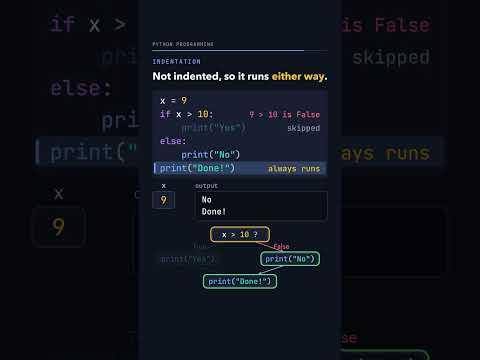
x = 9. If x is more than 10 print Yes, else print No, then Done! What prints?
The test, is x more than 10, is a question with a True or False answer, and for x = 9 it is False. So Python skips the indented block under if and runs the block under else, which prints No. The last line is not indented, so it runs either way and prints Done!. Indentation decides which lines belong to the if or the else.
-
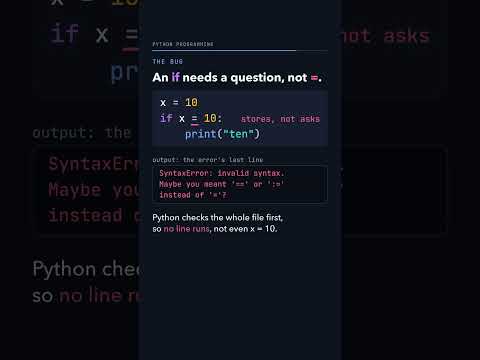
x = 10, then if x = 10: print("ten"). Spot the bug. What happens?
One = stores a value in a name, so x = 10 puts 10 in x. Two == ask a question: x == 10 is True and x == 5 is False. An if needs a question, so if x = 10: stops the whole file before any line runs, with SyntaxError: invalid syntax. Maybe you meant '==' or ':=' instead of '='? Writing if x == 10: prints ten.
-

marks = 0, then if marks: print Yes., else print No. No comparison. What prints?
An if can test a plain number with no comparison: Python asks whether the value counts as True. 0 counts as False, so the else block runs and it prints No.; 100 and -100 both count as True and print Yes. To say what you mean, compare with 0 in the test itself. Watch for a stray comma: marks = 5,6 makes a tuple, which counts as True.
-

What is 13 in binary? Divide by 2 and keep the remainders
In base 2 each place is worth 2 times the next one: 1, 2, 4, 8. To write 13 in binary, divide by 2 and keep the remainder, then divide the answer again: 13 // 2 is 6 remainder 1, then 3 remainder 0, 1 remainder 1, 0 remainder 1. Read the remainders from the bottom up to get 1101, which is 8 + 4 + 0 + 1 = 13, and print(bin(13)) prints 0b1101.
-

Can 4 binary digits after the point hold 0.2? What do these prints show?
After the point, binary places are worth 1/2, 1/4, 1/8, 1/16 and so on. Doubling 0.2 gives the bits 0, 0, 1, 1 and then 0.2 comes back, so 0011 repeats forever. Keeping 4 bits gives 1/8 + 1/16, which prints 0.1875, and 8 bits give 0.19921875: closer, never equal. A float keeps a fixed number of bits, so 0.2 is stored as the nearest value it can reach.
-

if 0==1 and 1/0==1: does Python print Yes, No, or crash with an error?
Python checks 0==1 and 1/0==1 from the left: 0==1 is False, and with and both sides must be True, so Python stops there, never runs 1/0, and the else branch prints No. Change and to or and Python needs just one True side, so it goes on to 1/0 and stops with ZeroDivisionError: division by zero. This is short-circuiting: and stops at the first False, or stops at the first True. So print(1==1 or 1/0==1) prints True.
-

x is 0. Does if x != 0 and 1/x is more than 1/100 crash?
and checks its left side first. With x = 0, x != 0 is False, so the whole and must be False and Python never works out 1/x: the program just prints done. Swap the two sides and the division runs first, stopping with ZeroDivisionError: division by zero. Put the safety check on the left; or works the same way and stops at the first True.
-

marks is 95 and the grade should be A. What does this if, if, else code print?
With marks = 95, the first if test is True, since 95 is at least 90, so the code prints A. The second if is a new, separate question, and 95 is also at least 80, so it prints B as well; the else belongs only to that second if. Change the second if to elif, which Python checks only when the tests above it were False, and only A prints.
-
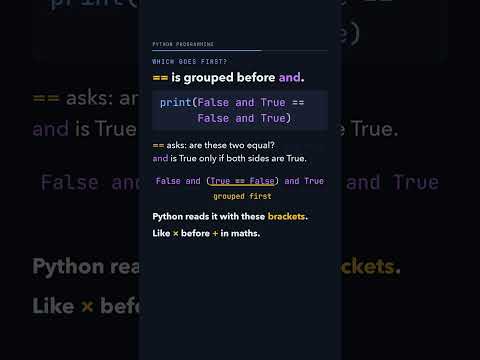
print(False and True == False and True): does it print True or False?
Python groups == before and, just as x comes before + in maths, so it reads the line as False and (True == False) and True. True == False is False, and and is True only when every part is True, so print shows False. Brackets change the question: print((False and True) == (False and True)) compares False with False and prints True.
-

Rock 0, paper 1, scissors 2. You play rock, the computer plays paper. What prints?
Encode rock as 0, paper as 1 and scissors as 2: each move is beaten by the next number, and (u + 1) % 3 wraps scissors (2) round to rock (0). With u = 0 and c = 1, (0 + 1) % 3 is 1, which equals c, so the program prints Comp wins. With u = 2 and c = 0, (2 + 1) % 3 is 0, and it prints Comp wins again: rock beats scissors.
-

total starts at 0 and a while loop adds i while i is at most 4. What prints?
The loop starts with total = 0 and i = 1, and repeats its indented lines while its test, i at most 4, is True. Each round adds i to total and 1 to i, so total goes 1, 3, 6, 10 as i goes 1, 2, 3, 4. When i is 5 the test is False, the loop ends, and print(total) prints 10. With no loop, n*(n+1)//2 for n = 4 also gives 10.
-
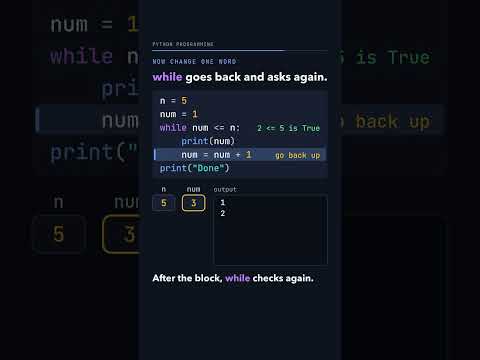
n = 5, num = 1. What does this if print, and what changes with while?
With n = 5 and num = 1, an if runs its block at most once: it prints 1, num becomes 2, and the program prints Done. Change if to while and Python goes back after the block and asks again whether num is at most n, so it prints 1, 2, 3, 4 and 5, stops when num is 6, and then prints Done. Forget num = num + 1 and the test never becomes False: the while version prints 1 forever.
-

x = 1, while x is below 5: print x, add 1. Then print x again. What is the last number?
The loop prints x while x is below 5, so it prints 1, 2, 3 and 4; after printing 4, x becomes 5. Now 5 is not below 5, so the loop ends, and the print after the loop shows the value that stopped it: 5, not 4. Try x = 3 with x = x + x while x is below 8: x goes 3, 6, 12, and print(x) shows 12.
-

This loop should print 7, the square root of 49. Why does it print 6?
The code counts s up from 0 while s * s is below x and then prints s - 1. For x = 49 the loop stops at s = 7, because 49 is not below 49, so it prints 7 - 1 = 6. For 50 it stops at 8 and prints 7, which is right, so only perfect squares go wrong. Change the test to s * s at most x and it prints 7; with the fix, 50, 49, 16 and 17 give 7, 7, 4 and 4.
-

start = 1.0, halve it while it is above 0.0. Does "Fin." ever print?
In maths, halving 1 never reaches 0, but a Python float has a smallest positive value: 2 ** -1074, which prints as 5e-324. Half of that rounds to 0.0, so start is no longer above 0.0, the loop ends and Fin. prints. A counter shows the loop runs 1075 times, and print(5e-324 / 2) prints 0.0.
-

Is 91 prime? This loop looks for its smallest divisor. What does it print?
The loop starts at i = 2 and adds 1 to i while num % i != 0, where % gives the remainder after dividing. For 91 the remainders for i = 2 to 6 are 1, 1, 3, 1 and 1, and at i = 7 the remainder is 0, so the loop stops and prints 7: 91 = 7 x 13, so 91 is not prime. With num = 19 it prints 19, because a prime's smallest divisor from 2 up is the number itself.
-

Is 197 prime? Do you really have to try 195 divisors to find out?
Divisors come in pairs, and one of each pair is at most the square root: 91 = 7 x 13, and 7 is below the square root of 91, which is 9.54. The square root of 197 is 14.03..., so math.ceil(r) + 1 prints 16, and a loop that stops before 16 tries 14 divisors instead of 195; skipping even numbers after 2 leaves 7. Try r = math.sqrt(10) and print(math.ceil(r)): it prints 4, because ceil rounds up.
-
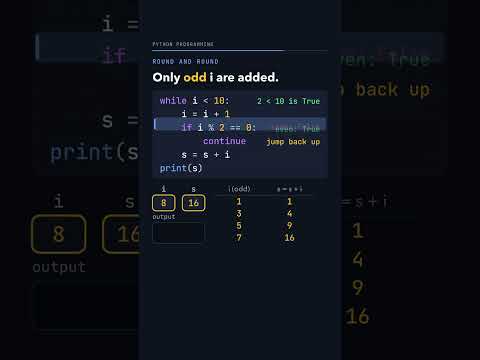
i = 0, s = 0. The loop adds i to s but skips even i with continue. What prints?
Each round adds 1 to i, and when i is even, continue jumps straight back to the while test, so s = s + i is skipped. Only the odd numbers are added: s goes 1, 4, 9, 16, 25, and print(s) shows 25. Put i = i + 1 after the continue instead and at i = 2 the loop jumps back before adding 1, so i stays 2 and the loop never ends.
-

x = 1. while x is below 5: break, then x = x + 1. What does print(x) show?
The loop starts because 1 is below 5, but break leaves the loop at once, so x = x + 1 never runs and print(x) shows 1. In a prime test, break stops the search at the first divisor: for 91 it sets found = True at i = 7 and prints True 7. break leaves only the loop it is in, so with an inner loop that breaks at 20, the outer loop still prints 1 10 and then 2 10.
-

A 3 x 3 times table with a loop inside a loop. Why does only one row print?
row and col both start at 1, once, before the loops. In row 1 the inner loop prints 1 2 3 and leaves col at 4, so in rows 2 and 3 col is already above 3: the inner loop does nothing and print() gives two empty lines. Put col = 1 as the first line inside the outer loop and every row starts again: 1 2 3, 2 4 6, 3 6 9.
-

k = 0 and i = 5. A while loop inside a while loop adds j to k. What is k at the end?
For each value of i, the inner loop adds 1 + 2 + ... + i to k: i = 5 adds 15, then i = 4 adds 10, i = 3 adds 6, i = 2 adds 3 and i = 1 adds 1. When i reaches 0 the outer test fails, since 0 is not above 0, and k is 35. The pattern is k = i(i+1)(i+2)/6, and 5 x 6 x 7 // 6 is 35 too.
-
![Thumbnail: scores = [90, 82, 83, 100, 102]. What do len, [0], [-1] and [5] give?](https://i.ytimg.com/vi/jVkVZGep5yU/hqdefault.jpg)
scores = [90, 82, 83, 100, 102]. What do len, [0], [-1] and [5] give?
A list keeps its items in order, and len(scores) counts them: 5. Positions start at 0, so scores[0] is 90, and -1 counts from the end, so scores[-1] is 102. The five positions run from 0 to 4, so scores[5] stops with IndexError: list index out of range. scores[len(scores) - 1] also gives the last item, 102.
-
![Thumbnail: x = [] then x.append(10) prints [10]. Why does y = y.append(10) make y None?](https://i.ytimg.com/vi/jugvgmbr9oY/hqdefault.jpg)
x = [] then x.append(10) prints [10]. Why does y = y.append(10) make y None?
append changes a list in place: after x = [] and x.append(10), print(x) shows [10]. But append gives back None, so y = y.append(10) adds 10 to the list and then points y at that None, and print(y) prints None. Call append on its own line instead; the same trap catches print([2, 3].append(4)) and xs = [].extend([1, 2]), which both give None.
-
![Thumbnail: x.append([5, 6, 7]) or x.extend([5, 6, 7]): what does each list print?](https://i.ytimg.com/vi/xiUa3JnGHus/hqdefault.jpg)
x.append([5, 6, 7]) or x.extend([5, 6, 7]): what does each list print?
append adds exactly one item, even when that item is a whole list, so x = [1, 2, 3, 4] followed by x.append([5, 6, 7]) prints [1, 2, 3, 4, [5, 6, 7]]. extend adds each item of the list one by one, so y.extend([5, 6, 7]) prints [1, 2, 3, 4, 5, 6, 7]. print(len(x), len(y)) shows 5 7. extend also walks through text: y.extend("5") adds the text '5' as a new item.
-
![Thumbnail: x = [1] * 2 and y = x * 2. What does print(x, y) show in Python?](https://i.ytimg.com/vi/ttYCYmk-YBU/hqdefault.jpg)
x = [1] * 2 and y = x * 2. What does print(x, y) show in Python?
The * sign on a list repeats it, so [1] * 2 is [1, 1] and y = x * 2 is [1, 1, 1, 1]: print(x, y) shows [1, 1] [1, 1, 1, 1]. A list inside a list counts as one item, so len([[1, 2], 3]) is 2. The + sign joins two lists, [2, 3] + [4, 5] gives [2, 3, 4, 5], but a list plus a number is a TypeError.
-
![Thumbnail: x = ["a", "b", "c", "d", "e"]. Which letters does x[1:4] give in Python?](https://i.ytimg.com/vi/PP0TTa0kYZA/hqdefault.jpg)
x = ["a", "b", "c", "d", "e"]. Which letters does x[1:4] give in Python?
A slice x[start:stop] starts at position start and stops before position stop, so x[1:4] takes positions 1, 2 and 3 and prints ['b', 'c', 'd']. With no start it begins at 0, so x[:3] prints ['a', 'b', 'c']. Strings slice the same way: "Hello, World!"[1:4] is ell. A third number is the step: x[::2] gives ['a', 'c', 'e'].
-
![Thumbnail: x = ["a", "b", "c", "d", "e"]. What do x[::-1], x[4:0:-1] and x[4:-1:-1] give?](https://i.ytimg.com/vi/ao1rqxHIcSA/hqdefault.jpg)
x = ["a", "b", "c", "d", "e"]. What do x[::-1], x[4:0:-1] and x[4:-1:-1] give?
A slice with a step of -1 walks from right to left, so x[::-1] reverses the list: ['e', 'd', 'c', 'b', 'a']. It still stops before its stop, so x[4:0:-1] leaves out position 0 and gives ['e', 'd', 'c', 'b']. As a position, -1 means the last one, 4, so x[4:-1:-1] starts and stops at the same place and gives []. Try "hello world"[20:-3:-2]: it prints d.
-
![Thumbnail: x has 5 items. Which crashes in Python: x[0:10], x[4:2] or x[10]?](https://i.ytimg.com/vi/9GlO2i5THAc/hqdefault.jpg)
x has 5 items. Which crashes in Python: x[0:10], x[4:2] or x[10]?
A slice that runs past the end just stops at the end, so x[0:10] on a 5-item list prints all 5: ['a', 'b', 'c', 'd', 'e']. A slice whose start comes after its stop gives an empty list, so x[4:2] prints []. Reading one position that does not exist is an error: x[10] gives IndexError: list index out of range. Strings behave the same way.
-

f = f * i for i in range(11) should give 10 factorial. Why does it print 0?
range(11) gives 0, 1, 2 up to 10: it starts at 0 and stops before 11. So the first round of the loop multiplies f by 0, f becomes 0, and 0 times anything stays 0: the code prints 0. Start at 1 with range(1, 11) and it prints 3628800, which is 10 factorial. Try print(list(range(0, 10, 2))): it prints [0, 2, 4, 6, 8].
-

x = 10.0, then for x in range(2): print x, add 1, print x. What prints?
The for line gives the loop name its next value at the start of every round, so x = 10.0 is replaced by 0. Round 1 prints 0, sets x to 1 and prints 1. In round 2 the for line sets x to 1 again, not 2, so it prints 1 and then 2: the output is 0,1,1,2, on one line. Changing x inside the loop does not change which values come next.
-
![Thumbnail: All prefixes of [1, 2, 3] with range(len(xs)). What does print(ys) show?](https://i.ytimg.com/vi/FVCxmNaFJuQ/hqdefault.jpg)
All prefixes of [1, 2, 3] with range(len(xs)). What does print(ys) show?
range(len(xs)) is range(3), which gives 0, 1 and 2. Each round appends the slice xs[:i], so ys gets [], [1] and [1, 2], and print(ys) shows [[], [1], [1, 2]]. i never reaches 3, so the full list [1, 2, 3] is missing. Loop over range(len(xs) + 1) and it prints [[], [1], [1, 2], [1, 2, 3]].
-
![Thumbnail: highest = 0, then keep the biggest of [-5, -2, -9]. What does it print?](https://i.ytimg.com/vi/hfNjOvqG2_Y/hqdefault.jpg)
highest = 0, then keep the biggest of [-5, -2, -9]. What does it print?
The loop keeps the biggest value seen so far in highest, which starts at 0. Every item of [-5, -2, -9] is below 0, so x is never bigger than highest and the code prints 0, a number that is not even in the list. Start with the first item instead, highest = xs[0], and it prints -2. max(xs) also gives -2.
-
![Thumbnail: xs[i] = xs[i] - xs[i-1] for each i on [1, 2, 3, 4]. What does print(xs) show?](https://i.ytimg.com/vi/DM8SelrY0HQ/hqdefault.jpg)
xs[i] = xs[i] - xs[i-1] for each i on [1, 2, 3, 4]. What does print(xs) show?
The loop replaces each item after the first by itself minus the one before, and we expect [1, 1, 1, 1]. At i = 1 it computes 2 - 1 = 1, but at i = 2 it reads the new xs[1], which is now 1, so it computes 3 - 1 = 2, and at i = 3 it computes 4 - 2 = 2. It prints [1, 1, 2, 2] because it reads values it already changed. Going backwards with range(3, 0, -1) prints [1, 1, 1, 1].
-
![Thumbnail: x = [1, 2, 3], y = x, y[1] = 4. What does print(x) show?](https://i.ytimg.com/vi/8-pFJ-_lz44/hqdefault.jpg)
x = [1, 2, 3], y = x, y[1] = 4. What does print(x) show?
In Python, a name is a label on an object. After x = [1, 2, 3] and y = x, both names point to the same list, and id(x) and id(y) print the same number. So y[1] = 4 changes that one list, and print(x) and print(y) both show [1, 4, 3]. For a separate list, write y = x.copy(): then print(x) still shows [1, 2, 3].
-

x = 600, y = x, y = y + 2. Does x change? What does print(x, y) show?
In Python a name points at an object. After x = 600 and y = x, both names point at the same int, and x is y is True. y = y + 2 builds a new int, 602, and moves only y's arrow, so x is y becomes False and print(x, y) shows 600 602. An int never changes in place. A list can: with x = [600], y = x and y[0] = y[0] + 2, print(x) shows [602].
-
![Thumbnail: x = [[1, 2], [3, 4]], y = x.copy(), y[0][0] = 99. What does print(x) show?](https://i.ytimg.com/vi/_2UusLvTMrk/hqdefault.jpg)
x = [[1, 2], [3, 4]], y = x.copy(), y[0][0] = 99. What does print(x) show?
x.copy() makes a new outer list, so x is y is False, but the new list points at the same two inner lists, so x[0] is y[0] is True. Then y[0][0] = 99 changes the shared inner list, and print(x) shows [[99, 2], [3, 4]]. For a copy that shares nothing, use deepcopy from the copy module: after y = deepcopy(x) and y[0][0] = 4, x is still [[1, 2], [3, 4]].
-
![Thumbnail: row = [0, 0, 0], matrix = [row, row, row], matrix[0][0] = 1. What prints?](https://i.ytimg.com/vi/jc1z1goG_EE/hqdefault.jpg)
row = [0, 0, 0], matrix = [row, row, row], matrix[0][0] = 1. What prints?
matrix = [row, row, row] does not make three rows: it holds three arrows to one row object. So matrix[0][0] = 1 changes that one row, and print(matrix) shows [[1, 0, 0], [1, 0, 0], [1, 0, 0]]. To get three separate rows, build the matrix from row.copy() three times: then the same change prints [[1, 0, 0], [0, 0, 0], [0, 0, 0]].
-
![Thumbnail: a = [400, 500], b = [400, 500], c = a. What does print(a == b, a is b, a is c) show?](https://i.ytimg.com/vi/d0FBNsoLpKI/hqdefault.jpg)
a = [400, 500], b = [400, 500], c = a. What does print(a == b, a is b, a is c) show?
a and b are two separate lists that hold the same numbers, and c = a gives a's list a second name. == compares values, so a == b is True. is asks whether two names point at the same object, so a is b is False and a is c is True: the line prints True False True. is compares id numbers, so print(id(a) == id(c)) prints True.
-
![Thumbnail: x = "hello", then x[0] = "a". What happens in Python?](https://i.ytimg.com/vi/xRFvZD96ONk/hqdefault.jpg)
x = "hello", then x[0] = "a". What happens in Python?
Reading one letter of a string works: x[0] is h. But strings are immutable, which means they cannot be changed in place, so x[0] = "a" stops with TypeError: 'str' object does not support item assignment. Build a new string instead: x = "a" + x[1:] makes aello and points x at it. A new string moves only one name: after s = "december", t = s and s = "november", print(s, t) shows november december.
-
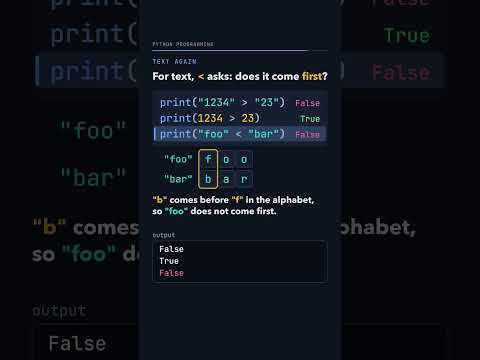
Is "1234" greater than "23" in Python? True or False?
Python compares numbers by size, so 1234 greater than 23 prints True. Text is compared one character at a time from the left, like words in a dictionary, and the first characters that differ decide. "1" comes before "2", so "1234" greater than "23" prints False, and "b" comes before "f", so "foo" less than "bar" prints False too. Comparing a number with text, as in 22 greater than "33", stops with a TypeError.
-

How do you print 5.136 as 5.14, or 1000 as 1,000, in Python?
An f-string puts values inside curly brackets, and what comes after the colon says how to write the number. With number = 5.136, f"{number:.2f}" keeps 2 digits after the point and prints 5.14. A comma adds thousands separators: 10000000000.239 with :,.2f prints 10,000,000,000.24, and 1000 with :, prints 1,000. The number itself does not change; only the printed text does.
-

x = "HELLo World", then x.lower(). Did x change?
Strings in Python cannot change, so x.lower() builds a new lower-case string instead of changing x. On a line of its own that new string gets no name and is thrown away, so print(x) still shows HELLo World. Save the result, y = x.lower(), and print(y) shows hello world. Methods like isupper() only answer a question: x.isupper() is False and "HELLO".isupper() is True.
-

How do you add up the numbers in the text "3,4,5,6,7,8,10" in Python?
Numbers typed with commas arrive as one piece of text. x.split(",") cuts it at each comma into a list of text pieces, '3', '4' and so on, and int(s) turns each piece into a number. The loop adds them as it goes: 3 + 4 + 5 + 6 + 7 + 8 + 10, so print(total) shows 43. Forget int() and + joins text instead: "3" + "4" is 34.
-
![Thumbnail: Joining ["Hello", "World"] with a loop: where does the extra space come from?](https://i.ytimg.com/vi/oa_hzHYwEqY/hqdefault.jpg)
Joining ["Hello", "World"] with a loop: where does the extra space come from?
The loop s = s + " " + x adds a space and then a word, and it does that for the first word too. So after two rounds s is " Hello World", and print("[" + s + "]") shows [ Hello World] with a stray space at the front. " ".join(xs) puts the space only between the items and prints [Hello World]. Any text can go between: "-".join(["a", "e", "l", "l", "o"]) gives a-e-l-l-o.
-

What does "This is a good question.".replace("is", "IS") give in Python?
replace looks for the letters, not for whole words. In "This is a good question." the letters "is" appear twice, at the end of This and as the word is, so x.replace("is", "IS") prints ThIS IS a good question. It returns a new string and x keeps the old text. To change only the word, put the spaces in the search: x.replace(" is ", " IS ") gives This IS a good question.
-

area_of_circle(10) + area_of_rect(5, 3): what does Python print?
def only stores a function: its name, its parameters and its body. Nothing in the body runs until you call it. area_of_circle(10) puts 10 into r, runs 3.14 * 10 * 10 and returns 314.0; area_of_rect(5, 3) puts 5 into l and 3 into b and returns 15. So the last line prints 329.0, a float because 3.14 is.
-

A function prints "Imaginary." So what is stored in s1?
describe_roots1(1, 1, 1) works out d = 1 - 4 = -3, and since d is below 0 it prints Imaginary. to the screen. The function has no return, so the call gives back None, and print(s1) shows None. Write return "Imaginary." instead and s1 holds the text. print shows, return hands back: even a = print("Hello") leaves a as None.
-

foo(0) matches neither the if nor the elif. What does it return?
foo(3) checks whether 3 is greater than 0, which is True, so it returns "positive". foo(0) checks whether 0 is greater than 0 and then whether it is less than 0, both False, and the body ends without reaching a return. A function that ends without return gives back None, so print(foo(3), foo(0)) shows positive None. Add a last line, return "zero", and it prints positive zero.
-

Can a Python function return two values?
A function returns one value, but that value can be a tuple. divmod(7, 2) gives the tuple (3, 1), and q, r = divmod(7, 2) unpacks it, so print(q, r) shows 3 1. Your own function works the same way: predsucc(5) returns (4, 6), p, s = predsucc(5) gives 4 and 6, and print(p, s, predsucc(5)) shows 4 6 (4, 6). The comma makes the tuple: type((1)) is int, type((1,)) is tuple.
-

for i, c in enumerate("abc"): what does this loop print?
enumerate("abc") pairs each item with its position: (0, 'a'), (1, 'b'), (2, 'c'). Writing two names in the for loop, for i, c in ..., unpacks each pair, so print(i, c) shows 0 a, 1 b and 2 c. A list of pairs unpacks the same way: (1, 2) and (3, 4) into x and y print 3 and 7. Every item must be a pair; a lone (7,) stops the loop with a ValueError.
-
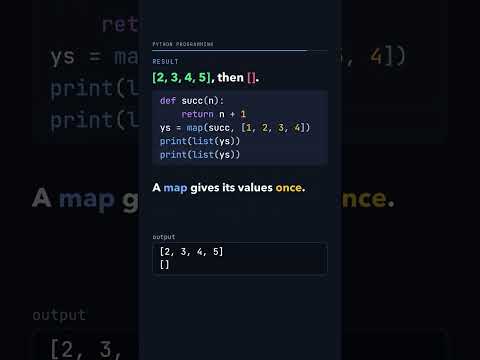
The same map printed twice. Why is the second list empty?
map(succ, [1, 2, 3, 4]) does not make any values yet; it only remembers to call succ on each item. The first list(ys) asks for every value and prints [2, 3, 4, 5]. After that the map is used up, so the second list(ys) prints []. If you need the values twice, make a list once: ys = list(map(succ, xs)).
-

Remove every word from a list inside a for loop. What is left?
A for loop walks the list by position: 0, 1, 2 and so on, on the list as it is right now. Removing "Is" at position 0 shifts every word left, so position 1 is now "a" and "this" is never visited; then "course?" goes at position 2, and position 3 is past the end. So print(xs) shows ['this', 'good']. Never change a list while looping over it: loop over xs.copy() and every word is removed, leaving [].
-
![Thumbnail: sum = 0 in a loop, then sum([1, 2, 3]). Why does Python raise an error?](https://i.ytimg.com/vi/0wacsrY9NxU/hqdefault.jpg)
sum = 0 in a loop, then sum([1, 2, 3]). Why does Python raise an error?
In Python a function is a value, and sum is just a name that points at the built-in sum function. sum = 0 moves that name to the number 0, and the loop makes it 3, so print(sum) shows 3. Then sum([1, 2, 3]) tries to call the number 3 and stops with TypeError: 'int' object is not callable. Use another name, such as total, and sum([1, 2, 3]) gives 6.
-
![Thumbnail: What does list(map(int, ["1", "245", "129"])) print in Python?](https://i.ytimg.com/vi/6u-Fk1Cjs-c/hqdefault.jpg)
What does list(map(int, ["1", "245", "129"])) print in Python?
map takes a function and a list and calls the function on each item. list(map(int, xs)) turns the texts "1", "245" and "129" into the numbers [1, 245, 129]. Your own function works the same way: with succ adding 1, list(map(succ, [1, 2, 3])) gives [2, 3, 4]. Write int, not int(): map needs the function itself, and map(int(), xs) fails with TypeError: 'int' object is not callable.
-

derivative(f) returns a new function. What does derivative(square)(5) print?
derivative(f) builds a new function df that remembers f and dx = 0.001, and returns it. So derivative(square) is df with f = square, and calling it with 5 works out (square(5.001) - square(5)) / 0.001. Python prints 10.001000000002591, close to the true slope 10 of x * x at 5. Newton's method uses the same idea: for f(x) = x*x + x - 6 it finds the roots 2 and -3.
-

f sets its own y = x, and y = 0 outside it. What do print(f(2)) and print(y) show?
Calling f(2) gives the call its own local names: x is 2 and a new local y is 2, so f returns 2 and print(f(2)) prints 2. When the call ends, those local names are gone. The y = 0 outside f is a global name that f never touched, so print(y) prints 0. Local names do not leak out: with no global y, print(y) after f(2) gives NameError: name 'y' is not defined.
-

y = 3 outside, and y = y + x inside f. What happens when you call f(2)?
Because f assigns to y, Python treats y as a local name everywhere inside f. So y = y + x reads the local y before it has a value, and f(2) stops with UnboundLocalError: cannot access local variable 'y' where it is not associated with a value. Only reading works: return y + x uses the global y and gives 5. To change the global y, write global y first, and print(y) shows 5.
-

x = 10 outside, and f(x) prints x, sets x = 20, prints x. What does f(5) print?
Calling f(5) makes a local x that holds 5, because a parameter is a local name even when a global has the same name. The first print shows 5, x = 20 changes only the local x, and the second print shows 20, so the output is 5 20 (with a space at the end from end=" "). The global x stays 10 the whole time: add print(x) after the call and the full output is 5 20 10.
-

Two counters from one function, from 5 and 25. What does print(c1(), c2(), c1(), c2()) show?
make_counter(start) makes a tick function that remembers its own start box: a closure. So c1 = make_counter(5) and c2 = make_counter(25) keep two separate boxes, one holding 5 and one holding 25. Each call gives back its box's value and adds 1 to it, so print(c1(), c2(), c1(), c2()) prints 5 25 6 26. A new counter starts again: print(make_counter(5)()) prints 5 every time.
-
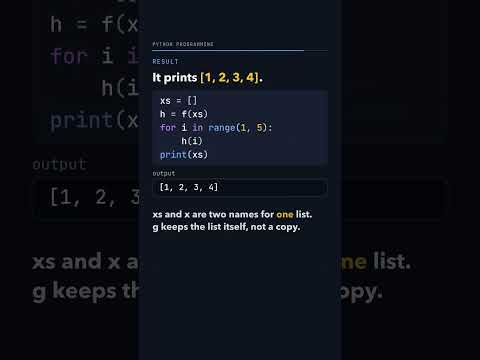
h adds to a list it remembers. After h(1) to h(4), what does print(xs) show?
f(xs) returns a function g, and g remembers x, which names the same list as xs. Each call h(1), h(2), h(3), h(4) appends to that one list, so print(xs) prints [1, 2, 3, 4]. The closure keeps the object itself, not a copy. Writing x = x + [y] inside g instead makes x local to g, and h(1) stops with UnboundLocalError.
-
 and fs[5](1) give?](https://i.ytimg.com/vi/vsCpFGFEFsk/hqdefault.jpg)
Ten functions made in a loop, each returning i + x. What do fs[0](1) and fs[5](1) give?
The loop makes 10 functions, and each one's body says return i + x. A function looks up i only when it runs, and by then the loop is over and i is 9. So fs[0](1) is 9 + 1 = 10, fs[5](1) is 10 too, and the line prints 10 10. One fix saves the value as a default when def runs: with def f(x, i=i): the same line prints 1 6.
-

A for loop and a list comprehension build the squares of 1 to 10. Does xs == ys print True?
The loop starts with an empty list ys and appends x*x for x from 1 to 10. The list comprehension [x*x for x in range(1, 11)] says the same thing in one line, like set-builder notation in maths. Both hold the same items, so print(xs == ys) prints True and print(xs) shows [1, 4, 9, 16, 25, 36, 49, 64, 81, 100]. A filter fits in too: keeping only the items above 95 from [90, 82, 83, 100, 102] gives [100, 102].
-
![Thumbnail: Does order matter? {2, 3, 5, 7, 11} == {3, 5, 7, 11, 2} and [1, 2, 3] == [2, 1, 3]](https://i.ytimg.com/vi/zQLNsaha_8s/hqdefault.jpg)
Does order matter? {2, 3, 5, 7, 11} == {3, 5, 7, 11, 2} and [1, 2, 3] == [2, 1, 3]
Curly brackets make a set, a collection with no order, so two sets with the same items are equal and the first line prints True. Lists keep their order and compare position by position, so [1, 2, 3] == [2, 1, 3] prints False. The in operator asks whether an item is there: 3 in zs prints True. Sets can grow: after zs.add(13), print(zs) shows {2, 3, 5, 7, 11, 13}.
-
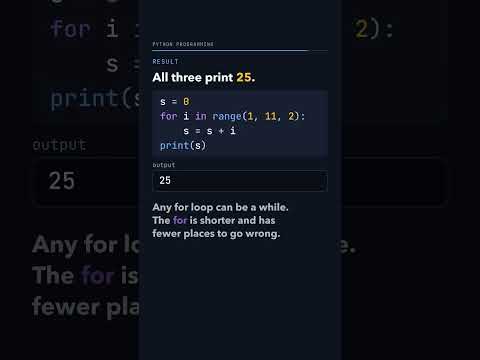
Three loops add 1, 3, 5, 7, 9. What does the for loop with range(1, 11, 2) print?
range(1, 11, 2) counts 1, 3, 5, 7, 9, so s goes 1, 4, 9, 16, 25 and print(s) shows 25. The same sum takes 10 lines with a while loop, where i changes in two places, and 6 lines with a for loop that skips even numbers with continue. Any for loop can be written as a while, but the for is shorter and has fewer places to go wrong. Move one i = i + 1 below the continue in the while version and i stays at 2 forever.
-
![Thumbnail: A dictionary of scores. What do scores["Beta"] and scores["beta"] print?](https://i.ytimg.com/vi/5sfPxkHsSgM/hqdefault.jpg)
A dictionary of scores. What do scores["Beta"] and scores["beta"] print?
With two lists, names and scores, you have to search for Beta's position before you can read its score. A dictionary stores key: value pairs and jumps straight to the key, so scores["Beta"] prints 80. Keys must match exactly: "beta" with a small b is a different key, so scores["beta"] stops with KeyError: 'beta'. Check first with in: print("Beta" in scores, "beta" in scores) prints True False.
-

Count the words of "the quick brown fox jumps over the lazy dog". What is in freq?
Start with an empty dictionary and go through text.split() word by word. A word seen before gets 1 added to its count; a new word is set to 1. Only "the" appears twice, so print(freq) shows {'the': 2, 'quick': 1, 'brown': 1, 'fox': 1, 'jumps': 1, 'over': 1, 'lazy': 1, 'dog': 1}. Then print(freq["the"], len(freq)) prints 2 8: the count for "the" and 8 different words.
-
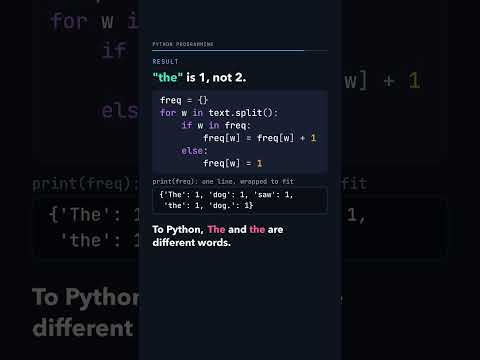
Count the words of "The dog saw the dog." with a dictionary. Is "the" counted 2 times?
split() cuts only at spaces, so "The dog saw the dog." gives the words The, dog, saw, the and dog. with its full stop. "The" and "the" differ by one capital letter and "dog." is not "dog", so they are different keys and print(freq) shows {'The': 1, 'dog': 1, 'saw': 1, 'the': 1, 'dog.': 1}. The fix is two changes: loop over text.lower().split() and add w = w.strip(".,?!") as the first line in the loop. Then freq is {'the': 2, 'dog': 2, 'saw': 1}.
-
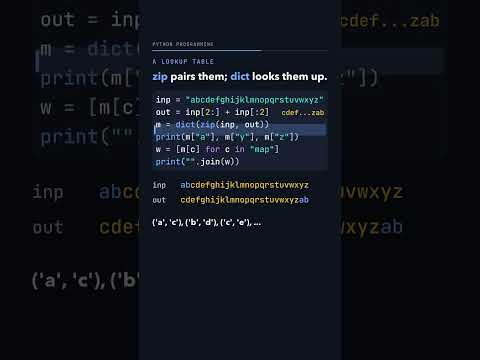
A dictionary code moves each letter 2 places. What does "map" become?
out = inp[2:] + inp[:2] is the alphabet moved 2 places, "cdefghijklmnopqrstuvwxyzab". zip pairs the letters of inp and out, ('a', 'c'), ('b', 'd') and so on, and dict turns the pairs into a lookup table, so m["a"], m["y"] and m["z"] print c a b. Looking up each letter of "map" gives o, c and r, so the code prints ocr. The same table can be built with a loop: for i in range(len(inp)): m[inp[i]] = out[i].