In Part 1, we built a character-level language model that generates Indian names. Now we’ll prove that the same architecture works on completely different data.
We’ll train on Shakespeare’s text and generate new “Shakespeare-like” prose.
The Key Insight
Language models are general-purpose pattern learners. The same architecture that learned:
Names often start with consonants
Vowels follow consonants in patterns
Names end with ‘a’, ‘i’, or consonants
Can also learn:
English words have common letter patterns
Shakespearean vocabulary and rhythm
How sentences flow
Setup
import torchimport torch.nn.functional as Ffrom torch import nnimport matplotlib.pyplot as pltimport osimport requeststorch.manual_seed(42)device = torch.device("cuda"if torch.cuda.is_available() else"cpu")print(f"Using device: {device}")
Using device: cuda
Step 1: Get Shakespeare’s Text
We’ll use the “tiny Shakespeare” dataset—a collection of Shakespeare’s works.
# Download Shakespeare datasetifnot os.path.exists('shakespeare.txt'):print("Downloading Shakespeare dataset...") url ="https://raw.githubusercontent.com/karpathy/char-rnn/master/data/tinyshakespeare/input.txt" response = requests.get(url)withopen('shakespeare.txt', 'w') as f: f.write(response.text)print("Download complete!")withopen('shakespeare.txt', 'r') as f: text = f.read()print(f"Total characters: {len(text):,}")print(f"\nFirst 500 characters:")print("-"*50)print(text[:500])
Total characters: 1,115,394

First 500 characters:
--------------------------------------------------
First Citizen:
Before we proceed any further, hear me speak.

All:
Speak, speak.

First Citizen:
You are all resolved rather to die than to famish?

All:
Resolved. resolved.

First Citizen:
First, you know Caius Marcius is chief enemy to the people.

All:
We know't, we know't.

First Citizen:
Let us kill him, and we'll have corn at our own price.
Is't a verdict?

All:
No more talking on't; let it be done: away, away!

Second Citizen:
One word, good citizens.

First Citizen:
We are accounted poor
# Look at the character setchars =sorted(set(text))print(f"Unique characters: {len(chars)}")print(f"Characters: {''.join(chars)}")
# Create mappingsstoi = {ch: i for i, ch inenumerate(chars)}itos = {i: ch for ch, i in stoi.items()}vocab_size =len(stoi)print(f"Vocabulary size: {vocab_size}")
Vocabulary size: 65
Step 3: Create Training Data
Same approach as Part 1, but now we slide a window over continuous text rather than individual words.
block_size =32# Larger context for prosedef build_dataset(text, stoi, block_size):""" Create training examples from continuous text. Unlike names, we don't have natural boundaries. We just slide a window over the entire text. """ X, Y = [], []for i inrange(len(text) - block_size): context = text[i:i + block_size] target = text[i + block_size] X.append([stoi[ch] for ch in context]) Y.append(stoi[target])return torch.tensor(X), torch.tensor(Y)X, Y = build_dataset(text, stoi, block_size)print(f"Dataset size: {len(X):,} examples")print(f"Input shape: {X.shape}")print(f"Target shape: {Y.shape}")
# Visualize some examplesprint("Sample training examples:")print("-"*60)for i inrange(0, 15, 5): context =''.join(itos[idx.item()] for idx in X[i]) target = itos[Y[i].item()]# Show context with target highlightedprint(f"'{context}' → '{target}'")
Sample training examples:
------------------------------------------------------------
'First Citizen:
Before we proceed' → ' '
' Citizen:
Before we proceed any ' → 'f'
'zen:
Before we proceed any furth' → 'e'
Step 4: The Same Model
Here’s the crucial point: we use the exact same architecture from Part 1.
class CharLM(nn.Module):"""Same architecture as Part 1!"""def__init__(self, vocab_size, block_size, emb_dim, hidden_size):super().__init__()self.emb = nn.Embedding(vocab_size, emb_dim)self.hidden = nn.Linear(block_size * emb_dim, hidden_size)self.output = nn.Linear(hidden_size, vocab_size)def forward(self, x): x =self.emb(x) x = x.view(x.shape[0], -1) x = torch.tanh(self.hidden(x)) x =self.output(x)return x
# Create model with larger capacity for more complex dataemb_dim =32# Increased from 16hidden_size =512# Increased from 256model = CharLM(vocab_size, block_size, emb_dim, hidden_size).to(device)num_params =sum(p.numel() for p in model.parameters())print(f"Model has {num_params:,} parameters")# Model scale contextprint(f"\n--- Model Scale Context ---")print(f"Our model: ~{num_params/1000:.0f}K parameters")print(f"GPT-2 Small: 124M parameters ({124_000_000/num_params:.0f}x larger)")print(f"GPT-3: 175B parameters ({175_000_000_000/num_params:.0f}x larger)")print(f"Claude/GPT-4: ~1T+ parameters ({1_000_000_000_000/num_params:.0f}x larger)")
Model has 560,225 parameters

--- Model Scale Context ---
Our model:     ~560K parameters
GPT-2 Small:   124M parameters  (221x larger)
GPT-3:         175B parameters  (312374x larger)
Claude/GPT-4:  ~1T+ parameters  (1784997x larger)
Model Scaling
Compared to Part 1: - Names model: ~5,000 parameters - Shakespeare model: ~50,000+ parameters
We scaled up because: 1. Larger vocabulary (65 vs 27) 2. Longer context (32 vs 5) 3. More complex patterns to learn
============================================================
GENERATED SHAKESPEARE (temperature=0.8)
============================================================
                         ROMEO:
That is she way dost while more to do,
I will noul true full into have is the bestremegh,
As the newsling, teme conning, manion.

KING HENRY VO
YORDO I dain that much out and down pute
Their purse wounded in hark againsty beats
Farewell's comfort, the penich what to my creding Rut.
Therefore worses, you peace, my hearth you,
mant feven my lord, this fault to the trut it,
Thy fre unlinalower of ments these eyes
actous: those falsent her inaught,
For should of nurst, into hels the chusbed
Though the before your brows replious from their love.
Of whe why slappers, slat even an a marks
Do you are must fall me.

KING RICHARD III:
O thou boot, addento time that you see much adrawly?

DUKE VINCENAS:
Hark! Your not, the what of my horse;
And when dears; the slain look him: never shall be past: I p
print("="*60)print("GENERATED SHAKESPEARE (temperature=0.5, more focused)")print("="*60)print(generate(model, itos, stoi, block_size, "To be or not to be", length=500, temperature=0.5))
============================================================
GENERATED SHAKESPEARE (temperature=0.5, more focused)
============================================================
              To be or not to bear our swor; I will be my must,
Which in the leaven, and most mainted of the people,
Upon hency now thy tonour Juckn I'll burger'dowingent incled; atreed the hothing of this brauty some toweed: we with yet have should be for thee, while did rest asseep,
To cullow me herd that I spitch on you.

CORIOLANUS:
I do rave me tord the fent
And sprry:
There coulses her surren see more proud master,
Where is the courtaution how make him:
I with a wondembry the words to be but the married from her upon my
Comparing Names vs Shakespeare
Let’s see how the same architecture adapts to different domains:
Aspect
Names Model
Shakespeare Model
Vocabulary
27 (a-z + ‘.’)
65 (mixed case + punctuation)
Context
5 characters
32 characters
Pattern type
Word structure
Prose flow
Output
Single words
Continuous text
Parameters
~5K
~50K
The Universal Pattern
Both models learn the same fundamental task:
P(next character | previous characters)
The architecture doesn’t change. Only the data and scale differ. This is exactly how large language models work—they’re just scaled up versions of what we built here.
Visualizing Embeddings
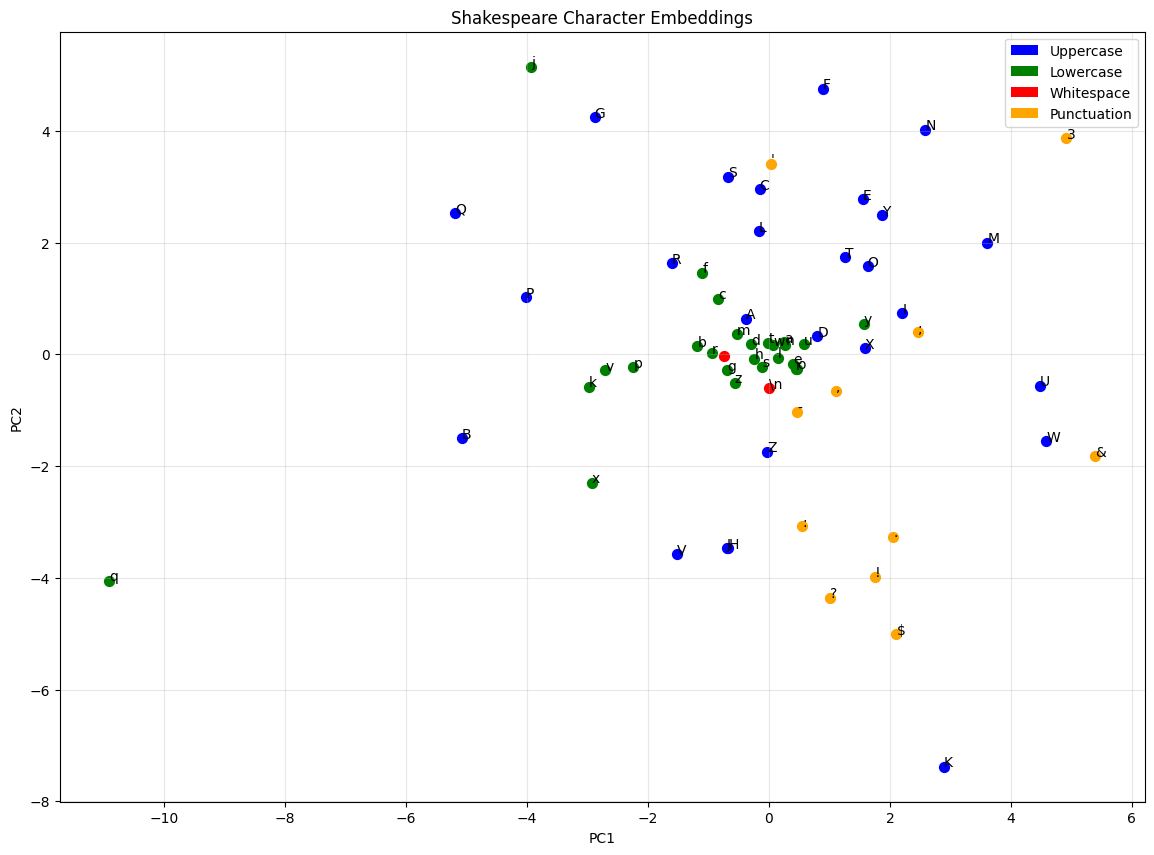
from sklearn.decomposition import PCAdef plot_embeddings(model, itos, highlight_chars=None): weights = model.emb.weight.detach().cpu().numpy() pca = PCA(n_components=2) weights_2d = pca.fit_transform(weights) plt.figure(figsize=(14, 10))for i, (x, y) inenumerate(weights_2d): char = itos[i]# Color code by character typeif char.isalpha() and char.isupper(): color ='blue'elif char.isalpha() and char.islower(): color ='green'elif char.isspace() or char =='\n': color ='red'else: color ='orange' plt.scatter(x, y, c=color, s=50)# Show printable chars, escape others label = char if char.isprintable() andnot char.isspace() elserepr(char)[1:-1] plt.annotate(label, (x, y), fontsize=10) plt.title('Shakespeare Character Embeddings') plt.xlabel('PC1') plt.ylabel('PC2') plt.grid(True, alpha=0.3)from matplotlib.patches import Patch legend_elements = [ Patch(facecolor='blue', label='Uppercase'), Patch(facecolor='green', label='Lowercase'), Patch(facecolor='red', label='Whitespace'), Patch(facecolor='orange', label='Punctuation') ] plt.legend(handles=legend_elements) plt.show()plot_embeddings(model, itos)
Save Model for Later Use
Export the Shakespeare model for comparison with BPE and for use in applications.
import os# Create models directoryos.makedirs('../models', exist_ok=True)# Save model checkpoint with all necessary info for inferencecheckpoint = {'model_state_dict': model.state_dict(),'model_config': {'vocab_size': vocab_size,'block_size': block_size,'emb_dim': emb_dim,'hidden_size': hidden_size, },'stoi': stoi,'itos': itos,'final_loss': losses[-1] if losses elseNone,}torch.save(checkpoint, '../models/char_lm_shakespeare.pt')print(f"Model saved to ../models/char_lm_shakespeare.pt")# Verify the checkpointloaded = torch.load('../models/char_lm_shakespeare.pt', weights_only=False)print(f"Checkpoint keys: {list(loaded.keys())}")print(f"Model config: {loaded['model_config']}")print(f"Final training loss: {loaded['final_loss']:.4f}")
Model saved to ../models/char_lm_shakespeare.pt
Checkpoint keys: ['model_state_dict', 'model_config', 'stoi', 'itos', 'final_loss']
Model config: {'vocab_size': 65, 'block_size': 32, 'emb_dim': 32, 'hidden_size': 512}
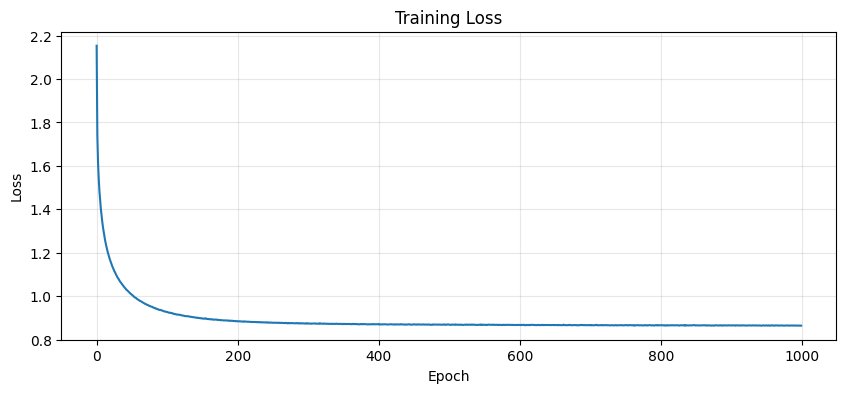
Final training loss: 0.8647
Clean Up GPU Memory
import gc# Delete model and data tensorsdel modeldel X, Y# Clear CUDA cacheif torch.cuda.is_available(): torch.cuda.empty_cache() torch.cuda.synchronize()gc.collect()print("GPU memory cleared!")if torch.cuda.is_available():print(f"GPU memory allocated: {torch.cuda.memory_allocated() /1024**2:.1f} MB")print(f"GPU memory cached: {torch.cuda.memory_reserved() /1024**2:.1f} MB")
Our model works, but it has a fundamental limitation: it sees characters, not words.
When predicting the next character after “The king”, our model must: 1. Remember that ‘T-h-e- -k-i-n-g’ was seen 2. Predict what comes next one character at a time
This is inefficient. Consider: - To learn “the”, it needs “t→h”, “h→e”, “e→” patterns - To learn “thee” (Shakespearean), it needs different patterns - No concept of words as units
Preview of Part 3
In Part 3, we’ll introduce Byte-Pair Encoding (BPE), which learns to tokenize at the subword level:
Common words become single tokens: “the” → [token_123]
Rare words split into pieces: “shakespeare” → [“shake”, “speare”]
This is how GPT-2, GPT-3, and modern LLMs tokenize text.
Summary
We demonstrated that our character-level language model is domain-agnostic:
Same architecture works on names and Shakespeare
Only data and hyperparameters change
The model learns whatever patterns exist in the data
This is the power of neural language models—they’re universal pattern learners.
What’s Next
In Part 3, we’ll build a BPE tokenizer from scratch and show how subword tokenization improves model quality and efficiency.
Exercises
Different prompts: Try generating from “HAMLET:”, “JULIET:”, “First Citizen:”
Context length: What happens with block_size = 8 vs 64?
Temperature exploration: Generate at temperatures 0.2, 0.5, 1.0, 1.5
Train longer: What’s the minimum loss you can achieve?
Measure perplexity: Compute exp(loss) on held-out text